
1. Arahan Keselamatan Penting
- Baca arahan ini dengan teliti sebelum mengendalikan peranti.
- Simpan arahan ini untuk rujukan masa hadapan.
- Do not expose this appliance to dripping or splashing water. Do not place objects filled with liquids, such as vases, on the appliance.
- Jangan sekat sebarang bukaan pengudaraan. Pasang mengikut arahan pengilang.
- Jangan pasang berhampiran mana-mana sumber haba seperti radiator, daftar haba, dapur, atau radas lain (termasuk amppenghidup) yang menghasilkan haba.
- Lindungi kabel kuasa dari berjalan atau dicubit, terutama pada palam, wadah kemudahan, dan titik di mana mereka keluar dari perkakas.
- Hanya gunakan lampiran/aksesori yang ditentukan oleh pengilang.
- Cabut plag perkakas ini semasa ribut petir atau apabila tidak digunakan untuk jangka masa yang lama.
- Rujuk semua perkhidmatan kepada pegawai perkhidmatan yang berkelayakan. Servis diperlukan apabila alat telah rosak dengan cara apa pun.
2. Produk Lebihview
The Auna MC 120 is a compact vertical stereo system designed for versatile audio playback. It features a CD player, MP3 playback via USB and SD card, an AUX input for external devices, and an FM radio. The system also includes an alarm clock with two programmable alarms and can be wall-mounted or used with its integrated stand. A remote control is provided for convenient operation.
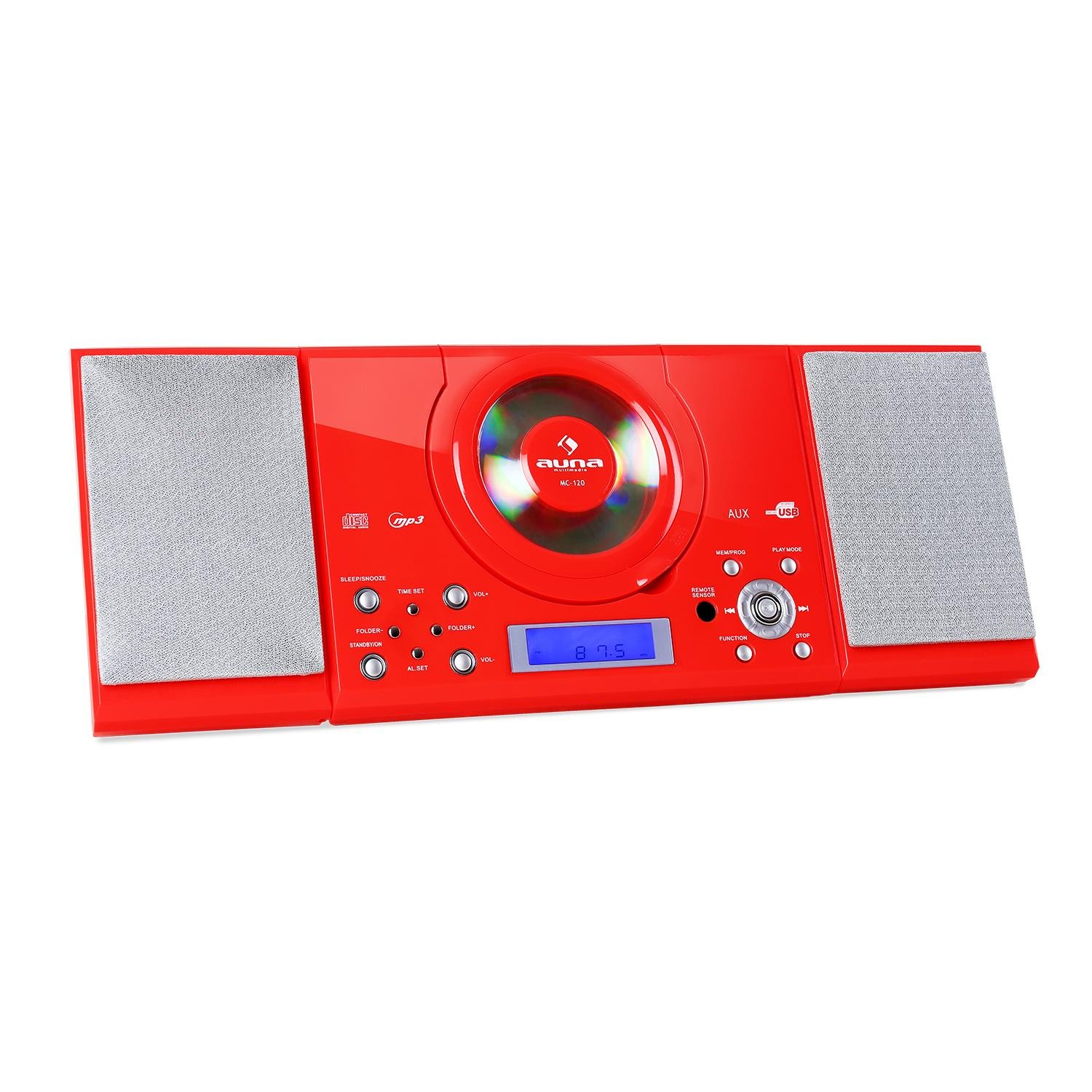
Rajah 2.1: Depan view of the Auna MC 120 Compact Vertical Stereo System, showing the central CD player, display, and control buttons.
3. Kandungan Pakej
- Auna MC 120 Stereo System
- Alat Kawalan Jauh
- Penyesuai Kuasa
- Manual Pengguna
4. Persediaan
4.1 Peletakan dan Sambungan Kuasa
- Choose a stable, flat surface for the stereo system, or prepare a wall for mounting. Ensure adequate ventilation around the unit.
- Sambungkan penyesuai kuasa ke port DC IN di bahagian belakang unit.
- Palamkan penyesuai kuasa ke salur keluar dinding standard.
4.2 Pemasangan Dinding
The Auna MC 120 can be mounted on a wall using the integrated mounting holes on the rear panel.
- Identify a suitable wall location, ensuring it can support the weight of the unit.
- Mark the positions for two screws on the wall, matching the spacing of the mounting holes on the unit's rear.
- Gerudi lubang pandu dan masukkan sauh dinding yang sesuai jika perlu.
- Insert screws into the wall, leaving a small gap between the screw head and the wall.
- Carefully align the unit's mounting holes with the screws and slide the unit downwards to secure it.

Rajah 4.1: Belakang view of the Auna MC 120, showing the foldable stand and wall mounting holes.

Rajah 4.2: Terperinci view of the rear panel, highlighting power input and safety labels.
5. Arahan Operasi
5.1 Kuasa Hidup/Mati dan Kawalan Kelantangan
- Tekan ke KUASA button (on unit or remote) to turn the system on or off.
- Laraskan kelantangan menggunakan VOL+ dan vol- butang pada unit atau + dan - butang pada alat kawalan jauh.
5.2 Pemilihan Mod
Tekan ke FUNGSI button on the unit or remote to cycle through available modes: CD, USB, SD, AUX, FM.
5.3 Main Semula CD/MP3
- Main balik CD: Open the CD compartment, insert a CD with the label side facing up, and close the compartment. The system will automatically switch to CD mode and begin playback.
- Main balik USB/SD: Masukkan pemacu kilat USB ke dalam USB port atau kad SD ke dalam SD slot. The system will switch to USB/SD mode. Use the FOLDER+ / FOLDER- buttons to navigate folders and SKIP butang untuk memilih trek.

Figure 5.1: USB stick inserted into the dedicated USB port on the Auna MC 120.
- Main/Jeda: Tekan ke MAIN/JEDA butang.
- Langkau Trek: Tekan ke Langkau ke Hadapan or SKIP KE BELAKANG butang.
- Maju Pantas/Putar Balik: Tekan dan tahan butang Langkau ke Hadapan or SKIP KE BELAKANG butang.
- Berhenti: Tekan ke BERHENTI butang.
5.4 Operasi Radio FM
- Tukar kepada mod FM menggunakan FUNGSI butang.
- Tekan dan tahan butang MAIN/JEDA button to initiate an automatic scan for FM stations. The system will save found stations as presets.
- Gunakan CH+ / CH- buttons on the remote or Langkau ke Hadapan / SKIP KE BELAKANG buttons on the unit to navigate through preset stations.
5.5 Input AUX
Sambungkan peranti audio luaran (cth., telefon pintar, pemain MP3) ke AUX IN port using a 3.5mm audio cable. Switch the system to AUX mode using the FUNGSI button. Audio will play from the connected device.
5.6 Fungsi Jam dan Penggera
- Menetapkan Jam: Dalam mod siap sedia, tekan dan tahan butang MASA DITETAPKAN butang. Gunakan SKIP buttons to adjust hours and minutes, and MASA DITETAPKAN sekali lagi untuk mengesahkan.
- Menetapkan Penggera: Dalam mod siap sedia, tekan dan tahan butang SET AL butang. Gunakan SKIP buttons to set the alarm time and SET AL again to confirm. You can set two alarms (AL1, AL2).
- Mengaktifkan/Menyahaktifkan Penggera: Tekan ke SET AL button repeatedly to cycle through AL1 ON, AL2 ON, AL1 OFF, AL2 OFF.
5.7 Sleep/Snooze Function
- Pemasa Tidur: Tekan ke TIDUR button repeatedly to set a sleep timer (e.g., 15, 30, 60, 90 minutes). The system will turn off automatically after the set time.
- Tunda: Apabila penggera berbunyi, tekan butang MENGEJUTKAN button (on remote) to temporarily silence the alarm for a few minutes.
5.8 Alat Kawalan Jauh
The remote control provides full functionality for the stereo system. Ensure batteries are correctly inserted.

Figure 5.2: The remote control for the Auna MC 120, showing power, play mode, memory/program, sleep, volume, channel, function, and snooze buttons.
6. Penyelenggaraan
6.1 Pembersihan
- Sentiasa cabut plag unit daripada salur keluar kuasa sebelum membersihkan.
- Gunakan kain lembut dan kering untuk membersihkan permukaan luar.
- Jangan gunakan pembersih, lilin atau pelarut yang melelas kerana ia boleh merosakkan kemasan.
6.2 CD/USB/SD Card Care
- Pegang CD di tepinya untuk mengelakkan cap jari dan calar.
- Bersihkan CD dengan kain lembut dan tidak berbulu, lap dari tengah ke luar.
- Ensure USB drives and SD cards are free of dust and debris before insertion.
7. Penyelesaian masalah
| Masalah | Kemungkinan Punca | Penyelesaian |
|---|---|---|
| Tiada kuasa | Kord kuasa tidak disambungkan; Salur keluar kuasa rosak | Periksa sambungan kord kuasa; Cuba outlet lain |
| Tiada bunyi | Volume too low; Incorrect mode selected; Mute activated | Increase volume; Select correct mode (CD, USB, AUX, FM); Deactivate mute |
| CD/USB/SD not playing | Disc/device inserted incorrectly; Disc/file format not supported; Disc/device damaged | Reinsert disc/device correctly; Ensure MP3 format for USB/SD; Try a different disc/device |
| Alat kawalan jauh tidak berfungsi | Batteries depleted/incorrectly inserted; Obstruction between remote and unit | Replace batteries, check polarity; Remove obstructions, ensure line of sight |
| Penerimaan FM yang lemah | Antena tidak dipanjangkan/diletakkan dengan betul; Isyarat lemah | Extend and adjust the FM antenna; Try repositioning the unit |
8. Spesifikasi Teknikal
- Jenama: Auna
- model: MC 120
- Teknologi Ketersambungan: Bantu
- Format Audio yang Disokong: MP3
- Jenis pembesar suara: Stereo
- Sumber Kuasa: Elektrik Bertali
- Peranti Serasi: Pemain MP3
- Mod Output Audio: Stereo
- Pengeluar: AUNA
- Nombor Bahagian: MG4-MC-120 RED
9. Waranti dan Sokongan
This product is covered by a manufacturer's warranty. For detailed warranty information, please refer to the warranty card included in your package or contact Auna customer support. For technical assistance or service inquiries, please visit the official Auna webtapak atau hubungi terus pasukan sokongan mereka.