
pengenalan
This manual provides essential information for the safe and efficient use of your Lixada 10W Portable USB Solar Panel Charger. Designed for outdoor enthusiasts, this lightweight and high-efficiency solar panel allows you to charge your USB-powered devices using solar energy, making it ideal for campmendaki, mendaki dan melancong.

Image: The Lixada 10W Portable USB Solar Panel Charger, a compact and efficient device for outdoor charging.
Apa yang ada dalam Kotak
- 1 x Pengecas Suria
Arahan Persediaan
- Unpack the Solar Panel: Carefully remove the solar panel from its packaging.
- Kedudukan untuk Cahaya Matahari Optimum: Expand the solar panel fully and place it in direct sunlight. Ensure no shadows or obstructions cover the panel for maximum efficiency.
- Sambungkan Peranti Anda: Plug your USB charging cable into the USB output port on the solar panel. Then, connect the other end of the cable to your device (e.g., smartphone, tablet, action camera).
- Selamatkan Panel (Pilihan): Use the integrated eyelets and included carabiner (if applicable) to attach the panel to a backpack or other suitable surface, ensuring it remains stable and exposed to sunlight.
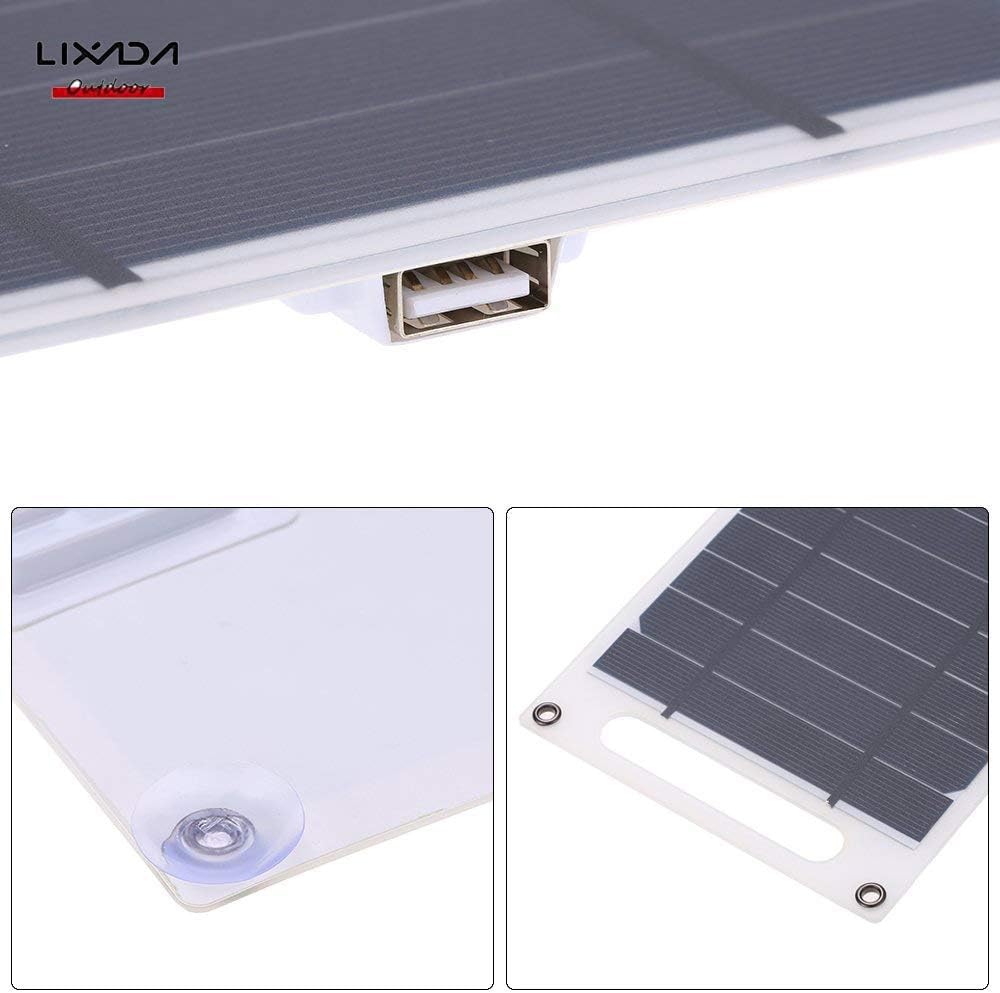
Imej: Dari dekat view of the solar panel's USB port and the included suction cups for versatile mounting.
Arahan Operasi
- Pengecasan Terus: The Lixada solar panel charger does not store electricity internally. It provides direct power to your device when exposed to sunlight.
- Prestasi Optimum: For the best charging speed, ensure the solar panel is positioned to receive maximum direct sunlight. Any cloud cover or partial shading will reduce charging efficiency.
- Keserasian Peranti: This charger is compatible with almost all 5V Android and Apple devices that charge via USB.
Video: Demonstrates the Lixada 10W Solar Panel Charger in use, showing how to connect and charge various devices like an iPhone.

Image: The Lixada solar panel conveniently attached to a backpack, illustrating its portability for charging devices during outdoor activities.
Penyelenggaraan
- Reka bentuk kalis air: The panel features IP67 waterproof material, allowing it to withstand unpredictable weather conditions.
- Self-Cleaning Material: The eco-friendly E-membrane material offers long-lasting durability and is designed to be self-cleaning, easily withstanding high temperatures.
- Pembersihan: If necessary, gently wipe the solar panel surface with a soft, damp cloth to remove any dust or debris that may accumulate and affect performance. Avoid harsh chemicals or abrasive materials.
Menyelesaikan masalah
- Pengecasan perlahan: If your device is charging slowly, ensure the solar panel is in direct, unobstructed sunlight. Clouds, shade from trees, or any covering will significantly affect charging speed.
- Tiada Pengecasan: Verify that your device is properly connected to the USB port. Check if the solar panel is receiving sufficient direct sunlight. If the issue persists, try a different USB cable or device to rule out cable/device problems.
Spesifikasi
| Ciri | Perincian |
|---|---|
| Jenama | Lixada |
| Nombor Model | RUJ7664252054855JF |
| Wattage | 10 watt |
| Input Voltage | 5 Volt |
| Keluaran Voltage | 5 Volt |
| Amppemadam | 1700 Miliamps |
| Penilaian Semasa | 0.7 Amps |
| Jumlah Port USB | 1 |
| Jenis Penyambung | USB |
| Jenis Penyambung Kuasa Utama | USB Jenis C |
| Berat Barang | 3.6 auns |
| Bahan Kepungan | Monocrystalline silicon, Epoxy resin |
| Ciri Khas | Mudah Alih, Perjalanan |
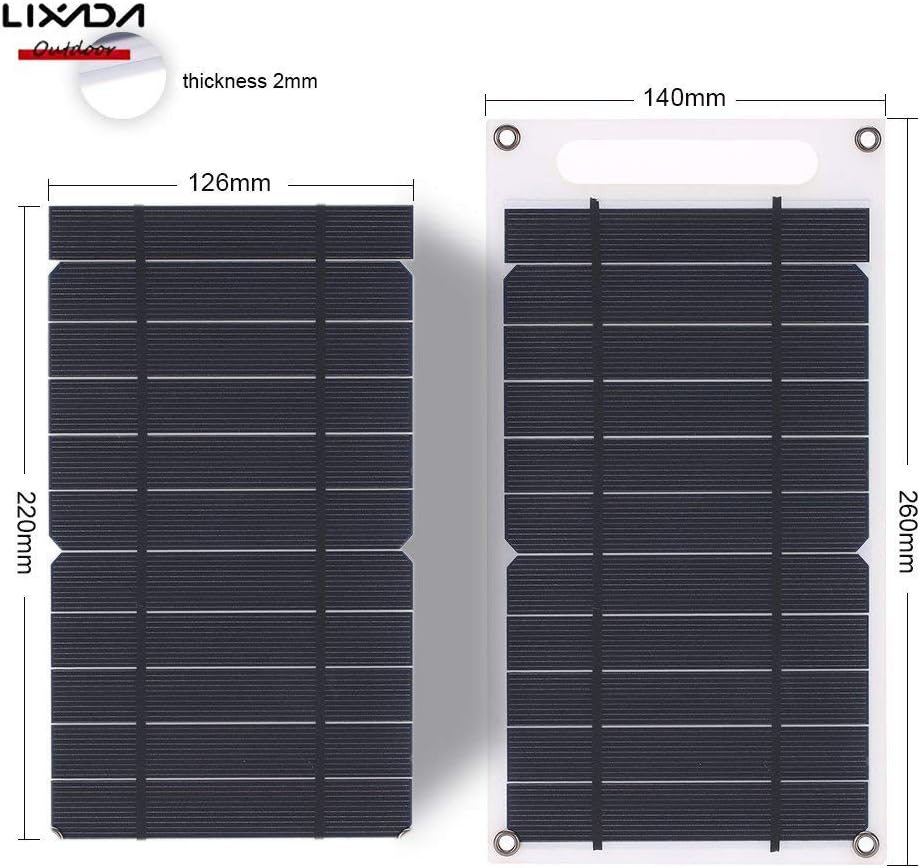
Image: Detailed dimensions of the Lixada 10W Portable USB Solar Panel Charger.
Waranti dan Sokongan
For any questions or concerns regarding your Lixada 10W Portable USB Solar Panel Charger, please contact Lixada customer support. We are committed to providing high-quality products and excellent service.
Please refer to your purchase documentation for specific warranty details. If you encounter any issues during use, you can always contact us by email. We will reply within 24 hours.