
1. Pengenalan
Terima kasih kerana membeliasing the Syma X5HW RC Quadcopter Drone. This manual provides essential information for the safe operation, setup, and maintenance of your drone. Please read it thoroughly before first use to ensure proper function and to avoid damage.
The Syma X5HW is a 2.4G 4-channel RC quadcopter featuring a 0.3MP HD camera for FPV real-time transmission, high-hold mode, 360° 3D flips, headless mode, and a built-in 6-axis gyro for stable flight. It is designed for both beginners and experienced users.
2. Langkah-langkah Keselamatan
- Persekitaran Penerbangan: Fly in open areas, away from people, animals, buildings, and power lines. Avoid flying in strong winds or adverse weather conditions.
- Cadangan Umur: Produk ini disyorkan untuk pengguna berumur 14 tahun ke atas. Pengawasan orang dewasa dinasihatkan untuk pengguna yang lebih muda.
- Keselamatan Bateri: Use only the provided charger and battery. Do not overcharge or short-circuit the battery. Disconnect the battery after use and during charging. Do not expose batteries to extreme temperatures or direct sunlight.
- Keselamatan Kipas: Keep hands, face, and loose clothing away from rotating propellers. Always ensure propellers are securely attached before flight.
- Pendedahan Air: The drone is not waterproof. Avoid contact with water or moisture.
- Garis Penglihatan Visual: Sentiasa mengekalkan garis penglihatan visual dengan dron semasa penerbangan.
- Hormati Privasi: When using the camera, respect the privacy of others.
3. Kandungan Pakej
Sahkan bahawa semua item terdapat dalam pakej:
- Syma X5HW RC Quadcopter Drone
- Alat Kawalan Jauh
- Kabel Pengecas USB
- Main Blades (Propellers)
- Pengawal Baling-Baling
- Alat Pendaratan
- HD Camera (0.3MP)
- Pemutar skru
- Manual Pengguna (dokumen ini)
- Bateri LiPo 3.7V 600mAh

Image: Syma X5HW package contents, showing the drone, remote, and various accessories.
4. Pengenalan Komponen
4.1 Komponen Dron

Imej: Atas view of the Syma X5HW drone.
- Penjual: Four main blades for lift and propulsion.
- Pengawal Kipas: Bingkai pelindung di sekeliling kipas.
- Motor: Memandu kipas.
- Lampu LED: Indicate drone orientation and status (front: red, rear: green).
- Petak Bateri: Located on the underside of the drone.
- kamera: Attaches to the bottom for photo and video capture.
- Gear pendaratan: Provides stable landing and protects the camera.
4.2 Komponen Alat Kawalan Jauh
Image: Syma X5HW remote controller (part of the package contents image).
- Kayu Joy Kiri (Pendikit/Kuap): Mengawal ketinggian (atas/bawah) dan putaran (kiri/kanan).
- Kayu Joy Kanan (Arah): Mengawal pergerakan ke hadapan/belakang dan kiri/kanan.
- Suis kuasa: Menghidupkan/mematikan pengawal.
- Butang Potong: Adjust drone stability (forward/backward, left/right, yaw).
- Butang Mod Kelajuan: Toggles between low and high speed.
- 3D Flip Button: Initiates 360° flips.
- Butang Mod Tanpa Kepala: Mengaktifkan/menyahaktifkan mod tanpa kepala.
- Butang Foto/Video: Menangkap foto atau memulakan/menghentikan rakaman video.
- Pemegang Telefon: For mounting a smartphone to view FPV feed.
5. Persediaan
5.1 Mengecas Bateri Dron
- Sambungkan bateri dron ke kabel pengecas USB.
- Plug the USB cable into a USB power source (e.g., computer USB port, USB wall adapter).
- Lampu penunjuk pada kabel USB akan menyala semasa pengecasan dan padam apabila dicas sepenuhnya.
- Charging time is approximately 90 minutes. Do not leave unattended during charging.
5.2 Pemasangan Bateri Alat Kawalan Jauh
- Buka petak bateri di belakang alat kawalan jauh.
- Insert 4x AA batteries (not included) according to the polarity markings.
- Tutup petak bateri dengan selamat.
5.3 Pemasangan Baling-baling
Ensure propellers are installed correctly. Each propeller is marked with 'A' or 'B'. Match them to the corresponding motor shafts marked 'A' or 'B'.
- Attach propeller 'A' to motor shafts 'A'.
- Attach propeller 'B' to motor shafts 'B'.
- Press down firmly until they are seated.
5.4 Pemasangan Propeller Guard
Attach the propeller guards to the drone's arms using the provided screws and screwdriver for added protection.
5.5 Pemasangan Gear Pendaratan
Slide the landing gear into the designated slots on the underside of the drone until they click into place.
5.6 Pemasangan Kamera
- Connect the camera's cable to the port on the underside of the drone.
- Secure the camera module into its slot.
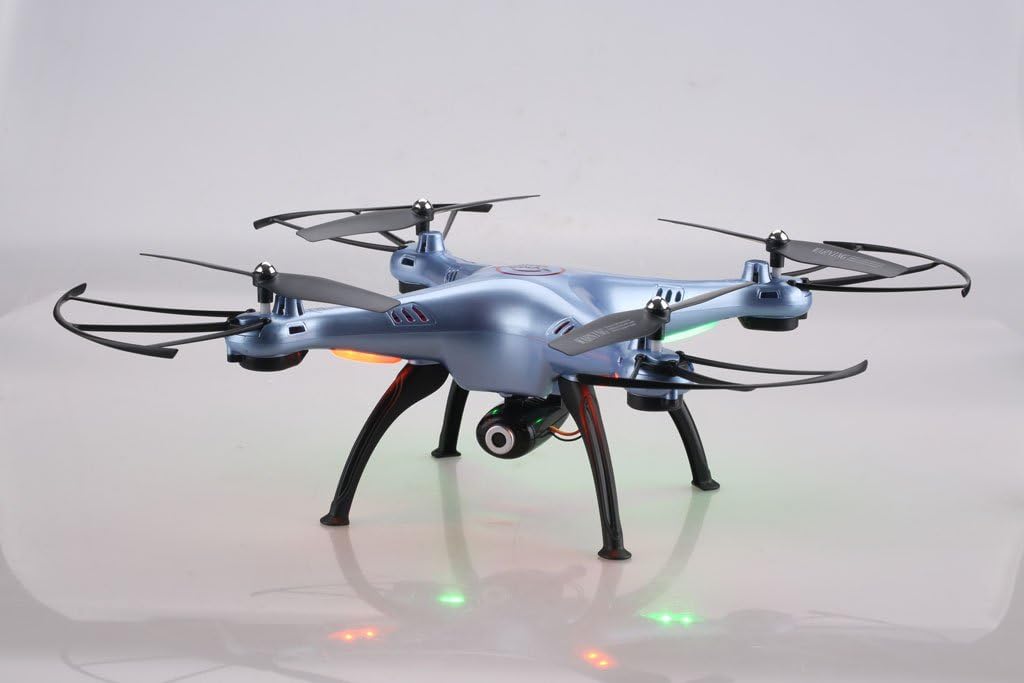
Image: Syma X5HW drone with camera and landing gear attached.
6. Arahan Operasi
6.1 Pairing the Drone and Remote Controller
- Letakkan drone di permukaan rata dan rata.
- Insert the charged battery into the drone and connect it. The drone's LED lights will flash.
- Turn on the remote controller. The indicator light on the remote will flash.
- Push the left joystick (throttle) all the way up, then all the way down.
- The drone's LED lights and the remote's indicator light will become solid, indicating successful pairing.
6.2 Calibration (Gyroscope Reset)
If the drone drifts during flight, perform a gyroscope calibration:
- After pairing, place the drone on a flat, level surface.
- Push both joysticks to the bottom-right corner simultaneously for 2-3 seconds.
- The drone's LED lights will flash rapidly and then become solid, indicating successful calibration.
6.3 Kawalan Asas Penerbangan
- Berlepas: After pairing and calibration, gently push the left joystick (throttle) up. The propellers will start spinning, and the drone will ascend.
- Pendaratan: Gently pull the left joystick (throttle) down. The drone will descend and land.
- Kawalan Ketinggian: Left joystick up/down.
- Rotation (Yaw): Left joystick left/right.
- Maju/Mundur: Right joystick up/down.
- Left/Right Sideways Flight: Right joystick left/right.
6.4 Advanced Flight Functions
- Mod Kelajuan: Press the Speed Mode button to switch between low and high speed. Low speed is recommended for beginners.
- Mod Tanpa Kepala: Press the Headless Mode button. The drone will orient itself relative to the pilot, regardless of its actual front direction. Press again to exit.
- High-Hold Mode (Altitude Hold): The drone automatically maintains its altitude using an integrated air pressure sensor. After taking off, release the left joystick, and the drone will hover at its current height. Adjust altitude by pushing the left joystick up or down.
- Lambungan 3D: Fly the drone to a height of at least 3 meters. Press the 3D Flip button, then quickly push the right joystick in any direction (forward, backward, left, or right). The drone will perform a 360° flip in that direction.
6.5 FPV and Camera Operation
The Syma X5HW features a 0.3MP HD camera for real-time FPV transmission via Wi-Fi.
- Muat turun Apl: Download the free "SYMA FPV" app from the App Store (iOS) or Google Play Store (Android) to your smartphone.
- Sambung ke Wi-Fi: Turn on the drone. On your smartphone, go to Wi-Fi settings and connect to the Wi-Fi network named "SYMA-X5HW" (or similar).
- Lancarkan Apl: Open the SYMA FPV app. You should see the live video feed from the drone's camera.
- Ambil Foto: Press the Photo/Video button on the remote controller once to take a photo. Photos are saved to your smartphone.
- Rakam Video: Press and hold the Photo/Video button on the remote controller to start video recording. Press and hold again to stop. Videos are saved to your smartphone.
7. Penyelenggaraan
- Pembersihan: Use a soft, dry cloth to clean the drone and remote controller. Do not use solvents or harsh chemicals.
- Pemeriksaan baling-baling: Regularly check propellers for damage (cracks, bends). Replace damaged propellers immediately.
- Penjagaan Motor: Keep motors free from dust and debris.
- Penyimpanan Bateri: If storing the drone for an extended period, charge the battery to about 50% and remove it from the drone. Store in a cool, dry place.
- Storan Umum: Store the drone and remote in a cool, dry environment, away from direct sunlight and extreme temperatures.
8. Penyelesaian masalah
| Masalah | Kemungkinan Punca | Penyelesaian |
|---|---|---|
| Drone tidak bertindak balas kepada alat kawalan jauh. | Not paired; low battery (drone or remote). | Pastikan dron dan alat kawalan jauh dihidupkan dan dipasangkan dengan betul. Cas bateri dron. Gantikan bateri alat kawalan jauh. |
| Drone hanyut semasa penerbangan. | Gyroscope not calibrated; uneven surface during startup; wind interference. | Perform gyroscope calibration on a flat surface. Fly in calm conditions. Use trim buttons to fine-tune. |
| Kipas tidak berputar. | Propellers jammed; motor issue; low battery. | Check for obstructions. Ensure battery is charged and connected. |
| Tiada suapan video FPV. | Wi-Fi not connected; app not open; camera not connected. | Ensure smartphone is connected to drone's Wi-Fi. Open SYMA FPV app. Check camera connection to drone. |
| Masa penerbangan yang singkat. | Bateri tidak dicas sepenuhnya; bateri lama; terbang agresif. | Ensure battery is fully charged. Consider replacing old batteries. Fly more gently. |
9. Spesifikasi
- model: Syma X5HW
- Kekerapan: 2.4GHz
- Saluran: 4-Saluran
- Gyro: Giroskop 6-Paksi
- kamera: 0.3MP HD Camera (720p video resolution)
- FPV: Wi-Fi Real-time Transmission
- Mod Penerbangan: High-Hold Mode, Headless Mode, 3D Flips
- Bateri: 3.7V 600mAh LiPo
- Masa Pengecasan: Lebih kurang 90 minit
- Masa Penerbangan: Lebih kurang 10 minit
- Julat Kawalan: Sehingga 100 meter
- Bahan: plastik
- Umur Disyorkan: 14+
10. Waranti dan Sokongan
Syma products are manufactured to high quality standards. For warranty information or technical support, please refer to the contact details provided with your purchase documentation or visit the official Syma webtapak. Simpan bukti pembelian anda untuk tuntutan waranti.