
pengenalan
This manual provides detailed instructions for the proper use, setup, operation, and maintenance of your Dorr Small Travel Trolley Backpack with Wheels. Designed for photographers and travelers, this versatile bag offers the convenience of a wheeled trolley and the portability of a backpack, adapting to various travel needs.
Ciri-ciri utama termasuk:
- Durable D600 Nylon material for robust protection.
- Detachable wheels for easy conversion between trolley and backpack modes.
- Comfortable padded shoulder straps for extended carrying.
- Fold-out tripod bag and loop for secure attachment.
- Separate padded compartment for a 13-inch laptop.
- Quick access main compartment with customizable padded internal dividers.
- Includes a rain cover for weather protection.
Persediaan
Before using your Dorr Travel Trolley Backpack, follow these steps to prepare it for your equipment and travel.
1. Attaching/Detaching Wheels
The backpack features detachable wheels for versatile use.
- To attach the wheels: Align the wheel assembly with the designated slots at the base of the backpack. Push firmly until you hear a click, ensuring it is securely locked in place. The rubberized wheels provide smooth rolling.
- To detach the wheels: Locate the release mechanism (usually a button or lever) near the wheel attachment points. Press or pull the mechanism while gently pulling the wheel assembly away from the backpack. Once detached, the wheel assembly can be stored within the backpack's compartments.
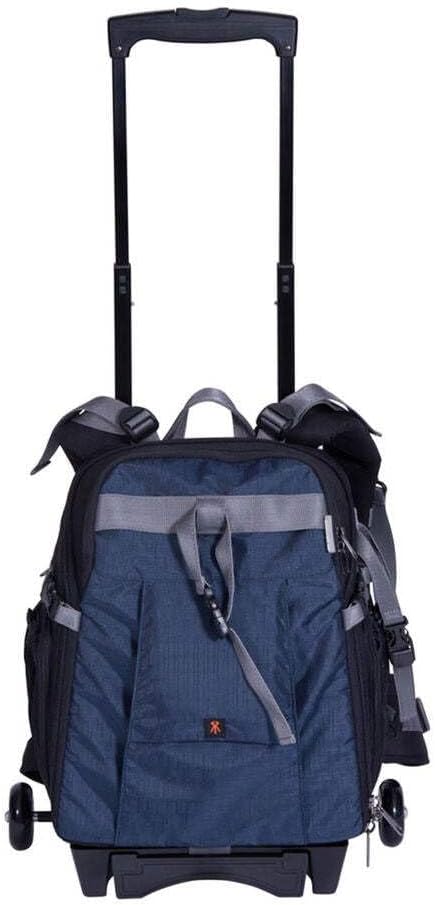
Figure 1: Dorr Travel Trolley Backpack with wheels attached and handle extended, ready for rolling.
2. Melaraskan Tali Bahu
For comfortable carrying as a backpack, adjust the padded shoulder straps.
- Loosen the straps by pulling the ends through the buckles.
- Put on the backpack and pull the strap ends to tighten until the backpack sits snugly and comfortably on your back.
- Ensure the weight is evenly distributed.
3. Configuring Internal Compartments
The main compartment features customizable padded dividers to secure your camera gear.
- Unzip the front cover around three sides to fully open the main compartment.
- The internal dividers are attached with hook-and-loop fasteners. Gently peel them off to remove or reposition.
- Arrange the dividers to create snug compartments for your camera bodies (up to 2), lenses (up to 5), and other accessories. Ensure all equipment is cushioned and protected.
- The soft material of the dividers helps prevent scratches.
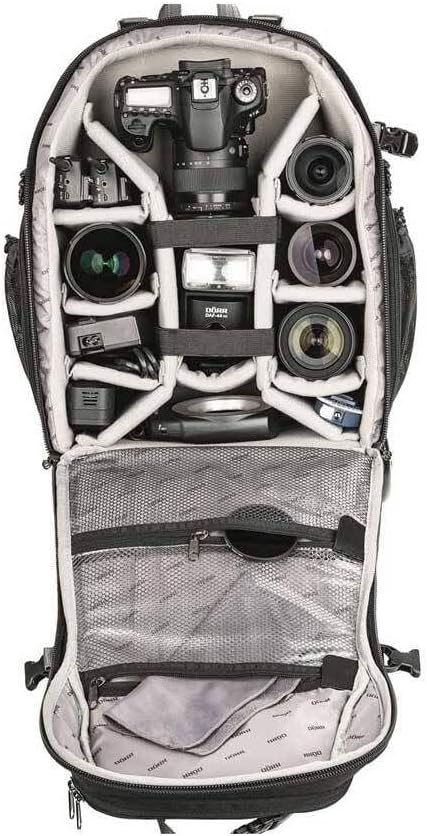
Gambar 2: Dalaman view of the Dorr Travel Trolley Backpack, demonstrating the customizable padded dividers for camera equipment.
Mengendalikan Beg Galas
1. Using as a Trolley
With the wheels attached, extend the telescopic handle located at the top of the backpack. Pull the handle upwards until it locks into position. The tilt protection trolley design allows the bag to stand upright on its own. Pull the bag behind you using the extended handle.
2. Using as a Backpack
Ensure the wheels are detached and stored if desired. Adjust the padded shoulder straps for a comfortable fit. For heavy loads, utilize the chest and waist straps (if present) to distribute weight and reduce strain.
3. Mengakses Kompartmen
- Petak Utama: Unzip the front panel to access your camera bodies, lenses, and other large accessories. The wide opening ensures quick and easy access.
- Petak Laptop: A dedicated compartment is available for a 13-inch laptop. Locate the zipper for this section, typically on the back or side of the backpack.
- Poket Luaran: Utilize any external pockets for smaller items, cables, batteries, or personal effects.
4. Menggunakan Penutup Hujan
The included rain cover provides protection against adverse weather conditions. Locate the rain cover, typically stored in a small pocket. Unfold it and stretch it over the entire backpack, ensuring all sides are covered to protect your equipment from rain and moisture.
5. Attaching a Tripod
The backpack features a fold-out tripod bag and loop. Extend the tripod bag from its storage pocket, insert the tripod legs, and secure the top of the tripod using the adjustable loop or strap provided. Ensure the tripod is balanced and securely fastened before carrying.
Penyelenggaraan
Proper maintenance will extend the life of your Dorr Travel Trolley Backpack.
- Pembersihan: Untuk pembersihan umum, lap bahagian luar denganamp cloth and mild soap. Do not machine wash or tumble dry. For stubborn dirt, use a soft brush. Allow to air dry completely before storage.
- Zip: Keep zippers clean and free of debris. If they become stiff, apply a small amount of zipper lubricant or wax.
- Roda: Periodically check the wheels for debris or hair that might impede smooth rolling. Clean as necessary.
- Storan: Store the backpack in a cool, dry place away from direct sunlight when not in use. Ensure it is empty and clean to prevent mold or mildew.
- Penutup Hujan: After use in wet conditions, allow the rain cover to dry completely before folding and storing it back in its pocket.
Menyelesaikan masalah
This section addresses common issues you might encounter with your backpack.
- Roda tidak bergolek dengan lancar: Check for debris (e.g., hair, lint) caught in the wheel axles. Clean thoroughly. Ensure the wheels are securely attached and not loose.
- Telescopic handle sticking: Ensure the handle is clean and free of dirt. Try extending and retracting it several times. Avoid forcing the handle if it resists.
- Zippers difficult to open/close: Apply a small amount of zipper lubricant (e.g., silicone spray or zipper wax) to the zipper teeth. Work the zipper back and forth to distribute the lubricant.
- Backpack feels uncomfortable: Re-adjust the shoulder straps to ensure proper fit and weight distribution. If using as a trolley, ensure shoulder straps are tucked away or secured to prevent dragging.
- Rain cover not fitting properly: Ensure the rain cover is fully unfolded and oriented correctly. It should stretch over the entire bag. If the bag is overpacked, it might be difficult to fit.
Spesifikasi
Detailed specifications for the Dorr Small Travel Trolley Backpack with Wheels.
| Atribut | Nilai |
|---|---|
| Jenama | Dorr |
| Nombor Model | 464070 |
| warna | Biru |
| Dimensi Produk (L x W x H) | 42 x 29 x 29 sentimeter |
| Berat Barang | 3.24 Kilogram |
| Dimensi Pakej (L x W x H) | 50.5 x 38 x 31 sentimeter |
| Berat Pakej | 4.32 Kilogram |
| bahan | Durable D600 Nylon |
| Tahap Ketahanan Air | Tahan Air |
| Laptop Compartment Size | Fits up to 13-inch laptop |
| Kapasiti | Up to 5 lenses and 2 camera bodies |
| Tarikh Mula-mula Tersedia | 20 Okt. 2016 |
Waranti dan Sokongan
For information regarding product warranty, returns, or technical support, please refer to the documentation provided at the time of purchase or visit the official Dorr website. Specific warranty terms and conditions may vary by region and retailer.