
1. Pengenalan
Thank you for choosing the Kaidi KD-766 Gaming Headset. This manual provides essential information for the proper setup, operation, and maintenance of your new headset. Please read it thoroughly before use to ensure optimal performance and longevity of the product.
2. Maklumat Keselamatan
- Elakkan mendengar berpanjangan pada kelantangan tinggi untuk mengelakkan kerosakan pendengaran.
- Jangan dedahkan alat dengar kepada suhu, kelembapan atau bahan menghakis yang melampau.
- Jauhkan peranti daripada air dan cecair lain.
- Jangan cuba membuka atau mengubah suai alat dengar. Ini akan membatalkan jaminan.
- Clean the headset with a soft, dry cloth only.
3. Kandungan Pakej
Pastikan semua item ada dalam pakej:
- Kaidi KD-766 Gaming Headset
- Manual Pengguna (dokumen ini)

Image: Retail box of the Kaidi KD-766 Gaming Headset, showing the headset with RGB lighting and the model number KD-766.
4. Produk Lebihview
Familiarize yourself with the components of your KD-766 Gaming Headset.
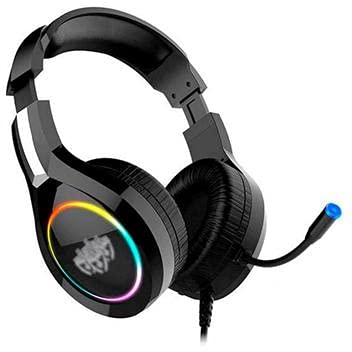
Image: The Kaidi KD-766 Gaming Headset, featuring over-ear cups, an adjustable headband, and a flexible boom microphone.
- Destar boleh laras: Untuk kesesuaian yang selesa.
- Penutup Telinga Berpad: Over-ear design for sound isolation and comfort.
- Mikrofon Boom Fleksibel: Adjustable for clear voice communication.
- In-line Remote Control: Untuk pelarasan kelantangan dan senyap mikrofon.
- 3.5mm Audio Jack (P2): Untuk input/output audio.
- Penyambung USB: For powering LED lighting.
5. Arahan Persediaan
5.1 Connecting to a PC/Console
- Sambungan Audio: Locate the 3.5mm audio jack (P2) on your computer or gaming console. Plug the 3.5mm connector from the headset into this port. Ensure it is fully inserted.
- USB Power (for LED): If your headset features LED lighting, plug the USB connector into an available USB port on your computer or console. This provides power for the lighting effects.
- Persediaan Mikrofon: If your device has separate audio and microphone jacks, you may need a Y-splitter adapter (not included) to use both the headset audio and microphone simultaneously with a single 3.5mm combo jack. For devices with separate ports, plug the 3.5mm audio jack into the headphone port and the microphone jack (if separate) into the microphone port. The KD-766 typically uses a single 3.5mm jack for audio and mic, plus a USB for LED.
- Laraskan Tetapan: After connecting, go to your device's sound settings to ensure the headset is selected as the default audio output and input device. Adjust volume levels as needed.
6. Arahan Operasi
6.1 Kawalan Kelantangan
Use the in-line remote control on the headset cable to adjust the volume. Rotate the volume wheel up to increase volume and down to decrease it.
6.2 Penggunaan Mikrofon
Position the flexible boom microphone approximately 2-3 cm (1 inch) from your mouth for optimal voice clarity. Use the microphone mute switch on the in-line remote to quickly turn the microphone on or off.
6.3 Lampu LED
The LED lighting on the earcups will illuminate automatically when the USB connector is plugged into a powered USB port. There are no user-adjustable controls for the LED lighting.
7. Penyelenggaraan
- Pembersihan: Wipe the headset with a soft, dry, lint-free cloth. Do not use liquid cleaners or aerosols.
- Storan: Store the headset in a cool, dry place when not in use. Avoid direct sunlight and extreme temperatures.
- Penjagaan Kabel: Elakkan selekoh tajam atau tarikan kabel yang berlebihan untuk mengelakkan kerosakan.
8. Penyelesaian masalah
| Masalah | Kemungkinan Punca | Penyelesaian |
|---|---|---|
| Tiada bunyi dari set kepala. | Headset not properly connected. Volume too low. Incorrect audio output selected. | Ensure the 3.5mm jack is fully inserted. Increase volume using the in-line control and your device's settings. Check your device's sound settings and select the headset as the default output. |
| Mikrofon tidak berfungsi. | Microphone muted. Incorrect audio input selected. | Check the microphone mute switch on the in-line remote. Ensure the headset microphone is selected as the default input device in your device's sound settings. |
| Lampu LED tidak berfungsi. | USB connector not plugged in or not receiving power. | Ensure the USB connector is securely plugged into a powered USB port. Try a different USB port. |
| Kualiti bunyi kurang baik. | Loose connection. Audio source issue. | Check all connections. Test the headset with another device to rule out an issue with the audio source. |
9. Spesifikasi
| Jenama: | Kaidi |
| model: | KD-766 |
| Peletakan Telinga: | Circum-aural (Over-ear) |
| Kawalan Bunyi: | Pengasingan Bunyi |
| Sensitiviti: | 108 dB |
| Julat Kekerapan: | 20Hz - 20kHz |
| Teknologi Ketersambungan: | berwayar |
| Input Fon Kepala: | Bicu 3.5mm |
| Peranti Serasi: | Desktops, Notebooks, Gaming Consoles |
| Kaedah Kawalan: | Remote (In-line) |
10. Waranti dan Sokongan
For warranty information and technical support, please refer to the warranty card included with your product or contact your local Kaidi distributor or retailer. Keep your proof of purchase for warranty claims.