
1. Pengenalan
The Minuteman EN550 is a Standby Uninterrupted Power Supply (UPS) designed to provide reliable power protection for your electronic devices. It features a 550VA/300W capacity, 120Vac input and output, and a voltage range of 95-140Vac. This UPS includes four battery-backed receptacles and four surge-only receptacles, offering comprehensive protection against power outages and surges. Key features include phone/fax/modem line protection, independent battery bypass, and hot-swappable, tool-less battery replacement.
Kandungan Pakej
- Minuteman EN550 UPS Unit
- Manual Pengguna
- Panduan Pemasangan Pantas
- Kad Waranti
- Platinum Protection Card
- Sales Brochure
- Kabel USB
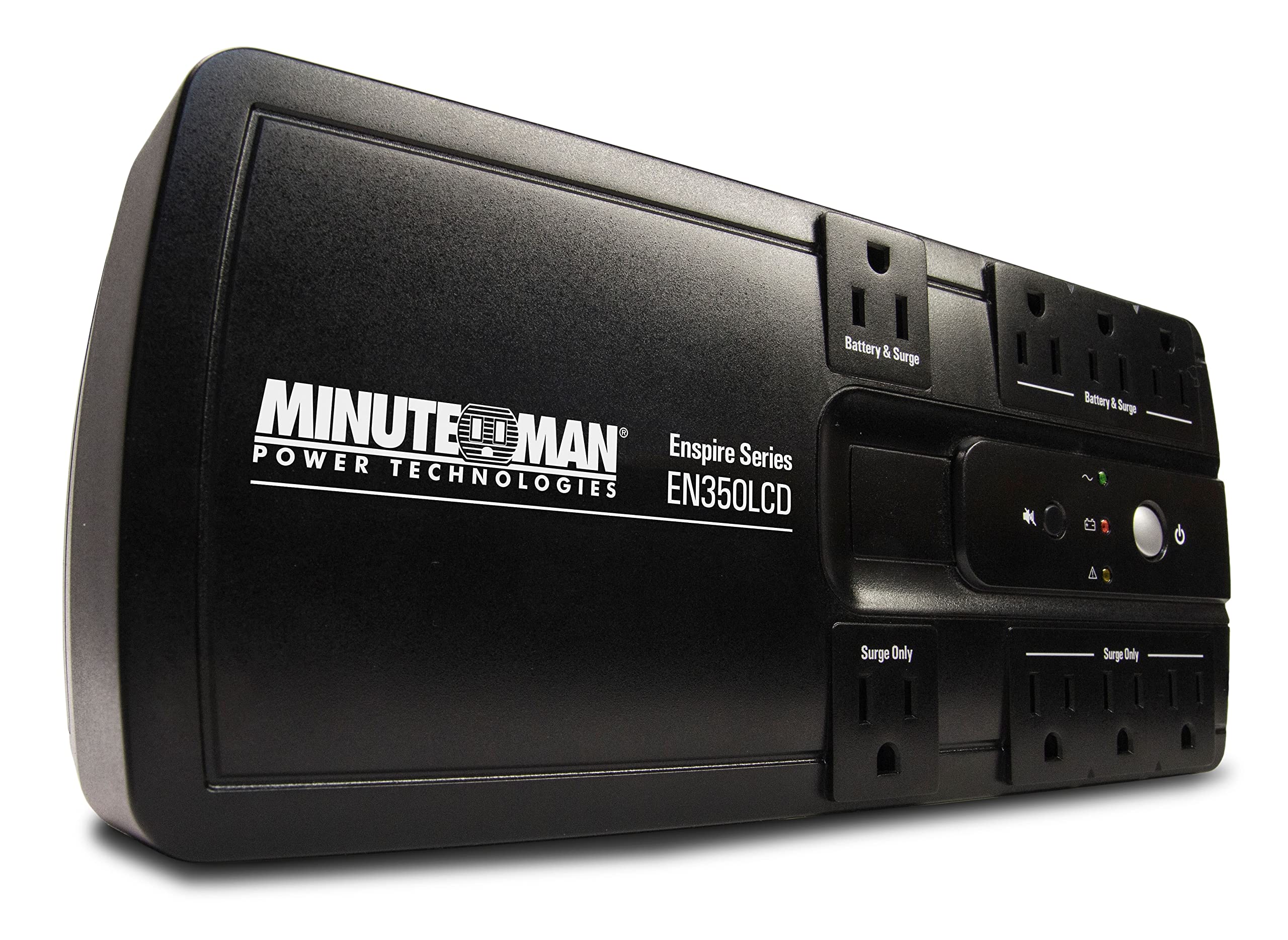
Image showing the Minuteman EN550 UPS unit with its front and side panels visible, highlighting the power outlets and status indicators.
2. Maklumat Keselamatan
Please read and follow all instructions carefully before installing or operating the Minuteman EN550 UPS. Retain this manual for future reference.
- Jangan buka UPS casing. There are no user-serviceable parts inside, except for the battery. Refer battery replacement to qualified service personnel.
- Jangan sekat bukaan pengudaraan. Pastikan aliran udara yang mencukupi di sekeliling unit.
- Jangan dedahkan UPS kepada hujan, lembapan atau kelembapan berlebihan.
- Connect the UPS to a properly grounded AC power outlet only.
- Elakkan meletakkan UPS di bawah cahaya matahari langsung atau berhampiran sumber haba.
- Disconnect the UPS from the AC power outlet before cleaning. Use a dry cloth for cleaning.
- Bateri ini mengandungi bahan berbahaya. Buang bateri dengan betul mengikut peraturan tempatan.
3. Persediaan dan Pemasangan
Penempatan
Place the Minuteman EN550 UPS in a cool, dry, and well-ventilated indoor area. Ensure it is away from direct sunlight, heat sources, and excessive dust. The unit is wall-mountable for flexible placement options.
Sambungan Awal
- Sambungkan Bateri: The UPS battery may be disconnected for shipping. Refer to the Quick Install Guide for instructions on connecting the internal battery.
- Sambungkan ke Kuasa AC: Plug the UPS power cord into a standard 120Vac grounded wall outlet.
- Caj Permulaan: Allow the UPS to charge for at least 8 hours before connecting any devices to ensure optimal battery runtime. The unit will charge whether it is turned on or off.
- Sambungkan Peranti: Plug your critical electronic devices (computer, monitor, modem, etc.) into the four battery-backed receptacles. Plug non-critical devices (printer, scanner) into the four surge-only receptacles.
- Komunikasi USB: Connect the provided USB cable from the UPS to your computer to enable communication and use the Sentried software (available via free download) for advanced monitoring and control.
- Phone/Fax/Modem Protection: Connect your phone, fax, or modem line through the RJ11/45 ports on the UPS to protect against surges on the data line.
4. Operasi
Menghidupkan/Mematikan
- Untuk Menghidupkan: Press and hold the power button for approximately 2 seconds until you hear a beep.
- Untuk Mematikan: Press and hold the power button for approximately 2 seconds until you hear a beep and the unit powers down.
Receptacle Types
- Battery Backup & Surge Protection Outlets (4): These outlets provide power from the UPS battery during an outage and protect against surges. Connect your most critical equipment here.
- Surge-Only Protection Outlets (4): These outlets provide surge protection but do not offer battery backup. Connect less critical equipment that still requires surge protection.
Kuasa Outage Operasi
Semasa kuasa outage, the UPS will automatically switch to battery power. The unit will emit an audible alarm to indicate it is operating on battery. The EN550 provides approximately 3 minutes of runtime at full load (300W) and 11 minutes at half load (150W). It is recommended to save your work and shut down your computer gracefully during an extended outage.
Sentried Software
The Sentried software, available for free download, allows you to monitor the UPS status, configure settings, and perform automatic shutdowns of your computer during prolonged power events. Connect the UPS to your computer via the USB port to utilize this feature.
5. Penyelenggaraan
Penggantian Bateri
The Minuteman EN550 features a hot-swappable battery design, allowing for tool-less battery replacement without powering down connected equipment. Batteries typically last 2-3 years under normal operating conditions. Refer to the Quick Install Guide or Minuteman's website for detailed battery replacement instructions.
- Always use genuine Minuteman replacement batteries to ensure compatibility and optimal performance.
- Buang bateri lama secara bertanggungjawab mengikut peraturan tempatan.
Pembersihan
Ensure the UPS is turned off and disconnected from the AC power outlet before cleaning. Use a soft, dry cloth to wipe the exterior of the unit. Do not use liquid or aerosol cleaners.
6. Penyelesaian masalah
If you experience issues with your Minuteman EN550 UPS, consult the following table for common problems and solutions.
| Masalah | Kemungkinan Punca | Penyelesaian |
|---|---|---|
| UPS tidak dihidupkan. | Bateri tidak disambungkan atau dinyahcas. | Ensure battery is properly connected. Plug UPS into AC outlet and allow to charge for 8 hours. |
| Masa jalan bateri pendek. | Overload, battery not fully charged, or battery end-of-life. | Reduce connected load. Allow UPS to charge for 8 hours. Replace battery if it is old. |
| UPS constantly beeps. | Operating on battery power during an outagbateri rendah atau rendah. | Check AC power. If power is restored, UPS will return to normal. If low battery, allow to charge. |
| Tiada kuasa ke peranti yang disambungkan. | UPS is off, circuit breaker tripped, or outlets are surge-only. | Turn on UPS. Check and reset UPS circuit breaker. Ensure devices are plugged into battery-backed outlets. |
If the problem persists after attempting these solutions, please contact Minuteman technical support.
7. Spesifikasi
| Ciri | Spesifikasi |
|---|---|
| Model | EN550 |
| Kapasiti (VA/Watts) | 550VA / 300W |
| Input Voltage | 120 Voltan AC |
| Voltage Julat | 95-140Vac |
| Keluaran Voltage | 120 Voltan AC |
| Outlet | 4 Battery Backup & Surge, 4 Surge-Only |
| Jenis Bateri | Asid Plumbum Tertutup (1 termasuk) |
| Typical Runtime (Full Load) | 3 minit |
| Typical Runtime (Half Load) | 11 minit |
| Dimensi Produk (L x W x H) | 12.4 x 5.1 x 3.7 inci |
| Berat Barang | 6.4 paun |
| warna | Hitam |
| Pengeluar | Office Depot, Inc. |
| Tarikh Tersedia Pertama | 15 September 2016 |
8. Waranti dan Sokongan
Waranti Produk
The Minuteman EN550 Uninterrupted Power Supply comes with a 3-year warranty on the unit and a 2-year warranty on the battery. Please refer to the included Warranty Card and Platinum Protection Card for full terms and conditions.
Sokongan Teknikal
For technical assistance, troubleshooting beyond this manual, or warranty claims, please contact Minuteman customer support. Contact information can typically be found on the Minuteman website or on the included documentation.