
1. Pengenalan
Thank you for choosing the Baseus Encok S16 Neck Hung Bluetooth Wireless In-Ear Earphone. This manual provides detailed instructions for setup, operation, and maintenance to ensure optimal performance and longevity of your device. Please read this manual thoroughly before use.
2. Kandungan Pakej
Sahkan bahawa semua item terdapat dalam pakej:
- 1 x Baseus Encok S16 Wireless Earphone
- 1 x Kabel Pengecasan
- 1 x Manual Pengguna
- 1 x Kad Waranti

Image: Contents of the Baseus Encok S16 earphone package, showing the earphones, charging cable, user manual, and warranty card.
3. Produk Lebihview
The Baseus Encok S16 earphones feature a neck-hung design for comfortable and secure wear. Key features include:
- Penetapan Magnetik: Earbuds can be magnetically joined when not in use, preventing tangling and loss.
- Adjustable Coils: The earphone line length can be adjusted by sliding for a customized fit.
- High Fidelity Sound: Equipped with a dynamic speaker unit, composite diaphragm, and independent tune trope structure for clear audio.
- Kuasa Cekap: Utilizes a British CSR chip and 120mAh battery for low power consumption and extended battery life.
- Keserasian Universal: Smartly matches with smartphones and tablet PCs, compatible with all Bluetooth 4.0 enabled devices.

Image: Close-up of the Baseus Encok S16 earbuds demonstrating their magnetic connection capability.
4. Persediaan
4.1 Mengecas Fon Telinga
- Connect the provided charging cable to the charging port on the earphone's control unit.
- Connect the other end of the charging cable to a USB power source (e.g., computer USB port, USB wall adapter).
- The indicator light will illuminate during charging and turn off or change color when fully charged.
- Pengecasan penuh biasanya mengambil masa kira-kira 1.5 hingga 2 jam.
4.2 Berpasangan Bluetooth
- Pastikan fon telinga dicas sepenuhnya.
- Press and hold the Power button on the control unit until the indicator light flashes red and blue alternately, indicating pairing mode.
- Pada telefon pintar atau peranti berdaya Bluetooth anda, pergi ke tetapan Bluetooth.
- Cari untuk available devices and select "Baseus Encok S16" from the list.
- Once connected, the indicator light will flash blue slowly or turn solid blue.
- Jika digesa untuk kata laluan, masukkan "0000".
5. Arahan Operasi
5.1 Kawalan Asas
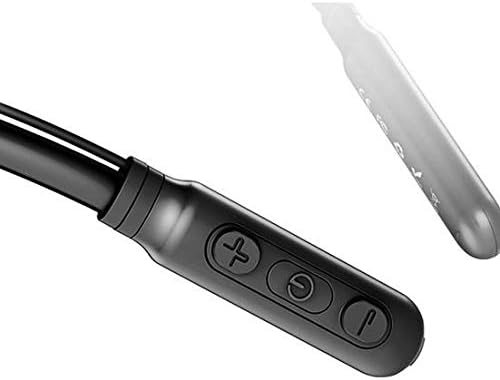
Image: Close-up of the Baseus Encok S16 earphone's inline control unit, showing the power/multi-function button, volume up, and volume down buttons.
| Butang | Fungsi |
|---|---|
| Butang Kuasa (Tengah) |
|
| Kelantangan Naik (+) |
|
| Perlahankan suara (-) |
|
5.2 Memakai Fon Telinga
Place the neckband around your neck, ensuring the control unit is easily accessible. Insert the earbuds comfortably into your ears. Adjust the earphone line length using the sliding coils for a secure and comfortable fit.
6. Penyelenggaraan
- Clean the earbuds and control unit regularly with a soft, dry cloth.
- Avoid exposing the earphones to extreme temperatures, humidity, or corrosive liquids.
- Store the earphones in a cool, dry place when not in use. The magnetic earbuds can help prevent tangling during storage.
- Jangan cuba membuka atau membaiki fon telinga sendiri, kerana ini akan membatalkan jaminan.
7. Penyelesaian masalah
| Masalah | Penyelesaian |
|---|---|
| Tidak boleh hidupkan | Ensure the earphones are fully charged. Press and hold the Power button for 3 seconds. |
| Tidak boleh berpasangan dengan peranti |
|
| Tiada suara atau kelantangan rendah |
|
| Sambungan terputus-putus |
|
8. Spesifikasi
| Ciri | Perincian |
|---|---|
| Jenama | Baseus |
| Nombor Model | FWP-E-S16 |
| Teknologi Ketersambungan | Bluetooth |
| Versi Bluetooth | 4.0 (compatible with devices enabling Bluetooth 4.0) |
| Faktor Bentuk | In Ear, Neck Hung |
| Jenis Kawalan | Voice Control, Touch (via buttons) |
| Kapasiti Bateri | 120mAh |
| Berat badan | 30 Gram |
| Komponen yang Disertakan | Wireless Earphone, Charging Cable, User Manual, Warranty Card |
9. Waranti dan Sokongan
This product comes with a Limited Warranty. Please refer to the included Warranty Card for detailed terms and conditions regarding coverage and duration.
For technical support or warranty claims, please contact your retailer or visit the official Baseus weblaman web untuk maklumat khidmat pelanggan.
Nombor Pengenalan Perdagangan Global (GTIN): 06953156264489