
pengenalan
Thank you for choosing the Awei A860BL-BK Bluetooth In-Ear Earphones. This manual provides essential information for the proper setup, operation, and maintenance of your device. Please read it thoroughly before use to ensure optimal performance and longevity of your earphones.
Kandungan Pakej
Sahkan bahawa semua item yang disenaraikan di bawah terdapat dalam pakej anda:
- Awei A860BL-BK Bluetooth In-Ear Earphones
- Kabel Pengecas USB
- Petua Telinga (pelbagai saiz)
- Manual Pengguna

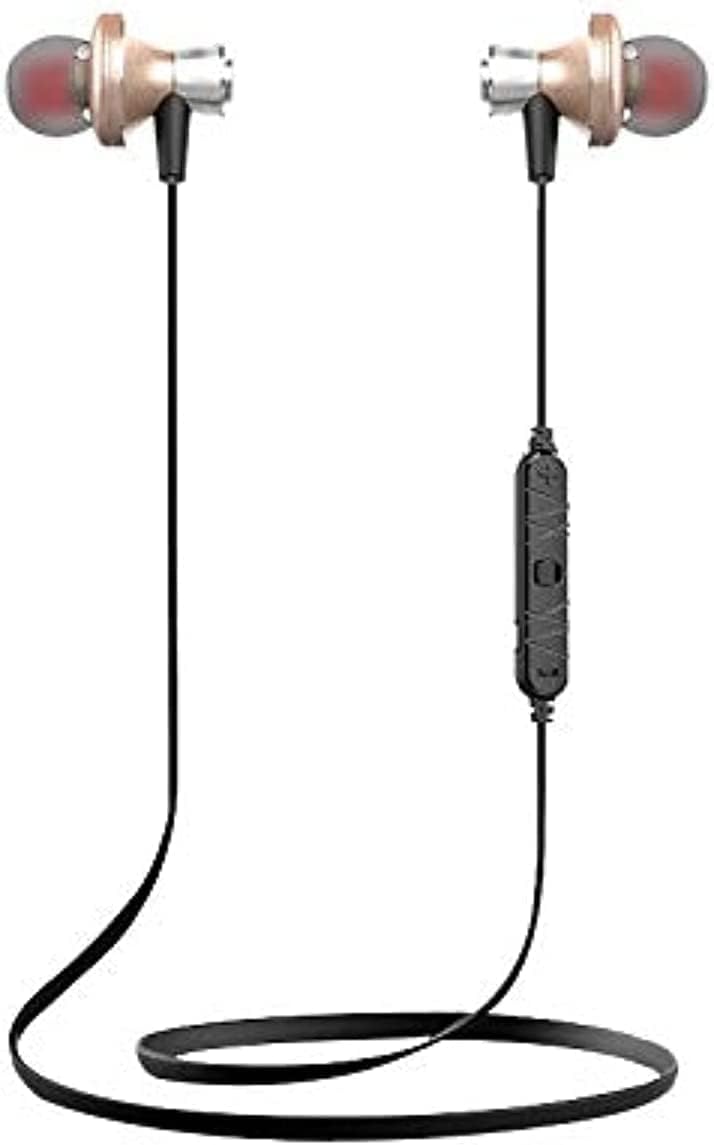
Produk Selesaiview
The Awei A860BL-BK earphones are designed for wireless audio playback and hands-free calling. They feature an in-ear design for comfortable fit and sound isolation.

Persediaan
1. Mengecas Fon Telinga
Before first use, fully charge the earphones. Connect the USB charging cable to the charging port on the earphones and to a compatible USB power source (e.g., computer, wall adapter). The charging indicator light will typically show red during charging and turn off or blue when fully charged.
- Masa Pengecasan: Approximately 1 to 2 hours.
2. Berpasangan Bluetooth
Untuk menyambungkan fon telinga anda ke peranti yang didayakan Bluetooth:
- Ensure the earphones are fully charged and turned off.
- Press and hold the multi-function button on the earphones until the indicator light flashes red and blue alternately, indicating pairing mode.
- Pada peranti anda (telefon pintar, tablet, dll.), dayakan Bluetooth dan cari peranti yang tersedia.
- Select "Awei A860BL-BK" from the list of found devices.
- Sebaik sahaja disambungkan, lampu penunjuk pada fon telinga biasanya akan berkelip biru perlahan atau padam.
If pairing fails, turn off both devices, restart them, and repeat the pairing process.
Arahan Operasi
Hidupkan/Mati Kuasa
- Hidupkan kuasa: Tekan dan tahan butang berbilang fungsi selama lebih kurang 3 saat sehingga lampu penunjuk berkelip biru.
- Matikan: Press and hold the multi-function button for approximately 3-5 seconds until the indicator light flashes red and then turns off.
Kawalan Muzik
- Main/Jeda: Tekan sebentar butang berbilang fungsi.
- Lagu Seterusnya: Tekan lama butang Kelantangan +.
- Trek Sebelumnya: Tekan lama butang Kelantangan -.
- Kelantangan: Tekan butang Kelantangan + sebentar.
- Perlahankan suara: Tekan butang Kelantangan sebentar.
Kawalan Panggilan
- Jawab/Tamatkan Panggilan: Tekan sebentar butang berbilang fungsi.
- Tolak Panggilan: Tekan lama butang berbilang fungsi.
- Dail Semula Nombor Terakhir: Tekan dua kali butang berbilang fungsi.
Pembantu Suara
- Aktifkan Pembantu Suara: Triple-press the multi-function button (functionality depends on your connected device).
Penyelenggaraan
Proper maintenance ensures the longevity and performance of your earphones.
- Pembersihan: Use a soft, dry cloth to clean the earphones. Do not use abrasive cleaners or solvents.
- Storan: Simpan fon telinga di tempat yang sejuk dan kering jauh dari cahaya matahari langsung dan suhu yang melampau.
- Tahan Air: Fon telinga ini tidak kalis air. Avoid exposure to liquids, moisture, and high humidity.
- Penjagaan Kabel: Avoid pulling the cable excessively or bending it sharply to prevent damage.
Menyelesaikan masalah
If you encounter issues with your Awei A860BL-BK earphones, refer to the following common solutions:
| Masalah | Penyelesaian yang Mungkin |
|---|---|
| Fon telinga tidak boleh dihidupkan. | Ensure the earphones are fully charged. Connect to a power source and charge for 1-2 hours. |
| Tidak boleh berpasangan dengan peranti. |
|
| Tiada bunyi atau kelantangan rendah. |
|
| Kualiti panggilan kurang baik. |
|
Spesifikasi
Detailed technical specifications for the Awei A860BL-BK Bluetooth In-Ear Earphones:
- Jenama: Awei
- model: A860BL-BK
- Ketersambungan: Wayarles (Bluetooth)
- Versi Bluetooth: Not specified (assumed standard)
- Julat Tanpa Wayar: Sehingga 10 meter
- mikrofon: ya
- Sokongan Muzik: ya
- warna: Hitam
- Jenis fon telinga: Dalam Telinga
- Masa Pengecasan: 1-2 jam
- Masa Main Muzik: Lebih kurang 4 jam
- Masa Berbual: Lebih kurang 6 jam
- Kawalan Bunyi: Tidak
- Jenis Kawalan: Volume control, Touch
- Tahan Air: Tidak kalis air
- Komponen yang Disertakan: Petua telinga
Maklumat Keselamatan
Sila patuhi garis panduan keselamatan berikut:
- Do not disassemble, repair, or modify the earphones.
- Jauhkan daripada suhu ekstrem, cahaya matahari langsung dan nyalaan api terbuka.
- Elakkan pendedahan kepada air atau cecair lain.
- Do not use the earphones at excessively high volumes for prolonged periods to prevent hearing damage.
- Jauhkan daripada kanak-kanak dan haiwan peliharaan.
Waranti dan Sokongan
Untuk maklumat jaminan atau sokongan teknikal, sila rujuk dokumentasi yang disediakan semasa pembelian atau hubungi peruncit anda. Simpan bukti pembelian anda untuk sebarang tuntutan jaminan.