
1. Pengenalan
This manual provides essential information for the safe and correct installation, operation, and maintenance of the Keyence FU-2897 Fiber Optic Sensor. Please read this manual thoroughly before using the product to ensure optimal performance and prevent potential hazards. Keep this manual in a safe place for future reference.
2. Maklumat Keselamatan
Always observe the following safety precautions to prevent injury to personnel and damage to the equipment.
- Bekalan Kuasa: Pastikan bekalan kuasa voltage is within the specified range. Incorrect voltage can cause damage or malfunction.
- Pendawaian: Perform all wiring with the power supply turned off. Incorrect wiring can lead to electric shock or equipment damage.
- Persekitaran: Do not install the sensor in locations subject to excessive dust, moisture, corrosive gases, or extreme temperatures.
- Pengendalian: Handle the fiber optic cables with care. Bending or pulling them excessively can cause damage and affect performance.
- Penyelenggaraan: Only qualified personnel should perform maintenance and repairs.
3. Produk Lebihview
The Keyence FU-2897 is a high-performance fiber optic sensor designed for reliable detection in various industrial applications. It utilizes fiber optic cables to transmit and receive light, allowing for precise object detection in confined spaces or harsh environments where traditional sensors may not be suitable.
Ciri-ciri Utama:
- Reka bentuk padat untuk penyepaduan yang mudah.
- High-speed response for demanding applications.
- Robust construction for industrial environments.
- Compatible with various fiber units (sold separately) for flexible detection solutions.
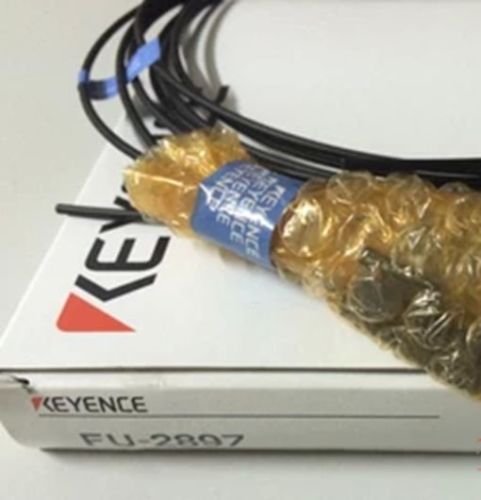
Figure 3.1: Keyence FU-2897 Fiber Optic Sensor. This image shows the main body of the sensor, typically a small amplifier unit, which connects to fiber optic cables for detection.
4. Persediaan
Follow these steps for proper installation of the FU-2897 sensor.
- Memasang Penderia Amplebih hidup:
Securely mount the FU-2897 amplifier unit in the desired location using appropriate mounting hardware. Ensure it is free from excessive vibration and heat sources.
- Attaching Fiber Units:
Insert the fiber optic cables (fiber units) into the designated ports on the sensor amplifier. Ensure the fibers are fully inserted and the locking mechanism (if present) is engaged. Avoid excessive force or bending of the fibers.
An illustration here would typically show the correct method for inserting and securing fiber optic cables into the sensor amppelabuhan penguat.
- Wiring the Power Supply and Output:
Connect the power supply wires to the sensor amplifier according to the wiring diagram provided in the product's specific datasheet. Connect the output wires to your control system (e.g., PLC). Double-check all connections before applying power.
Refer to the specific wiring diagram for your FU-2897 model for detailed connection instructions.
5. Arahan Operasi
Once the sensor is installed and wired, follow these steps for operation.
- Hidupkan kuasa:
Apply power to the sensor. The power indicator LED (if present) should illuminate.
- Initial Setup/Sensitivity Adjustment:
Most fiber optic sensors require sensitivity adjustment to optimize detection for specific targets and distances. This is typically done via a potentiometer, push-buttons, or a digital display on the ampunit yang lebih hidup.
- Pelarasan Manual: If equipped with a potentiometer, turn it to adjust sensitivity until stable detection is achieved for your target object.
- Auto-Teach Function: Some models feature an auto-teach button. Place the target object in the detection area and press the teach button, then remove the object and press again (or follow specific teach mode instructions).
Consult the detailed datasheet for your specific FU-2897 variant for precise sensitivity adjustment procedures.
- Pengesahan:
Test the sensor's detection by repeatedly presenting and removing the target object. Observe the output indicator LED and verify that your control system receives the correct signal.
6. Penyelenggaraan
Regular maintenance ensures the longevity and reliable operation of your FU-2897 sensor.
- Pembersihan:
Periodically clean the sensing surfaces of the fiber units and the amplifier unit with a soft, dry cloth. For stubborn dirt, use a cloth lightly dampened with isopropyl alcohol. Avoid abrasive cleaners or solvents.
- Pemeriksaan:
Regularly inspect fiber optic cables for damage, kinks, or excessive bending. Check electrical connections for looseness or corrosion. Ensure mounting hardware is secure.
- Pemeriksaan Alam Sekitar:
Verify that the operating environment remains within the specified limits for temperature, humidity, and presence of corrosive substances.
7. Penyelesaian masalah
If you encounter issues with your FU-2897 sensor, refer to the following common problems and solutions.
| Masalah | Kemungkinan Punca | Penyelesaian |
|---|---|---|
| Sensor does not power on. | No power supply, incorrect wiring, faulty power supply. | Semak sambungan kuasa dan voltage. Verify wiring against diagram. Test power supply. |
| No detection or unstable detection. | Incorrect sensitivity setting, dirty fiber ends, damaged fiber, target too far/small, ambient light interference. | Adjust sensitivity. Clean fiber ends. Inspect fiber for damage. Ensure target is within detection range. Shield from strong ambient light. |
| Output always ON/OFF. | Incorrect output mode (Light-ON/Dark-ON), sensor saturated, no target present. | Check output mode setting. Adjust sensitivity. Verify target presence. |
If the problem persists after attempting these solutions, contact Keyence technical support.
8. Spesifikasi
The following are general specifications for the Keyence FU-2897 Fiber Optic Sensor. Specific performance may vary depending on the connected fiber unit and application.
- model: FU-2897
- Pengeluar: KEYENCE
- ASIN: B01LN3DGUI
- Kaedah Pengesanan: Through-beam or Diffuse reflective (depends on fiber unit)
- Sumber Cahaya: Red LED (typical for general purpose fiber sensors)
- Masa Respons: Varies by mode, typically 250 µs to 1 ms
- Bekalan Kuasa: 12 to 24 VDC ±10% (typical)
- Penggunaan Semasa: 30 mA or less (typical)
- Jenis Output: NPN or PNP open collector (depends on model variant)
- Suhu Operasi: -10 to +55 °C (14 to 131 °F) (typical)
- Rintangan Alam Sekitar: IP67 (amplifier front panel, typical)
- Tarikh Mula-mula Tersedia: Nov. 6 2016
9. Waranti dan Sokongan
Keyence products are manufactured under strict quality control. For information regarding product warranty, please refer to the warranty statement provided with your purchase or visit the official Keyence webtapak.
For technical assistance, troubleshooting beyond this manual, or repair services, please contact Keyence technical support directly. Have your product model number (FU-2897) and serial number ready when contacting support.