
1. Pengenalan
This manual provides instructions for the proper use and maintenance of your Casio GX-12B Value Series Desk Top/Compact Desk Type Calculator. Please read this manual thoroughly before using the calculator to ensure optimal performance and longevity.
Ciri-ciri Utama:
- Extra Large 12-Digit Display
- Two-Way Power (Solar and Battery)
- 2 Independent Memories
- Item Counter Function
- Mark-up Percentage Fungsi
- Durable Plastic Keys
- Compact Desk Type Design
2. Persediaan dan Bekalan Kuasa
Sumber Kuasa:
The Casio GX-12B calculator operates on a two-way power system, utilizing both solar power and a single LR44 button-cell battery. For optimal performance, ensure the solar panel is exposed to sufficient light. In low-light conditions, the battery automatically takes over.
Pemasangan/Penggantian Bateri:
- Pastikan kalkulator dimatikan.
- Cari penutup petak bateri di bahagian belakang kalkulator.
- Using a small screwdriver, carefully remove the screw and open the battery compartment cover.
- Remove the old LR44 battery (if replacing) and insert a new LR44 battery with the positive (+) side facing up.
- Gantikan penutup petak bateri dan kencangkannya dengan skru.
- Tekan ke AC (All Clear) button to reset the calculator.
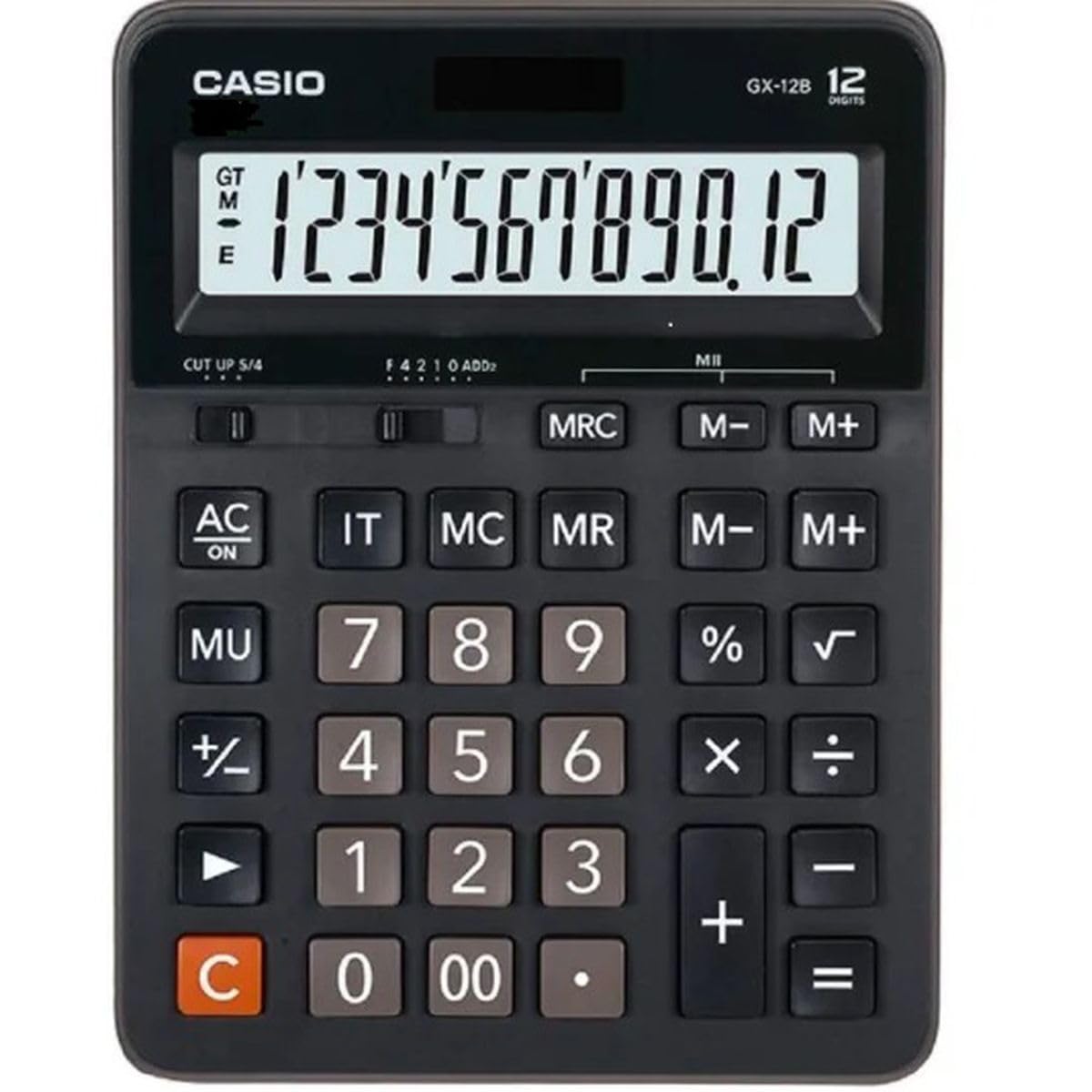
This image displays the Casio GX-12B calculator, highlighting its approximate length of 8.8 inches (22 cm) for scale. The calculator features a large display and clearly labeled keys.
3. Operasi Asas
Familiarize yourself with the key functions to perform calculations efficiently.
Fungsi Utama Selesaiview:
- AC: All Clear. Clears all values and operations, resetting the calculator.
- C: Clear Entry. Clears the last entered number.
- + / - / × / ÷: Basic arithmetic operations.
- =: Executes the pending calculation.
- %: Peratustage key. Used for percentage calculations (e.g., 100 + 10% = 110).
- MU: Mark-up key. Used for profit margin calculations.
- M+: Menambah nilai yang dipaparkan pada memori.
- M-: Menolak nilai yang dipaparkan daripada memori.
- BSMM: Memory Recall/Clear. Press once to recall the memory value. Press twice to clear the memory.
- IT: Item Counter. Counts the number of entries in a series of calculations.
Example Calculations:
- Tambahan: To calculate 123 + 456:
- Tekan AC
- Masuk 123
- Tekan +
- Masuk 456
- Tekan = (Keputusan: 579)
- Peratustage: To add 10% to 200:
- Tekan AC
- Masuk 200
- Tekan +
- Masuk 10
- Tekan % (Keputusan: 220)
- Fungsi Memori: To calculate (5 × 3) + (8 × 2):
- Tekan AC
- Masuk 5 × 3 M+ (15 is added to memory)
- Masuk 8 × 2 M+ (16 is added to memory)
- Tekan BSMM (Keputusan: 31)
- Tekan BSMM again to clear memory.
4. Penjagaan dan Penyelenggaraan
- Pembersihan: Wipe the calculator with a soft, dry cloth. For stubborn dirt, use a cloth lightly dampened with water and a mild detergent, then wipe dry immediately. Avoid using strong solvents or abrasive cleaners.
- Storan: Simpan kalkulator di tempat yang sejuk dan kering, jauh daripada cahaya matahari langsung dan suhu yang melampau.
- Elakkan Kesan: Do not drop or subject the calculator to strong impacts, as this can damage internal components or the display.
- Hayat Bateri: If the display becomes dim or unresponsive, replace the LR44 battery.
5. Penyelesaian masalah
| Masalah | Kemungkinan Punca | Penyelesaian |
|---|---|---|
| Paparan kosong atau malap. | Cahaya yang tidak mencukupi untuk panel solar, atau bateri lemah. | Move the calculator to a brighter area. Replace the LR44 battery if the issue persists. |
| Keputusan pengiraan yang salah. | Incorrect key input, or memory not cleared. | Tekan AC to clear all operations and memory, then re-enter the calculation. Ensure correct order of operations. |
| Kekunci tidak responsif. | Low battery, or internal malfunction. | Replace the LR44 battery. If the problem continues, contact customer support. |
6. Spesifikasi
- model: GX-12B
- paparan: 12-Digit Extra Large LCD
- Sumber Kuasa: Two-Way Power (Solar and 1 x LR44 Battery)
- Dimensi (L x W): Kira-kira 20.8 cm x 15.9 cm (8.2 inci x 6.3 inci)
- Berat: Kira-kira 0.32 kg (0.7 lbs)
- Bahan: plastik
- Fungsi: Basic arithmetic, Percentage, Mark-up, Memory (M+, M-, MRC), Item Counter
7. Maklumat Waranti
This Casio product is covered by a Limited Warranty. For specific terms, conditions, and duration of the warranty, please refer to the warranty card included with your purchase or visit the official Casio webtapak. Simpan bukti pembelian anda untuk tuntutan waranti.
8. Sokongan Pelanggan
If you encounter any issues not covered in this manual or require further assistance, please contact Casio customer support. Contact details can typically be found on the official Casio webtapak atau pada pembungkusan produk.