
pengenalan
The ARRIS SURFboard TM822G is a high-performance DOCSIS 3.0 cable modem and a 2-port telephony modem, designed for use with XFINITY from Comcast Internet & Voice service. This device provides a reliable connection for your internet and supports two Voice over IP (VoIP) telephone lines. By owning your modem, you can avoid monthly rental fees from your service provider.
Kandungan Pakej
Pastikan semua item terdapat dalam pakej produk anda:
- ARRIS SURFboard TM822G Cable Modem
- Kabel Ethernet
- Coaxial Cable Splitter
- Dua Kabel Sepaksi
- Kord Kuasa
- Manual Pengguna (dokumen ini)
Peranti Lebihview
Familiarize yourself with the ARRIS SURFboard TM822G's components and indicators.
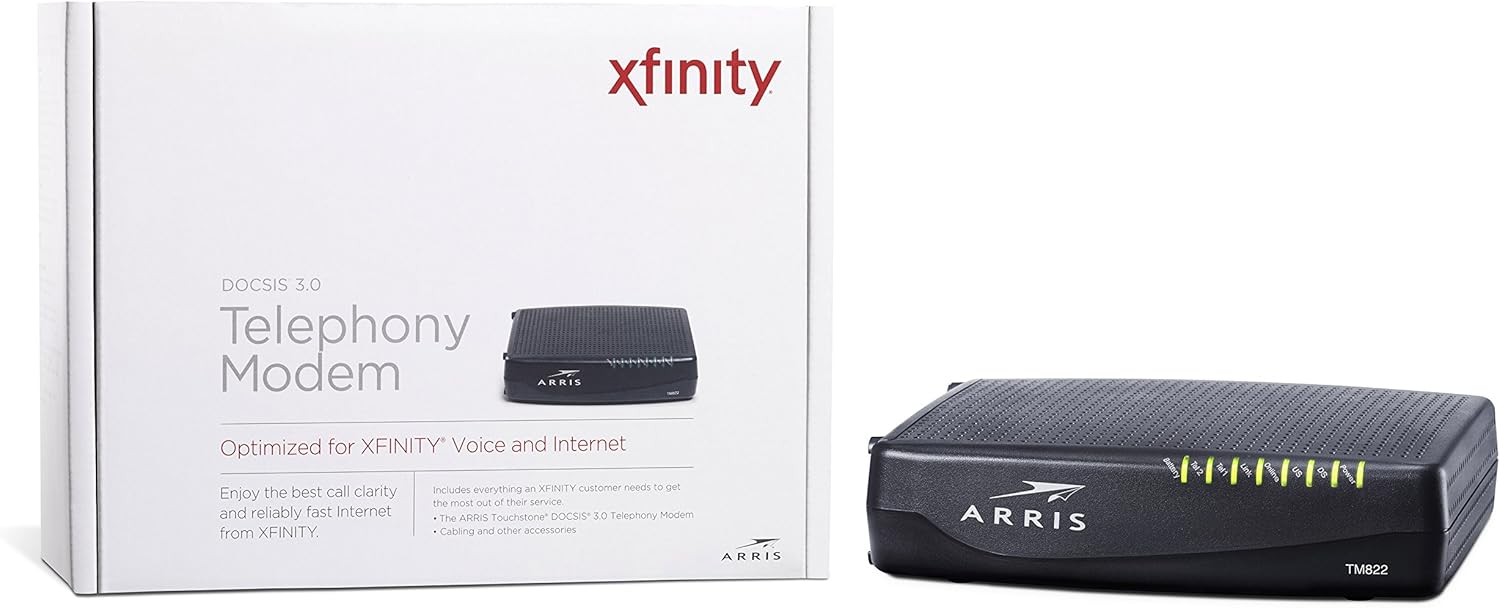
Rajah 1: Depan View of ARRIS SURFboard TM822G
This image shows the front panel of the ARRIS SURFboard TM822G cable modem, highlighting the status indicator lights.

Rajah 2: Belakang View of ARRIS SURFboard TM822G
This image displays the rear panel of the ARRIS SURFboard TM822G, detailing the coaxial input, Ethernet port, and two telephone line ports.
Penunjuk Status LED
The front panel LEDs provide information about the modem's operational status:
- Kuasa: Indicates the modem's power status.
- DS (Downstream): Indicates downstream channel connectivity.
- US (Upstream): Indicates upstream channel connectivity.
- dalam talian: Menunjukkan sambungan internet yang berjaya.
- Pautan: Indicates Ethernet connection status.
- Tel1 / Tel2: Indicate the status of the two telephone lines.
- Bateri: Indicates the status of an optional battery backup (sold separately).
Persediaan
Follow these steps to set up your ARRIS SURFboard TM822G cable modem:
- Sambungkan Kabel Sepaksi: Connect one end of a coaxial cable to the cable wall outlet and the other end to the "Cable In" port on the back of the modem. Ensure the connection is finger-tight.
- Sambungkan Kabel Ethernet: Connect one end of the Ethernet cable to the Ethernet port on the back of the modem and the other end to your computer or wireless router.
- Connect Telephone Lines: If you have Xfinity Voice service, connect your telephone(s) to the "Tel1" and/or "Tel2" ports on the back of the modem.
- Sambungkan Kuasa: Plug the power cord into the modem's power port and then into an electrical outlet.
- Hidupkan kuasa: Wait for the modem to power on and for the front panel LEDs (Power, DS, US, Online, Link, Tel1/Tel2) to become solid green or blue, indicating a stable connection. This may take several minutes.
- Aktifkan Perkhidmatan:
- For Xfinity Users: Buka a web penyemak imbas pada peranti yang disambungkan dan navigasi ke xfinity.com/aktivasi. Follow the on-screen instructions to activate your modem. You may need your Xfinity account information.
- For Other ISPs: Refer to your Internet Service Provider's activation instructions or contact their customer support.
Arahan Operasi
Once successfully set up and activated, your ARRIS SURFboard TM822G will provide internet and telephone service. The modem operates continuously to maintain your connection. Monitor the front panel LEDs to ensure proper operation. Solid lights typically indicate a stable connection, while blinking lights or specific color changes may indicate activity or a problem.
For optimal performance, ensure the modem is placed in a well-ventilated area, away from direct sunlight or heat sources, and not obstructed by other objects.
Penyelenggaraan
Regular maintenance helps ensure the longevity and optimal performance of your modem:
- Pembersihan: Periodically wipe the exterior of the modem with a soft, dry cloth. Avoid using liquid cleaners or abrasive materials.
- Pengudaraan: Pastikan lubang pengudaraan modem tidak tersumbat untuk mengelakkan terlalu panas.
- Kemas kini Firmware: Firmware updates are typically managed automatically by your Internet Service Provider. Do not attempt to manually update the firmware unless instructed by your ISP.
- But semula: If you experience connectivity issues, a simple reboot of the modem (unplugging the power for 30 seconds and plugging it back in) can often resolve minor problems.
Menyelesaikan masalah
If you encounter issues with your ARRIS SURFboard TM822G, refer to the following common troubleshooting tips:
| Masalah | Kemungkinan Punca | Penyelesaian |
|---|---|---|
| Tiada LED Kuasa | Modem is not receiving power. | Check power cord connections to the modem and electrical outlet. Ensure the outlet is functional. |
| DS/US/Online LEDs are blinking or off | No connection to the cable network or internet. | Ensure coaxial cable is securely connected. Check for service outages in your area. Contact your ISP if the issue persists. |
| Link LED is off | No Ethernet connection to your computer/router. | Verify the Ethernet cable is securely connected to both the modem and your device/router. Try a different Ethernet cable. |
| Tel1/Tel2 LEDs are off or blinking | Telephone service issue. | Ensure telephone lines are correctly connected. Contact your Xfinity Voice service provider. |
| Kelajuan Internet Perlahan | Network congestion, outdated router, or ISP issue. | Reboot the modem and router. Ensure your router is capable of handling your internet speed plan. Contact your ISP to check line quality and service plan. |
The ARRIS SURFboard TM822G supports Loop Diagnostics for remote testing and troubleshooting of in-house wiring, which can be utilized by your service provider.
Spesifikasi
Key technical specifications for the ARRIS SURFboard TM822G:
- Jenama: ARRIS
- model: TM822G
- Jenis Modem: Cable Modem with Telephony Adapter
- DOCSIS Standard: DOCSIS 3.0
- Downstream Channels: 8 bonded channels
- Upstream Channels: 4 bonded channels
- Maximum Downstream Speed: Sehingga 343 Mbps
- Maximum Upstream Speed: Sehingga 131 Mbps
- Port Ethernet: 1 port Gigabit Ethernet
- Pelabuhan Telefon: 2 (for Voice over IP)
- Compatible ISP: Certified for Comcast Xfinity Internet & Voice service only.
- Teknologi Ketersambungan: Ethernet
- warna: Hitam
Waranti dan Sokongan
The ARRIS SURFboard TM822G comes with a Waranti alat ganti terhad dan buruh selama 2 tahun. For technical assistance or warranty claims, please contact ARRIS customer support. You can find contact information and additional resources on the official ARRIS support webtapak.