
1. Pengenalan
Thank you for choosing the Senso ActivBuds S-230 Wireless Bluetooth Noise Cancelling Headphones. These headphones are designed to provide high-fidelity audio and a secure, comfortable fit for an active lifestyle. This manual provides essential information on how to set up, operate, maintain, and troubleshoot your device.

Image 1.1: Senso ActivBuds S-230 Wireless Bluetooth Noise Cancelling Headphones.
2. Apa yang ada di dalam Kotak
Sila semak kandungan pakej untuk memastikan semua item ada:
- Senso ActivBuds S-230 Bluetooth Headphones
- Membawa Sarung
- Short Micro USB Charging Cable
- 3 Sets of Ear Tips (Small, Medium, Large)
- Klip Pengurusan Kabel
- Manual Pengguna
- Dual Port USB Car Charger (Bonus Item)
- 3ft Charging Cable for Apple (Lightning connector) and Android (Micro USB connector) Devices (Bonus Item)
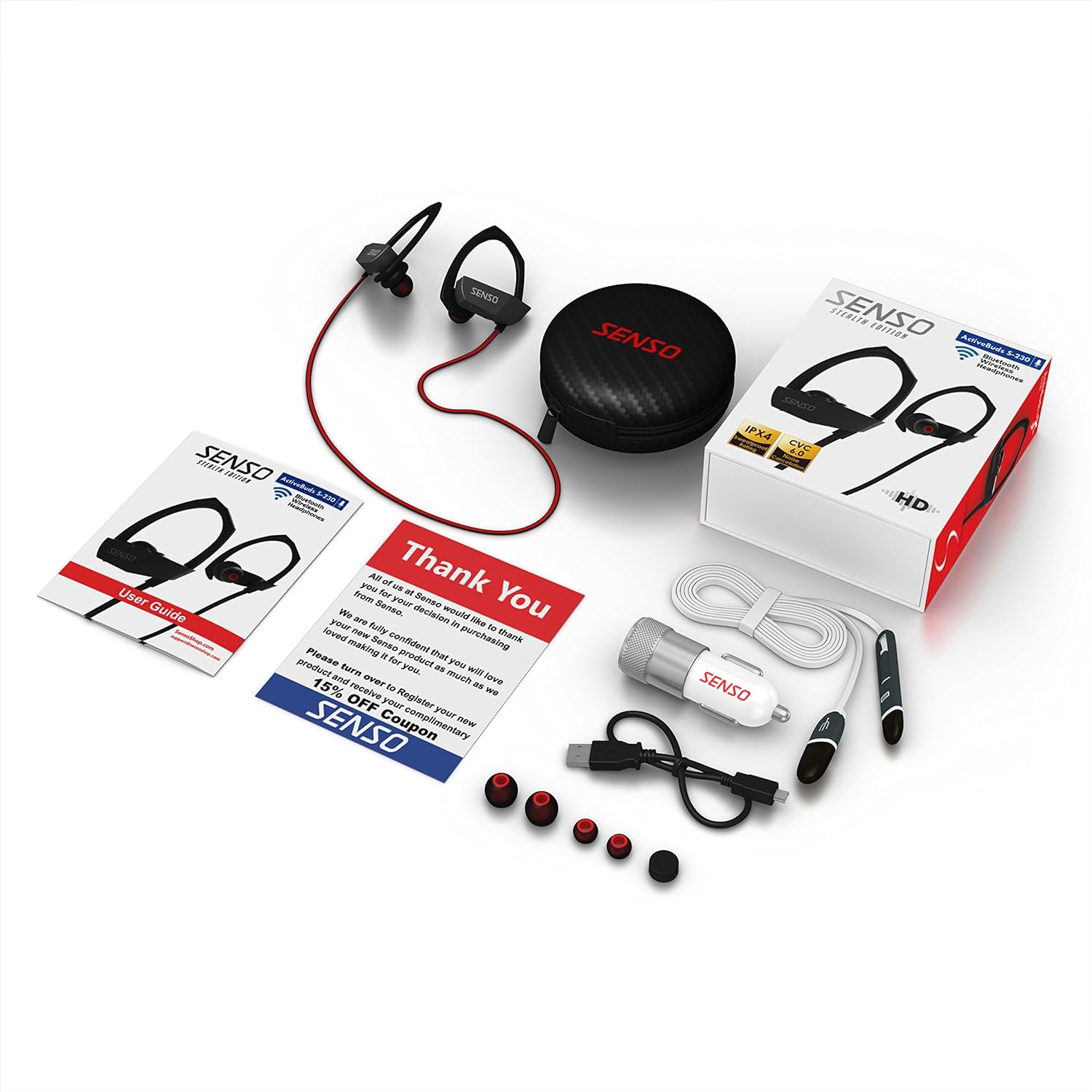
Image 2.1: All items included in the Senso ActivBuds S-230 package.
3. Persediaan
3.1 Mengecas Fon Kepala
- Connect the short Micro USB charging cable to the charging port on the headphones.
- Connect the other end of the cable to a USB power source (e.g., computer USB port, wall adapter, or the included car charger).
- The LED indicator on the headphones will illuminate during charging.
- Charging typically takes approximately 1.5 hours. The LED indicator will change or turn off once charging is complete.
Ensure the headphones are fully charged before first use for optimal battery life.
3.2 Berpasangan dengan Peranti Bluetooth
- Pastikan fon kepala dimatikan.
- Press and hold the Multi-function button (usually the center button on the control panel) for approximately 5-7 seconds until the LED indicator flashes red and blue alternately. This indicates pairing mode.
- Pada peranti anda yang didayakan Bluetooth (telefon pintar, tablet, komputer), pergi ke tetapan Bluetooth dan dayakan Bluetooth.
- Cari untuk available devices. You should see "Senso ActivBuds S-230" or a similar name appear in the list.
- Select the headphones from the list to connect. If prompted for a password, enter "0000".
- Once successfully paired, the LED indicator on the headphones will flash blue slowly, and you may hear an audible confirmation.
Fon kepala akan cuba menyambung semula secara automatik ke peranti yang terakhir dipasangkan apabila dihidupkan.
3.3 Adjusting for a Secure Fit
The ActivBuds S-230 feature an in-ear design with secure over-ear hooks for stability during activity. Experiment with the three included sizes of ear tips (Small, Medium, Large) to find the most comfortable and secure fit that also provides optimal sound isolation.
- Masukkan fon telinga perlahan-lahan ke dalam saluran telinga anda.
- Position the over-ear hook comfortably around the back of your ear.
- Adjust the cable management clip to secure the cable behind your neck, preventing it from bouncing during movement.

Image 3.1: Proper fit and use of the cable management clip.
4. Arahan Operasi
4.1 Hidupkan/Mati Kuasa
- Hidupkan kuasa: Press and hold the Multi-function button for approximately 3 seconds until the LED flashes blue and you hear an audible prompt.
- Matikan: Press and hold the Multi-function button for approximately 3 seconds until the LED flashes red and you hear an audible prompt.
4.2 Kawalan Main Semula Muzik

Image 4.1: Control panel on the Senso ActivBuds S-230.
- Main/Jeda: Tekan butang Pelbagai fungsi sekali.
- Lagu Seterusnya: Tekan dan tahan butang Naik Kelantangan (+).
- Trek Sebelumnya: Tekan dan tahan butang Turun Kelantangan (-).
- Kelantangan: Press the Volume Up (+) button briefly.
- Perlahankan suara: Press the Volume Down (-) button briefly.
4.3 Pengurusan Panggilan
- Jawab/Tamatkan Panggilan: Tekan butang Pelbagai fungsi sekali.
- Tolak Panggilan: Tekan dan tahan butang Berbilang fungsi selama lebih kurang 2 saat.
- Dail Semula Nombor Terakhir: Tekan dua kali butang Berbilang fungsi.
4.4 Connecting to Two Devices Simultaneously
The ActivBuds S-230 support connecting to two Bluetooth devices at once. Follow these steps:
- Pasangkan fon kepala dengan peranti pertama seperti yang diterangkan dalam Bahagian 3.2.
- Turn off the Bluetooth function on the first device.
- Put the headphones back into pairing mode (red and blue flashing LED).
- Pasangkan fon kepala dengan peranti kedua.
- Once the second device is paired, re-enable Bluetooth on the first device. The headphones should automatically connect to both devices.
5. Penyelenggaraan
5.1 Pembersihan
- Regularly clean the ear tips with a soft, dry cloth. For deeper cleaning, remove the ear tips and wash them with mild soap and water, ensuring they are completely dry before reattaching.
- Wipe the headphone body and cable with a soft, slightly damp kain. Elakkan menggunakan bahan kimia yang keras atau bahan yang melelas.
- Pastikan port pengecasan bebas daripada habuk dan serpihan.
5.2 Penyimpanan
- When not in use, store the headphones in the provided carrying case to protect them from dust, moisture, and physical damage.
- Simpan di tempat yang sejuk dan kering, jauh daripada suhu yang melampau.
5.3 Penjagaan Bateri
- Avoid fully discharging the battery frequently. Charge the headphones when the low battery indicator appears.
- If storing for an extended period, charge the headphones to about 50% every few months to preserve battery health.
6. Penyelesaian masalah
If you encounter issues with your Senso ActivBuds S-230, please refer to the following common problems and solutions:
| Masalah | Penyelesaian yang Mungkin |
|---|---|
| Fon kepala tidak dihidupkan. | Pastikan fon kepala dicas sepenuhnya. Sambungkan ke sumber kuasa dan cuba lagi. |
| Tidak boleh berpasangan dengan peranti Bluetooth. |
|
| Tiada bunyi atau bunyi rendah. |
|
| Intermittent connection or static. |
|
| Mikrofon tidak berfungsi. |
|
7. Spesifikasi
Technical specifications for the Senso ActivBuds S-230:
| Ciri | Spesifikasi |
|---|---|
| Nama Model | ActivBuds S-230 |
| Spesifikasi Bluetooth | 4.1+EDR |
| Julat Tanpa Wayar | Sehingga 30 kaki (10 meter) |
| Penilaian Ketahanan Air | IPX4 (Kalis Peluh) |
| Pengurangan Bunyi | CVC6.0 |
| Jenis Bateri | Polimer Litium-ion 85mAh |
| Port Pengecasan | USB mikro |
| Masa Mengecas | Lebih kurang 1.5 jam |
| Masa Main Semula | Sehingga 8 jam |
| Masa Tunggu Sedia | Sehingga 240 jam |
| Respons Kekerapan | 20 - 22kHz |
| Berat Barang | Kira-kira 0.001 auns (0.02 gram) |
| Dimensi Produk | 1.93 x 0.51 x 1.85 inci |
| Ciri Khas | Integrated Microphone, Noise Cancellation |
8. Waranti dan Sokongan
8.1 Maklumat Waranti
The Senso ActivBuds S-230 headphones come with a 1-year limited warranty from the date of purchase. This warranty covers manufacturing defects. Additionally, a 30-day hassle-free return policy is offered. Please retain your proof of purchase for warranty claims.
8.2 Sokongan Pelanggan
For any questions, technical assistance, or warranty claims, please contact Senso customer support. Refer to the contact information provided on the product packaging or the official Senso webtapak untuk saluran sokongan yang paling terkini.