
pengenalan
The Movo Photo MTP-11 is a motorized panoramic tripod head designed for creating smooth time-lapse videos and panoramic photographs. This device offers variable speed, time, and direction controls, making it suitable for use with DSLR cameras, GoPro cameras, and smartphones. It features a built-in rechargeable battery for portable operation.
Apa yang Termasuk
Upon unboxing your Movo Photo MTP-11, please ensure all the following items are present:
- Movo Photo MTP-11 Motorized Panoramic Time Lapse Tripod Head
- GoPro tripod mount adapter
- Kabel pengecas USB
- Smartphone / iPhone mount
- Kes pembawa
Produk Selesaiview
The MTP-11 features a compact, cylindrical design with intuitive controls for setting rotation parameters. The top surface includes a 1/4-inch mounting screw for attaching cameras or adapters. The base includes a 1/4-inch mounting thread for attachment to tripods.

Imej: Depan view of the Movo MTP-11 showing the power switch, duration, start/stop, and direction buttons, along with LED indicators for settings.
Kawalan dan petunjuk utama:
- Suis kuasa: Terletak di sebelah, digunakan untuk menghidupkan atau mematikan peranti.
- Duration/Angle Indicators: A series of LEDs indicating the total rotation angle (e.g., 15°, 30°, 45°, 60°, 90°, 180°, 360°).
- Time Interval Indicators: A series of LEDs indicating the time duration for the rotation (e.g., 5 minutes, 15 minutes, 30 minutes, 60 minutes).
- DIR (Direction) Button: Used to select the rotation direction (clockwise or counter-clockwise).
- Butang Mula / Berhenti: Initiates or pauses the rotation sequence.
- R.T. (Real Time) Button: Activates continuous rotation mode.

Image: The MTP-11 shown with a Sony mirrorless camera, another mirrorless camera, and a smartphone mounted, demonstrating its versatility.
Persediaan
- Cas Peranti: Before first use, fully charge the MTP-11 using the provided USB cable. Refer to the 'Charging the Battery' section for details.
- Mount to a Tripod (Optional): If using a tripod, screw the MTP-11 onto your tripod's 1/4-inch screw mount located on the bottom of the device. Ensure it is securely fastened.

Image: Underside of the MTP-11, highlighting the 1/4-inch tripod mounting thread.
- Attach Your Camera/Device:
- Untuk Kamera DSLR/Tanpa Cermin: Screw your camera directly onto the 1/4-inch mounting screw on the top of the MTP-11. Ensure the camera is stable and centered.

Image: A Canon DSLR camera securely mounted on the MTP-11.
- For GoPro Cameras: Attach the provided GoPro tripod mount adapter to the MTP-11's top screw, then secure your GoPro to the adapter.
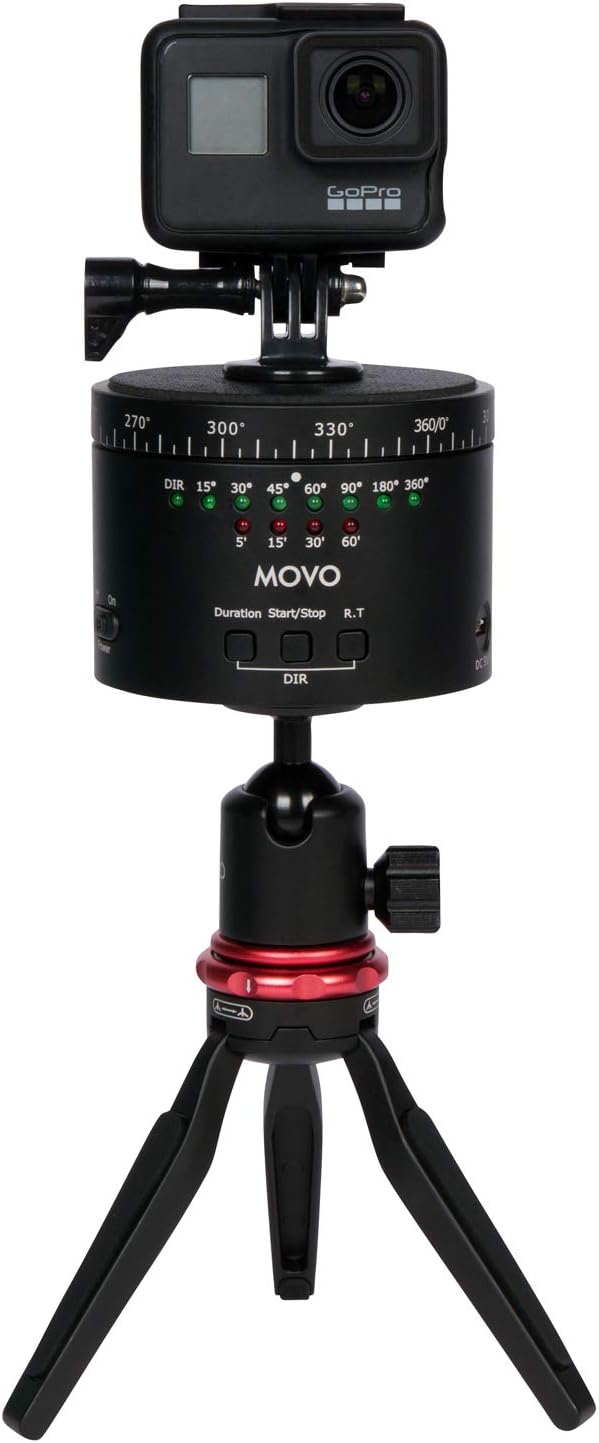
Image: A GoPro camera mounted on the MTP-11, which is then attached to a mini tripod.
- Untuk telefon pintar: Attach the provided smartphone mount to the MTP-11's top screw, then secure your smartphone within the mount.
- Untuk Kamera DSLR/Tanpa Cermin: Screw your camera directly onto the 1/4-inch mounting screw on the top of the MTP-11. Ensure the camera is stable and centered.
- Hidupkan kuasa: Slide the 'Power' switch to the 'On' position. The indicator LEDs will illuminate.
Arahan Operasi
The MTP-11 allows for precise control over rotation angle, duration, and direction for time-lapse photography and continuous panning.
- Select Rotation Angle/Duration: Press the 'Duration' button repeatedly to cycle through the available rotation angles (e.g., 15°, 30°, 45°, 60°, 90°, 180°, 360°) and corresponding time intervals (e.g., 5 min, 15 min, 30 min, 60 min). The active setting will be indicated by an illuminated LED.
- Pilih Arah Putaran: Press the 'DIR' button to toggle between clockwise and counter-clockwise rotation. An LED indicator will show the selected direction.
- Start Time-Lapse: Once your desired angle, duration, and direction are set, press the 'Start/Stop' button to begin the motorized rotation. The device will rotate smoothly over the selected duration.
- Stop Time-Lapse: To pause or stop the rotation before completion, press the 'Start/Stop' button again.
- Real-Time Panning: For continuous, non-timed rotation, press the 'R.T.' button. The device will rotate continuously until the 'Start/Stop' button is pressed.
Nota: The MTP-11 is designed for smooth panning. Ensure your camera setup does not exceed the maximum weight recommendation of 2 kg (4.4 lbs) to maintain stability and smooth operation.
Mengecas Bateri
The MTP-11 features a built-in rechargeable battery with an average life of 6 hours on a single charge.
- Locate the USB charging port on the side of the MTP-11.
- Connect the provided USB charging cable to the MTP-11's charging port.
- Sambungkan hujung kabel USB yang satu lagi ke penyesuai kuasa USB standard (tidak disertakan) atau port USB komputer.
- A charging indicator light (if present) will show the charging status. The light typically changes color or turns off when fully charged.
- Putuskan sambungan kabel setelah pengecasan selesai.
Penyelenggaraan
- Pastikan peranti bersih dengan mengelapnya dengan kain yang lembut dan kering. Elakkan menggunakan bahan kimia yang keras atau bahan yang melelas.
- Store the MTP-11 in its carrying case when not in use to protect it from dust and physical damage.
- Avoid exposing the device to extreme temperatures, moisture, or direct sunlight for prolonged periods.
- Jangan cuba membuka atau membaiki peranti sendiri, kerana ini akan membatalkan jaminan.
Menyelesaikan masalah
| Masalah | Kemungkinan Punca | Penyelesaian |
|---|---|---|
| Peranti tidak dihidupkan. | Bateri habis. | Charge the MTP-11 using the USB cable. |
| Rotation is not smooth or device shakes. | Camera/device weight exceeds maximum capacity (2 kg / 4.4 lbs). | Ensure the total weight of the mounted equipment is within the specified limit. |
| Device stops unexpectedly during operation. | Bateri lemah atau halangan. | Recharge the battery. Check for any physical obstructions preventing rotation. |
| LED indicators are difficult to see. | Keadaan cahaya ambien yang terang. | Operate in a shaded area or use your hand to shield the indicators for better visibility. |
Spesifikasi
| Ciri | Perincian |
|---|---|
| Nombor Model | MTP-11 |
| warna | Hitam |
| Cadangan Berat Maksimum | 2 kg (4.4 lbs) |
| Berat Barang | 500 Gram |
| Saiz Dilipat | 3.5 x 3.5 x 2.5 inci (lebih kurang 8.9 x 8.9 x 6.35 cm) |
| Dimensi Bungkusan | 15.09 x 11.2 x 9.19 cm |
| Jenis Bateri | Product Specific (Rechargeable) |
| Purata Hayat Bateri | 6 Jam |
| Peranti Serasi | Cameras (DSLR, Mirrorless), Cellphones (Smartphones), GoPro |
| Memasang Benang | 1/4-inch (top and bottom) |
Waranti
The Movo Photo MTP-11 comes with a Waranti 1 tahun from the date of purchase. This warranty covers manufacturing defects and ensures the product functions as intended under normal use. Please retain your proof of purchase for warranty claims. The warranty does not cover damage caused by misuse, unauthorized modifications, accidents, or normal wear and tear.
Sokongan
For technical assistance, troubleshooting beyond this manual, or warranty inquiries, please contact Movo customer support. Refer to the official Movo webtapak untuk maklumat hubungan terkini.
When contacting support, please have your product model (MTP-11) and proof of purchase readily available.


