
pengenalan
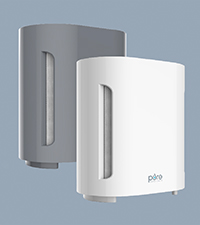
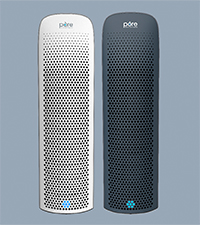
The Pure Enrichment PureZone Air Purifier is designed to improve air quality in your home. Featuring a 4-stage filtration system and UV-C light, it effectively captures and eliminates various airborne particles and microorganisms.

Image: Pure Enrichment PureZone Air Purifier, front view.
Ciri-ciri Utama:
- 4-Stage Pembersihan Udara: Includes a Washable Pre-Filter, Activated Carbon Filter, H13 True HEPA Filter, and UV-C Light for comprehensive air cleaning.
- Deep Clean Your Air: Captures 99.97% of dust and allergens, and eliminates up to 99.9% of viruses and bacteria.
- 3 Fan Speeds & Quiet Operation: Offers low, medium, and high fan settings with a quiet operation level as low as 30dB.
- Energy-Efficient & Easy to Use: Features 2, 4, or 8-hour timer settings and a filter reset indicator.
Persediaan
1. Pembukaan dan Penyediaan Penapis
Carefully remove the air purifier from its packaging. Before first use, locate the filter compartment, typically at the bottom or back of the unit. Remove the protective plastic wrapping from the filter(s) and re-install them securely.

Imej: Gambar rajah yang menggambarkan 4-stagkomponen sistem penapisan e.
2. penempatan
Place the air purifier on a firm, level surface. Ensure there is adequate space around the unit (at least 6 inches) for proper airflow. Avoid placing it directly against walls or furniture. For optimal performance, place it in the room where air purification is most needed.

Image: The PureZone Air Purifier shown in a bedroom, office, kitchen, and living room.
3. Sambungan Kuasa
Plug the power adapter into a standard electrical outlet. The unit is now ready for operation.
Video: Satu produk tamatview demonstrating the air purifier's features and setup.
Arahan Operasi
The control panel is located on the top of the unit, providing easy access to all functions.

Image: Close-up of the PureZone Air Purifier's control panel with buttons for power, fan speed, UV-C light, sleep mode, and timer settings.
1. Hidupkan/Mati Kuasa
- Tekan ke Butang Kuasa (
 ) untuk menghidupkan atau mematikan unit.
2. Pelarasan Kelajuan Kipas
- Tekan ke Butang Kelajuan Kipas (
 ) repeatedly to cycle through low, medium, and high settings.
3. Tetapan Pemasa
- Tekan ke Butang Pemasa (
 ) to set the unit to operate for 2, 4, or 8 hours. The unit will automatically shut off after the selected time.
4. UV-C Light Function
- Tekan ke Butang UV-C (
 ) to activate or deactivate the UV-C light for enhanced sanitization.
5. Mod Tidur
- Tekan ke Butang Mod Tidur (
 ) to dim the control panel lights and reduce fan speed for quiet operation during sleep.
Video: Demonstration of the Pure Enrichment PureZone Air Purifier's controls and features.
Penyelenggaraan
1. Penggantian Penapis
The H13 True HEPA filter should be replaced approximately every 6 months, depending on usage. The filter reset indicator light on the control panel will illuminate when it's time for a new filter.
- To replace the filter, turn off and unplug the unit.
- Open the filter compartment (refer to your unit's specific design for access).
- Keluarkan penapis lama dan buang dengan betul.
- Insert the new H13 True HEPA filter, ensuring it is correctly oriented.
- Tutup petak penapis.
- Pasangkan unit dan tekan dan tahan Butang Kuasa for 3-5 seconds to reset the filter indicator.
Video: A detailed look at the Pure Enrichment PureZone Air Purifier, including filter access and replacement.
2. Pembersihan Pra-Penapis
The washable pre-filter (first stage of filtration) can be cleaned every 4-6 weeks to maintain efficiency. Gently vacuum the pre-filter to remove large particles like dust, pet hair, and lint. If necessary, it can be washed with mild soap and water, then thoroughly air-dried before re-installation.
Menyelesaikan masalah
- Unit Tidak Dihidupkan: Ensure the power cord is securely plugged into a working outlet. Check if the filter is installed correctly and the filter compartment is closed.
- Reduced Airflow/Poor Performance: Check the filter for excessive dirt or blockage. Clean the pre-filter or replace the H13 True HEPA filter if needed. Ensure there is no obstruction to the air intake or outlet vents.
- Bunyi Luar Biasa: Verify that the unit is placed on a stable, flat surface. Check for any foreign objects inside the unit or if the filter is improperly installed.
- Filter Reset Light Remains On: After replacing the filter, ensure you reset the filter indicator by pressing and holding the Power Button for 3-5 seconds.
Spesifikasi
| Ciri | Perincian |
|---|---|
| Jenama | Pengayaan Tulen |
| Nombor Model | PEAIRPLG |
| Dimensi Produk | 6.9"D x 10.8"W x 12.1"H |
| Berat badan | 7.7 paun |
| Liputan Keluasan Lantai | Sehingga 300 kaki persegi. |
| Tahap Kebisingan | 30 Desibel (tetapan terendah) |
| Jenis Penapisan | 4-Stage (Washable Pre-Filter, Activated Carbon, H13 True HEPA, UV-C Light) |

Image: Visual representation of the PureZone Air Purifier's dimensions.

Imej: Belakang view of the PureZone Air Purifier showing the model number and electrical specifications.
Waranti dan Sokongan
The Pure Enrichment PureZone Air Purifier comes with a Waranti Pengeluar 5 Tahun. For any questions, concerns, or warranty claims, please contact Pure Enrichment customer support.
Visit the official Pure Enrichment weblaman web atau rujuk maklumat hubungan yang diberikan dalam pembungkusan produk anda untuk bantuan.