
Asas Amazon K001575
Amazon Basics LCD Computer Monitor Stand Riser User Manual
Model: K001575 | Brand: Amazon Basics
1. Pengenalan
This user manual provides comprehensive instructions for the assembly, operation, maintenance, and troubleshooting of your Amazon Basics LCD Computer Monitor Free-Standing Desk Stand Riser. Designed to enhance your ergonomic workspace, this stand allows for flexible adjustment of your monitor to achieve optimal viewsudut dan keselesaan.

Rajah 1.1: Depan view of the Amazon Basics LCD Computer Monitor Stand Riser.
2. Ciri-ciri
- Pelarasan Ketinggian: Set the height of your LCD for a comfortable computing experience.
- Multi-directional Movement: With fingertip effort, raise or lower your display, pan left/right, tilt, and rotate.
- Kapasiti Berat: Supports monitors weighing between 6-16 pounds.
- Keserasian Saiz Skrin: Designed for screens up to 24 inches.
- Pelarasan Ketinggian Menegak: Offers 5 inches of monitor height adjustability.
- Putaran: Monitor can be used in portrait or landscape orientation (360° rotation).
- Julat Miring: +25/-5 degree tilt capability.
- Julat Pan: 270° right/left pan from the base.
- Keserasian VESA: Supports VESA 100 x 100 mm and 75 x 75 mm mounting patterns.
- Pengurusan Kabel: Integrated cable pass-through channel near the base keeps cables organized.
3. Kandungan Pakej
Sila pastikan semua komponen ada sebelum memulakan pemasangan:
- Monitor Stand Base and Arm Assembly
- Plat Pemasangan VESA
- Mounting Screws (various sizes for VESA 75x75mm and 100x100mm)
- Allen Key (for adjustments and assembly)

Figure 3.1: Typical components included with the monitor stand.
4. Arahan Persediaan
- Sediakan Stand: Place the monitor stand base on a stable, flat surface. Ensure the Allen key is accessible, often stored at the bottom of the base.
- Lampirkan Plat VESA ke Monitor: Carefully lay your monitor face down on a soft, clean surface to prevent scratches. Align the VESA mounting plate with the screw holes on the back of your monitor. Use the appropriate mounting screws (M4 or M5, depending on your monitor) to secure the plate to the monitor. Do not overtighten.
- Mount Monitor to Stand: With the VESA plate attached to your monitor, carefully lift the monitor and slide the VESA plate onto the arm of the stand. Ensure it clicks securely into place.
- Laraskan Ketegangan (jika perlu): If the monitor sags or is too stiff to adjust, use the included Allen key to adjust the tension screws on the arm. These are typically located near the VESA plate attachment point or along the arm's pivot points. Turn clockwise to increase tension (stiffer movement) and counter-clockwise to decrease tension (looser movement).
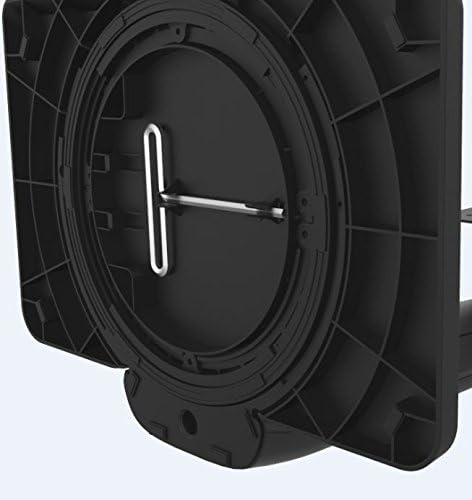
Figure 4.1: Allen key storage on the underside of the stand base.
5. Arahan Operasi
The Amazon Basics LCD Monitor Riser offers a range of adjustments for optimal viewkeselesaan:
- Pelarasan Ketinggian: Gently push or pull the monitor up or down to your desired height. The stand is designed to hold its position once released.
- Pelarasan Kecondongan: Grasp the top and bottom edges of your monitor and gently tilt it forward or backward to achieve the perfect viewsudut ing.
- Pelarasan Kuali: Rotate the entire stand base left or right on your desk for horizontal viewdalam pelarasan.
- Rotation (Portrait/Landscape): Rotate the monitor 360 degrees to switch between landscape and portrait orientations. Ensure no cables are tangled during rotation.

Figure 5.1: Monitor on stand in landscape orientation.

Figure 5.2: Monitor on stand in portrait orientation, side view.
5.1. Video Produk Rasmi
Video 5.1: An official product video demonstrating the features and adjustments of the Amazon Basics LCD Monitor Stand Adjustable Riser.
6. Penyelenggaraan
- Pembersihan: Gunakan kain lembut dan kering untuk mengelap penyangga. Untuk kesan degil, gunakan sedikit kainamp kain dengan sabun lembut boleh digunakan, diikuti dengan pengeringan. Elakkan pembersih atau pelarut yang melelas.
- Pemeriksaan biasa: Periodically check all screws and connections to ensure they are secure. Retighten if necessary using the provided Allen key.
- Pengurusan Kabel: Ensure cables are routed neatly through the cable pass-through channel to prevent strain or damage.
7. Penyelesaian masalah
- Monitor Sags or Won't Stay Up:
This indicates that the tension on the arm is too loose. Use the Allen key to tighten the tension screws on the arm until the monitor holds its position securely. Refer to Section 4, Step 4 for guidance.
- Monitor is Too Stiff to Adjust:
The tension on the arm may be too tight. Use the Allen key to loosen the tension screws slightly until movement is smooth but still holds position.
- Goyangan Monitor:
Ensure the stand is placed on a stable, flat surface. Check that all assembly screws are tightened securely, including those attaching the VESA plate to the monitor and the monitor to the stand.
- Cables are Tangled:
Utilize the integrated cable pass-through channel at the base of the stand to route cables neatly. This prevents tangling and keeps your workspace tidy.
8. Spesifikasi
| Atribut | Nilai |
|---|---|
| Nombor Model | K001575 |
| Jenama | Asas Amazon |
| bahan | aluminium |
| warna | Hitam |
| Berat Barang | 5 paun (2.27 kg) |
| Dimensi Produk (LxWxH) | 12 x 10.2 x 15.8 inci (30.5 x 25.9 x 40.1 cm) |
| Max Screen Size Supported | 24 Inci |
| Weight Adjustable Range | 6-16 pounds (2.7-7.2 kg) |
| Kebolehlarasan Ketinggian | 5 inci (12.7 cm) |
| Sudut Kecondongan | +25/-5 darjah |
| Sudut Pan | 270 degrees (right/left from base) |
| Putaran | 360 degrees (portrait/landscape) |
| Keserasian VESA | 75x75mm, 100x100mm |
9. Waranti dan Sokongan
This product is backed by an Amazon Basics 1-Year Limited Warranty. For detailed warranty information or technical support, please refer to the official Amazon Basics webtapak atau hubungi perkhidmatan pelanggan Amazon secara terus.
Sokongan dalam talian: melawat Perkhidmatan Pelanggan Amazon
Ask a question about this manual
Ask about setup, troubleshooting, compatibility, parts, safety, or missing instructions. Manuals+ will review the question and use this page’s manual context to help answer it.