
1. Maklumat Keselamatan
Read and understand all safety warnings and instructions before operating the generator. Failure to follow these instructions may result in electric shock, fire, serious injury, or death.
1.1 Bahaya Karbon Monoksida
- Generators produce carbon monoxide, an odorless, colorless gas that can kill you.
- TIDAK PERNAH operate the generator indoors or in partially enclosed areas.
- Always use the generator outdoors in a well-ventilated area, far from windows, doors, and vents.
1.2 Bahaya Kejutan Elektrik
- Do not operate the generator in wet conditions. Keep it dry.
- Pastikan semua sambungan elektrik kukuh dan dibumikan dengan betul.
- Never touch the generator or connected devices with wet hands.
1.3 Bahaya Kebakaran
- Fuel is highly flammable. Refuel in a well-ventilated area with the engine off and cool.
- Do not smoke or allow open flames near the generator, especially during refueling.
- Store fuel in an approved container in a safe location.
2. Produk Lebihview
The DUCAR D 1000iS is a compact and efficient inverter generator designed to provide portable electrical power. It features a 4-stroke engine and inverter technology for stable power output.
2.1 Ciri-ciri Utama
- Penjana kuasa penyongsang
- 4-stroke engine, 54 cc displacement
- Permulaan mundur
- Fuel tank capacity: 3 liters (petrol)
- Maximum power output: 1000 VA (1000 Watts)
- Low noise level: 56 dB(A) at 7 meters
- Berat: 14 kg
- jld elektroniktage regulator (inverter)
2.2 Komponen Penjana
Familiarize yourself with the main components of your DUCAR D 1000iS generator:
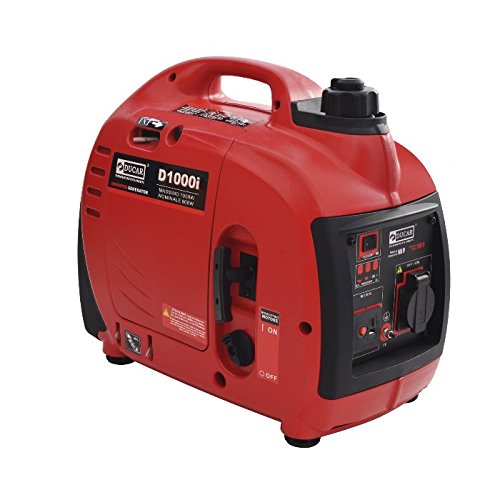
This image shows the DUCAR D 1000iS Inverter Generator from an angled perspective, highlighting its compact design and control panel. Key dimensions are overlaid: 94cm height, 64cm length, and 44cm width.
- Penutup Tangki Bahan Api: Untuk menambah petrol.
- Panel Kawalan: Contains outlets, switches, and indicators.
- Pemula Recoil: For manual engine starting.
- Oil Fill Cap/Dipstick: For adding and checking engine oil.
- Air Filter Cover: Melindungi penapis udara.
- Keluaran Ekzos: Releases engine exhaust.
3. Persediaan
Before first use, or after extended storage, proper setup is crucial for safe and efficient operation.
3.1 Tambah Minyak Enjin
The generator is shipped without engine oil. You must add the correct amount of oil before starting.
- Letakkan penjana pada permukaan yang rata.
- Buka skru dan tanggalkan penutup isi minyak/dipstick.
- Carefully pour approximately 350ml of SAE 10W-30 engine oil into the oil fill opening. Do not overfill.
- Check the oil level using the dipstick. The oil level should be at the 'L' (Low) position or slightly above, but not exceeding the 'H' (High) mark.
- Gantikan penutup isi minyak/dipstick dengan selamat.
3.2 Add Fuel
Use unleaded gasoline with an octane rating of 87 or higher. Do not use E85 fuel.
- Pastikan penjana dimatikan dan sejuk.
- Tanggalkan penutup tangki bahan api.
- Carefully pour gasoline into the fuel tank, up to the fill limit (maximum 3 liters). Do not overfill.
- Pasang semula penutup tangki bahan api dengan kemas.
Video: Generator Setup and Operation
This video provides a step-by-step guide on preparing and starting an inverter generator, including adding engine oil, filling the fuel tank, and engaging the choke and engine switch. The procedures are similar for the DUCAR D 1000iS model.
4. Arahan Operasi
4.1 Memulakan Penjana
- Ensure the generator is on a level surface and in a well-ventilated outdoor area.
- Turn the fuel switch to the "ON" position.
- Move the choke lever to the "CHOKE" position (for cold starts).
- Putar suis enjin ke kedudukan "ON".
- Tarik pemegang starter sentakan dengan kuat dan lancar sehingga enjin dihidupkan.
- Setelah enjin dihidupkan, gerakkan tuil pencekik secara beransur-ansur ke kedudukan "RUN".
- Allow the engine to warm up for 3-5 minutes before connecting any devices.
4.2 Menyambung Peranti
After the generator has warmed up, you can connect your electrical devices to the appropriate outlets on the control panel.
- Pastikan jumlah wattage of connected devices does not exceed the generator's rated output (900W continuous, 1000W peak).
- Plug in your devices one at a time.
4.3 Menghentikan Penjana
- Putuskan sambungan semua peranti elektrik daripada penjana.
- Putar suis enjin ke kedudukan "OFF".
- Turn the fuel switch to the "OFF" position.
Video: Inverter Generator in Use
This video demonstrates the operation of an inverter generator, including starting procedures, connecting devices, and observing the digital display. While the model shown is 2000W, the operational steps are generally applicable to the DUCAR D 1000iS.
4.4 Using the Digital Display
The digital display provides real-time information about the generator's performance. Press the 'M' (Menu) button to cycle through different data points:
- Voltage (V): Keluaran voltage (cth, 230V).
- Kekerapan (Hz): Output frequency (e.g., 50 Hz).
- Run Time (h): Operating time for the current session.
- Total Run Time (h): Total operating hours since first use.
- Semasa (A): Output semasa.
- Load (%): Peratustage of generator utilization.
- RPM: Engine revolutions per minute.
If an alarm light illuminates or in case of overload, check the load, then press the 'M' button for 3 seconds to reset and restart the generator.
5. Penyelenggaraan
Regular maintenance ensures the longevity and optimal performance of your generator. Always turn off the engine and allow it to cool before performing any maintenance.
5.1 Minyak Enjin
- Periksa paras minyak sebelum setiap penggunaan.
- Tukar minyak selepas 20 jam pertama operasi, kemudian setiap 50 jam atau setiap tahun.
5.2 Penapis Udara
- Inspect the air filter every 50 hours or every 3 months.
- Bersihkan atau gantikan jika kotor.
5.3 Palam Pencucuh
- Inspect the spark plug every 100 hours or every 6 months.
- Bersihkan atau ganti jika perlu.
5.4 Sistem Bahan Api
- Drain the fuel tank and carburetor if storing the generator for more than 30 days.
- Use a fuel stabilizer if you cannot drain the fuel.
6. Penyelesaian masalah
Bahagian ini menyediakan penyelesaian kepada isu operasi yang lazim.
6.1 Enjin Tidak Bermula
- Tiada Bahan Api: Check fuel level and add unleaded gasoline if needed.
- No Oil: Check oil level and add SAE 10W-30 engine oil if needed.
- Kedudukan Tercekik: Ensure choke is in the correct position for starting (CHOKE for cold, RUN for warm).
- Suis Mesin: Verify the engine switch is in the "ON" position.
- Palam Pencucuh: Periksa palam pencucuh untuk sebarang kotoran atau kerosakan. Bersihkan atau gantikan jika perlu.
6.2 Tiada Output Kuasa
- Lebihan beban: Disconnect all devices and restart the generator. Reduce the load.
- Pemutus litar: Check if any circuit breakers have tripped on the control panel. Reset if needed.
- Mod ECO: Ensure ECO mode is not causing insufficient power for high-demand devices.
6.3 Enjin Berjalan Dengan Buruk
- Bahan Api Basi: Drain old fuel and refill with fresh gasoline.
- Penapis Udara: Bersihkan atau gantikan penapis udara yang kotor.
- Palam Pencucuh: Periksa dan bersihkan atau gantikan palam pencucuh.
7. Spesifikasi
| Spesifikasi | Nilai |
|---|---|
| Model | D 1000iS |
| Jenis Enjin | OHV 4 lejang |
| Anjakan | 54 cc |
| Jenis Bahan Api | Petrol tanpa plumbum |
| Kapasiti Tangki Bahan Api | 3 liter |
| Sistem Permulaan | Manual (Undur) |
| Output Kuasa Maks | 1000 W |
| Output Kuasa Dinilai | 900 W |
| Output AC | 230 Vac - 50 Hz - 3.9 Ah |
| Keluaran DC | 12 Vdc - 5.0 Ah |
| Pengecas Bateri | 12 Vdc - 7.5 Ah |
| Tahap Bunyi (7m) | 56 dB(A) |
| Guaranteed Noise Level Lw(A) | 90 dB(A) |
| Ketinggian Maks | 1000 m |
| Dimensi (L x W x H) | 47.6 x 27.1 x 42.5 cm (from description) / 94L x 64l x 44H cm (from specifications, conflicting, using description's more specific values) |
| Berat badan | 14 kg |
8. Waranti dan Sokongan
For warranty information, technical support, or replacement parts, please contact DUCAR customer service or your authorized dealer. Keep your purchase receipt and serial number handy for faster service.