1. Pengenalan dan Selesai Produkview
The Oreck WK15500B Air Refresh is a versatile 2-in-1 appliance designed to improve indoor air quality and comfort. It combines a HEPA air purifier with an ultrasonic humidifier, suitable for small rooms up to 115 square feet, such as bedrooms, dens, or nurseries.
Ciri-ciri Utama:
- Dwi Fungsi: Operates as both an air purifier and an ultrasonic humidifier, or as an air purifier independently.
- 2-Stage Penapisan: Features a HEPA media filter to capture 99% of dust and allergens, and a charcoal filter to reduce odors.
- Ultrasonic Humidification: Releases a cool mist to add moisture to dry air without using hot steam.
- Operasi senyap: Designed with silence technology for minimal noise during use.
- Saiz Bilik: Berkesan untuk bilik sehingga 115 kaki persegi.
2. Arahan Keselamatan Penting
Please read all instructions carefully before operating this appliance to reduce the risk of fire, electric shock, or injury.
- Sentiasa cabut plag perkakas sebelum membersihkan, melakukan penyelenggaraan atau apabila tidak digunakan.
- Jangan kendalikan sebarang perkakas dengan kord atau palam yang rosak.
- Jauhkan kord kuasa daripada permukaan yang dipanaskan.
- Jangan gunakan di luar atau di permukaan basah.
- Jangan biarkan kanak-kanak mengendalikan perkakas ini tanpa pengawasan.
- Only use clean, cool tap water in the humidifier tank. Do not add essential oils or other additives.
- Ensure the water tank is securely placed before operating the humidifier function.
- Jangan sekat bukaan udara.
- Use only Oreck recommended replacement filters.
3. Kandungan Pakej
Sahkan bahawa semua item terdapat dalam pakej:
- Oreck WK15500B Air Refresh Unit
- HEPA Media Filter (pre-installed or separate)
- Charcoal Filter (pre-installed or separate)
- Manual Pengguna (dokumen ini)
4. Komponen Produk

Rajah 4.1: Depan view of the Oreck WK15500B Air Refresh unit, showcasing its sleek grey design and top control panel.

Rajah 4.2: bersudut view of the Oreck WK15500B Air Refresh unit, highlighting its modern profile.

Rajah 4.3: sebelah view of the Oreck WK15500B Air Refresh unit, showing its slim design.
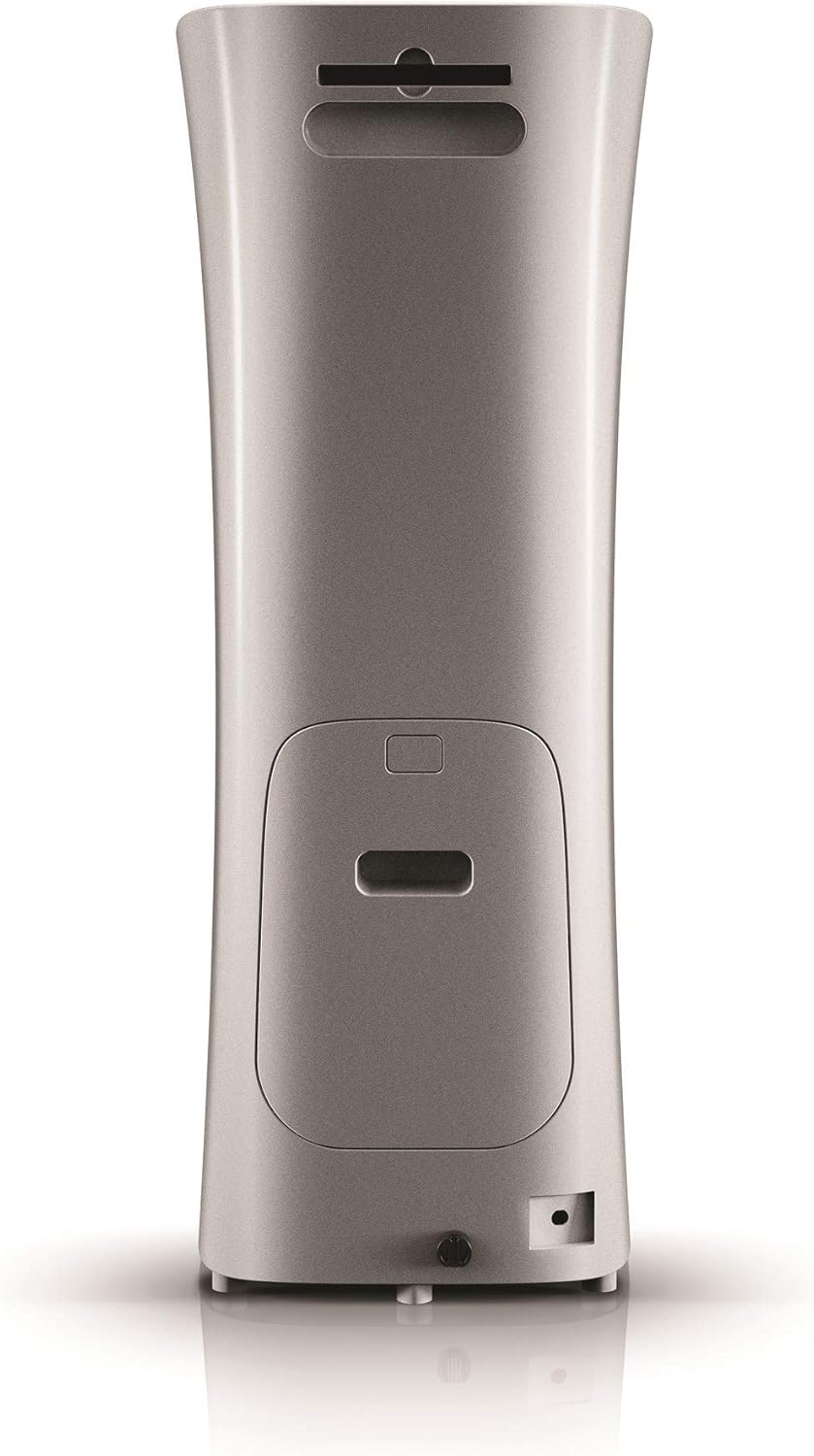
Rajah 4.4: belakang view of the Oreck WK15500B Air Refresh unit, indicating the filter access panel and power input.

Rajah 4.5: Close-up of the top control panel with digital display and buttons for Sleep, Humidity, Timer, Speed, and On/Off, along with a 'Reset filter' indicator.

Rajah 4.6: Diagram illustrating the internal filter system, showing the outer casing removed to reveal the charcoal filter and HEPA media filter, designed to capture dust, allergens, and odors.

Rajah 4.7: The Oreck WK15500B Air Refresh unit positioned in a nursery, demonstrating its suitability for small rooms and quiet operation.

Rajah 4.8: The Oreck WK15500B Air Refresh unit actively emitting cool mist, illustrating its ultrasonic humidification function.

Rajah 4.9: The Oreck WK15500B Air Refresh unit integrated into a living room environment, showcasing its compact and aesthetic design.
5. Arahan Persediaan
- Buka bungkusan Unit: Carefully remove the Oreck WK15500B from its packaging. Retain packaging for future storage or transport.
- Pemasangan Penapis:
- Locate the filter access panel on the back of the unit (refer to Figure 4.4).
- Open the panel and ensure the HEPA and charcoal filters are correctly seated. Remove any protective plastic packaging from the filters if present.
- Tutup panel akses penapis dengan selamat.
- Kedudukan: Place the unit on a firm, level surface, ensuring there is at least 6 inches of clearance from walls or furniture for optimal airflow.
- Fill Water Tank (for Humidifier function):
- Keluarkan tangki air dari unit.
- Tanggalkan penutup di bahagian bawah tangki.
- Fill the tank with clean, cool tap water. Do not exceed the maximum fill line.
- Securely screw the cap back on and place the water tank firmly into the unit.
- Sambungan Kuasa: Palamkan kord kuasa ke soket elektrik standard.
6. Arahan Operasi
6.1. Panel Kawalan Selesaiview (Rujuk Rajah 4.5)
- Butang Hidup/Mati: Menghidupkan atau mematikan unit.
- Butang Kelajuan: Adjusts the fan speed for air purification (Low, Medium, High).
- Butang Pemasa: Sets the operating time (e.g., 2, 4, 8 hours) after which the unit will automatically turn off.
- Butang Kelembapan: Activates or deactivates the humidifier function and adjusts mist output levels.
- Butang Tidur: Reduces fan speed and dims display lights for quiet operation during sleep.
- Tetapkan Semula Penunjuk Penapis: Menyala apabila tiba masanya untuk memeriksa atau menggantikan penapis.
6.2. Operasi Asas
- Hidupkan/Mati Kuasa: Tekan ke Hidup/Mati butang untuk menghidupkan unit. Tekan sekali lagi untuk mematikan.
- Laraskan Kelajuan Kipas: While the unit is on, press the Kelajuan button repeatedly to cycle through fan speeds (Low, Medium, High).
- Activate Humidifier:
- Pastikan tangki air diisi.
- Tekan ke Kelembapan button to turn on the humidifier.
- Tekan ke Kelembapan button again to adjust mist output levels if available, or to turn off the humidifier function while air purification continues.
- Tetapkan Pemasa: Tekan ke Pemasa button to select a desired operating duration. The unit will automatically shut off after the set time.
- Mod tidur: Tekan ke tidur button for quiet operation. The fan speed will decrease, and display lights will dim. Press any button to exit Sleep Mode.
7. Penyelenggaraan
Regular maintenance ensures optimal performance and extends the lifespan of your Oreck WK15500B.
7.1. Penggantian Penapis
The 'Reset filter' indicator light will illuminate when it's time to check or replace the filters. Filter lifespan varies based on usage and air quality.
- Cabut palam unit daripada salur keluar kuasa.
- Buka panel akses penapis di bahagian belakang unit.
- Remove the old HEPA and charcoal filters. Dispose of them properly.
- Insert new Oreck genuine replacement filters, ensuring they are correctly oriented.
- Tutup panel akses penapis dengan selamat.
- Plug the unit back in. With the unit powered on, press and hold the 'Reset filter' button (if available, otherwise refer to manual for specific reset procedure) for 3-5 seconds until the indicator light turns off.
7.2. Pembersihan Tangki Air
Clean the water tank regularly to prevent mineral buildup and bacterial growth.
- Cabut palam unit.
- Keluarkan tangki air dan kosongkan sebarang air yang tinggal.
- Rinse the tank thoroughly with clean water. For mineral buildup, use a solution of white vinegar and water, let it soak, then rinse well.
- Wipe the inside of the tank and cap dry before refilling.
7.3. Pembersihan Luaran
Lap bahagian luar unit dengan lembut, damp kain. Jangan gunakan pembersih atau pelarut yang melelas.
8. Penyelesaian masalah
| Masalah | Kemungkinan Punca | Penyelesaian |
|---|---|---|
| Unit tidak dihidupkan. | Tidak dipasang; kerosakan saluran kuasa; kerosakan unit. | Pastikan kord kuasa dipasang dengan kukuh ke soket yang berfungsi. Cuba soket lain. Jika masalah berterusan, hubungi khidmat pelanggan. |
| No mist from humidifier. | Water tank empty; tank not seated correctly; humidifier function not activated. | Refill water tank. Ensure tank is securely placed. Press the Humidity button to activate. |
| Air purification seems ineffective. | Filters are dirty or clogged; unit is too small for the room; air inlets/outlets blocked. | Check and replace filters if necessary. Ensure unit is placed in a room within its recommended size. Clear any obstructions around the unit. |
| Bunyi luar biasa semasa operasi. | Penapis longgar; objek asing di dalam; unit tidak berada di atas permukaan yang rata. | Check that filters are securely installed. Unplug and inspect for foreign objects. Place unit on a stable, level surface. |
9. Spesifikasi
| Nama Model | Penyegaran Udara |
| Nombor Model | WK15500B |
| Jenama | Oreck |
| Dimensi Produk | 26.7D x 27.9W x 73.7H Sentimeter |
| Berat Barang | 6.8 kg |
| Liputan Keluasan Lantai | 115 Kaki Persegi |
| Ciri Khas | Teknologi Ultrasonik |
| bahan | plastik |
| warna | Kelabu |
| Komponen yang Disertakan | Unit Pembersih Udara |
10. Waranti dan Sokongan Pelanggan
For information regarding warranty coverage, technical support, or to purchase replacement parts and filters, please contact Oreck customer service. Refer to the official Oreck webtapak atau dokumentasi pembelian anda untuk butiran hubungan.
Webtapak: www.oreck.com