
1. Produk Lebihview
The INSIZE 2871-101 Electronic Thickness Gage is a precision measuring instrument designed for accurately determining the thickness of various materials. It features a digital display for clear readings and user-friendly controls for efficient operation.
Ciri-ciri Utama:
- Ceramic spindle tip and anvil for durability and precision.
- Intuitive buttons for On/Off, Zero, and Inch/Millimeter unit conversion.
- Powered by a CR2032 battery with automatic power-off function to conserve energy.
- Data output capability for advanced applications.
2. Persediaan
Before using your INSIZE Electronic Thickness Gage, please follow these setup instructions:
2.1. Pemasangan Bateri
The gage requires one CR2032 button cell battery. Ensure proper polarity when inserting.
- Cari penutup petak bateri, biasanya di bahagian belakang atau sisi unit paparan.
- Use a small coin or screwdriver to gently open the battery compartment.
- Masukkan bateri CR2032 dengan sisi positif (+) menghadap ke atas.
- Tutup penutup petak bateri dengan selamat.
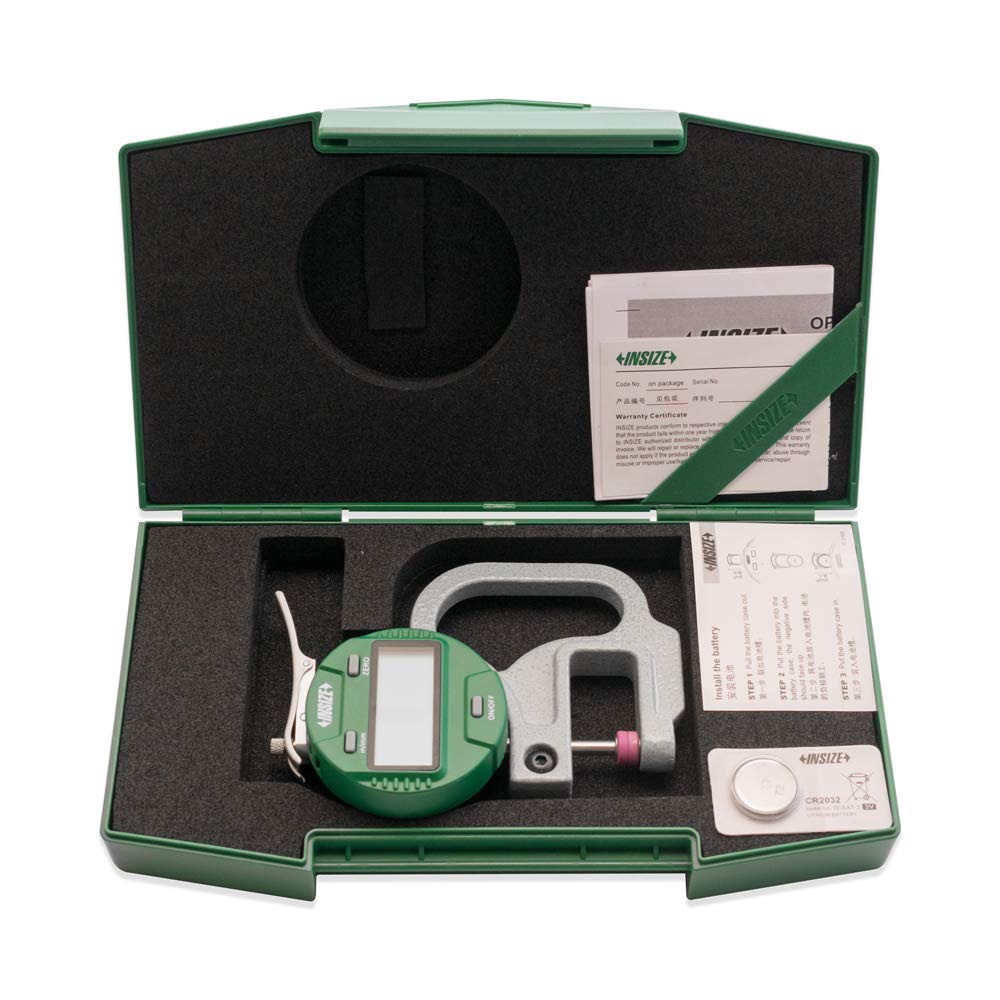
Figure 1: The INSIZE 2871-101 Electronic Thickness Gage shown in its protective case, with the CR2032 battery ready for installation. This image illustrates the product's packaging and initial setup components.
2.2. Initial Power On and Zeroing
After battery installation, power on the device and perform an initial zeroing.
- Tekan ke HIDUP/MATI button to turn on the gage. The display should light up.
- Ensure the spindle tip and anvil are clean and free of debris.
- Gently close the spindle tip onto the anvil until they make contact.
- Tekan ke SIFAR button. The display should now read 0.0000 or 0.000. If it does not, repeat the process.
3. Arahan Operasi
Follow these steps to take accurate measurements with your thickness gage:
3.1. Mengambil Pengukuran
- Ensure the gage is powered on and zeroed as described in Section 2.2.
- Gently lift the spindle lever to open the measuring jaws.
- Carefully insert the material to be measured between the ceramic spindle tip and the anvil.
- Release the spindle lever slowly, allowing the tip to rest firmly on the material without applying excessive force.
- Read the thickness value displayed on the digital screen.

Figure 2: The INSIZE 2871-101 Electronic Thickness Gage in operation, highlighting its digital display and ergonomic design for precise measurements.
3.2. Menukar Unit Pengukuran
The gage can display measurements in both inches and millimeters.
- Tekan ke DALAM/MM button to toggle between inch (in) and millimeter (mm) units. The current unit will be indicated on the display.
3.3. Matikan
To turn off the gage, press and hold the HIDUP/MATI button until the display turns off. The gage also features an automatic power-off function after a period of inactivity to save battery life.
4. Penyelenggaraan
Proper maintenance ensures the longevity and accuracy of your thickness gage.
4.1. Pembersihan
- Wipe the gage body with a soft, dry cloth.
- For the ceramic spindle tip and anvil, use a clean, lint-free cloth. Avoid using abrasive cleaners or solvents, as they may damage the surfaces.
- Ensure no dust or debris accumulates on the measuring surfaces.
4.2. Penggantian Bateri
When the display becomes dim or the gage does not power on, it's time to replace the battery. Refer to Section 2.1 for battery installation instructions.
4.3. Penyimpanan
- Store the gage in its original protective case when not in use.
- Keep the gage in a dry environment, away from direct sunlight, extreme temperatures, and high humidity.
- Avoid storing in areas with excessive dust or corrosive chemicals.

Figure 3: The INSIZE 2871-101 Electronic Thickness Gage safely enclosed in its protective case, demonstrating proper storage for long-term preservation and protection.
5. Penyelesaian masalah
If you encounter issues with your INSIZE Electronic Thickness Gage, refer to the following common problems and solutions:
| Masalah | Kemungkinan Punca | Penyelesaian |
|---|---|---|
| Paparan tidak dihidupkan. | Bateri mati atau tidak dipasang dengan betul. | Gantikan bateri CR2032, memastikan kekutuban yang betul. |
| Bacaan yang tidak tepat. | Gage not zeroed; debris on measuring surfaces; damaged spindle/anvil. | Re-zero the gage; clean spindle tip and anvil; inspect for damage. If damaged, contact support. |
| Paparan menunjukkan 'E' atau kod ralat. | Internal error; low battery. | Replace battery; turn off and restart the gage. If error persists, contact manufacturer support. |
| Butang tidak bertindak balas. | Bateri lemah; kerosakan dalaman. | Replace battery. If issue continues, contact manufacturer support. |
6. Spesifikasi
Detailed technical specifications for the INSIZE 2871-101 Electronic Thickness Gage:
| Spesifikasi | Nilai |
|---|---|
| Nombor Model | 2871-101 |
| Julat Pengukuran | 0 - 0.4 inci (0 - 10 mm) |
| Resolusi | 0.00005 inci (0.001 mm) |
| Ketepatan Pengukuran | +/-0.00005 inches |
| Material (Spindle Tip & Anvil) | Seramik |
| Jenis Bateri | CR2032 |
| Output Data | ya |
7. Waranti dan Sokongan
For warranty information and technical support, please refer to the official INSIZE webtapak atau hubungi pengedar sah anda. Simpan resit pembelian anda sebagai bukti pembelian.
Pengeluar: INSIZE
For further assistance, visit the official INSIZE webtapak atau hubungi bahagian perkhidmatan pelanggan mereka.