
Casio GG-1000-1A
Casio G-Shock GG-1000-1ADR Instruction Manual
Model: GG-1000-1A
pengenalan
This manual provides detailed instructions for the proper use, setup, and maintenance of your Casio G-Shock GG-1000-1ADR watch. Please read this manual thoroughly to ensure optimal performance and longevity of your timepiece. This watch is designed for durability and functionality, featuring analog-digital display, twin sensor capabilities, and robust construction.

Rajah 1: Depan view of the Casio G-Shock GG-1000-1ADR watch, showcasing its black dial, analog and digital displays, and robust casing.
Persediaan
Tetapan Masa Awal
Upon first use or after battery replacement, it is necessary to set the current time and date. The GG-1000-1ADR features both analog and digital time displays. Ensure both are synchronized for accurate timekeeping.
- Enter Timekeeping Mode: Tekan ke MODE butang berulang kali sehingga mod ketepatan masa dipaparkan.
- Laraskan Tetapan: tahan SESUAIKAN button until the city code starts flashing, indicating the setting mode.
- Select City Code: Gunakan CARIAN dan COMP buttons to select your home city code. This will automatically set the correct time zone.
- Set Daylight Saving Time (DST): Tekan ke MODE button to cycle through settings. When DST is flashing, use the CARIAN button to toggle between ON and OFF.
- Tetapkan Masa dan Tarikh: Terus tekan MODE button to navigate through hour, minute, year, month, and day settings. Use the CARIAN dan COMP butang untuk melaraskan nilai.
- Keluar dari Mod Tetapan: Tekan ke SESUAIKAN button to save your settings and exit.
Analog Hand Alignment
If the analog hands do not match the digital time, manual adjustment may be required.
- Dalam Mod Penjagaan Masa, tahan SESUAIKAN butang sehingga kod bandar berkelip.
- Tekan ke MODE button repeatedly until "0:00" appears and the minute hand starts flashing.
- Gunakan CARIAN button to advance the minute hand. Hold it down for rapid movement.
- Once the hands are aligned to 12 o'clock, press the SESUAIKAN butang untuk menyimpan.
Arahan Operasi
Navigasi Mod
The MODE button (bottom left) cycles through the watch's various functions:
- Mod Penjagaan Masa: Displays current time, date, and day.
- Mod Kompas: Activates the digital compass.
- Thermometer Mode: Displays ambient temperature.
- Mod Masa Dunia: Shows time in various global cities.
- Mod Jam Randik: Measures elapsed time.
- Mod Pemasa Undur: Counts down from a preset time.
- Mod Penggera: Sets daily alarms.
Menggunakan Kompas
To use the digital compass, press the COMP button (top right). The second hand will point north, and the digital display will show the direction and bearing angle.
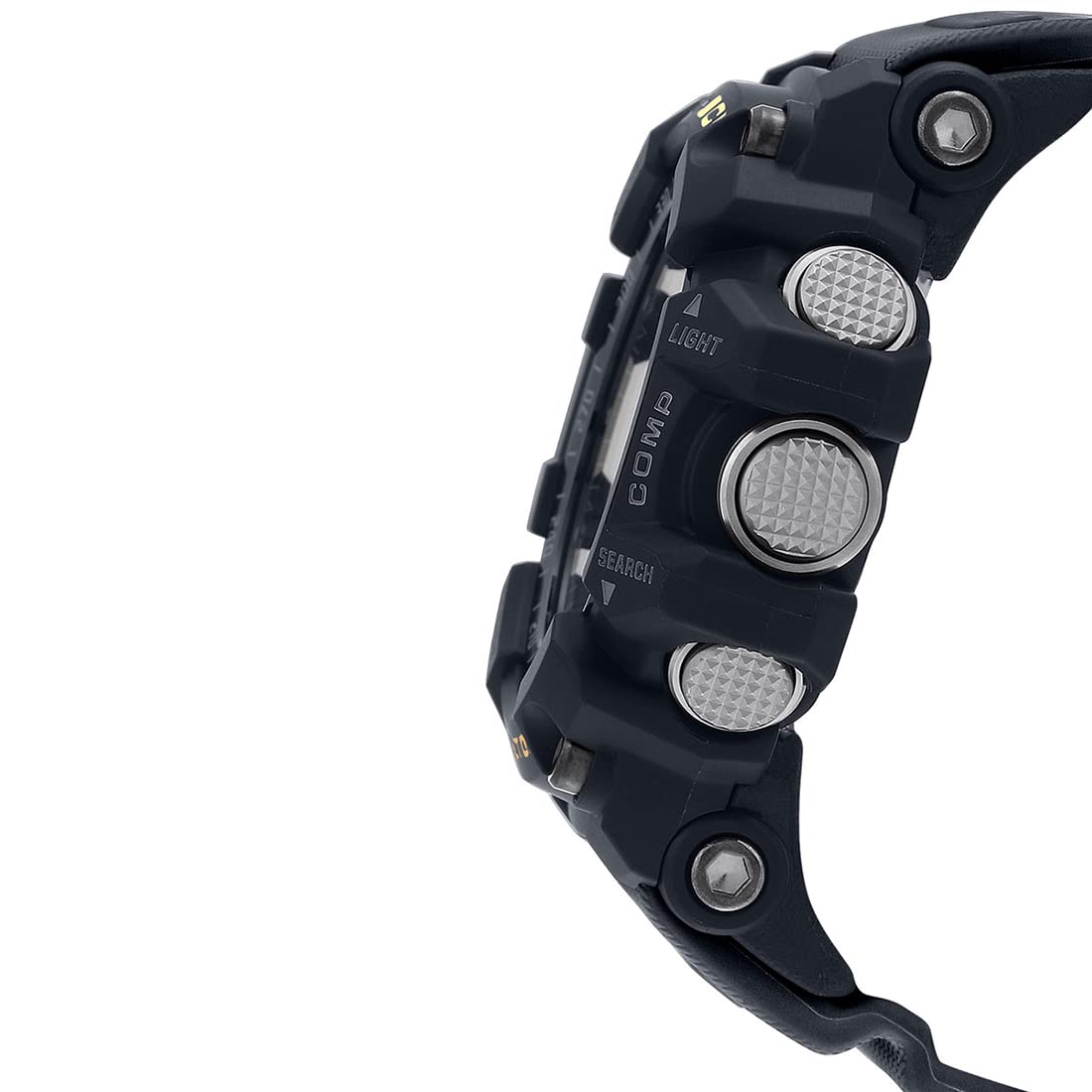
Rajah 2: Sisi view of the watch, highlighting the prominent buttons for various functions like LIGHT, COMP, and SEARCH.
For accurate readings, ensure the watch is held level. Magnetic interference can affect readings; avoid using near strong magnetic fields.
Pengukuran Suhu
The watch can measure temperature from -10°C to 60°C (14°F to 140°F). To activate, navigate to Thermometer Mode using the MODE button. For accurate ambient temperature readings, remove the watch from your wrist for at least 20-30 minutes to avoid body heat influence.
Pencahayaan
Tekan ke CAHAYA button (top left) to illuminate the watch face for visibility in low-light conditions. The illumination duration can be adjusted in settings.
Penyelenggaraan
Pembersihan
Regular cleaning helps maintain the appearance and functionality of your watch. Wipe the watch with a soft, dry cloth. For stubborn dirt, use a soft cloth dampdicairkan dengan air dan detergen neutral yang lembut, kemudian lap sehingga kering. Elakkan menggunakan agen meruap seperti pencair atau benzin, kerana ia boleh merosakkan komponen resin.
Tahan Air
This watch is water resistant to 200 meters (20 BAR). This means it is suitable for recreational scuba diving. Do not operate buttons while the watch is wet or submerged to prevent water ingress.
Penggantian Bateri
The watch is powered by 1 Lithium Metal battery. When the display becomes dim or functions become erratic, it indicates low battery power. Battery replacement should be performed by a qualified technician to ensure proper sealing and water resistance is maintained.

Rajah 3: Belakang view of the watch, showing the stainless steel case back with water resistance and model engravings.
Menyelesaikan masalah
- Masalah: Jarum analog tidak sepadan dengan masa digital.
Penyelesaian: Perform analog hand alignment as described in the "Setup" section. Strong impacts or magnetic fields can sometimes cause misalignment.
- Masalah: Temperature readings are inaccurate.
Penyelesaian: Ensure the watch has been off your wrist for at least 20-30 minutes to allow it to acclimate to ambient temperature. Body heat significantly affects readings.
- Masalah: Compass readings are inconsistent or incorrect.
Penyelesaian: Calibrate the compass if available (refer to full manual for specific calibration steps, not detailed here). Avoid strong magnetic fields (e.g., speakers, large metal objects) when taking readings. Ensure the watch is held level.
- Masalah: Paparan malap atau kosong.
Penyelesaian: This typically indicates a low battery. Replace the battery at an authorized service center. If the issue persists after battery replacement, contact customer support.
Spesifikasi
| Nombor Model | GG-1000-1A |
| Jenis Paparan | Analog-Digital |
| Jenis Pergerakan | Kuarza |
| Bahan Kes | damar |
| Bahan Band | damar |
| Kedalaman Rintangan Air | 200 meter (20 BAR) |
| Dimensi Sarung (L x W x H) | 5.62 x 5.53 x 1.73 cm (56.2 x 55.3 x 17.3 mm) |
| Berat Barang | 94 g |
| Jenis Bateri | 1 bateri Lithium Metal (termasuk) |
| Julat Paparan Suhu | -10 hingga 60°C (14 hingga 140°F) |
| Countdown Timer Range | 1 minit hingga 60 minit (kenaikan 1 minit) |
| Negara Asal | China |

Figure 4: Visual representation of the watch dimensions (56.2 mm length) compared to a standard credit card (54 mm width).
Waranti dan Sokongan
Your Casio G-Shock GG-1000-1ADR watch comes with a limited warranty. Please refer to the warranty card included with your purchase for specific terms and conditions, including coverage duration and what is covered. Typically, the warranty covers manufacturing defects.
For technical support, repairs, or warranty claims, please contact an authorized Casio service center. Do not attempt to open or repair the watch yourself, as this may void the warranty and cause further damage.
Manufacturer: Casio India Co Pvt Ltd, A-41, 1st Floor, MCIE, Mathura Road, New Delhi-110044
Importer: Imported By - Casio India Co Pvt Ltd, A-41, 1st Floor, MCIE, Mathura Road, New Delhi-110044
Ask a question about this manual
Ask about setup, troubleshooting, compatibility, parts, safety, or missing instructions. Manuals+ will review the question and use this page’s manual context to help answer it.