
1. Pengenalan
Terima kasih kerana membeliasing the Forever BS600 Bluetooth Speaker. This portable wireless speaker combines powerful audio with versatile playback options, including Bluetooth, FM radio, USB, and SD card support. It also features a built-in microphone for hands-free calling. Please read this manual carefully to ensure proper use and maintenance of your device.
Komponen yang Disertakan:
- Forever BS600 Bluetooth Speaker
- Kabel Jack 3.5mm
- Kabel Pengecas USB
- Lithium Battery (pre-installed)

Image 1.1: Forever BS600 speaker with its accompanying 3.5mm audio cable and USB charging cable.
2. Maklumat Keselamatan
To ensure safe and optimal operation, please observe the following precautions:
- Jangan dedahkan peranti kepada suhu yang melampau, cahaya matahari langsung atau kelembapan yang tinggi.
- Elakkan daripada menjatuhkan atau menundukkan pembesar suara kepada impak yang kuat.
- Jangan buka, baiki atau ubah suai peranti ini sendiri. Rujuk semua servis kepada kakitangan yang berkelayakan.
- Keep the speaker away from water and other liquids. It is not waterproof.
- Use only the provided or approved charging cables.
- Buang bateri mengikut peraturan tempatan. Jangan dedahkan bateri kepada haba yang berlebihan.
3. Produk Lebihview
Biasakan diri anda dengan kawalan dan port pembesar suara:
Butang Kawalan:
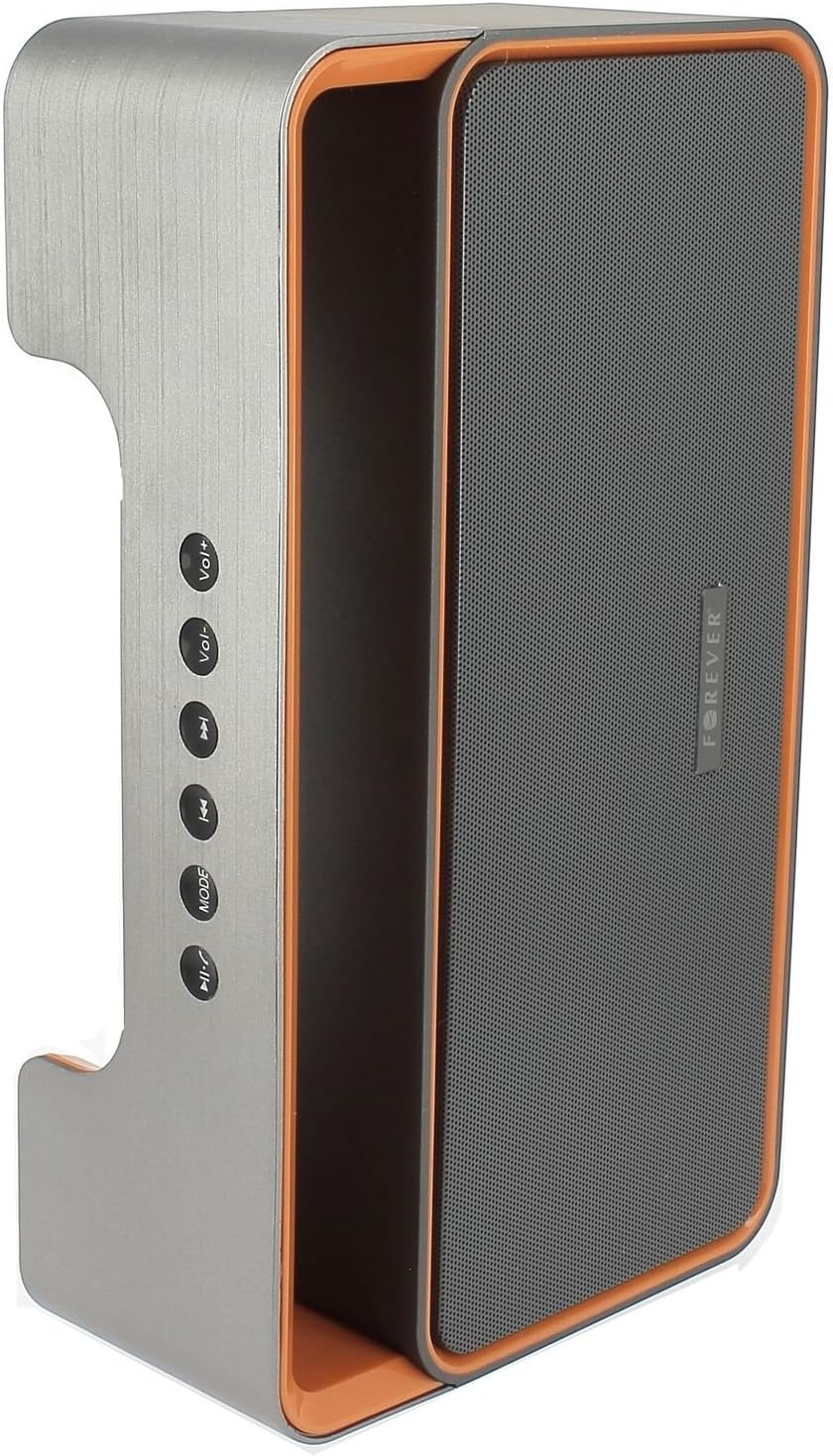
Image 3.1: Side panel with control buttons.
- Vol+ / Vol-: Adjust volume.
- Trek Sebelumnya / Laluan Seterusnya: Navigate between tracks in playback modes or stations in FM mode.
- MODE: Switch between Bluetooth, FM Radio, USB, SD Card, and AUX modes.
- Main/Jeda: Play or pause audio. Answer or end calls.
Pelabuhan dan Penyambung:

Image 3.2: Rear panel with ports and power switch.
- Input AUX: For connecting external audio devices via 3.5mm cable.
- Slot Kad SD Mikro: For playing music from a Micro SD card.
- Port USB: For playing music from a USB flash drive.
- Port Pengecasan USB MikroUntuk mengecas bateri dalaman pembesar suara.
- Suis HIDUP/MATI: To power the speaker on or off.
4. Persediaan
4.1 Mengecas Speaker
- Connect the small end of the USB charging cable to the Micro USB port on the back of the speaker.
- Sambungkan hujung kabel USB yang lebih besar ke penyesuai kuasa USB (tidak disertakan) atau port USB komputer.
- Lampu penunjuk pengecasan akan menyala (warna mungkin berbeza) untuk menunjukkan bahawa pembesar suara sedang dicas.
- Setelah dicas sepenuhnya, lampu penunjuk akan bertukar atau padam. Putuskan sambungan kabel pengecas.
Note: For first-time use, fully charge the speaker for approximately 3-4 hours.
4.2 Menghidupkan/Mematikan
- To power on, slide the ON/OFF switch on the rear panel to the 'ON' position. You will hear an audible prompt.
- Untuk mematikan kuasa, luncurkan suis ON/OFF ke kedudukan 'OFF'.
5. Arahan Operasi
5.1 Pemilihan Mod
Tekan ke MODE button repeatedly to cycle through the available modes: Bluetooth, FM Radio, USB, SD Card, and AUX.
5.2 Berpasangan Bluetooth
- Hidupkan pembesar suara. Ia akan memasuki mod gandingan Bluetooth secara automatik, ditunjukkan oleh lampu LED berkelip dan gesaan yang boleh didengar.
- Dayakan Bluetooth pada peranti mudah alih anda (telefon pintar, tablet, komputer).
- Cari untuk available Bluetooth devices. You should find "BS600" in the list.
- Select "BS600" to connect. Once paired, the LED light will stop flashing, and you will hear a confirmation sound.
- Anda kini boleh memainkan audio daripada peranti anda melalui pembesar suara.
Mod Radio 5.3 FM
- Switch the speaker to FM Radio mode using the MODE butang.
- Tekan dan tahan butang Main/Jeda button to initiate an automatic scan for FM stations. The speaker will save all found stations.
- Gunakan Trek Sebelumnya dan Trek Seterusnya butang untuk menavigasi antara stesen yang disimpan.
5.4 Main Semula USB/Kad SD
- Insert a USB flash drive or a Micro SD card (with MP3 audio files) into the corresponding port on the rear panel.
- The speaker will automatically switch to USB or SD card mode and begin playing music. If not, press the MODE button to select the correct mode.
- Gunakan Trek Sebelumnya, Trek Seterusnya, dan Main/Jeda butang untuk mengawal main balik.
5.5 Mod AUX
- Sambungkan satu hujung kabel audio 3.5mm ke port input AUX pada pembesar suara.
- Connect the other end of the cable to the headphone jack of your external audio device.
- Tukar pembesar suara kepada mod AUX menggunakan MODE butang.
- Control playback from your external audio device.
5.6 Call Handling (Bluetooth Mode)
- Jawab Panggilan: When a call comes in during Bluetooth mode, press the Main/Jeda button once to answer.
- Tamatkan Panggilan: During a call, press the Main/Jeda button once to end the call.
- Tolak Panggilan: When a call comes in, press and hold the Main/Jeda butang untuk menolak panggilan.
5.7 Kawalan Kelantangan
Tekan ke Vol+ butang untuk meningkatkan kelantangan dan Jilid- butang untuk mengurangkan kelantangan.
6. Penyelenggaraan
6.1 Pembersihan
- Pastikan pembesar suara dimatikan dan diputuskan sambungannya daripada sebarang sumber kuasa sebelum membersihkannya.
- Use a soft, dry, lint-free cloth to wipe the exterior surfaces of the speaker.
- Jangan gunakan pembersih, pelarut atau semburan kimia yang kasar, kerana ini boleh merosakkan kemasan atau komponen dalaman.
6.2 Penyimpanan
- Apabila tidak digunakan untuk tempoh yang lama, simpan pembesar suara di tempat yang sejuk dan kering, jauh dari cahaya matahari langsung dan suhu yang melampau.
- It is recommended to charge the battery at least once every three months to maintain its lifespan.
7. Penyelesaian masalah
| Masalah | Kemungkinan Punca | Penyelesaian |
|---|---|---|
| Speaker tidak dihidupkan. | Bateri habis. | Cas pembesar suara menggunakan kabel USB. |
| Tiada bunyi. | Kelantangan terlalu rendah; mod yang salah dipilih; peranti tidak disambungkan. | Increase volume; press MODE button to select correct source; ensure Bluetooth/AUX connection is active. |
| Gandingan Bluetooth gagal. | Speaker not in pairing mode; device too far; Bluetooth not enabled on source. | Ensure speaker is in Bluetooth mode and flashing; move device closer; enable Bluetooth on your device. |
| Penerimaan radio FM yang lemah. | Isyarat lemah; gangguan persekitaran. | Letakkan semula pembesar suara ke kawasan dengan penerimaan yang lebih baik. |
| Kad USB/SD tidak dimainkan. | tak betul file format; card/drive not inserted correctly; corrupted media. | pastikan files are MP3 format; reinsert media; try a different USB drive/SD card. |
8. Spesifikasi
| Nama Model | BS600 |
| Jenama | Selamanya |
| Teknologi Ketersambungan | Bluetooth, Tambahan, USB |
| Jenis Pembesar Suara | Pembesar Suara Bluetooth Mudah Alih |
| Ciri Khas | FM Radio, USB Reader, SD Card Reader |
| Kuasa Output Maksimum | 10 Watt (2 x 5W) |
| Mod Keluaran Audio | Mono |
| Sumber Kuasa | Dikuasakan Bateri (Litium-ion) |
| Kaedah Kawalan | Butang Taktil |
| Dimensi (lebih kurang) | Tinggi: 13 cm, Lebar: 24 cm |
| warna | Grey / Orange |
| Kalis air | Tidak |
9. Maklumat Waranti
The Forever BS600 Bluetooth Speaker comes with a limited warranty. Please refer to the warranty card included with your purchase or contact your retailer for specific terms and conditions. This warranty typically covers manufacturing defects but does not cover damage caused by misuse, accidents, unauthorized modifications, or normal wear and tear.
10. Sokongan
If you encounter any issues not covered in the troubleshooting section or require further assistance, please contact the retailer where you purchased the product or visit the official Forever website for support resources. Please have your product model (BS600) and purchase details ready when seeking support.