pengenalan
This manual provides detailed instructions for the setup, operation, and maintenance of your BIOS Weather Indoor/Outdoor Wireless Thermometer & Hygrometer. Please read this manual thoroughly before using the device to ensure proper function and longevity.
The BIOS Weather Indoor/Outdoor Wireless Thermometer & Hygrometer is designed to provide accurate readings of indoor temperature and humidity, as well as outdoor temperature. It features wireless connectivity for the outdoor sensor, a moon phase display, and the capability to connect with up to three sensors (additional sensors sold separately).
- Wireless range up to 30 meters (100 feet) from the outdoor sensor.
- Indoor monitor includes a hygrometer sensor for RH percentage readings (20% to 95%).
- Displays temperature from up to 3 sensors (Model No. 312TX, sold separately).
- Tracks relative indoor humidity and moon phase.
Kandungan Pakej
Selepas membuka bungkusan, sila sahkan bahawa semua komponen ada dan dalam keadaan baik:
- 1 x Main Display Unit (Indoor Monitor)
- 1 x Penderia Luar Wayarles
- 1 x Manual Arahan (dokumen ini)

Image: The main display unit (left) and the wireless outdoor sensor (right). The main unit shows indoor temperature, humidity, moon phase, time, and outdoor temperature. The outdoor sensor displays its current temperature.
Panduan Persediaan
1. Pemasangan Bateri
Both the main display unit and the wireless outdoor sensor require batteries (not included).
- Open the battery compartment on the back of both the main display unit and the outdoor sensor.
- Insert the required batteries (e.g., AA or AAA, refer to the battery compartment markings for correct type and polarity).
- Tutup petak bateri dengan selamat.
Nota:
- It is recommended to insert batteries into the outdoor sensor first, then the main display unit, to facilitate immediate pairing.
- Use high-quality alkaline batteries for optimal performance, especially in cold weather for the outdoor sensor.
2. Peletakan Sensor
Proper placement of both units is crucial for accurate readings and reliable wireless communication.
- Unit Paparan Utama: Place indoors, away from direct sunlight, heat sources, or drafts that could affect temperature and humidity readings. Ensure it is within 30 meters (100 feet) of the outdoor sensor.
- Sensor Luaran Tanpa Wayar:
- Mount in a shaded area to avoid direct sunlight, which can cause artificially high temperature readings.
- Protect from direct rain and snow. An overhang or a weather-resistant enclosure is ideal.
- Avoid placing near large metal objects, electrical appliances, or thick walls that could interfere with the wireless signal.
- Ensure it is within the 30-meter (100-foot) wireless range of the main unit.
3. Gandingan Awal
The main display unit and outdoor sensor should automatically pair upon battery installation. If pairing does not occur:
- Pastikan kedua-dua unit mempunyai bateri yang baharu.
- Bring the outdoor sensor closer to the main display unit.
- Press the "CH" (Channel) button on the main display unit to cycle through channels or initiate a search for the sensor.
- If issues persist, remove batteries from both units, wait a few minutes, and reinsert them, starting with the outdoor sensor.
Arahan Operasi
1. Paparan Lebihview
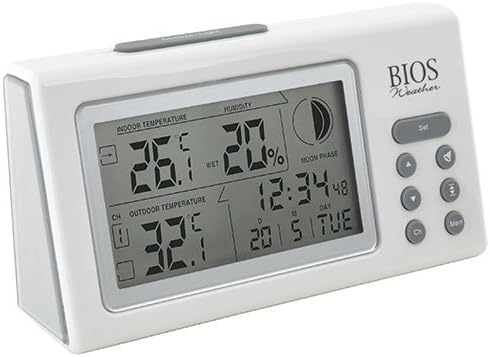
Imej: Bersudut view of the main display unit, highlighting the various segments for indoor temperature, humidity, moon phase, time, and outdoor temperature.
Unit paparan utama menyediakan maklumat berikut:
- Suhu Dalaman: Displays the current temperature inside the room where the main unit is located.
- Kelembapan: Shows the relative indoor humidity percentage.
- Suhu Luaran: Displays the temperature from the connected wireless outdoor sensor.
- Masa dan Tarikh: Masa dan tarikh semasa.
- Fasa Bulan: An icon indicating the current moon phase.
- Petunjuk Saluran: Shows which outdoor sensor channel is currently displayed (if multiple sensors are used).
2. Fungsi Butang
The main display unit features several buttons for configuration and viewdata dalam:
| Butang | Fungsi |
|---|---|
| SET | Enters setup mode for time, date, and other settings. Press to confirm settings. |
| ▲ / ▼ (Up/Down) | Adjusts values during setup. Cycles through channels for outdoor sensors. |
| CH (Saluran) | Switches between outdoor sensor channels (1, 2, 3) or initiates a search for sensors. |
| MEM (Memori) | Displays maximum and minimum temperature/humidity readings. Press again to clear. |
3. Menetapkan Masa dan Tarikh
- Tekan dan tahan butang SET button until the time display flashes.
- Gunakan ▲ or ▼ butang untuk melaraskan jam.
- Tekan SET to confirm and move to the next setting (minutes, year, month, day).
- Ulang langkah 2 dan 3 sehingga semua tetapan dikonfigurasikan.
- Tekan SET one last time to exit setup mode.
4. Viewing Max/Min Readings
Tekan ke MEM butang ke view the maximum recorded indoor temperature, humidity, and outdoor temperature. Press MEM lagi ke view the minimum readings. To clear the memory, press and hold the MEM button while the max/min readings are displayed.
Penyelenggaraan
1. Pembersihan
To clean the display unit and outdoor sensor, use a soft, damp cloth. Do not use abrasive cleaners, solvents, or harsh chemicals, as these may damage the plastic casing atau komponen elektronik.
2. Penggantian Bateri
When the battery indicator appears on the display, it is time to replace the batteries in the respective unit (main unit or outdoor sensor). Always replace all batteries in a unit at the same time with new, high-quality batteries of the correct type.
Penting:
- Buang bateri lama secara bertanggungjawab mengikut peraturan tempatan.
- If the unit will not be used for an extended period, remove the batteries to prevent leakage and damage.
Menyelesaikan masalah
If you experience issues with your BIOS Weather Thermometer & Hygrometer, please refer to the following common problems and solutions:
| Masalah | Kemungkinan Punca / Penyelesaian |
|---|---|
| No outdoor temperature reading or "---" displayed. |
|
| Bacaan suhu/kelembapan tidak tepat. |
|
| Paparan malap atau kosong. |
|
| Masa/Tarikh tidak betul. |
|
Spesifikasi Produk

Image: The main display unit with indicated dimensions: 21.59 cm (length), 7.62 cm (width), and 19.05 cm (height).
| Ciri | Perincian |
|---|---|
| Nombor Model | BBYCA10300783 (312BC) |
| taip | Indoor/Outdoor Thermometer and Hygrometer |
| bahan | plastik |
| warna | putih |
| Dimensi (Unit Utama) | Tinggi: 19.05 cm, Lebar: 7.62 cm, Dalam: 21.59 cm |
| Berat badan | 0.30 kg |
| Julat Tanpa Wayar | Sehingga 30 meter (100 kaki) |
| Julat Kelembapan Dalaman | 20% hingga 95% RH |
| Sensor Capability | Supports up to 3 outdoor sensors (additional sensors Model No. 312TX, sold separately) |
| Ciri Khas | Wireless connectivity, Multi-Sensor support, Humidity Tracking, Moon Phase Display |
| Sumber Kuasa | Dikuasakan Bateri |
Maklumat Waranti
This BIOS Weather product comes with a Waranti 1 Tahun untuk Alat Ganti dari tarikh pembelian. Waranti ini meliputi kecacatan bahan dan mutu kerja di bawah penggunaan biasa. Ia tidak meliputi kerosakan akibat salah guna, kemalangan, pengubahsuaian tanpa kebenaran atau pemasangan yang tidak betul.
Sila simpan bukti pembelian anda untuk tuntutan waranti.
Sokongan Pelanggan
If you have any questions, require technical assistance, or need to make a warranty claim, please contact Bios customer support. For more information and resources, you may also visit the official Bios store on Amazon:
Visit the Bios Store on Amazon
Please have your product model number (BBYCA10300783) and purchase date ready when contacting support.