
Fluance RT80
Fluance RT80 Classic High Fidelity Vinyl Turntable
Manual Arahan Pengguna
pengenalan
Welcome to the user manual for your new Fluance RT80 Classic High Fidelity Vinyl Turntable. This manual provides detailed instructions for setting up, operating, maintaining, and troubleshooting your turntable to ensure optimal performance and longevity. Please read this manual thoroughly before using your turntable.
Apa yang Termasuk
Your Fluance RT80 turntable package includes the following components:
- RT80 Turntable Plinth
- Penutup Habuk
- 2x Engsel Penutup Habuk
- Headshell with Audio Technica AT91 Cartridge
- Kaunter berat badan
- Pinggan Aluminium
- Tali pinggang getah
- 45 Penyesuai
- Felt Slip Mat
- 3ft RCA Cable With Ground Wire
- 5ft 100V - 240V (50/60Hz) AC Power Adapter
- Panduan Mula Pantas
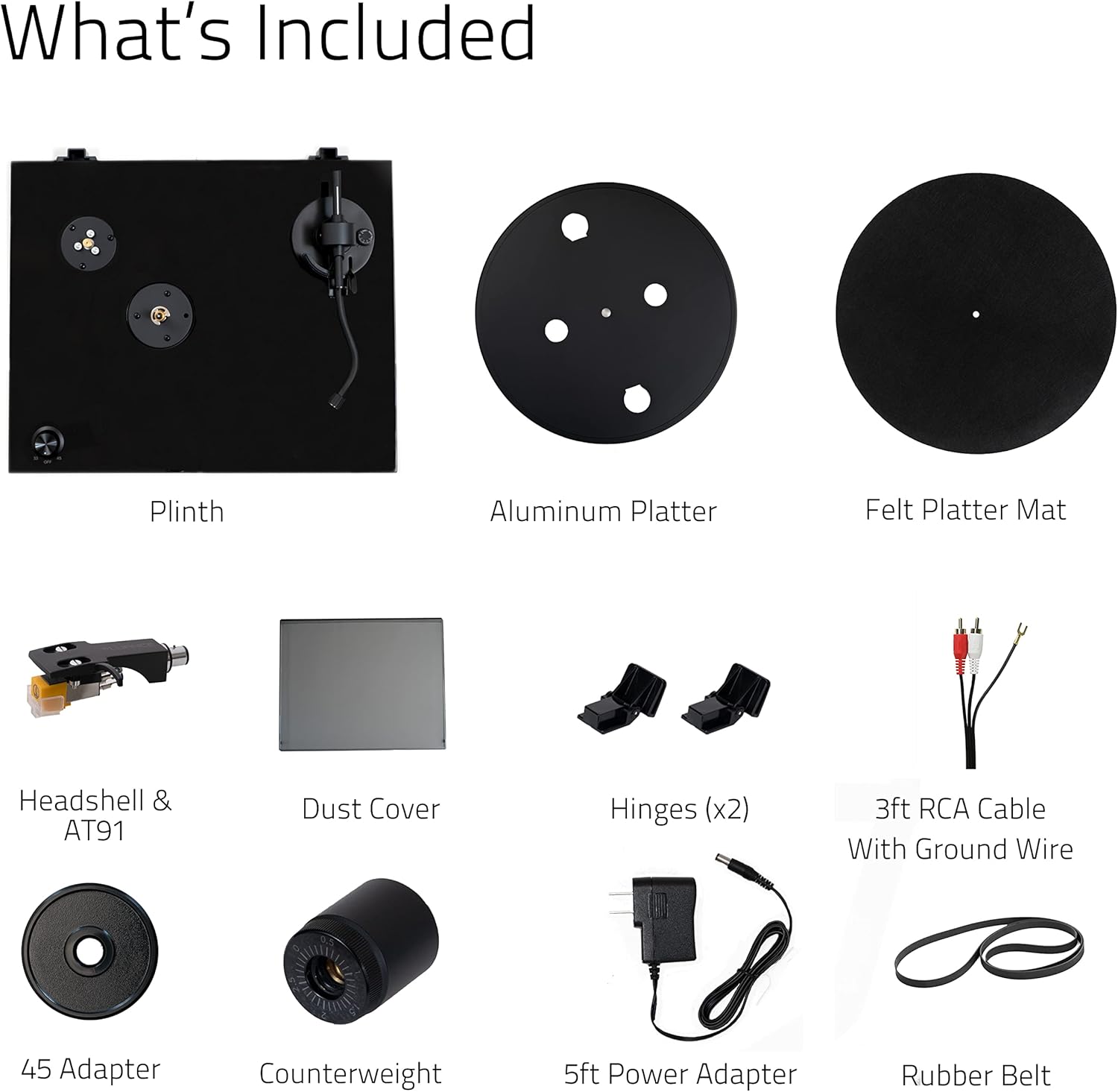
Image: All components included in the Fluance RT80 turntable package, laid out for easy identification.
Maklumat Keselamatan Penting
Please read and follow all safety instructions carefully to prevent damage to the unit and ensure your safety.
- Jangan dedahkan unit kepada hujan atau lembapan.
- Jangan letakkan objek yang diisi dengan cecair, seperti pasu, pada unit.
- Jangan sekat sebarang bukaan pengudaraan.
- Jangan pasang berhampiran mana-mana sumber haba seperti radiator, daftar haba, dapur, atau radas lain (termasuk amppenghidup) yang menghasilkan haba.
- Lindungi kord kuasa daripada berjalan atau tersepit.
- Hanya gunakan lampiran/aksesori yang ditentukan oleh pengilang.
- Cabut plag radas ini semasa ribut petir atau apabila tidak digunakan untuk jangka masa yang lama.
- Rujuk semua servis kepada kakitangan perkhidmatan yang berkelayakan.
Panduan Persediaan
Follow these steps to properly set up your Fluance RT80 turntable.
1. Membongkar dan Meletakkan
Carefully remove all components from the packaging. Place the turntable on a stable, level surface away from direct sunlight, heat sources, and excessive vibration.
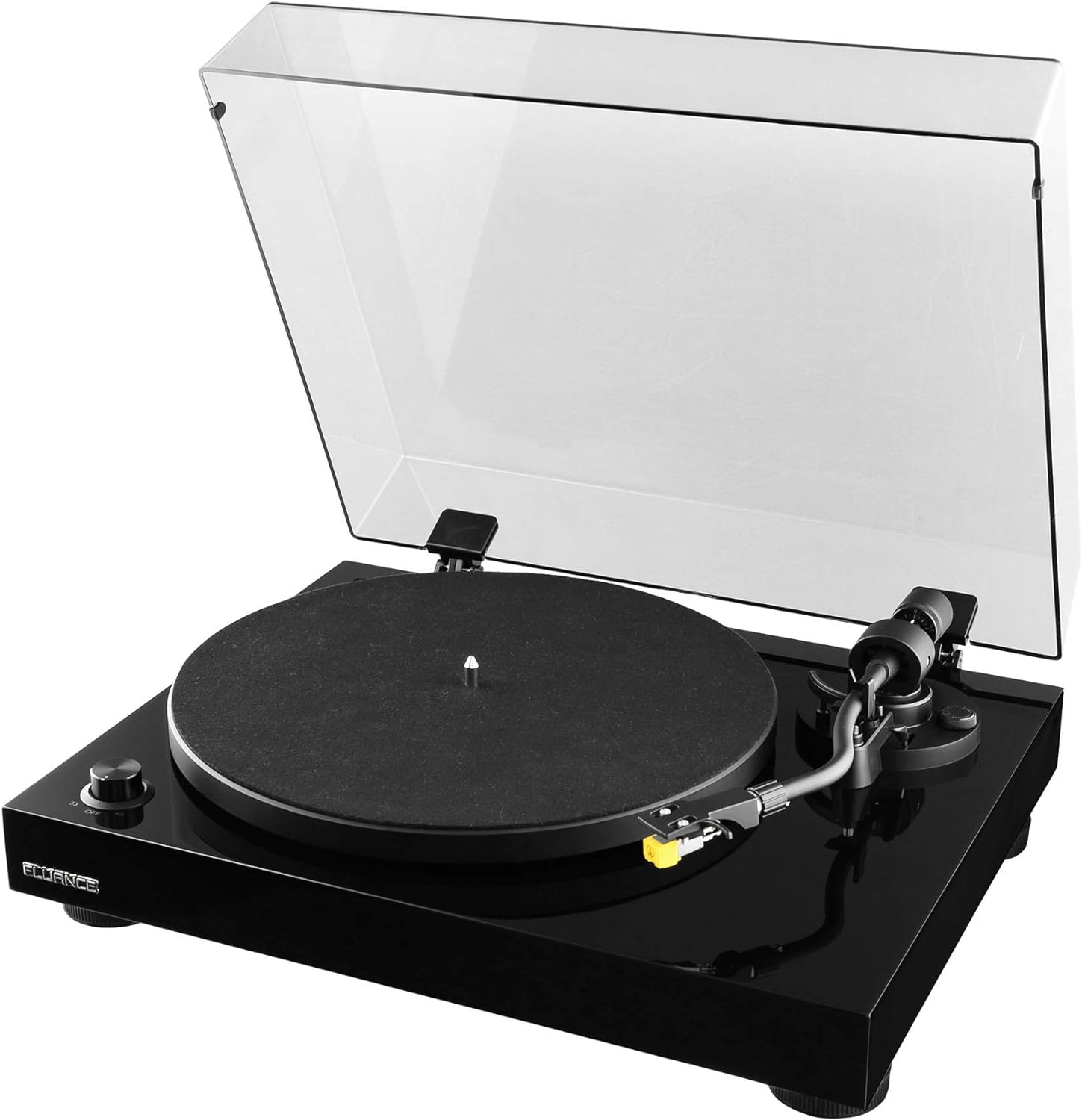
Image: The Fluance RT80 turntable in its assembled state, ready for use.
2. Pemasangan Pinggan dan Tali Pinggang
- Place the aluminum platter onto the center spindle.
- Locate the rubber drive belt. Carefully stretch the belt around the inner rim of the platter and hook it onto the motor pulley. Ensure the belt is not twisted.
- Place the felt slip mat on top of the platter.
3. Counterweight and Tonearm Balance
The Audio Technica AT91 cartridge is pre-installed on the headshell. You will need to balance the tonearm.
- Gently slide the counterweight onto the rear of the tonearm with the numbers facing forward.
- Remove the stylus protector from the cartridge.
- While holding the tonearm lift, carefully release the tonearm clamp.
- Adjust the counterweight by rotating it until the tonearm is perfectly balanced and floats horizontally.
- Setelah seimbang, pegang pemberat balas dengan stabil dan putar cincin bernombor kepada '0' (sifar).
- Rotate the entire counterweight counter-clockwise to the recommended tracking force of 2.0 grams (2 on the scale).

Imej: A terperinci view of the Audio Technica AT91 cartridge, highlighting its position on the tonearm.
4. Pelarasan Anti-Skate
Set the anti-skate dial to the same value as your tracking force, which is 2.0 for the AT91 cartridge.
5. Pemasangan Penutup Habuk
Insert the two dust cover hinges into the slots at the rear of the turntable plinth, then attach the dust cover to the hinges.

Image: The Fluance RT80 turntable with its protective dust cover in the open position.
6. Sambungan
Connect the RCA cables from the turntable to your amplifier or powered speakers. Ensure the ground wire is connected to the ground terminal on your amppenguat jika ada.
Connect the power adapter to the DC 12V input on the turntable and then plug it into a wall outlet.

Image: The rear connection panel of the turntable, illustrating the RCA outputs, ground terminal, and power input.

Image: The back of the turntable, displaying the various connection ports and switches.
7. Praamp Tukar
The RT80 has a built-in Texas Instruments preamp. Use the switch on the rear panel to select between PHONO (BYPASS) if connecting to an amplifier with a dedicated phono input, or LINE if connecting to a standard auxiliary input on an amppembesar atau pembesar suara berkuasa.
Arahan Operasi
Memainkan Rekod
- Place a record on the felt slip mat.
- Select the appropriate speed (33 1/3 RPM or 45 RPM) using the speed selector knob. Use the 45 adapter for 7-inch singles if needed.
- Angkat lengan atas menggunakan tuil isyarat.
- Letakkan lengan nada di atas alur permulaan rekod yang diingini.
- Gently lower the cueing lever to allow the stylus to descend onto the record.
- At the end of the record, the auto-stop feature will engage, and the platter will stop spinning.
- Lift the tonearm using the cueing lever and return it to the tonearm rest. Secure it with the tonearm clamp.
Fungsi Auto-Stop
The RT80 features an auto-stop function that automatically stops the platter rotation when the tonearm reaches the end of a record. This helps prevent unnecessary wear on the stylus and record. The auto-stop function can be toggled ON/OFF via a switch on the rear panel.
Penjagaan Rekod
- Sentiasa kendalikan rekod pada tepinya untuk mengelakkan pemindahan minyak dari kulit anda.
- Simpan rekod secara menegak dalam lengan bajunya untuk mengelakkan meledingkan.
- Clean records regularly with a carbon fiber brush or a record cleaning solution to remove dust and static.
Penyelenggaraan
Membersihkan Meja Putar
- Wipe the dust cover and plinth with a soft, dry, lint-free cloth.
- Jangan gunakan bahan kimia atau pembersih kasar.
- For the platter and tonearm, use a slightly damp cloth if necessary, then dry immediately.
Penjagaan Stylus
- Clean the stylus regularly using a soft brush designed for stylus cleaning, brushing from back to front.
- A dirty stylus can damage your records and degrade sound quality.
- Replace the stylus after approximately 300-500 hours of playback, or if you notice a decrease in sound quality or increased distortion.
Penggantian Tali Pinggang
The rubber drive belt may stretch or degrade over time. If you notice inconsistent speed or a decrease in playback quality, the belt may need to be replaced. Contact Fluance support for replacement belts.
Menyelesaikan masalah
| Masalah | Kemungkinan Punca | Penyelesaian |
|---|---|---|
| Tiada bunyi atau bunyi yang sangat perlahan. |
|
|
| Distorted sound or skipping. |
|
|
| Platter not spinning or spinning too slowly/quickly. |
|
|
| Bunyi bising. |
|
|
Spesifikasi
| Ciri | Perincian |
|---|---|
| Nama Model | RT80 |
| Jenama | Fluance |
| Dimensi Produk | 13.75 x 16.5 x 5.5 inci |
| Berat Barang | 9.9 paun |
| bahan | Kayu MDF |
| warna | Piano Hitam |
| Kartrij | Audio Technica AT91 |
| Jenis Drive | Pemacu Belt |
| Pra terbina dalamamp | Yes (Texas Instruments) |
| Kelajuan | 33 1/3, 45 RPM |
| Teknologi Ketersambungan | Berwayar (RCA) |
| Negara Asal | Taiwan |
Waranti dan Sokongan
Your Fluance RT80 turntable comes with a Waranti Pengeluar 2 Tahun, ensuring peace of mind regarding your purchase. Fluance also offers Sokongan Pelanggan Sepanjang Hayat.
For technical assistance, warranty claims, or general inquiries, please visit the official Fluance website or contact their customer support directly. You can also refer to the Panduan Pengguna (PDF) or Manual Pemasangan (PDF) provided by Fluance for additional information.
Ask a question about this manual
Ask about setup, troubleshooting, compatibility, parts, safety, or missing instructions. Manuals+ will review the question and use this page’s manual context to help answer it.