
1. Pengenalan
Terima kasih kerana membeliasing the Silverlit Xion FPV Camera Drone 84765. This drone is designed for outdoor use and offers an exciting First-Person View (FPV) flying experience with its integrated camera. Please read this manual thoroughly before operating the drone to ensure safe and optimal performance. Keep this manual for future reference.

Image 1.1: The Silverlit Xion FPV Camera Drone 84765.
2. Maklumat Keselamatan
AMARAN: Kegagalan mematuhi arahan ini boleh mengakibatkan kecederaan atau kerosakan pada produk.
- Sentiasa kendalikan dron di kawasan terbuka dan bersih, jauh daripada orang, haiwan, bangunan dan talian kuasa.
- Jangan terbang dalam keadaan angin kencang atau keadaan cuaca buruk.
- Jauhkan tangan, muka dan pakaian longgar daripada kipas yang berputar.
- Ensure the drone battery and remote control batteries are fully charged before each flight.
- Jangan biarkan pengecasan bateri tanpa pengawasan.
- This product is intended for children. Adult supervision is recommended.
- Jangan ubah suai atau buka dron atau komponennya.
- Always turn off the drone and remote control when not in use.
3. Kandungan Pakej
Sahkan bahawa semua item terdapat dalam pakej:
- Silverlit Xion FPV Camera Drone 84765
- Alat Kawalan Jauh
- Goggles FPV
- Rechargeable Drone Battery
- USB Charging Cable (for drone battery)
- Baling-baling ganti
- Manual Pengguna

Image 3.1: The Silverlit Xion FPV Drone product box, showing the drone and FPV goggles.
4. Persediaan
4.1. Pemasangan Bateri Kawalan Jauh
- Buka petak bateri di belakang alat kawalan jauh.
- Insert the required batteries (not included) according to the polarity indicators.
- Tutup petak bateri dengan selamat.
4.2. Pemasangan Bateri Dron
- Pastikan dron dimatikan.
- Cari petak bateri pada dron.
- Carefully insert the charged drone battery, ensuring it is properly seated and connected.
- Tutup penutup petak bateri.
4.3. Propeller Installation (if required)
If propellers are not pre-installed, attach them according to the markings (e.g., A and B) on the propellers and motor shafts. Ensure they are securely fastened.
4.4. Remote Control and Drone Pairing
- Letakkan drone di permukaan rata dan rata.
- Turn on the drone. The indicator lights will flash.
- Hidupkan alat kawalan jauh.
- Move the left joystick (throttle) fully up, then fully down. The drone's indicator lights will become solid, indicating successful pairing.
4.5. FPV Goggle Setup
Connect the FPV goggles to your smartphone (if applicable) or power them on as per their specific instructions. Ensure a stable connection for live video feed.

Image 4.1: The remote control and FPV goggles for the Silverlit Xion Drone.
5. Mengecas Bateri Drone
The drone's battery requires charging before use. A USB charging cable is included, but a compatible USB power adapter (not included) is required.
- Sambungkan kabel pengecas USB ke bateri dron.
- Plug the other end of the USB cable into a suitable USB power adapter (e.g., a smartphone charger or computer USB port).
- The charging indicator light will show the charging status (refer to the cable's specific instructions for light behavior).
- Charging typically takes 80-100 minutes for a full charge.
- After a flight, allow the battery to cool down for 10-15 minutes before recharging to prolong battery life.
Note: A fully charged battery provides approximately 4-5 minutes of flight time.
6. Mengendalikan Dron
6.1. Senarai Semak Pra-Penerbangan
- Pastikan bateri dron dan alat kawalan jauh dicas sepenuhnya.
- Periksa bahawa kipas dipasang dengan selamat dan tidak rosak.
- Verify the flight area is clear of obstacles, people, and animals.
- Confirm successful pairing between the drone and remote control.
6.2. Berlepas dan Mendarat
- Letakkan drone di permukaan rata dan rata.
- Perlahan-lahan tolak kayu bedik kiri (pendikit) ke atas untuk membuat dron naik.
- To land, slowly pull the left joystick (throttle) downwards until the drone gently touches the ground.
6.3. Kawalan Asas Penerbangan
- Kayu Joy Kiri (Pendikit): Up/Down for altitude control.
- Left Joystick (Yaw): Left/Right for rotating the drone horizontally.
- Kayu Bedik Kanan (Pitch/Roll): Up/Down for moving forward/backward; Left/Right for moving left/right (sideways).
6.4. Camera Operation and FPV
The drone features a 1080p video recording capability and 0.3 MP effective still resolution. Refer to the remote control diagram for specific camera buttons.
- Rakaman Video: Press the designated video button on the remote control to start/stop recording.
- Tangkapan Foto: Press the designated photo button to take a still image.
- FPV Live Feed: Once the FPV goggles are set up and connected, you will see the live video feed from the drone's camera, enhancing your flying experience.
7. Penyelenggaraan
- Pembersihan: Gunakan kain lembut dan kering untuk membersihkan dron dan alat kawalan jauh. Jangan gunakan bahan kimia atau pelarut yang keras.
- Pemeriksaan baling-baling: Regularly check propellers for cracks, bends, or damage. Replace any damaged propellers with spare parts provided.
- Storan: Store the drone and its components in a cool, dry place, away from direct sunlight and extreme temperatures. Remove batteries from the remote control if storing for extended periods.
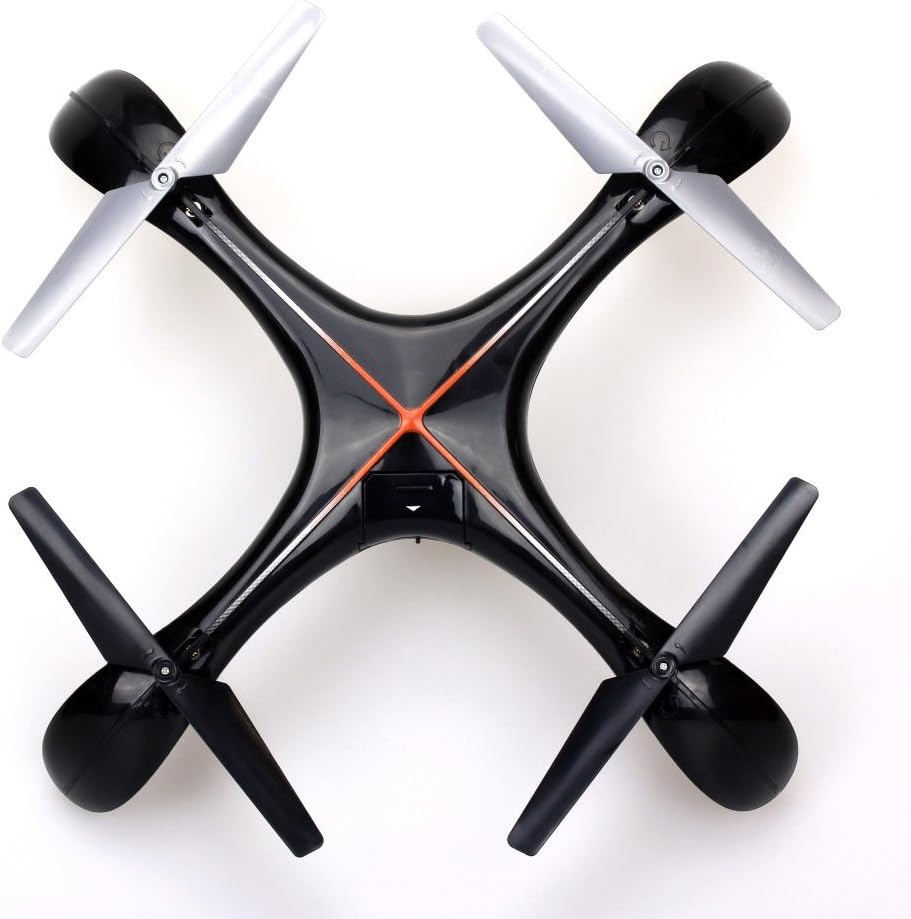
Imej 7.1: Atas view of the Silverlit Xion FPV Drone, showing propeller orientation.
8. Penyelesaian masalah
| Masalah | Kemungkinan Punca | Penyelesaian |
|---|---|---|
| Drone tidak bertindak balas terhadap alat kawalan jauh. | Bateri rendah dalam dron atau jauh; tidak dipasangkan dengan betul. | Charge drone battery, replace remote control batteries, re-attempt pairing process. |
| Drone terbang tidak menentu atau hanyut. | Drone not calibrated on a flat surface; damaged propeller. | Ensure drone is placed on a level surface during pairing/initialization. Check and replace damaged propellers. Refer to manual for calibration steps if available. |
| Poor video quality or no FPV feed. | Weak signal; FPV goggles not connected properly. | Ensure drone is within range. Check FPV goggle connection and battery. |
| Masa penerbangan yang singkat. | Bateri tidak dicas sepenuhnya; bateri lama. | Ensure battery is fully charged (80-100 minutes). Consider replacing the battery if it's old and performance has degraded. |
9. Spesifikasi
- Jenama: Silverlit
- Nama Model: 84765
- Julat Umur: anak
- Resolusi Rakaman Video: 1080p
- Resolusi Pegun yang Berkesan: 0.3 MP
- Tahap kemahiran: Professional (Note: This may refer to advanced features, but basic operation is suitable for children with supervision)
- Jenis Kawalan: Alat Kawalan Jauh
- Bateri Termasuk: No (for remote control)
- Alat Kawalan Jauh Termasuk: ya
- Berat produk: 1.5 Kilogram
10. Waranti dan Sokongan
For warranty information or technical support, please refer to the documentation provided with your purchase or contact Silverlit customer service. Keep your proof of purchase for any warranty claims.