
1. Pengenalan
Thank you for choosing the MaxiAids EZ See Large Print Keyboard. This keyboard is designed to enhance visibility and typing efficiency for users who benefit from larger characters. It features extra-large, high-contrast legends on low-profile keys, making it an ideal solution for individuals with low vision or those who prefer easier-to-read keys. This manual provides essential information for setting up, operating, maintaining, and troubleshooting your new keyboard.
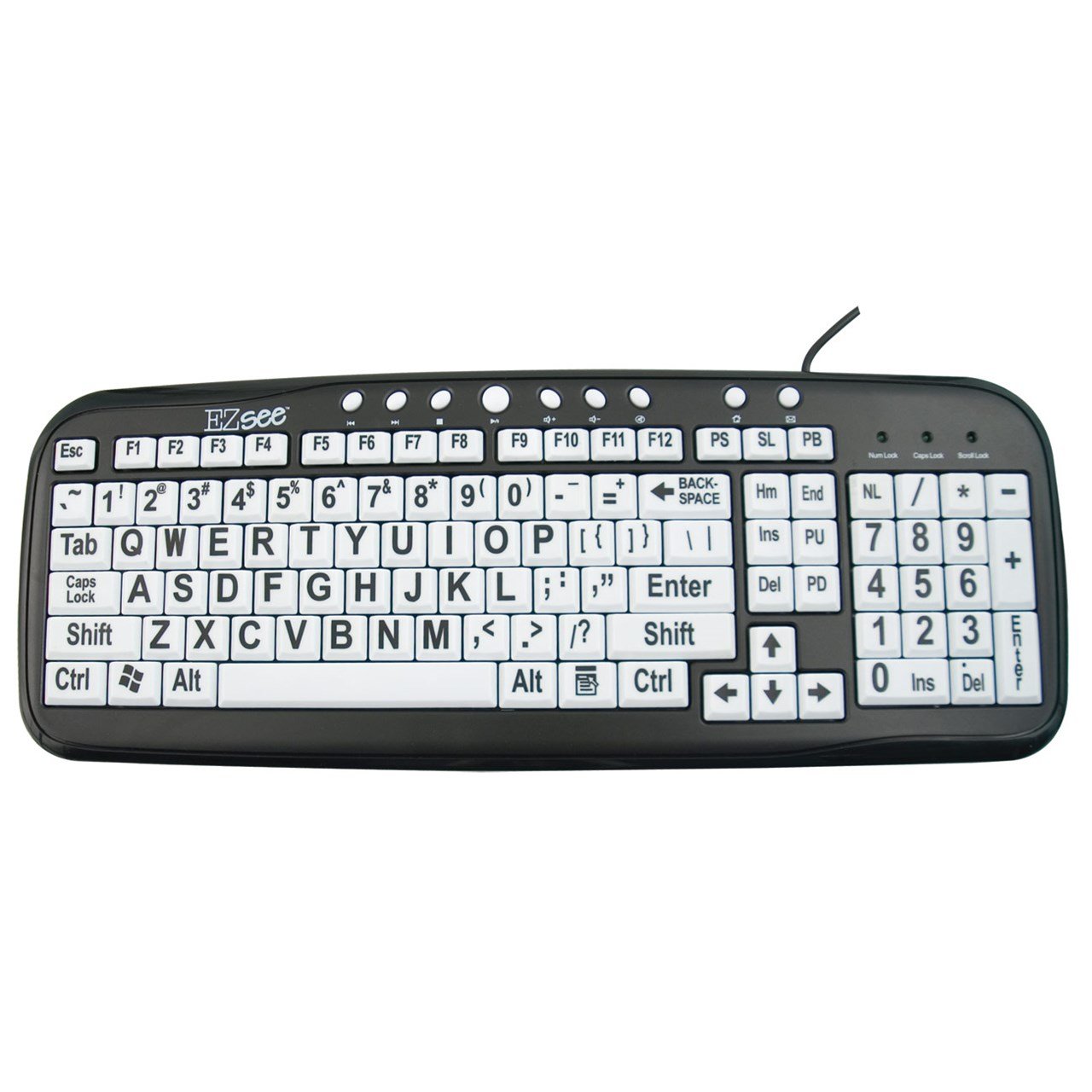
This image shows the MaxiAids EZ See Large Print Keyboard. It features white keys with oversized black characters for enhanced visibility, designed to assist users with low vision.
2. Persediaan
The MaxiAids EZ See Large Print Keyboard is a plug-and-play device, requiring no special drivers for most operating systems. Follow these simple steps to connect your keyboard:
- Buka pek Papan Kekunci: Tanggalkan papan kekunci dari pembungkusannya dengan berhati-hati.
- Cari Port USB: Identify an available USB port on your computer (desktop or laptop).
- Sambungkan Kabel USB: Insert the USB connector from the keyboard cable firmly into the USB port on your computer.
- Pengecaman Sistem: Your operating system should automatically detect and install the necessary drivers for the keyboard. This process may take a few moments.
- Test the Keyboard: Open a text editor or any application that accepts text input and type a few characters to ensure the keyboard is functioning correctly.
If the keyboard does not respond, try connecting it to a different USB port or restarting your computer.
3. Mengendalikan Papan Kekunci
The EZ See Large Print Keyboard functions like a standard 104-key QWERTY keyboard, with the primary difference being the enhanced visibility of its keys.
- Reka Letak Standard: The keyboard features a familiar QWERTY layout, including a numeric keypad, function keys (F1-F12), and navigation keys.
- Kekunci Cetakan Besar: Each keycap is designed with oversized, high-contrast characters to reduce eye strain and improve typing accuracy for users with visual impairments.
- Pro Rendahfile kunci: The keys have a low-profile design, which can contribute to a comfortable typing experience.
- Caps Lock, Num Lock, Scroll Lock Indicators: Standard LED indicators are present to show the status of Caps Lock, Num Lock, and Scroll Lock functions.
Simply use the keyboard as you would any other, benefiting from the improved readability of the key legends.
4. Penyelenggaraan
Proper care and maintenance will ensure the longevity and optimal performance of your MaxiAids EZ See Large Print Keyboard.
- Pembersihan: Untuk membersihkan papan kekunci, putuskan sambungannya dari komputer anda. Gunakan kain lembut dan bebas bulu yang sedikit kering.ampened with water or a mild, non-abrasive cleaning solution. Avoid spraying liquids directly onto the keyboard or allowing moisture to seep between the keys.
- Penyingkiran habuk: Gunakan udara termampat untuk mengeluarkan habuk dan serpihan dari antara kekunci.
- Elakkan Tumpahan: Keep liquids away from the keyboard to prevent damage. In case of a spill, immediately disconnect the keyboard and allow it to dry completely before reconnecting.
- Storan: Apabila tidak digunakan untuk tempoh yang lama, simpan papan kekunci dalam persekitaran yang bersih dan kering jauh daripada suhu yang melampau.
5. Penyelesaian masalah
If you encounter issues with your keyboard, please refer to the following common troubleshooting steps:
- Papan Kekunci Tidak Membalas:
- Pastikan kabel USB disambungkan dengan selamat ke kedua-dua papan kekunci dan komputer.
- Cuba sambungkan papan kekunci ke port USB lain pada komputer anda.
- Mulakan semula komputer anda.
- Test the keyboard on another computer, if available, to determine if the issue is with the keyboard or the computer.
- Kunci Khusus Tidak Berfungsi:
- Check for any debris or obstructions under the non-functioning keys. Use compressed air to clear any particles.
- Ensure the keyboard is clean and dry.
- Numeric Keypad Not Working:
- Verify that the Num Lock indicator light is on. Press the 'Num Lock' key to toggle it on or off.
- Some older operating systems or specific software configurations might require additional settings for the numeric keypad. Consult your computer's operating system documentation.
- Slow or Delayed Input:
- This could be a system performance issue. Close unnecessary applications and check your computer's resource usage.
- Ensure your computer's operating system is up to date.
If these steps do not resolve the issue, please contact MaxiAids customer support for further assistance.
6. Spesifikasi
| Jenama | MaxiAids |
| Nombor Model | 23570 |
| Teknologi Ketersambungan | USB |
| Peranti Serasi | Laptop (and Desktop Computers) |
| Penerangan Papan Kekunci | Papan Kekunci USB |
| Ciri Khas | Ergonomic, Large Print |
| warna | Hitam Putih |
| Gaya | Klasik |
| bahan | plastik |
| Komponen yang Disertakan | papan kekunci |
| Kuantiti Butang | 104 |
7. Waranti dan Sokongan
For information regarding the warranty period and terms for your MaxiAids EZ See Large Print Keyboard, please refer to the documentation included with your purchase or visit the official MaxiAids website. Warranty details can vary by region and retailer.
If you require technical support, have questions about product functionality, or need assistance with troubleshooting beyond what is covered in this manual, please contact MaxiAids customer service directly. Contact information can typically be found on the manufacturer's webtapak atau pada pembungkusan produk anda.