
1. Pengenalan
This manual provides detailed instructions for the setup, operation, and maintenance of your Enover TS18 7-Day Programmable Digital Timer. This device is designed to automate the control of electrical appliances by setting specific ON/OFF times throughout the week, offering convenience and energy management.
2. Ciri-ciri Produk
- Penjadualan Fleksibel: Program up to 10 distinct ON/OFF cycles within a 7-day period. Each program repeats weekly.
- Pengurusan Tenaga: Automatically controls lamps, holiday lights, humidifiers, and other electrical devices. Includes a feature to protect devices from overcharge.
- Security Function: Features a random ON/OFF option to vary lighting times, simulating occupancy when away from home.
- Antara Muka Mesra Pengguna: Equipped with a large LCD display for clear visibility and a manual override switch for immediate control adjustments.
- Bateri tambahan: An integrated battery retains programmed settings during power outages, eliminating the need for reprogramming.

Image: Enover TS18 Digital Timer highlighting key features for easy home automation.
3. Kandungan Pakej
Pakej termasuk item berikut:
- 1 x Enover Digital Timer Switch (Model TS18)
- 1 x Manual Pengguna

Image: Contents of the Enover TS18 Digital Timer package, including the timer and manual.
4. Produk Lebihview
The Enover TS18 Digital Timer features a clear LCD display and intuitive buttons for easy programming. It plugs directly into a standard electrical outlet.

Imej: Depan view of the Enover TS18 Digital Timer, displaying the time and control buttons.
Fungsi Butang:
- MINGGU: Sets the day(s) for programs.
- JAM: Adjusts the hour for time and program settings.
- MINIT: Adjusts the minute for time and program settings.
- RES/RCL: Resets or recalls settings.
- JAM: Memasuki atau keluar dari mod tetapan jam.
- PEMASA: Cycles through program settings (P1 ON, P1 OFF, P2 ON, etc.).
- HIDUP/AUTO/MATI: Memilih mod operasi (Sentiasa HIDUP, Automatik, Sentiasa MATI).
- RANDOM: Activates or deactivates the random ON/OFF function.
- TETAP SEMULA: Small button (requires a pointed object) to clear all settings and reset the device.
Video: A brief demonstration of the Enover Digital Timer's basic functions and display.
5. Persediaan
5.1 Caj Permulaan
Before first use, plug the timer into an electrical outlet for approximately 5-10 minutes to charge the internal battery. This ensures the display is active and settings can be retained.
5.2 Menetapkan Waktu dan Hari Semasa
- Tekan dan tahan butang JAM butang.
- Sambil pegang JAM, tekan butang MINGGU button repeatedly to set the current day of the week.
- Sambil pegang JAM, tekan butang JAM butang berulang kali untuk menetapkan jam semasa (AM/PM akan dipaparkan).
- Sambil pegang JAM, tekan butang MINIT butang berulang kali untuk menetapkan minit semasa.
- Lepaskan JAM butang untuk menyimpan tetapan.
6. Arahan Operasi
6.1 Pengaturcaraan Kitaran HIDUP/MATI
Pemasa membenarkan sehingga 10 program HIDUP/MATI. Ikuti langkah-langkah ini untuk menetapkan program:
- Tekan ke PEMASA butang sekali. Paparan akan menunjukkan "1 HIDUP".
- Tekan MINGGU to select the day(s) for this program (e.g., MO, TU, WE, TH, FR, SA, SU, MO TU WE TH FR, SA SU, MO TU WE TH FR SA SU, etc.).
- Tekan JAM untuk menetapkan jam ON yang diingini.
- Tekan MINIT untuk menetapkan minit ON yang diingini.
- Tekan ke PEMASA butang sekali lagi. Paparan akan menunjukkan "1 OFF".
- Repeat steps 2-4 to set the desired OFF time for Program 1. Ensure the correct day(s) are selected for the OFF time.
- Teruskan menekan PEMASA to cycle through and set additional programs (2 ON, 2 OFF, up to 10 ON, 10 OFF).
- Selepas menetapkan semua program yang dikehendaki, tekan butang JAM butang untuk kembali ke paparan masa semasa.
- Pastikan pemasa berada dalam keadaan AUTO mode for programs to execute. Press HIDUP/AUTO/MATI untuk berbasikal ke AUTO.
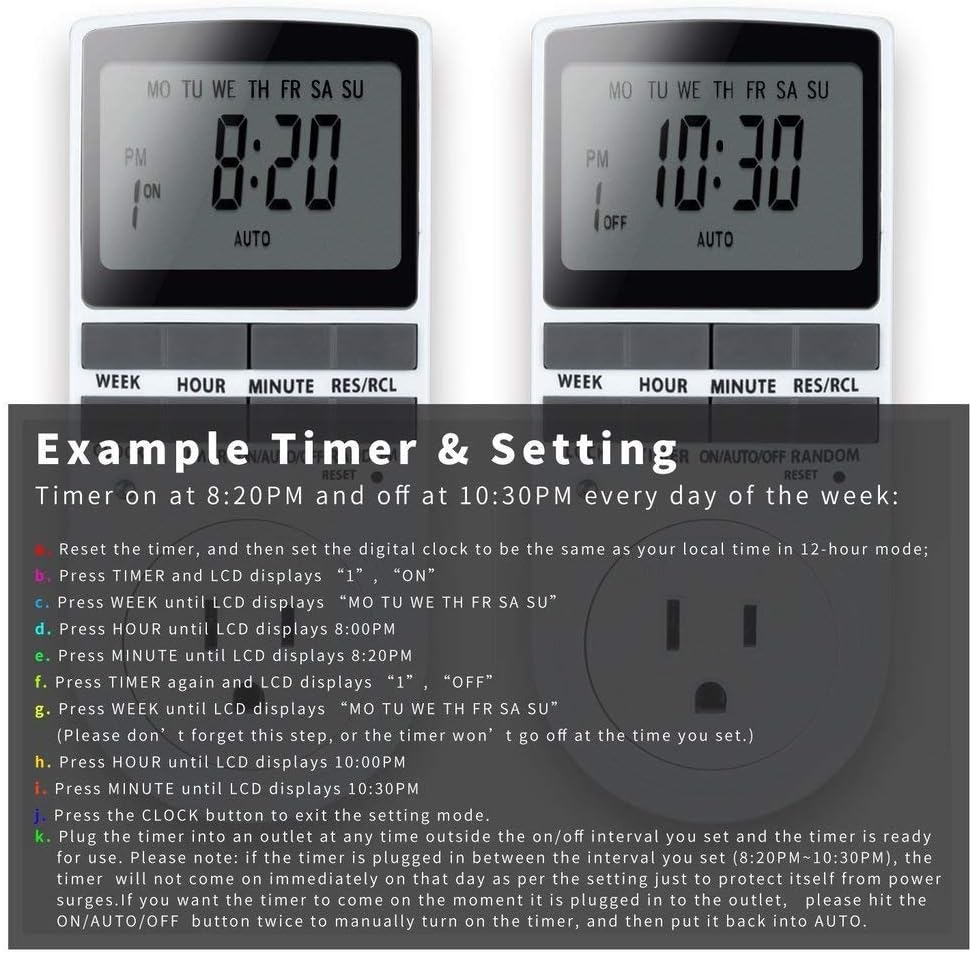
Image: Visual guide for setting an example timer program (ON at 8:20 PM, OFF at 10:30 PM daily).
6.2 Random Function (Anti-theft)
To activate the random ON/OFF feature:
- Tekan ke RANDOM button. The word "RANDOM" will appear on the display.
- In random mode, the timer will turn ON and OFF at varying times within a set period, typically around the programmed ON/OFF times, to simulate occupancy.
- Untuk menyahaktifkan, tekan RANDOM butang lagi.

Image: The anti-theft random feature of the Enover TS18 Digital Timer, designed to deter intruders.
6.3 Pembatalan Manual
To manually switch the timer's output without affecting programmed settings:
- Tekan ke HIDUP/AUTO/MATI butang untuk kitaran melalui mod: ON (sentiasa hidup), AUTO (follows programs), DIMATIKAN (sentiasa dimatikan).
- Select the desired temporary mode. The timer will revert to AUTO mode at the next programmed ON/OFF event.
Video: A detailed demonstration of setting programs and using the manual override function on the Enover Digital Timer.
7. Aplikasi
The Enover TS18 Digital Timer can be used to automate various household devices, enhancing convenience and energy efficiency.
- Coffee Makers: Program your coffee maker to start brewing before you wake up.
- Aquarium Lights/Pumps: Automate the lighting and filtration cycles for your aquarium.
- Indoor Grow Lights: Maintain consistent light schedules for plants.
- Hiasan Hari Raya: Set festive lights to turn on and off automatically.
- Fans/Humidifiers: Control environmental devices to operate only when needed.

Imej: Cthamples of automating daily routines with the Enover TS18 Digital Timer, such as a coffee maker and aquarium.
8. Spesifikasi
| Nombor Model | TS18 |
| Jenama | Enover |
| warna | putih |
| bahan | plastik |
| Bilangan Tetapan | 10 (ON/OFF programs) |
| Voltage | 120 Volt |
| Wattage | 1800 watt |
| AmpKapasiti padam | 15 Amps |
| Kaedah Pemasangan | Pemalam |
| Jenis Pemasangan | Pasang Pasang |
| Format Palam | B - gaya AS dengan palam pembumian |
| Ciri Khas | 3-wire grounded plug and 3-prong grounded outlet |
| Penggunaan | Penggunaan dalaman sahaja |
| Berat Barang | 6.4 auns |
| Dimensi Pakej | 5.67 x 3.31 x 2.6 inci |
| Jenis Sel Bateri | NiMH |
| Hayat Bateri | 100 days (backup) |
9. Penyelesaian masalah
- Pemasa tidak HIDUP/MATI seperti yang diprogramkan:
- Pastikan pemasa berada dalam keadaan AUTO mod.
- Sahkan bahawa waktu dan hari semasa ditetapkan dengan betul.
- Check that the ON and OFF times for the specific program are correctly entered and assigned to the desired days.
- Confirm the appliance connected to the timer is switched ON.
- Paparan kosong atau malap:
- Plug the timer into an active electrical outlet for 5-10 minutes to charge the internal battery.
- All settings lost after power outage:
- The internal battery may not be sufficiently charged. Ensure the timer is regularly plugged in to maintain battery charge.
- To clear all settings:
- Gunakan objek runcing (seperti hujung pen) untuk menekan TETAP SEMULA button. This will clear all programs and reset the clock. You will need to re-enter all settings.
10. Waranti dan Sokongan
For warranty information or technical support, please refer to the contact details provided on the product packaging or the official Enover webtapak. Simpan resit pembelian anda untuk tuntutan waranti.