
1. Pengenalan
The Datavideo HRS-30 is a versatile portable recorder and integrated 10.1-inch monitor designed for professional field recording and playback applications. This device supports both HD and SD video equipment, accepting signals via HD/SD-SDI inputs. It is compatible with various video formats including 1080i, 720p, 576i, and 480i.
The HRS-30 offers flexible recording formats, including MPEG-II Long-GOP or intra-frame (i-frame) with 4:2:2 color sampling. Recorded files are stored in the MXF/OP1A format, ensuring compatibility with a wide range of Non-Linear Editing (NLE) systems and playout solutions. Storage is facilitated by a removable caddy, compatible with standard 2.5-inch HDD and SSD drives.
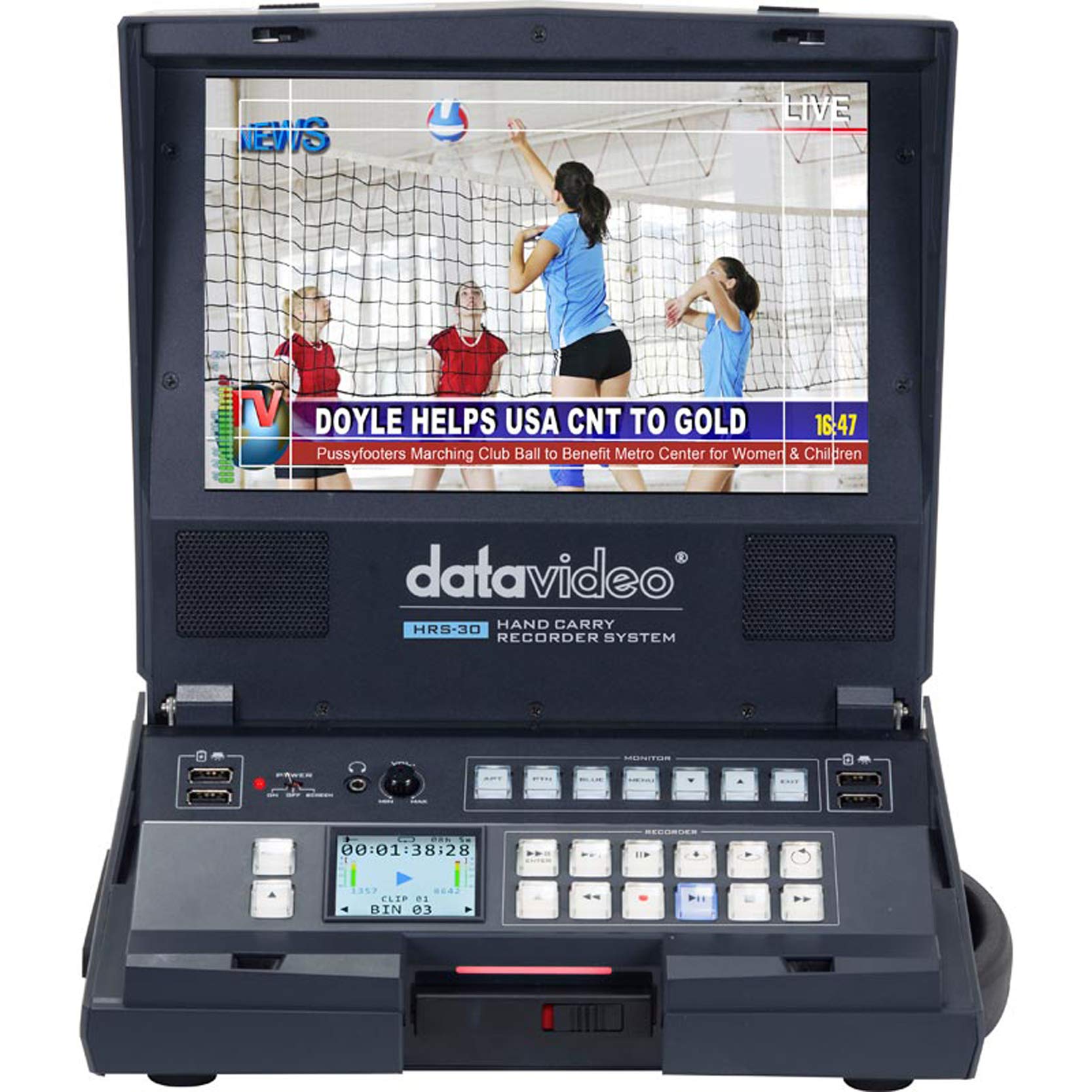
Rajah 1.1: Depan view of the Datavideo HRS-30 Portable Recorder Monitor, showing the integrated screen and control interface.
2. Maklumat Keselamatan
Please read and understand all safety instructions before operating the HRS-30. Failure to follow these instructions may result in electric shock, fire, or damage to the unit.
- Sumber Kuasa: Gunakan hanya penyesuai kuasa yang ditentukan dan pastikan voltage sepadan dengan keperluan unit.
- Pengudaraan: Jangan sekat bukaan pengudaraan. Pastikan aliran udara yang mencukupi di sekeliling unit untuk mengelakkan terlalu panas.
- Air dan Kelembapan: Jangan dedahkan unit kepada hujan, kelembapan atau rendamkannya di dalam air.
- Servis: Jangan cuba servis produk ini sendiri. Rujuk semua perkhidmatan kepada pegawai perkhidmatan yang berkelayakan.
- penempatan: Place the unit on a stable, level surface. Avoid placing it in direct sunlight or near heat sources.
3. Kandungan Pakej
Verify that all items are present in the package. If any items are missing or damaged, contact your dealer immediately.
- Datavideo HRS-30 Portable Recorder Monitor Unit
- Penyesuai Kuasa
- Removable Caddy for 2.5" HDD/SSD
- Manual Pengguna (dokumen ini)
- Additional accessories as specified by your retailer
4. Persediaan
Follow these steps to set up your HRS-30 unit for operation.
4.1 Installing Storage Media
- Ensure the HRS-30 is powered off.
- Locate the removable caddy slot on the unit.
- Insert a compatible 2.5-inch HDD or SSD into the removable caddy.
- Slide the caddy with the installed drive into the HRS-30's caddy slot until it clicks securely into place.
4.2 Kuasa Penyambung
- Connect the power adapter to the DC IN 12V port on the rear of the HRS-30.
- Palamkan penyesuai kuasa ke salur keluar elektrik yang sesuai.
- Press the POWER switch on the rear panel to turn on the unit.
4.3 Sambungan Video dan Audio
The HRS-30 supports various input and output connections. Refer to the rear panel diagram for port locations.
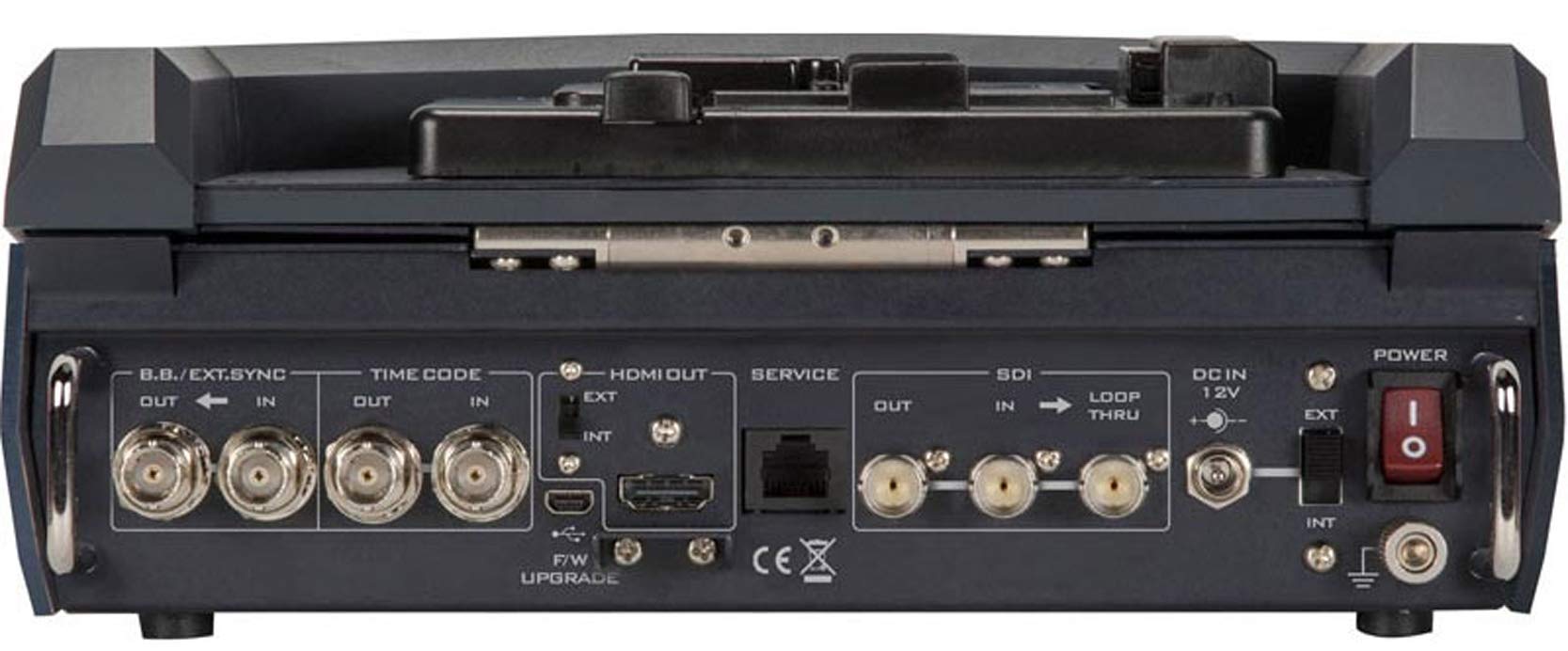
Figure 4.1: Rear panel connections of the Datavideo HRS-30, including SDI, HDMI, Timecode, and Power inputs/outputs.
- Input SDI: Connect your HD/SD-SDI video source to the SDI IN port. The unit also features an SDI LOOP THRU for connecting to another device.
- Output HDMI: Connect an external monitor or display to the HDMI OUT port for video monitoring.
- Kod masa: Use the TIME CODE IN/OUT ports for external timecode synchronization.
- BB/EXT.SYNC: Connect Black Burst or external sync signals to the BB/EXT.SYNC IN/OUT ports.
- Pelabuhan Perkhidmatan: For firmware upgrades and maintenance.
5. Arahan Operasi
This section details the basic operation of the HRS-30 for recording and playback.
5.1 Powering On and Initial Screen
- Ensure all necessary connections are made and the storage caddy is installed.
- Flip the POWER switch on the rear panel to the 'ON' position.
- The integrated 10.1-inch monitor will display the boot-up sequence, followed by the live video input or the last recorded clip.
5.2 Merakam Video
The HRS-30 records video from HD/SD-SDI sources in various formats.
- Pilih Input: Use the control panel buttons to select the desired SDI input source.
- Input Monitor: Verify the incoming video signal on the integrated monitor.
- Mulakan Rakaman: Tekan ke REC button on the control panel to begin recording. The recording indicator will illuminate.
- Hentikan Rakaman: Tekan ke BERHENTI button to end the recording. The recording indicator will turn off.
The HRS-30 supports recording in MPEG-II Long-GOP or intra-frame (i-frame) with 4:2:2 color sampling, producing MXF/OP1A files.
5.3 Main semula
Untuk kembaliview recorded content:
- Access Playback Mode: Use the navigation buttons to enter playback mode.
- Select Clip: Browse through your recorded clips using the navigation controls.
- Mula Main Semula: Tekan ke BERMAIN button to start playback of the selected clip.
- Kawalan Main Semula: Gunakan JEDA, FFW (Maju Pantas), dan REW (Rewind) buttons to control playback.
5.4 Menu Navigasi
The HRS-30 features an on-screen menu system for configuring settings such as video format, recording quality, audio settings, and system preferences. Use the MENU button and directional arrows to navigate, and the ENTER button to confirm selections.
6. Penyelenggaraan
Proper maintenance ensures the longevity and optimal performance of your HRS-30.
- Pembersihan: Use a soft, dry cloth to clean the exterior of the unit. For the screen, use a specialized screen cleaning solution and a microfiber cloth. Do not use abrasive cleaners or solvents.
- Storan: When not in use, store the HRS-30 in a cool, dry place, away from direct sunlight and extreme temperatures.
- Kemas kini Firmware: Periodically check the Datavideo website for firmware updates to ensure your unit has the latest features and bug fixes. Follow the instructions provided with the firmware update carefully.
7. Penyelesaian masalah
This section addresses common issues you might encounter with the HRS-30.
| Masalah | Kemungkinan Punca | Penyelesaian |
|---|---|---|
| Unit tidak dihidupkan | No power, faulty adapter, power switch off | Check power cable connection, verify power outlet, ensure power switch is ON. |
| No video on screen | Incorrect input selected, no signal from source, faulty cable | Select correct input, check video source, replace SDI/HDMI cable. |
| Tidak dapat merakam | No storage media, full storage, media error | Ensure caddy with drive is installed, check available storage space, format or replace drive if necessary. |
| Playback issues | rasuah file, incompatible format | Try playing another clip. Ensure recorded files tidak rosak. |
8. Spesifikasi
Detailed technical specifications for the Datavideo HRS-30.
- model: HRS-30
- Diagonal Skrin Kelihatan: 10 inci / 26 cm
- Dimensi Produk: 10.83 x 10.24 x 3.94 inci (27.5 x 26 x 10 cm)
- Berat Barang: 7.92 paun (3.6 kg)
- Input Video: HD/SD-SDI
- Output Video: HDMI, SDI Loop Thru
- Format Video yang Disokong: 1080i, 720p, 576i, 480i
- Format Rakaman: MPEG-II Long-GOP, Intra-frame (i-frame) with 4:2:2 color sampling
- File Format: MXF/OP1A
- Media Storan: Removable caddy for 2.5" HDD & SSD drives
- Pengeluar: Datavideo
- Tarikh Mula-mula Tersedia: 23 Mac 2016
9. Waranti dan Sokongan
For warranty information and technical support, please refer to the official Datavideo website or contact your authorized Datavideo dealer. Keep your purchase receipt as proof of purchase for warranty claims.