
1. Pengenalan
This manual provides essential instructions for the safe and effective use of your Otech C048HB-8538 battery, designed for compatibility with JVC BN-V124 camcorders. This battery is equipped with high-quality cells to ensure optimum service life and low self-discharge. Each unit undergoes individual load and capacity testing prior to shipment to ensure functionality.
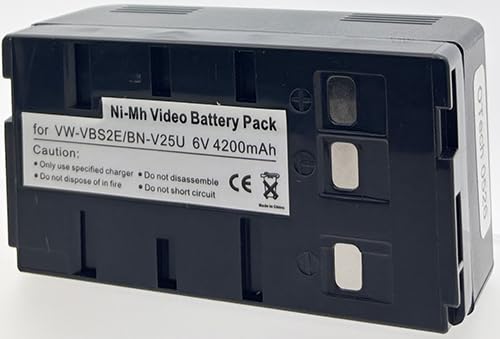
Figure 1: Otech C048HB-8538 Battery. This image displays the black, rectangular battery pack, highlighting its compact design and the OTech branding visible on the top surface.
2. Persediaan
2.1 Pengecasan Awal
Before first use, fully charge the battery. This process conditions the battery cells for optimal performance and longevity.
- Connect the battery to a compatible JVC BN-V124 camcorder or an external charger designed for this battery type.
- Pastikan pengecas disambungkan kepada sumber kuasa.
- Allow the battery to charge until the charging indicator on your device or charger signals a full charge. Refer to your camcorder's or charger's manual for specific indicator details.
2.2 Pemasangan
To install the battery into your camcorder:
- Turn off the camcorder and disconnect it from any power source.
- Locate the battery compartment on your JVC camcorder.
- Align the battery with the compartment's terminals and slide it in until it clicks securely into place.
- Close the battery compartment cover, if applicable.
3. Operasi
3.1 Mengecas Bateri
Regular charging is essential for maintaining battery performance. Always use a charger compatible with JVC BN-V124 type batteries.
- Sambungkan bateri ke pengecas.
- Palamkan pengecas ke soket elektrik standard.
- Monitor the charging indicator. Disconnect the battery once fully charged to prevent overcharging, although modern chargers typically have protection mechanisms.
3.2 Discharging and Usage
The battery powers your camcorder during operation. The actual operating time will vary depending on camcorder usage, settings, and environmental conditions.
- Pastikan bateri dicas sepenuhnya sebelum penggunaan lanjutan.
- Elakkan daripada menghabiskan bateri sepenuhnya dengan kerap, kerana ini boleh mengurangkan jangka hayatnya secara keseluruhan.
- If the camcorder indicates low battery, save your work and charge the battery promptly.
4. Penyelenggaraan
4.1 Penyimpanan
Proper storage extends battery life.
- Simpan bateri di tempat yang sejuk dan kering, jauh dari cahaya matahari langsung dan suhu yang melampau.
- For long-term storage, charge the battery to approximately 50-70% capacity. Avoid storing it fully charged or completely discharged.
- Tanggalkan bateri daripada kamera video jika ia tidak akan digunakan untuk tempoh yang lama.
4.2 Pembersihan
Keep battery contacts clean for optimal connection.
- Use a clean, dry cloth to wipe the battery terminals if they appear dirty.
- Jangan gunakan pembersih cecair atau bahan yang melelas.
4.3 Langkah Keselamatan
Observe the following safety guidelines:
- Jangan buka, remuk, tebuk atau litar pintas bateri.
- Jangan dedahkan bateri kepada api atau air.
- Jauhkan bateri daripada kanak-kanak dan haiwan peliharaan.
- Buang bateri yang habis mengikut peraturan tempatan.
5. Penyelesaian masalah
| Masalah | Kemungkinan Punca | Penyelesaian |
|---|---|---|
| Bateri tidak dicas |
|
|
| Masa operasi yang singkat |
|
|
6. Spesifikasi
| Ciri | Perincian |
|---|---|
| Jenama | Otech |
| Nombor Model | C048HB-8538 |
| Keserasian | JVC BN-V124 |
| Voltage | 3 Volt |
| Berat Barang | 0.1 Kilogram (100 g) |
| Berat Bateri | 358 Gram |
| ASIN | B01D3K92AW |
| Pengeluar | OTech |
7. Waranti dan Sokongan
Specific warranty details for the Otech C048HB-8538 battery are not provided in this manual. Please refer to the original purchase documentation or contact your retailer for warranty information.
For technical support or inquiries, please contact Otech customer service through their official webtapak atau maklumat hubungan yang diberikan pada tempat pembelian.