
1. Pengenalan
The GAMDIAS Hermes GKB3000 is a mechanical gaming keyboard designed for enhanced durability and performance. It features GAMDIAS Certified Blue Switches with a 50 million actuation lifecycle, a 7-color spectrum backlight with 14 lighting effects, and various functional keys for an optimized gaming and typing experience. This manual provides instructions for setting up, operating, and maintaining your keyboard.
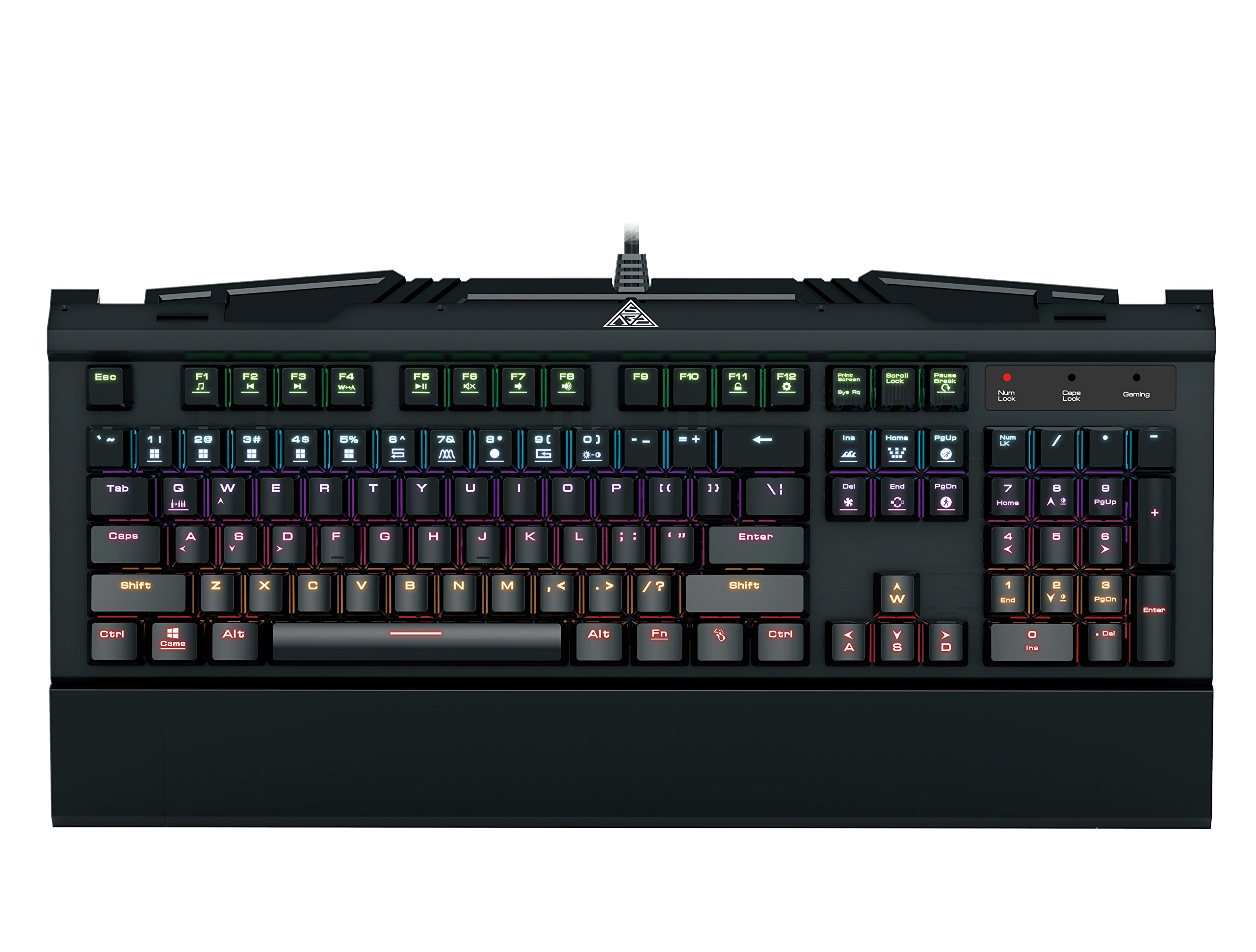
Image 1.1: The GAMDIAS Hermes GKB3000 Mechanical Gaming Keyboard. This image displays the full keyboard with its key layout and design, highlighting its compact yet robust build.
2. Kandungan Pakej
Sila semak kandungan bungkusan semasa membuka kotak untuk memastikan semua barang ada dan tidak rosak.
- GAMDIAS Hermes GKB3000 Mechanical Gaming Keyboard
- Manual Pengguna (dokumen ini)
3. Persediaan
Follow these steps to set up your GAMDIAS Hermes GKB3000 keyboard:
- Buka pek Papan Kekunci: Tanggalkan papan kekunci dari pembungkusannya dengan berhati-hati.
- Sambung ke Komputer: Plug the USB-A connector of the keyboard cable into an available USB port on your computer.
- Pemasangan Pemandu: The keyboard is plug-and-play. Your operating system (e.g., Windows) will automatically detect and install the necessary drivers. No additional software installation is typically required for basic functionality.
- penempatan: Place the keyboard on a stable, flat surface for comfortable use.
4. Arahan Operasi
4.1. Kesan Pencahayaan
The Hermes GKB3000 features a 7-color spectrum backlight with 14 sets of lighting effects. These include 9 preset effects and 5 customizable patterns.
- Kesan Penukaran: Use the dedicated function keys (often combined with the Fn key) to cycle through the preset lighting effects. Refer to the keyboard's keycap legends for specific combinations.
- Menyesuaikan Kesan: The keyboard supports 5 customizable lighting patterns. Instructions for programming these patterns are typically found in the full software suite available for download from the GAMDIAS website, if applicable.
- Pelarasan Kecerahan: Adjust backlight brightness using designated function key combinations.
4.2. Multimedia Control Keys
Access multimedia functions quickly using the dedicated multimedia control keys, often activated by holding the Fn kekunci dalam kombinasi dengan kekunci-F (F1-F12).
- Kawalan Kelantangan: Increase, decrease, or mute audio.
- Main balik Media: Play/pause, stop, previous track, next track.
- Fungsi lain: May include opening default browser, email client, or calculator.
4.3. Special Gaming Functions
- WASD-Arrow Key Swap: This feature allows you to swap the functionality of the WASD keys with the arrow keys. This is useful for certain games or user preferences. Activate this function using a specific Fn key combination (e.g., Fn + W).
- Consecutive Attack Mode: This mode enhances rapid key input for gaming. Refer to the keyboard's specific documentation or GAMDIAS software for activation and configuration details.
- Kunci Papan Kekunci: Temporarily disable the keyboard input to prevent accidental presses. Activate using a Fn kombinasi kunci.
- Windows Key Disable: Prevent accidental presses of the Windows key during gaming, which can minimize your game. Activate using a Fn key combination (e.g., Fn + Win key).
- Pergantian Kunci N: The GKB3000 supports N-key rollover, meaning multiple keys can be pressed simultaneously without ghosting or missed inputs. This ensures accurate and responsive commands during intense gaming sessions.
5. Penyelenggaraan
Penyelenggaraan yang betul memastikan jangka hayat dan prestasi optimum papan kekunci anda.
- Pembersihan:
- Putuskan sambungan papan kekunci daripada komputer anda sebelum membersihkan.
- Gunakan kain lembut dan tidak berbulu sedikit dampdisapu dengan air atau larutan pembersih lembut untuk mengelap permukaan.
- Untuk habuk dan serpihan di antara kunci, gunakan udara termampat.
- Elakkan menggunakan bahan kimia yang keras, pembersih yang melelas, atau pelarut.
- Storan: Simpan papan kekunci di tempat yang sejuk dan kering, jauh daripada cahaya matahari langsung dan suhu yang melampau apabila tidak digunakan untuk tempoh yang lama.
- Pengendalian: Avoid dropping the keyboard or exposing it to excessive force, as this can damage the mechanical switches or internal components.
6. Penyelesaian masalah
If you encounter issues with your GAMDIAS Hermes GKB3000 keyboard, refer to the following common solutions:
| Masalah | Penyelesaian yang Mungkin |
|---|---|
| Papan kekunci tidak bertindak balas. |
|
| Backlight is not working or is dim. |
|
| Certain keys are not working. |
|
| WASD keys are acting as arrow keys. |
|
If the problem persists after trying these solutions, please contact GAMDIAS customer support for further assistance.
7. Spesifikasi
The following are the technical specifications for the GAMDIAS Hermes GKB3000 Mechanical Gaming Keyboard:
| Ciri | Perincian |
|---|---|
| Jenama | GAMDIAS |
| Nombor Model | GKB3000 |
| Jenis Suis | GAMDIAS Certified Mechanical Blue Switches |
| Actuation Lifecycle | 50 Juta Penekanan Kekunci |
| Pencahayaan latar | 7-Color Spectrum, 14 Lighting Effects (9 preset, 5 customizable) |
| Anti-Ghosting | N-Key Rollover |
| Ketersambungan | USB-A |
| Sistem Operasi | Windows |
| Berat Barang | 2.42 paun (lebih kurang 1.1 kg) |
| Dimensi Produk (LxWxH) | 18.8 x 10.5 x 2 inci (lebih kurang 47.75 x 26.67 x 5.08 cm) |
| bahan | Plastic with Elegant Metal Plate Design |
8. Waranti dan Sokongan
GAMDIAS products are manufactured to the highest quality standards. For information regarding warranty coverage, terms, and conditions, please refer to the warranty card included with your product or visit the official GAMDIAS webtapak.
For technical support, troubleshooting assistance, or any product-related inquiries, please contact GAMDIAS customer support through their official webtapak atau maklumat hubungan yang diberikan dalam pembungkusan produk anda.
Rasmi GAMDIAS Webtapak: www.gamdias.com