
1. Perlindungan Penting
Apabila menggunakan peralatan elektrik, langkah berjaga-jaga keselamatan asas hendaklah sentiasa diikuti untuk mengurangkan risiko kebakaran, renjatan elektrik dan kecederaan kepada orang, termasuk yang berikut:
- Baca semua arahan sebelum mengendalikan cerek.
- Jangan sentuh permukaan panas. Gunakan pemegang atau tombol.
- To protect against fire, electric shock, and injury to persons, do not immerse cord, plugs, or the kettle base in water or other liquid.
- Pengawasan rapi diperlukan apabila sebarang perkakas digunakan oleh atau berhampiran kanak-kanak.
- Cabut plag dari soket apabila tidak digunakan dan sebelum membersihkan. Biarkan sejuk sebelum memakai atau menanggalkan bahagian, dan sebelum membersihkan perkakas.
- Jangan kendalikan sebarang perkakas dengan kord atau palam yang rosak, atau selepas perkakas tidak berfungsi atau rosak dalam apa jua cara. Hubungi perkhidmatan pelanggan untuk pemeriksaan, pembaikan atau pelarasan.
- Penggunaan lampiran aksesori yang tidak disyorkan oleh pengilang perkakas boleh mengakibatkan kebakaran, renjatan elektrik atau kecederaan kepada orang.
- Jangan gunakan di luar rumah.
- Jangan biarkan kord tergantung di tepi meja atau kaunter, atau menyentuh permukaan panas.
- Jangan letakkan pada atau berhampiran gas panas atau penunu elektrik, atau dalam ketuhar yang dipanaskan.
- Sentiasa pasangkan plag pada perkakas terlebih dahulu, kemudian pasangkan kord ke dalam salur keluar dinding. Untuk memutuskan sambungan, matikan mana-mana kawalan kepada "mati", kemudian tanggalkan palam dari alur keluar dinding.
- Jangan gunakan perkakas untuk kegunaan selain daripada yang dimaksudkan.
- This appliance operates on 120 Volt. Ensure your power supply matches this requirement to prevent damage or malfunction.
- Do not overfill the kettle. Fill only to the maximum fill line to prevent boiling water from overflowing.
2. Produk Lebihview
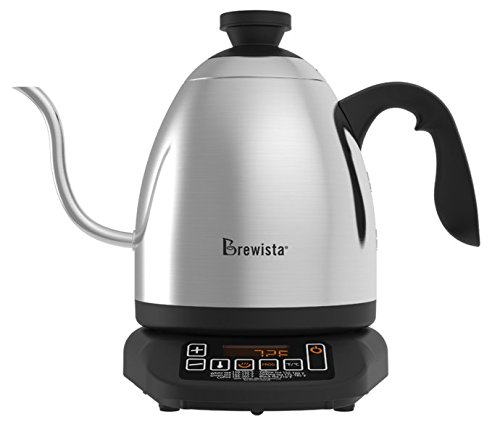
The Brewista SmartPour Variable Digital Kettle is designed for precise temperature control, ideal for brewing coffee and tea. It features a gooseneck spout for controlled pouring and a digital display for accurate temperature readings.

Rajah 2.1: Depan view of the Brewista SmartPour Variable Digital Kettle. This image shows the stainless steel kettle body, the gooseneck spout, the handle, and the digital control base.
2.1 Komponen
- Badan Cerek: Stainless steel construction with a 1.2-liter capacity.
- Muncung Leher Angsa: Designed for precise pouring control.
- Tudung: Removable lid with a handle.
- pemegang: Direka secara ergonomik untuk cengkaman yang selesa.
- Pangkalan Kuasa: Contains the heating element and digital controls.
- Paparan Digital: Shows current and target temperatures, and timer settings.
- Butang Kawalan: Power, Temperature Up/Down, Set Temperature, Keep Warm, Auto-Start.
Rajah 2.2: Close-up of the control panel on the Brewista SmartPour Kettle base. This image highlights the digital display and various control buttons for temperature adjustment and function selection.
3. Persediaan
3.1 Pembersihan Awal
- Remove all packaging materials and labels from the kettle and base.
- Lap bahagian luar cerek dan tapak dengan iklanamp kain.
- Wash the interior of the kettle and the lid with warm, soapy water. Rinse thoroughly.
- Fill the kettle with water to the maximum fill line and boil. Discard this water. Repeat this process two to three times to ensure the kettle is clean and free of manufacturing residues.
3.2 Penempatan
- Letakkan tapak kuasa di atas permukaan yang kering, rata, stabil dan tahan haba.
- Pastikan kord kuasa tidak tergantung atau bersentuhan dengan permukaan panas.
- Pasangkan kord kuasa ke soket elektrik 120V AC yang dibumikan.
4. Arahan Operasi
4.1 Mengisi Cerek
- Keluarkan cerek dari pangkalan kuasanya.
- Remove the lid and fill the kettle with fresh, cold water. Do not fill below the minimum or above the maximum fill lines. The capacity is 1.2 liters.
- Gantikan penutup dengan selamat.
- Place the kettle back onto the power base.
4.2 Menghidupkan dan Menetapkan Suhu
- Tekan ke KUASA button to turn on the kettle. The digital display will illuminate.
- To select a preset temperature, press the TETAPKAN SUHU button repeatedly to cycle through common brewing temperatures (e.g., 175°F, 195°F, 205°F, 212°F).
- To set a custom temperature, use the + dan - buttons to adjust the desired temperature in 1-degree increments.
- The kettle will automatically begin heating to the selected temperature. The display will show the current water temperature as it heats.
4.3 Menukar Unit Suhu (°F/°C)
Untuk bertukar antara Fahrenheit (°F) dan Celsius (°C), tekan dan tahan butang + dan - buttons simultaneously for a few seconds until the unit changes on the display.
4.4 Fungsi Kekalkan Panas
- After setting your desired temperature, press the PANASKAN butang.
- The kettle will heat to the set temperature and then maintain that temperature for up to one hour.
- To deactivate the Keep Warm function, press the PANASKAN button again or turn off the kettle.
4.5 Auto-Start Timer
The auto-start timer allows you to program the kettle to begin heating at a specific time.
- Pastikan cerek diisi dengan air dan diletakkan di atas tapaknya.
- Set your desired target temperature using the TETAPKAN SUHU or +/- butang.
- Tekan dan tahan butang AUTO-MULA button. The display will show the current time.
- Gunakan + dan - butang untuk menetapkan masa mula yang diingini.
- Tekan ke AUTO-MULA button again to confirm. The kettle will now display the current time and a small timer icon, indicating the auto-start is active.
- The kettle will begin heating at the programmed time.
Note: The auto-start timer can typically be set for up to 24 hours in advance.
5. Penyelenggaraan dan Pembersihan
Regular cleaning and maintenance will extend the life of your kettle.
5.1 Pembersihan Harian
- Unplug the kettle from the power outlet and allow it to cool completely before cleaning.
- Lap bahagian luar cerek dan tapak kuasa dengan kain lembut danamp kain. Jangan gunakan pembersih yang melelas atau pad penyental.
- The kettle body and lid can be hand washed with warm, soapy water. Rinse thoroughly and dry completely before returning to the base.
- Do not immerse the power base, cord, or plug in water or any other liquid.
5.2 Penyahkelasan
Mineral deposits (limescale) can build up inside the kettle over time, affecting performance. Descale your kettle regularly, depending on water hardness and frequency of use.
- Fill the kettle with a solution of equal parts white vinegar and water, or use a commercial descaling solution according to its instructions. Ensure the solution covers the mineral deposits.
- Allow the solution to soak for at least 30 minutes, or longer for heavy buildup. For stubborn deposits, you may heat the solution to just below boiling (do not boil vinegar).
- Kosongkan cerek dan bilas dengan teliti beberapa kali dengan air bersih.
- Boil a full kettle of fresh water and discard it to remove any residual descaling agent.
6. Penyelesaian masalah
| Masalah | Kemungkinan Punca | Penyelesaian |
|---|---|---|
| Cerek tidak menyala. | Tidak dipasang; soket kuasa tidak berfungsi; cerek tidak diletakkan dengan betul di atas tapak. | Ensure the power cord is securely plugged into a working 120V outlet. Check if the kettle is correctly placed on the power base. |
| Air tidak memanaskan. | Kettle not powered on; temperature not set; insufficient water. | Press the POWER button. Set a desired temperature. Ensure water level is between MIN and MAX lines. |
| Paparan suhu tidak tepat. | Mineral buildup on temperature sensor; internal sensor malfunction. | Descale the kettle thoroughly. If the problem persists, contact customer support. |
| Kettle leaks or rusts. | Overfilling; manufacturing defect; hard water corrosion. | Do not overfill past the MAX line. Regular descaling can prevent corrosion from hard water. If a defect is suspected, contact customer support. |
| Kettle is slow to heat. | Mineral buildup; low voltage. | Descale the kettle. Ensure the kettle is connected to a stable 120V power supply. |
| Auto-start timer does not activate. | Pemasa tidak ditetapkan dengan betul; gangguan kuasa. | Review the auto-start timer setting process. Ensure continuous power supply. |
For issues not listed here, or if solutions do not resolve the problem, please contact Brewista customer support.
7. Spesifikasi
| Nombor Model | BKV12S02 |
| Jenama | Brewista |
| Kapasiti | 1.2 Liter |
| bahan | Keluli Tahan Karat |
| Voltage | 120 Volt |
| Ciri Khas | Concealed Heating, Indicator Light, Variable Temperature Control, Gooseneck Spout, Keep Warm Function, Auto-Start Timer |
| Penjagaan Produk | Basuh tangan, Lap bersih |
| Berat Barang | 3 Paun (lebih kurang 1.36 kg) |
| Dimensi (LxWxH) | 27.3 x 21.1 x 30.4 Sentimeter |
| UPC | 735343350429, 645240812855 |
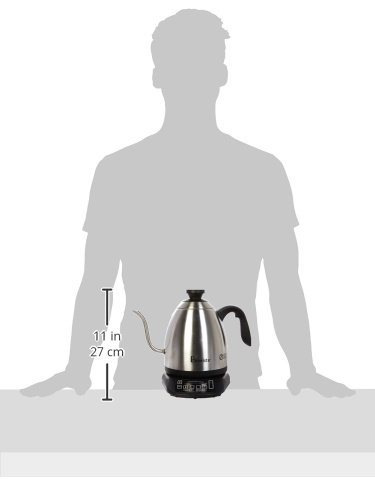
Rajah 7.1: Image illustrating the approximate size of the Brewista SmartPour Kettle in relation to a person, showing its compact countertop footprint.
8. Waranti dan Sokongan
For warranty information, product registration, or technical support, please refer to the official Brewista webtapak atau hubungi bahagian perkhidmatan pelanggan mereka. Simpan resit pembelian anda sebagai bukti pembelian untuk tuntutan waranti.
You may also find additional resources and product information by scanning the QR code provided on the product packaging or by visiting the link below: