
1. Pengenalan
This manual provides essential information for the safe and efficient operation, installation, and maintenance of your Daitsu ADDH10 Digital Dehumidifier. Please read these instructions thoroughly before using the appliance and retain them for future reference.
The Daitsu ADDH10 is designed to reduce humidity levels in indoor environments, helping to prevent mold, mildew, and other moisture-related issues. It features a digital display and automatic functions for user convenience.
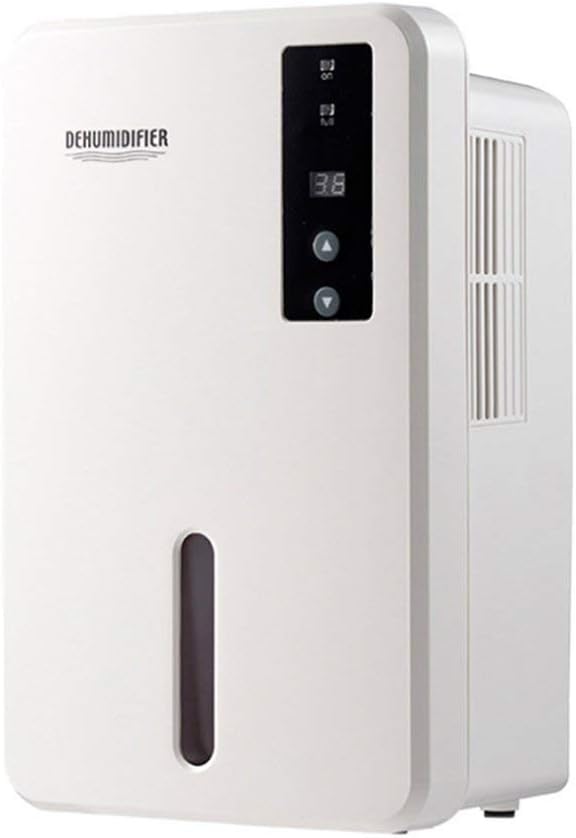
Imej 1.1: Depan view of the Daitsu ADDH10 Digital Dehumidifier, showing the control panel and water tank window.
2. Maklumat Keselamatan
Sentiasa ikuti langkah berjaga-jaga keselamatan asas apabila menggunakan peralatan elektrik untuk mengurangkan risiko kebakaran, renjatan elektrik dan kecederaan.
- Baca semua arahan sebelum menggunakan dehumidifier.
- Pastikan bekalan kuasa sepadan dengan voltage dinyatakan pada label penilaian.
- Jangan kendalikan penyahlembap dengan kord atau palam yang rosak.
- Jauhkan perkakas daripada sumber haba, cahaya matahari langsung dan bahan mudah terbakar.
- Do not block the air inlet or outlet. Ensure adequate air circulation around the unit.
- Sentiasa letakkan dehumidifier pada permukaan yang stabil dan rata.
- Unplug the unit before cleaning, maintenance, or when not in use for extended periods.
- Perkakas ini tidak dimaksudkan untuk digunakan oleh orang (termasuk kanak-kanak) yang kurang keupayaan fizikal, deria atau mental, atau kurang pengalaman dan pengetahuan, melainkan mereka telah diberi pengawasan atau arahan mengenai penggunaan perkakas oleh orang yang bertanggungjawab untuk keselamatan mereka.

Image 2.1: Illustration of the dehumidifier's double security protection, including automatic shut-off when the water tank is full and over-temperature protection (auto-stop if heat sink exceeds 80°C).
3. Komponen dan Ciri Produk
Biasakan diri anda dengan bahagian utama dehumidifier anda:
- Panel Kawalan: Digital display and buttons for operation.
- Saluran masuk udara: Where humid air is drawn into the unit.
- Saluran Udara: Di mana udara kering dibuang.
- Tangki Air: Collects condensed water. Features a transparent window to monitor water level.
- Water Tank Handle/Lid: For easy removal and emptying.

Image 3.1: Diagram showing the key components: Air outlet, Control panel, Air inlet, and the 1.5L water tank capacity.
The dehumidifier has a 1.5-liter water tank capacity and features automatic shut-off when the tank is full, indicated by a float sensor. It also includes over-temperature protection.
4. Persediaan dan Pemasangan
4.1 Membongkar
- Keluarkan dehumidifier dengan berhati-hati daripada pembungkusnya.
- Tanggalkan semua bahan pembungkusan, pita pelekat dan filem pelindung.
- Periksa unit ini untuk sebarang tanda kerosakan. Jika rosak, jangan kendalikan dan hubungi peruncit anda.
4.2 Penempatan
- Letakkan penyahlembap di atas permukaan yang kukuh dan rata yang dapat menampung beratnya apabila tangki air penuh.
- Ensure there is at least 20 cm (8 inches) of space around the air inlet and outlet for proper air circulation.
- Avoid placing the unit near walls, furniture, or curtains that could obstruct airflow.
- Do not place the unit in direct sunlight or near heat-generating appliances.
- For optimal performance, operate the dehumidifier in an enclosed area. Close all doors and windows in the room.
4.3 Sambungan Kuasa
- Ensure your hands are dry before plugging in the unit.
- Palamkan kord kuasa ke salur keluar elektrik yang dibumikan dengan betul.
5. Arahan Operasi
5.1 Panel Kawalan Selesaiview
The control panel features a digital display and control buttons:
- Paparan Digital: Shows current humidity level or settings.
- Butang Kuasa: Menghidupkan atau mematikan unit.
- Butang Naik / Turun: Adjust desired humidity level or other settings.

Image 5.1: Various angles of the dehumidifier, highlighting the digital control panel with up/down buttons and the transparent water tank.
5.2 Operasi Asas
- Hidupkan: Press the Power button to turn on the dehumidifier. The digital display will light up, showing the current room humidity.
- Tetapkan Kelembapan yang Diingini: Use the Up and Down buttons to set your desired humidity level. The unit will operate until the room humidity reaches the set level, then cycle on and off to maintain it.
- Matikan: Press the Power button again to turn off the dehumidifier.
5.3 Mengosongkan Tangki Air
When the water tank is full, the dehumidifier will automatically stop operating, and an indicator light (if available) may illuminate. The unit will not resume operation until the tank is emptied and reinserted correctly.
- Tarik keluar tangki air perlahan-lahan dari hadapan unit.
- Bawa tangki ke sinki atau longkang dengan berhati-hati.
- Remove the tank lid (if applicable) and pour out the collected water.
- Replace the lid securely and slide the empty water tank back into the dehumidifier until it clicks into place.
- The unit will resume operation automatically if the power is on and the desired humidity level has not been reached.

Image 5.2: The transparent water tank, designed for easy removal and emptying.
6. Penyelenggaraan
Penyelenggaraan tetap memastikan prestasi optimum dan memanjangkan jangka hayat penyahlembap anda. Sentiasa cabut plag unit sebelum melakukan sebarang penyelenggaraan.
6.1 Membersihkan Tangki Air
- Clean the water tank regularly (e.g., every few weeks) to prevent mold and bacteria growth.
- Keluarkan tangki air seperti yang diterangkan dalam Bahagian 5.3.
- Basuh tangki dengan detergen lembut dan air suam. Bilas sebersih-bersihnya.
- Keringkan tangki sepenuhnya sebelum memasukkannya semula ke dalam unit.
6.2 Membersihkan Bahagian Luar
- Lap bahagian luar dehumidifier dengan lembut, damp kain.
- Jangan gunakan pembersih yang melelas, pelarut atau bahan kimia yang keras, kerana ini boleh merosakkan permukaan.
- Pastikan tiada air memasuki komponen dalaman.
6.3 Penyimpanan
- If storing the dehumidifier for an extended period, ensure the water tank is empty and clean.
- Bersihkan bahagian luar unit.
- Simpan unit dalam kedudukan tegak di tempat yang sejuk dan kering, jauh dari cahaya matahari langsung dan suhu yang melampau.
7. Penyelesaian masalah
Sebelum menghubungi khidmat pelanggan, sila rujuk panduan penyelesaian masalah berikut untuk isu-isu biasa:
| Masalah | Kemungkinan Punca | Penyelesaian |
|---|---|---|
| Dehumidifier tidak dihidupkan. | Tiada bekalan kuasa. Kord kuasa tidak dipasang dengan selamat. |
Periksa sama ada salur keluar kuasa berfungsi. Pastikan kord kuasa dipasang dengan kukuh ke dalam unit dan alur keluar dinding. |
| Unit berjalan tetapi tidak mengumpul air. | Kelembapan bilik sudah rendah. Suhu terlalu rendah. Aliran udara disekat. |
Check the current humidity level on the display. If it's below your set point, the unit will not collect water. Penyahlembap kurang berkesan dalam persekitaran yang sangat sejuk. Pastikan saluran masuk dan keluar udara tidak terhalang. |
| Unit stops operating and indicator light is on. | Tangki air penuh. Water tank is not properly inserted. |
Kosongkan tangki air. Reinsert the water tank correctly until it clicks into place. |
| Bunyi luar biasa semasa operasi. | Unit tidak berada pada permukaan yang rata. Isu komponen dalaman. |
Pastikan unit diletakkan pada permukaan yang stabil dan rata. Jika bunyi bising berterusan, hentikan penggunaan dan hubungi khidmat pelanggan. |
8. Spesifikasi
| Ciri | Spesifikasi |
|---|---|
| Jenama | Daitsu |
| Nombor Model | ADDH10 (Technical Model: bb_S0403263) |
| warna | putih |
| Berat Barang | 10 Kilogram |
| Dimensi Produk (lebih kurang) | 286mm (Tinggi) x 180mm (Lebar) x 134mm (Dalam) |
| Kapasiti Tangki Air | 1.5 Liter |
| Mod Pengendalian | Automatik |
| Komponen yang Disertakan | Dehumidifier |
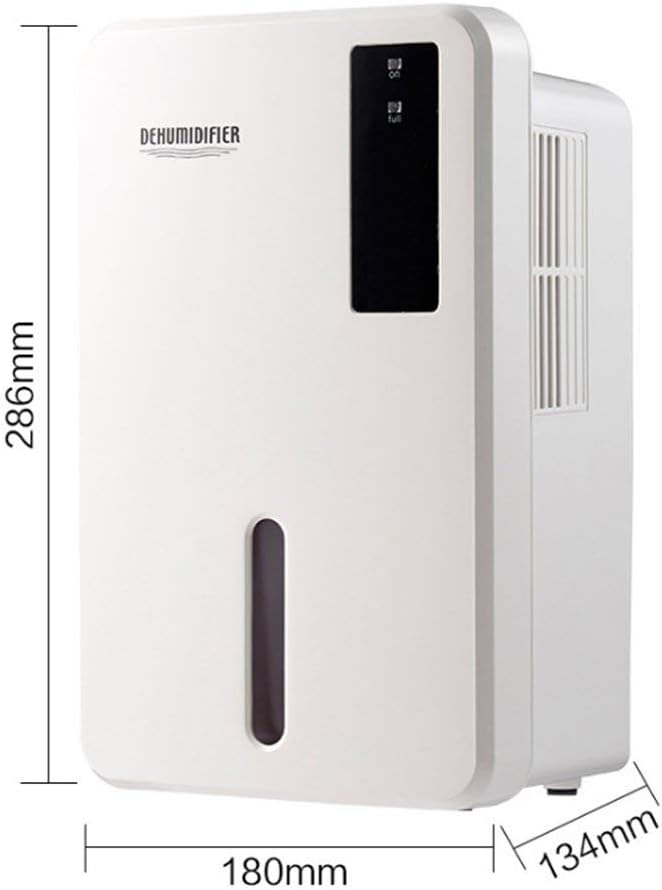
Image 8.1: Diagram illustrating the dimensions of the dehumidifier: 286mm height, 180mm width, and 134mm depth.
9. Waranti dan Sokongan
For warranty information, please refer to the documentation included with your product packaging or visit the official Daitsu webtapak. Terma dan syarat waranti mungkin berbeza mengikut wilayah dan peruncit.
If you encounter issues not covered in the troubleshooting section or require further assistance, please contact your retailer or the manufacturer's customer support. Have your model number (ADDH10) and purchase details ready when contacting support.