
1. Produk Lebihview
The J-Tech Digital ProAV Unlimited HDMI Extender Transmitter (TX) is designed to extend 1080P HDMI signals over a single Cat5e/6 cable up to 400 feet (120 meters). This device facilitates flexible audio-video distribution, supporting various configurations including point-to-point, point-to-many, and many-to-many broadcasting when used with compatible receivers and an Ethernet switch. It converts HDMI signals to standard TCP/IP for transmission over an internet cable or local area network (LAN). The system supports 1080p resolution, 3D content, HDCP, and wideband IR control (38-56 kHz).
2. Kandungan Pakej
Sahkan bahawa semua item terdapat dalam pakej:
- 1x J-Tech Digital ProAV Unlimited HDMI Extender Transmitter (TX)
- 1x Manual Pengguna
- 1x Kabel IR TX
- 1x Power Adapter DC 5V/1A

3. Ciri-ciri Produk
- Supports Point-to-Point, Point-to-Many, and Many-to-Many Broadcasting configurations.
- Extends 1080P HDMI signals up to 120m (394ft) over a single Cat5e/6 cable.
- Converts HDMI signals to standard TCP/IP for transmission over Ethernet or LAN.
- Compatible with 1080p, 3D, and HDCP content.
- Features wideband IR (38-56 kHz) control for remote device management.
- Can be cascaded for multiple layers by integrating additional Ethernet switches.
- Android application available for matrix switching control (search "J-Tech Digital Matrix" on Google Play).

4. Persediaan dan Pemasangan
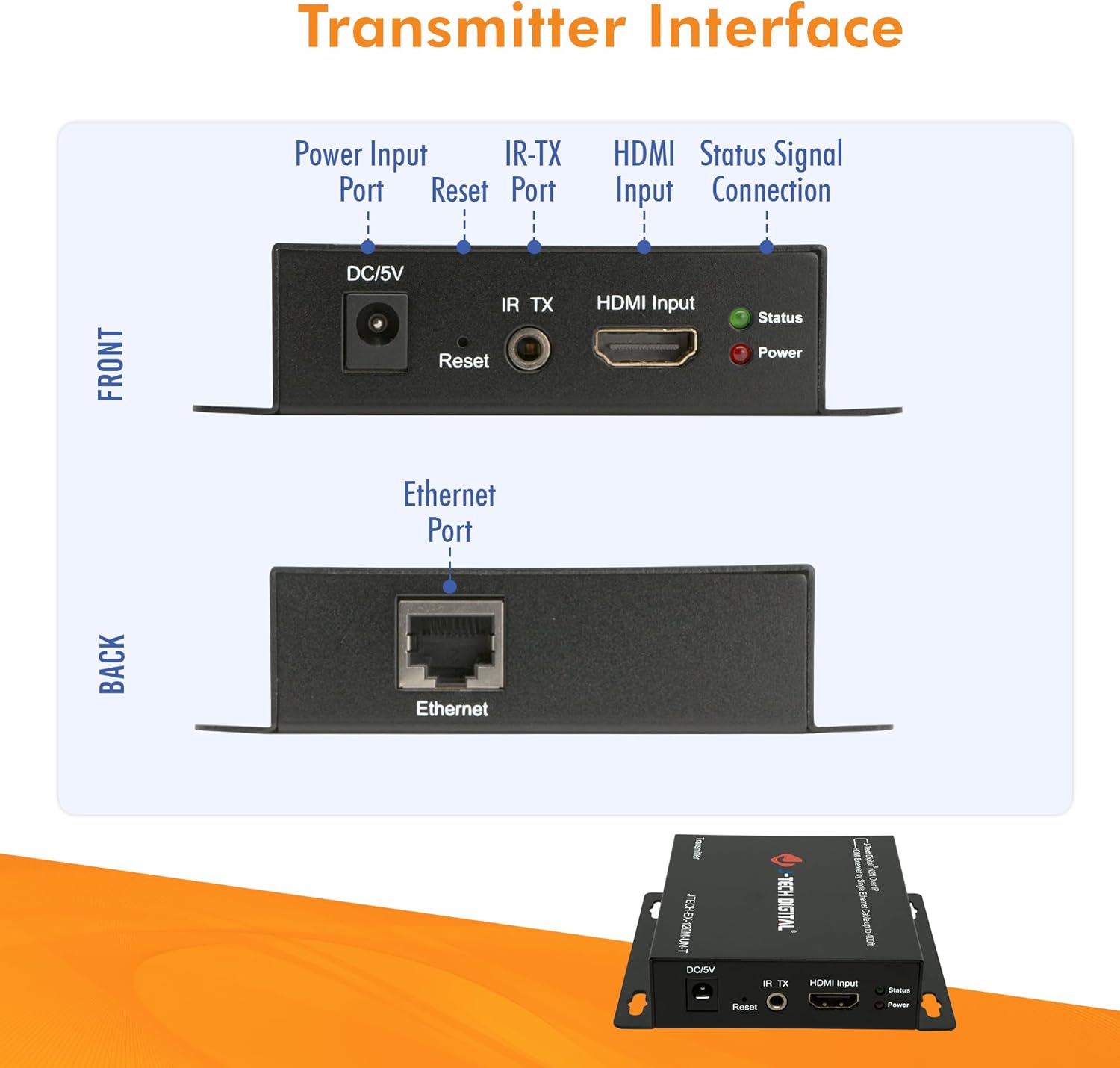
4.1. Transmitter Interface
Familiarize yourself with the ports and indicators on the Transmitter unit:
- DC/5V: Power Input Port.
- Tetapkan semula: Butang untuk menetapkan semula peranti.
- IR TX: IR Transmitter Port for sending IR signals to the source device.
- Input HDMI: Connect your HDMI source device here.
- Status: LED indicator for signal status.
- Kuasa: LED indicator for power status.
- Ethernet: RJ45 port for Cat5e/6 cable connection to the network switch or receiver.
4.2. Mod Sambungan
The J-Tech Digital HDMI Extender system supports various connection modes:
4.2.1. One-to-One Connection
In a point-to-point setup, a single Transmitter connects directly to a single Receiver via a Cat5e/6 cable. This extends the HDMI signal from one source to one display.

4.2.2. Many-to-Many Connection (Matrix Setup)
For more complex installations, multiple Transmitters and Receivers can be connected through one or more Gigabit Ethernet switches to create a flexible HDMI matrix. This allows any source to be routed to any display, or multiple displays simultaneously.

4.3. Langkah-langkah Pemasangan Asas
- Connect your HDMI source (e.g., Blu-Ray Player, Gaming Console) to the HDMI Input port of the Transmitter unit using an HDMI cable.
- Connect a Cat5e/6 Ethernet cable from the Ethernet port of the Transmitter to a Gigabit Ethernet switch (for matrix setup) or directly to a Receiver unit (for point-to-point).
- If using a matrix setup, connect Receiver units to the same or cascaded Gigabit Ethernet switches using Cat5e/6 cables.
- Connect your HDMI display (e.g., Monitor, Projector, Television) to the HDMI Output port of each Receiver unit using an HDMI cable.
- Connect the provided power adapters to all Transmitter and Receiver units, then plug them into a power outlet.
- For IR control, connect the IR TX cable to the Transmitter unit and position the IR emitter near the IR sensor of your source device.
5. Arahan Operasi
5.1. Matrix Switching via Web Antara muka
When using the J-Tech Digital ProAV Unlimited HDMI Extender system with a compatible Gigabit Ethernet switch, you can manage input-to-output routing via a web-based interface. Connect a computer to the same network as the switch to access its configuration menu.
5.2. Android App Control
An Android application is available for convenient control of the matrix switching functionality. Cari untuk "J-Tech Digital Matrix" on Google Play to download and install the app. This allows for intuitive management of your HDMI sources and displays from a mobile device.
6. Spesifikasi
| Ciri | Spesifikasi |
|---|---|
| Jenama | J-Tech Digital |
| Model | ProAV Unlimited HDMI Extender Transmitter (TX) |
| warna | Hitam |
| Jenis Penyambung | HDMI |
| Peranti Serasi | Blu-Ray Player, Gaming Console, Monitor, Projector, Television |
| Jenis Kabel | Ethernet, HDMI |
| Jarak Sambungan | Up to 120m (394ft) over Cat5e/6 cable |
| Sokongan Resolusi | 1080p, 3D |
| Sokongan HDCP | ya |
| Kawalan IR | Wideband IR (38-56 kHz) |
| UPC | 766150278057 |
| ASIN | B01C3HCZPK |

7. Penyelesaian masalah
- Tiada Gambar/Isyarat:
- Pastikan semua kabel HDMI dan Ethernet disambungkan dengan selamat.
- Verify that both the Transmitter and Receiver units are powered on.
- Check the status LEDs on the units; refer to the manual for their meaning.
- Test with shorter, certified Cat5e/6 cables to rule out cable issues.
- Ensure your display supports the output resolution (e.g., 1080p).
- Picture Flickering/Intermittent Signal:
- Periksa sambungan kabel yang longgar.
- Ensure the Cat5e/6 cable is of good quality and within the specified length limit (up to 400ft).
- Minimize electromagnetic interference by keeping cables away from power lines or other electronic devices.
- IR Control Not Working:
- Ensure the IR TX cable is correctly plugged into the Transmitter and the IR emitter is directly facing the IR sensor of the source device.
- Verify that the remote control is functioning correctly.
- Matrix Switching Issues:
- Ensure the Gigabit Ethernet switch is compatible and properly configured.
- Verify network connectivity to the switch and the extender units.
- Semak web interface settings to ensure correct input-to-output routing.
8. Penyelenggaraan
To ensure optimal performance and longevity of your J-Tech Digital HDMI Extender Transmitter, follow these maintenance guidelines:
- Keep the device in a cool, dry, and well-ventilated area.
- Avoid exposing the unit to excessive heat, moisture, or direct sunlight.
- Clean the unit with a soft, dry cloth. Do not use liquid or aerosol cleaners.
- Pastikan semua sambungan kabel selamat dan bebas daripada kerosakan.
- Periodically check for firmware updates from the J-Tech Digital website to ensure compatibility and improved performance.
9. Waranti dan Sokongan
J-Tech Digital products are designed for reliability and performance. For warranty information and technical support, please refer to the official J-Tech Digital website or contact their customer service. Their knowledgeable employees are based in Stafford, TX, and are available to assist with product inquiries and troubleshooting.
Untuk bantuan lanjut, lawati J-Tech Digital Store.