1. Maklumat Keselamatan Penting
Before using the FITFIU Fitness BEST-100 Static Bicycle, please read and understand all instructions in this manual. Keep this manual for future reference.
- Rujuk doktor sebelum memulakan sebarang program senaman.
- Ensure the bicycle is placed on a flat, stable surface.
- Jauhkan kanak-kanak dan haiwan peliharaan daripada peralatan semasa digunakan.
- The maximum recommended user weight is 100 kg.
- The maximum recommended user height is 1.65 m.
- Pakai pakaian senaman dan kasut yang sesuai.
- Berhenti bersenam serta-merta jika anda berasa pitam, pening, atau mengalami kesakitan.
- Regularly inspect the bicycle for wear and tear, especially moving parts and connections.
2. Produk Lebihview
The FITFIU Fitness BEST-100 is an ultra-compact static bicycle designed for moderate exercise at home or for rehabilitation purposes. It features a 5 kg inertia disc and 8 levels of adjustable magnetic resistance.
The integrated LCD display provides essential workout data, including speed, time, distance, and calories burned. The pedals are equipped with adjustable straps for secure foot placement.

Imej 2.1: Selesaiview of the FITFIU Fitness BEST-100 Static Bicycle.
3. Apa yang ada di dalam Kotak
Buka pek semua komponen dengan berhati-hati dan pastikan anda mempunyai item berikut:
- 1x BEST-100 Static Bicycle (Grey)
- 1x Manual Arahan (dokumen ini)
- 1x Assembly Kit (includes necessary tools and fasteners)
If any parts are missing or damaged, do not proceed with assembly. Contact customer support for assistance.
4. Arahan Perhimpunan
Assembly of the BEST-100 static bicycle requires careful attention to the provided diagrams and instructions. It is recommended to have a second person assist with certain steps.
- Base Stabilizers: Attach the front and rear stabilizer bars to the main frame using the provided bolts and nuts. Ensure they are securely tightened.
- Pedal: Identify the left (L) and right (R) pedals. Thread the left pedal counter-clockwise and the right pedal clockwise into their respective crank arms. Tighten firmly. Attach the foot straps to the pedals.
- Seat Post and Seat: Insert the seat post into the main frame. Adjust the height to your preference using the adjustment knob and secure it. Attach the seat to the seat post.
- Handlebar Post and Handlebars: Connect the handlebar post to the main frame. Attach the handlebars to the handlebar post. Ensure all connections are secure.
- Console/Display: Connect the sensor cables from the main frame to the LCD display unit. Mount the display unit onto the handlebar assembly.
- Semakan Akhir: Before first use, verify that all bolts, nuts, and connections are securely tightened. Ensure the bicycle is stable and does not wobble.

Image 4.1: Seat height adjustment mechanism. Adjust to ensure comfortable and effective pedaling.

Image 4.2: Pedals with adjustable straps for secure foot placement during exercise.
5. Arahan Operasi
5.1 Melaraskan Rintangan
The BEST-100 features 8 levels of magnetic resistance. To adjust the resistance, turn the knob located on the main frame below the handlebars. Turn clockwise to increase resistance for a more challenging workout, and counter-clockwise to decrease resistance for an easier workout.

Image 5.1: Resistance adjustment knob. Turn to select one of 8 resistance levels.
5.2 Menggunakan Paparan LCD
The LCD display tracks your workout progress. It typically shows the following metrics:
- LAJU: Kelajuan berbasikal semasa.
- MASA: Tempoh senaman anda.
- JARAK: Jumlah jarak yang dilalui semasa senaman.
- KALORI: Anggaran kalori yang dibakar.
The display is battery-powered. If the display becomes dim or unresponsive, replace the batteries (type usually AAA, refer to the battery compartment for specifics).

Image 5.2: LCD display showing workout metrics and handlebars for support.
6. Penyelenggaraan
Regular maintenance ensures the longevity and safe operation of your static bicycle.
- Pembersihan: Wipe down the bicycle with a damp kain selepas setiap penggunaan untuk mengeluarkan peluh dan habuk. Elakkan pembersih atau pelarut yang melelas.
- Pemeriksaan: Periksa semua bolt, nat dan bahagian yang bergerak secara berkala untuk memastikan kekejangan. Ketatkan sebarang pengikat yang longgar.
- Pelinciran: The magnetic resistance system is generally maintenance-free. Do not attempt to lubricate internal components unless specifically instructed by the manufacturer.
- Storan: Store the bicycle in a dry, cool place away from direct sunlight and extreme temperatures.
7. Penyelesaian masalah
If you encounter issues with your BEST-100 static bicycle, refer to the following common problems and solutions:
| Masalah | Kemungkinan Punca | Penyelesaian |
|---|---|---|
| Bicycle is unstable or wobbles. | Bolt pemasangan longgar; lantai tidak rata. | Check and tighten all assembly bolts. Ensure the bicycle is on a level surface. |
| Pedaling movement is not smooth or makes noise. | Loose components; internal friction. | Verify all connections are tight. If noise persists, contact customer support. |
| LCD display is not working or shows incorrect data. | Bateri mati; sambungan sensor longgar. | Replace the batteries in the display unit. Check that the sensor cable is securely connected. |
| Resistance adjustment is not effective. | Isu mekanisme dalaman. | Pastikan tombol rintangan berputar dengan bebas. Jika masalah berterusan, hubungi khidmat pelanggan. |
If the problem is not listed or persists after attempting the solutions, contact FITFIU Fitness customer support.
8. Spesifikasi
| Ciri | Spesifikasi |
|---|---|
| Nombor Model | 1100005 |
| Dimensi (L x W x H) | 60 x 40 x 85 cm |
| Berat Produk | 9 kg |
| Berat Pengguna Maksimum | 100 kg |
| Inertia Disc Weight | 5 kg |
| Tahap Rintangan | 8 (Boleh Laras) |
| Mekanisme Rintangan | Magnet |
| bahan | Keluli Aloi |
| Jenis Paparan | LCD |
| Fungsi Paparan | Kelajuan, Masa, Jarak, Kalori |
| warna | Kelabu |
| Sumber Kuasa (Paparan) | Dikendalikan Bateri |
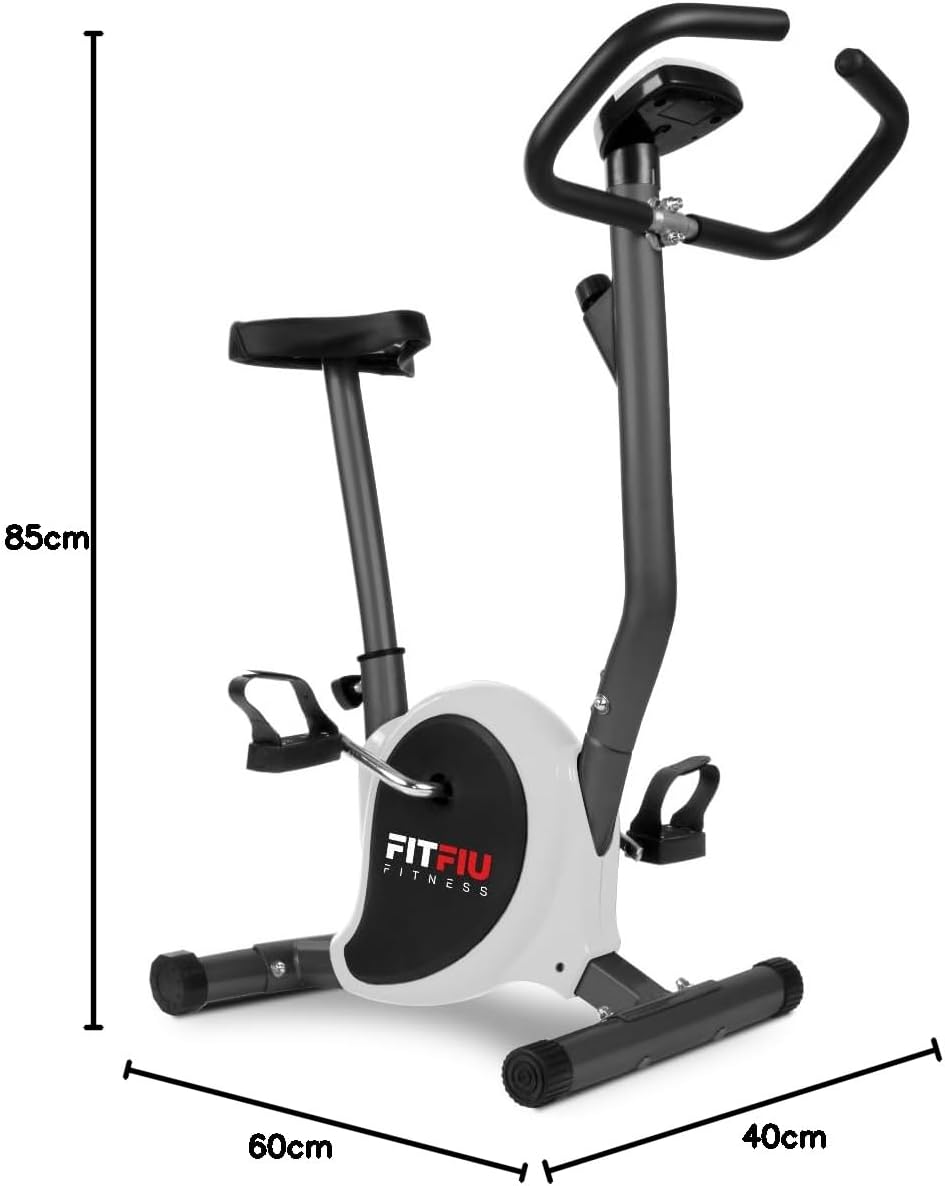
Image 8.1: Diagram showing the dimensions of the static bicycle.
9. Waranti dan Sokongan
For warranty information, product support, or to purchase replacement parts, please contact FITFIU Fitness customer service. Refer to your purchase documentation for specific warranty terms and contact details.
You can typically find support information on the official FITFIU Fitness webtapak atau melalui peruncit tempat anda membeli produk tersebut.