
RIGEXPERT AA-230
RIGEXPERT AA-230 ZOOM Antenna Analyzer
Manual Pengguna
Model: AA-230 | Brand: RIGEXPERT
pengenalan
The RIGEXPERT AA-230 ZOOM is a powerful antenna analyzer designed for testing, checking, tuning, and repairing antennas and antenna feedlines. It operates within a frequency range of 0.1 to 230 MHz, making it suitable for a wide array of amateur radio and professional applications. This manual provides essential information for the proper setup, operation, and maintenance of your device.
Please read this manual thoroughly before using the AA-230 ZOOM to ensure safe and efficient operation.
Kandungan dan Persediaan Pakej
Before beginning, ensure all components are present and undamaged. Carefully unpack the device and its accessories.

Figure 1: The AA-230 ZOOM antenna analyzer as it appears in its retail packaging, ready for unboxing.

Figure 2: The AA-230 ZOOM device alongside its essential accessories, including the USB cable, N-UHF adapter, and four AAA alkaline batteries.
Komponen yang Disertakan:
- RIGEXPERT AA-230 ZOOM Antenna Analyzer Unit
- 4 x 1.5V AAA Alkaline Batteries
- Kabel USB
- N-UHF Adapter
- Strap Cover
- Manual Pengguna (dokumen ini)
Pemasangan Bateri:
- Locate the battery compartment on the rear of the AA-230 ZOOM unit.
- Buka penutup petak bateri.
- Insert four (4) 1.5V AAA alkaline batteries, ensuring correct polarity (+/-) as indicated inside the compartment.
- Tutup penutup petak bateri dengan selamat.
Nota: The device can operate for up to 4 hours of continuous measurement or up to 2 days in standby mode on a full charge of alkaline batteries. Always use fresh alkaline batteries for optimal performance.
Menyambung ke Komputer:
The AA-230 ZOOM features a USB port for connection to a computer, enabling data transfer and potential firmware updates. Use the provided USB cable for this connection.

Figure 3: The bottom of the AA-230 ZOOM, highlighting the USB port for computer connectivity and power input.
Arahan Operasi
This section details the basic operation of your RIGEXPERT AA-230 ZOOM antenna analyzer.
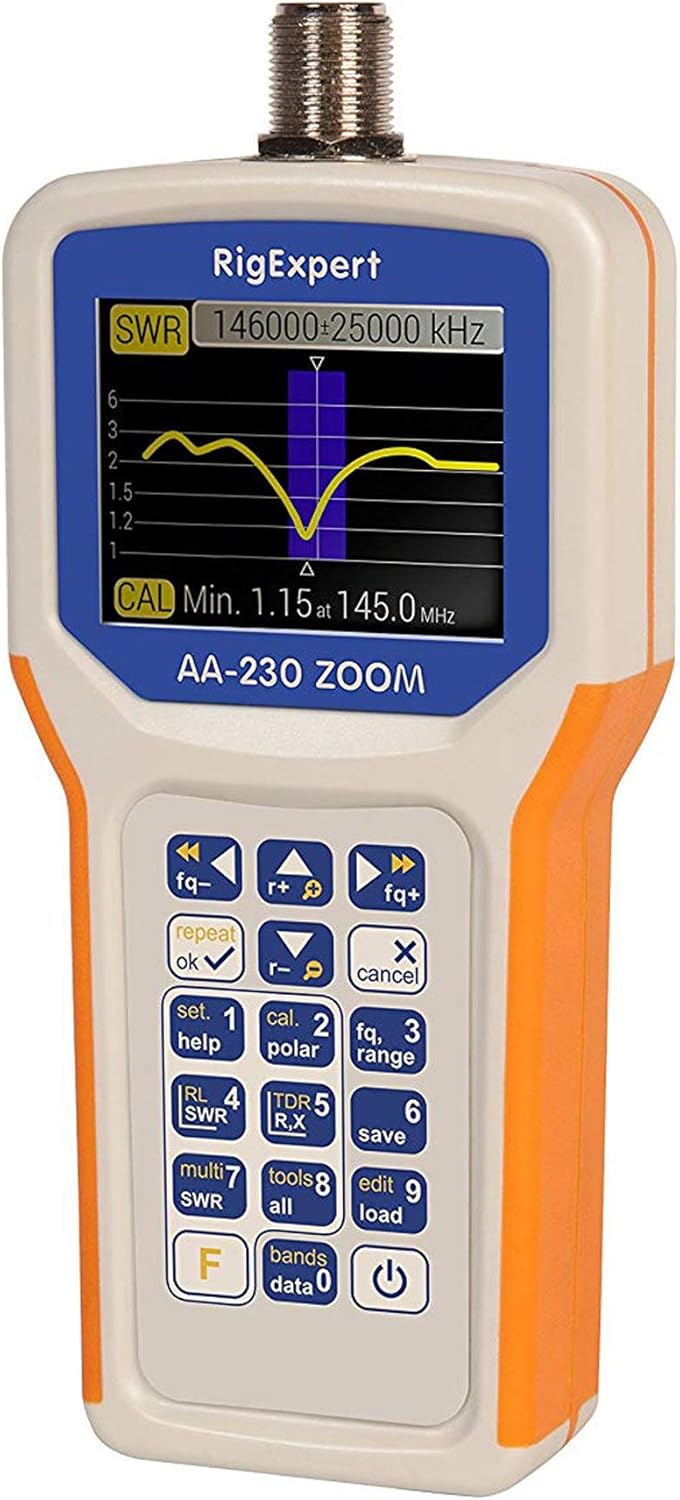
Figure 4: The main display of the AA-230 ZOOM showing an SWR sweep, along with the keypad for navigation and function selection.

Rajah 5: Satu terperinci view of the AA-230 ZOOM's screen, displaying a numerical SWR reading of 2.3 and corresponding return loss in dB.
Menghidupkan/Mematikan:
- Untuk menghidupkan peranti, tekan dan tahan butang kuasa button (usually located at the bottom right of the keypad) until the screen illuminates.
- Untuk mematikan, tekan dan tahan kuasa butang sekali lagi sehingga skrin dimatikan.
Fungsi papan kekunci:
The AA-230 ZOOM features a tactile keypad for navigating menus and selecting functions. Key functions include:
- Kawalan Kekerapan: Gunakan fq- dan fq+ buttons to adjust the operating frequency.
- OK/Repeat: Confirms selections or repeats the last measurement.
- Cancel/X: Cancels an operation or exits a menu.
- Set/Help (1): Accesses settings or displays help information.
- Cal/Polar (2): Initiates calibration or changes polarization.
- Fq/Range (3): Adjusts frequency range for sweeps.
- RL/SWR (4): Displays Return Loss or SWR.
- TDR/R,X (5): Activates Time Domain Reflectometer mode or displays Resistance and Reactance.
- Save (6): Saves current measurement data.
- Multi SWR (7): For multi-frequency SWR measurements.
- Tools/All (8): Accesses additional tools or displays all parameters.
- Edit/Load (9): Edits saved data or loads configurations.
- Bands/Data (0): Selects frequency bands or accesses stored data.
- F (Fungsi): Mengakses fungsi sekunder kunci.
Performing SWR Measurements:
- Connect the antenna or load to be tested to the N-type connector on the top of the AA-230 ZOOM. Use the N-UHF adapter if necessary.
- Hidupkan peranti.
- Navigate to the SWR measurement mode using the keypad (e.g., press RL/SWR (4)).
- Adjust the frequency using fq- dan fq+ buttons to the desired test frequency.
- The display will show the SWR value numerically and/or graphically.
- For a frequency sweep, use the Fq/Range (3) button to set the start and end frequencies.
Penyelenggaraan
Proper maintenance ensures the longevity and accuracy of your AA-230 ZOOM.
Pembersihan:
- Lap peranti dengan kain lembut dan kering.
- Untuk kotoran degil, gunakan sedikit damp kain dengan sabun lembut, kemudian lap sehingga kering dengan segera.
- Do not use abrasive cleaners, solvents, or harsh chemicals, as these can damage the casing atau skrin.
Penjagaan Bateri:
- Tanggalkan bateri jika peranti tidak akan digunakan untuk tempoh yang lama untuk mengelakkan kebocoran.
- Buang bateri terpakai mengikut peraturan tempatan.
Storan:
- Simpan peranti di tempat yang sejuk dan kering, jauh dari cahaya matahari langsung dan suhu yang melampau.
- Use the provided strap cover for protection during storage and transport.

Figure 6: The AA-230 ZOOM with its protective strap cover, which helps shield the device from dust and minor impacts during storage or transport.
Menyelesaikan masalah
If you encounter issues with your AA-230 ZOOM, refer to the following common problems and solutions:
| Masalah | Kemungkinan Punca | Penyelesaian |
|---|---|---|
| Peranti tidak dihidupkan. | Bateri mati atau tidak dipasang dengan betul. | Check battery polarity. Replace with fresh AAA alkaline batteries. |
| Inaccurate SWR readings. | Improper calibration; faulty cable/connector; external interference. | Perform a calibration. Check all cable connections. Ensure no strong RF sources are nearby. |
| Skrin kosong atau beku. | Gangguan perisian; bateri lemah. | Remove and reinsert batteries to perform a hard reset. Ensure batteries are charged. |
| Tidak dapat menyambung ke PC melalui USB. | Faulty USB cable; driver issue; incorrect port. | Try a different USB port or cable. Install necessary drivers from the RIGEXPERT website if prompted by your PC. |
Spesifikasi
Detailed technical specifications for the RIGEXPERT AA-230 ZOOM Antenna Analyzer.
| Julat Kekerapan | 0.1 hingga 230 MHz |
| Frequency Step Resolution | 1 kHz |
| Keserasian Impedans | 25, 50, 75, and 100 Ohm systems |
| SWR Measurement Range | 1-100 (numerical mode) / 1-10 (graphical mode) |
| R and X Range | 0-10000, -10000-10000 (numerical) / 0-1000, -1000-1000 (graphical) |
| Penyambung Output RF | N-jenis |
| Signal Output Form | Gelombang persegi |
| Kuasa Keluaran | -10 dBm (pada beban 50 Ohm) |
| Bekalan Kuasa | 4 x 1.5V AAA Alkaline Batteries |
| Hayat Bateri | Up to 4 hours continuous measurement / Up to 2 days standby |
| Paparan | Color TFT, 290 x 220 pixels |
| papan kekunci | Kalis air |
| Antara Muka PC | Port USB |
| Dimensi (H x W x D) | 182 x 82 x 32 mm (7.17 x 3.23 x 1.26 inci) |
| Berat badan | 236 g (0.52 paun) |
| Suhu Operasi | 0°C hingga +40°C (32°F hingga +104°F) |
| Nombor Model | AA-230 |
| UPC | 644730932592 |
Waranti dan Sokongan
For detailed warranty information, please refer to the warranty card included with your product or visit the official RIGEXPERT webtapak. Syarat jaminan mungkin berbeza mengikut wilayah dan peruncit.
For technical support, software updates, or additional resources, please visit the official RIGEXPERT support page or contact their customer service directly. Always provide your product model (AA-230) and serial number (if applicable) when seeking support.
Official RIGEXPERT Webtapak: www.rigexpert.com
Ask a question about this manual
Ask about setup, troubleshooting, compatibility, parts, safety, or missing instructions. Manuals+ will review the question and use this page’s manual context to help answer it.