
pengenalan
Thank you for choosing the Sonorous PL 2515 TV Stand. This stand is designed to provide a stable and stylish platform for your television and media devices. Featuring a black glass base, shelves, and a grey polished aluminum frame, it accommodates most televisions between 32 and 50 inches. The stand includes integrated cable management and wheels for easy repositioning.
Please read this manual carefully before assembly and use to ensure proper installation and safe operation of your new TV stand.
Maklumat Keselamatan
To prevent injury or damage to your equipment, please observe the following safety precautions:
- Ensure all components are securely fastened before placing any equipment on the stand.
- Do not exceed the maximum weight capacity of 50 kg for the television.
- Place the stand on a level and stable surface to prevent tipping.
- Keep children and pets away from the stand during assembly.
- Route all cables neatly to prevent tripping hazards and ensure proper ventilation.
- Jangan cuba mengubah suai pendirian dalam apa jua cara.
Kandungan Pakej
Before beginning assembly, please verify that all parts are present and undamaged. If any parts are missing or damaged, do not proceed with assembly and contact customer support.
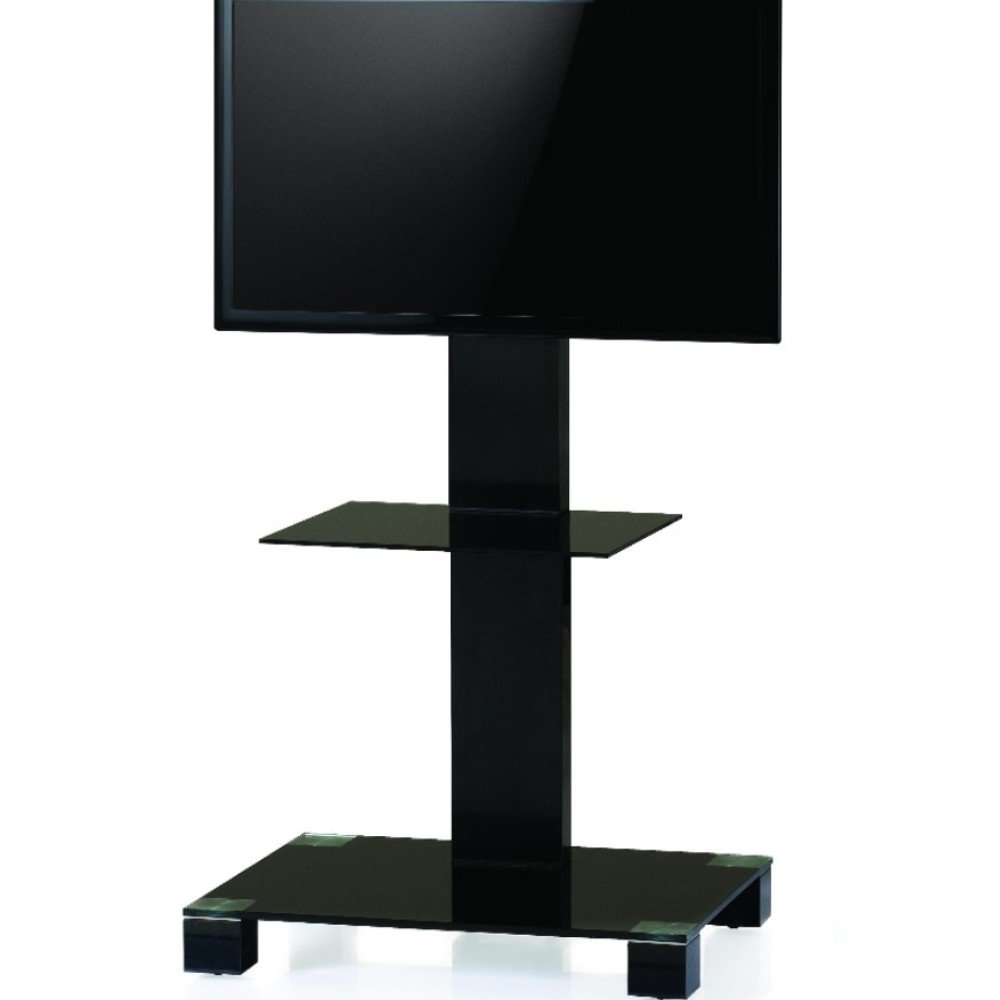
Image: The Sonorous PL 2515 TV Stand, showcasing its black glass base, central column, and TV mounting bracket. The stand features a sleek, modern design with a lower shelf for media devices.
Pakej itu hendaklah mengandungi:
- Main aluminum column
- Black tempered glass base
- Black tempered glass shelf
- pendakap pelekap TV (serasi VESA)
- Set of wheels (optional installation)
- Perkakasan pemasangan (skru, pencuci, alat)
- Manual arahan
Arahan Perhimpunan
It is recommended to assemble the stand on a soft, clean surface to prevent scratches. Two people may be required for certain steps.
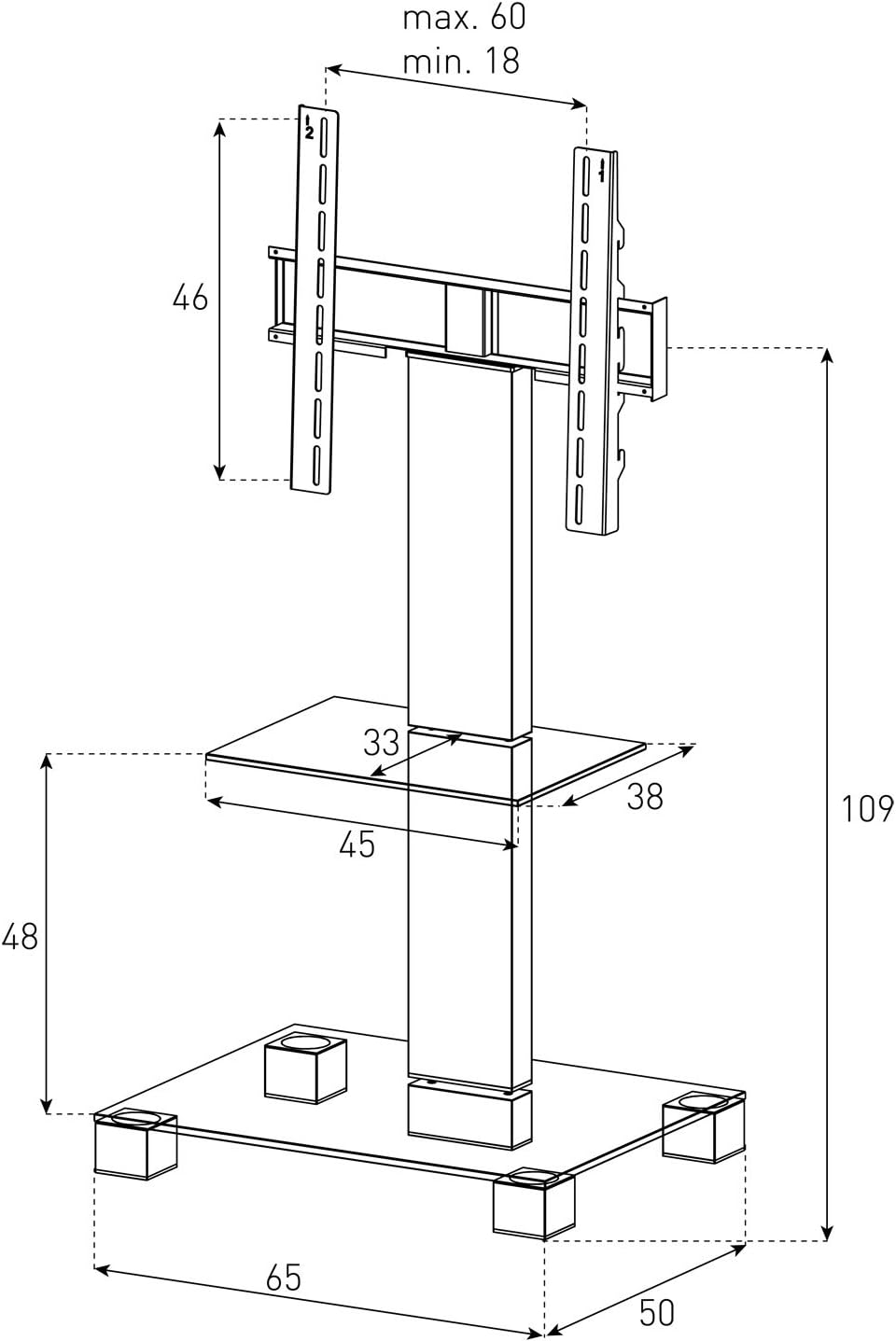
Image: A detailed technical drawing of the Sonorous PL 2515 TV Stand, illustrating its dimensions in centimeters. Key measurements include the overall height (109 cm), base width (65 cm), base depth (50 cm), shelf width (45 cm), shelf depth (38 cm), and TV bracket dimensions, along with VESA mounting patterns.
- Lampirkan Pangkalan: Carefully attach the black tempered glass base to the bottom of the main aluminum column using the provided screws and tools. Ensure it is firmly secured.
- Install Wheels (Optional): If desired, screw the wheels into the designated holes on the underside of the base. Ensure they are tightened for stability.
- Lampirkan Rak: Slide the black tempered glass shelf onto the main column at the fixed position. Note that the shelf height is not adjustable. Secure it with the appropriate fasteners.
- Mount the TV Bracket: Attach the VESA-compatible TV mounting bracket to the upper part of the main aluminum column. Ensure it is level and securely fastened.
- Prepare Your TV: Attach the smaller VESA mounting plates (if separate) to the back of your television. Refer to your TV's manual for specific instructions on VESA mounting.
- Lekapkan TV: Carefully lift your television and hook the attached mounting plates onto the TV bracket on the stand. Secure the TV to the bracket using the locking mechanisms or screws provided with the stand. Ensure the TV is centered and stable.
- Pengurusan Kabel: Utilize the internal cable management system within the main column to route and conceal all power and AV cables for a tidy appearance.
Arahan Operasi
TV Height Adjustment
The TV mounting bracket allows for continuous height adjustment of approximately +/- 8 cm. To adjust the TV height, loosen the securing screws on the bracket, carefully slide the TV to the desired height, and then re-tighten the screws firmly.
TV Swivel Function
The TV can be swiveled approximately +/- 35 degrees to the left or right. Gently push the TV to the desired viewing angle. No locking mechanism is required for the swivel function.
Pengurusan Kabel
The main column of the stand features an internal channel for cable management. Open the access points on the column, feed your cables through, and close the covers to conceal them. This helps maintain a clean and organized setup.
Penyelenggaraan
Regular maintenance will help prolong the life and appearance of your TV stand:
- Pembersihan: Gunakan yang lembut, damp cloth to clean the glass and aluminum surfaces. Avoid abrasive cleaners or solvents that could damage the finish.
- Semak Sambungan: Periodically check all screws and fasteners to ensure they remain tight and secure. Re-tighten if necessary.
- Berhabuk: Regularly dust the stand to prevent buildup, especially around electronic devices.
Menyelesaikan masalah
If you encounter any issues with your Sonorous PL 2515 TV Stand, refer to the following common problems and solutions:
- Pendirian Tidak Stabil: Ensure the stand is placed on a flat, level surface. Check that all assembly screws are fully tightened.
- TV Does Not Fit: Verify your TV's size and VESA mounting pattern against the specifications. Ensure the TV's maximum width (60 cm) and maximum weight (50 kg) are not exceeded.
- Cables are Visible/Messy: Re-route cables through the internal cable management system in the main column. Ensure all access covers are properly closed.
- Difficulty Adjusting TV Height: Loosen the securing screws on the TV bracket sufficiently before attempting to slide the TV. Do not force the adjustment.
Spesifikasi
| Ciri | Spesifikasi |
|---|---|
| Jenama | NYANYI |
| Model | PL 2515 |
| bahan | Aluminum frame, Tempered glass shelves/base |
| warna | Grey frame, Black glass |
| Jenis Pemasangan | Lantai Lantai |
| Jenis Pergerakan | Swivel (Left/Right +/- 35 degrees) |
| Saiz TV Serasi Minimum | 32 inci |
| Saiz TV Serasi Maksimum | 50 inci |
| Berat TV Maksimum | 50 kg |
| Keserasian VESA | 20x20, 30x30, 40x30, 40x40, 60x40 cm |
| Ketinggian Keseluruhan | 108 cm (adjustable +/- 8 cm for TV) |
| Lebar Asas | 60 sm |
| Kedalaman Pangkalan | 50 sm |
| Lebar Rak | 45 sm |
| Kedalaman Rak | 38 sm |
| Distance from Floor to Base | 6 sm |
| Distance between Base and Shelf | 48 sm |
| Pelarasan Ketinggian Rak | Tidak boleh laras |
| roda | Termasuk |
Waranti dan Sokongan
For warranty information and customer support, please refer to the documentation provided with your purchase or visit the official Sonorous webtapak. Simpan bukti pembelian anda untuk sebarang tuntutan waranti.