
Produk Selesaiview
The Airmaster CF71760 is a robust 24-inch industrial circulating fan designed for floor mounting. It features a powerful motor and durable construction suitable for various industrial and commercial applications. This fan provides efficient air circulation with three speed settings.
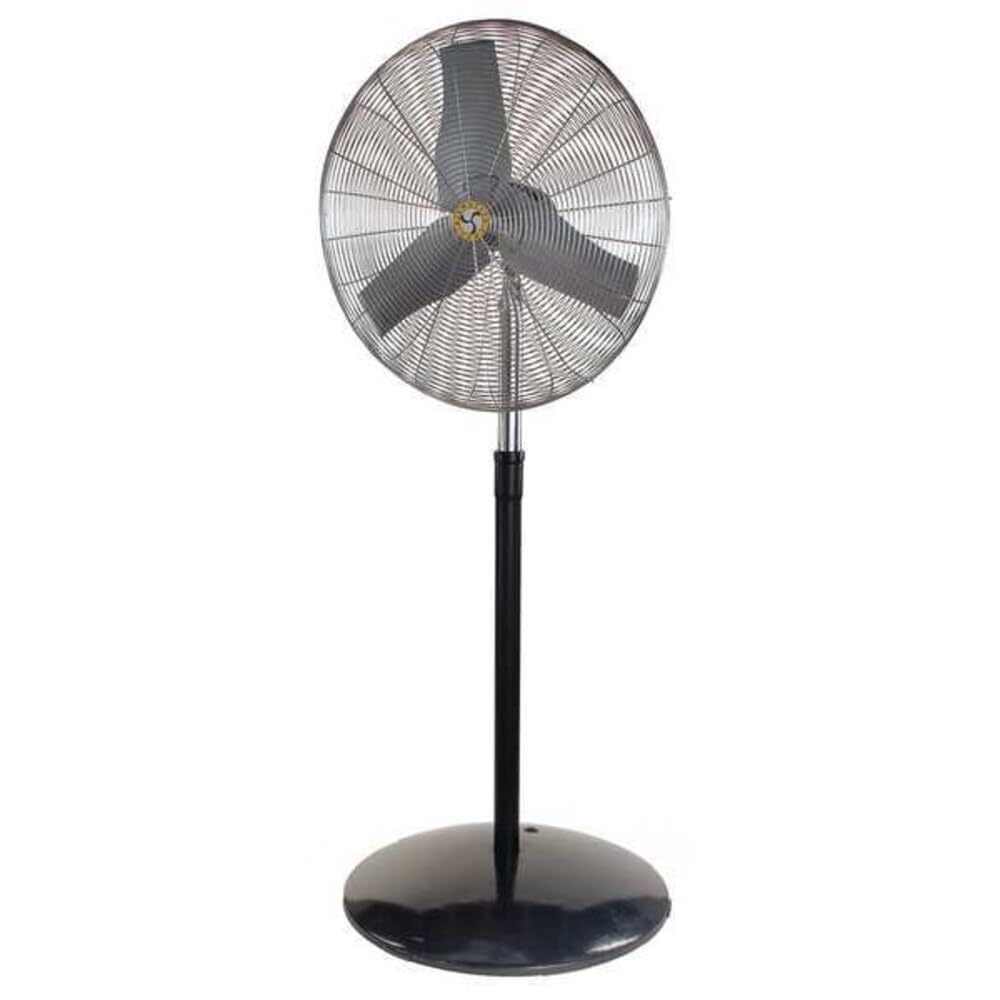
Image: The Airmaster CF71760 24-inch Industrial Floor Fan, shown assembled with its floor stand. This fan is designed for powerful air circulation in industrial settings.
Arahan Keselamatan Penting
Read all instructions carefully before using this fan. Failure to follow these instructions may result in electric shock, fire, or serious personal injury.
- Sentiasa cabut plag kipas dari soket kuasa sebelum membersihkan, menservis atau mengalihkannya.
- Jangan kendalikan mana-mana kipas dengan kord atau palam yang rosak. Buang kipas atau kembalikan ke kemudahan servis yang dibenarkan untuk pemeriksaan dan/atau pembaikan.
- Jangan gunakan tali di bawah permaidani. Jangan tutup tali dengan permaidani lempar, pelari, atau penutup yang serupa. Susun kord jauh dari kawasan lalu lintas dan di mana ia tidak akan tersandung.
- Jangan masukkan atau biarkan jari atau objek asing memasuki sebarang bukaan pengudaraan atau ekzos kerana ia boleh menyebabkan kejutan elektrik atau kebakaran, atau merosakkan kipas.
- Do not use outdoors. This fan is designed for indoor use only.
- To disconnect fan, turn controls to OFF, then remove plug from outlet.
- Gunakan kipas ini hanya seperti yang diterangkan dalam manual ini. Sebarang penggunaan lain yang tidak disyorkan oleh pengilang boleh menyebabkan kebakaran, kejutan elektrik atau kecederaan kepada orang lain.
- Avoid using extension cords if possible. If an extension cord must be used, use the shortest possible cord and ensure it is rated for the fan's power requirements.
Kandungan Pakej
Pastikan semua komponen ada sebelum pemasangan.
- Perhimpunan Ketua Kipas
- Pedestal Stand (Base and Pole)
- Mounting Hardware (Bolts, Washers, Nuts)
- Manual Pengguna
Persediaan dan Perhimpunan
Follow these steps to assemble your Airmaster CF71760 fan.
- Buka Pembungkusan Komponen: Keluarkan semua bahagian dari bungkusan dengan berhati-hati. Simpan pembungkusan untuk penyimpanan atau pengangkutan masa hadapan.
- Pasang Tapak Pedestal: Attach the pole to the base of the pedestal stand using the provided hardware. Ensure all connections are secure.
- Mount Fan Head: Secure the fan head assembly to the top of the pedestal pole. Align the mounting holes and fasten with the appropriate bolts, washers, and nuts. Do not overtighten.
- Kedudukan Kipas: Place the assembled fan on a stable, level surface. Ensure there is adequate clearance around the fan for proper airflow and to prevent obstruction.
Arahan Operasi
This section details how to operate your Airmaster CF71760 fan.
- Sambungan Kuasa: Plug the fan's power cord into a standard 115V AC electrical outlet. Ensure the outlet is properly grounded.
- Pemilihan Kelajuan: The fan features a button control for speed adjustment. Press the button to cycle through the available speed settings (Low, Medium, High) and Off.
- Melaraskan Arah Aliran Udara: The fan head can be tilted vertically to direct airflow. Loosen the adjustment knob on the side of the fan head, tilt to the desired angle, and then tighten the knob securely.
- Pengayun: The fan is equipped with an oscillation feature for wider air distribution. Locate the oscillation control (typically a knob or switch on the motor housing) and activate it as desired.
- Mematikan: To turn off the fan, cycle through the speed settings until the fan stops, or press the OFF button if available. Unplug the fan from the outlet when not in use for extended periods.
Penyelenggaraan
Penyelenggaraan yang kerap memastikan prestasi optimum dan memanjangkan jangka hayat kipas anda.
- Pembersihan: Sentiasa cabut plag kipas sebelum membersihkan. Gunakan pembersih lembutamp cloth to wipe the exterior surfaces. Do not use abrasive cleaners or solvents. For blade cleaning, carefully remove the front grille (if designed for removal) and wipe the blades. Ensure all parts are dry before reassembling and operating.
- Pelinciran Motor: The fan motor is permanently lubricated and requires no additional oiling.
- Storan: Apabila tidak digunakan, simpan kipas di tempat yang sejuk dan kering. Adalah disyorkan untuk menutup kipas untuk melindunginya daripada habuk.
Menyelesaikan masalah
| Masalah | Kemungkinan Punca | Penyelesaian |
|---|---|---|
| Kipas tidak dihidupkan. | No power to the unit; Fan not plugged in; Circuit breaker tripped. | Ensure fan is securely plugged into a live outlet. Check circuit breaker/fuse. |
| Pengurangan aliran udara. | Fan blades or grille are dirty; Obstruction near fan. | Clean fan blades and grilles. Remove any obstructions. |
| Kipas membuat bunyi yang luar biasa. | Loose parts; Fan not on a level surface; Debris in fan. | Check for loose screws or components. Place fan on a stable, level surface. Unplug and inspect for debris. |
| Fan oscillates intermittently or not at all. | Oscillation mechanism obstructed or damaged. | Ensure no obstructions are preventing oscillation. If issue persists, contact customer support. |
Spesifikasi
- model: CF71760
- Jenama: Airmaster
- Jenis Kipas: Industrial Circulating Floor Fan
- Diameter Bilah: 24 inci
- Bilangan Kelajuan: 3
- Sumber Kuasa: Elektrik Bertali
- Voltage: 115 Volt
- Kekerapan: 60 Hz
- Wattage: 260 W
- Bahan Bilah: plastik
- Jenis Pemasangan: Floor Mount, Pedestal
- Ciri Khas: Berayun
- Assembled Dimensions (Height x Width): 88 1/2 inches x 27 inches
- Berat Barang: 81 paun
- Pensijilan: cULus
Waranti dan Sokongan
Airmaster products are manufactured to high-quality standards. For warranty information or technical support, please contact Airmaster customer service.
Airmaster Customer Service: Please refer to the official Airmaster webtapak atau dokumentasi pembelian anda untuk maklumat hubungan semasa.
Anda juga boleh melawat Airmaster Store on Amazon untuk maklumat lanjut produk.