
1. Pengenalan
Terima kasih kerana membeliasing the ipega PG-9057 Wireless Game Controller. This manual provides detailed instructions for setting up, operating, and maintaining your device. Please read this manual carefully before use to ensure optimal performance and longevity of your controller.
2. Ciri-ciri Produk
- Kesambungan Tanpa Wayar: Enjoy gaming freedom with wireless connection technology.
- Keserasian Pelbagai Platform: Supports Android devices (smartphones, tablets, TV boxes) and Windows PCs.
- High Durability Buttons: Equipped with high-quality, durable buttons for extended gaming sessions.
- Kawalan Ketepatan: Features a D-pad with pressure sensitivity and a 360-degree joystick with no dead zone for accurate input.
- Reka bentuk ergonomik: Designed for comfortable grip and prolonged use.
- Pemegang Telefon Bersepadu: Conveniently mount your smartphone for mobile gaming.
3. Kandungan Pakej
Sila semak kandungan pakej semasa membuka kotak:
- ipega PG-9057 Pengawal Permainan Tanpa Wayar
- Kabel Pengecas USB
- Manual Pengguna (versi Jepun disertakan)
4. Persediaan
4.1. Mengecas Pengawal
Before first use, fully charge the controller using the provided USB cable. Connect the small end of the USB cable to the controller's charging port and the other end to a USB power source (e.g., PC, USB wall adapter).
4.2. Device Compatibility Overview
The ipega PG-9057 controller supports various devices and connection methods as shown below:

This image displays the ipega PG-9057 Wireless Game Controller, highlighting its compatibility with various devices including smartphones, tablets, personal computers, and VR headsets.
4.3. Connection Methods and System Environment
The controller offers multiple connection options depending on your device and operating system. Refer to the table below for detailed compatibility.

This table outlines the system requirements and connection methods for the ipega PG-9057 controller, detailing compatibility with Android smartphones, tablets, and TV boxes via Bluetooth 4.0 or USB, and PCs via USB.
4.3.1. Bluetooth Connection (Android Devices)
- Pastikan pengawal dicas.
- Tekan dan tahan butang RUMAH butang dan A button simultaneously until the indicator light flashes rapidly. This puts the controller into pairing mode.
- Pada peranti Android anda, pergi ke tetapan Bluetooth dan hidupkan Bluetooth.
- Cari untuk available devices and select "ipega PG-9057" (or similar name) from the list.
- Setelah dipasangkan, lampu penunjuk pada pengawal akan menjadi pepejal.
4.3.2. USB Wired Connection (Windows PC / Android Devices)
- Connect the controller to your Windows PC or Android device using the USB cable.
- The device should automatically recognize the controller. No special drivers are usually required for basic functionality.
5. Arahan Operasi
5.1. Kawalan Asas
The ipega PG-9057 features standard gamepad controls for intuitive gaming.

A terperinci view of the ipega PG-9057 controller's D-pad, joystick, and A/B/X/Y buttons, illustrating their high sensitivity and precise input capabilities.
- D-Pad: For directional input, offering pressure sensitivity.
- Kayu Joy Kiri/Kanan: 360-degree movement with no dead zone for precise control.
- Butang A/B/X/Y: Standard action buttons with zero delay response.
- L1/R1, L2/R2 Triggers: Shoulder buttons and triggers for various in-game actions.
- Butang PILIH/MULAKAN: For in-game menu navigation and actions.
- Butang rumah: To power on/off the controller or return to the main menu.
5.2. Using with a Smartphone
The controller includes an integrated holder for smartphones, allowing for a portable gaming experience.
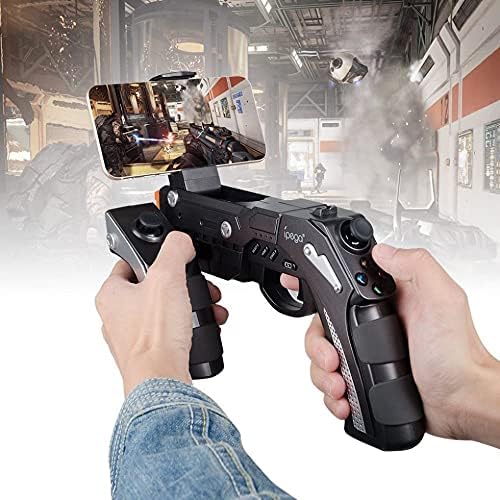
A user is shown holding the ipega PG-9057 Wireless Game Controller with a smartphone securely attached, actively engaged in mobile gaming.
- Extend the phone holder located on the top of the controller.
- Carefully place your smartphone into the holder, ensuring it is securely gripped.
- Connect the controller to your smartphone via Bluetooth as described in Section 4.3.1.
- Launch your desired game and configure controller settings if necessary.
6. Penyelenggaraan
To ensure the longevity and optimal performance of your ipega PG-9057 controller, follow these maintenance guidelines:
- Pembersihan: Use a soft, dry cloth to wipe the surface of the controller. Do not use harsh chemicals or abrasive cleaners.
- Storan: Simpan pengawal di tempat yang sejuk dan kering jauh dari cahaya matahari langsung dan suhu yang melampau.
- Elakkan Titisan: Protect the controller from drops and impacts, as this can damage internal components.
- mengecas: Do not overcharge the battery. Disconnect the charging cable once the controller is fully charged.

The ipega PG-9057 Wireless Game Controller is shown, emphasizing its construction from high-quality, durable ABS material.
7. Penyelesaian masalah
Jika anda menghadapi masalah dengan pengawal anda, sila rujuk penyelesaian biasa berikut:
- Pengawal tidak bersambung:
- Pastikan pengawal dicas sepenuhnya.
- Verify that Bluetooth is enabled on your device and the controller is in pairing mode.
- Cuba mulakan semula kedua-dua pengawal dan peranti anda.
- If using USB, ensure the cable is securely connected and try a different USB port.
- Butang atau kayu bedik tidak bertindak balas:
- Check if the controller is properly connected to your device.
- Restart the controller and reconnect.
- Ensure the game you are playing supports external controllers.
- Lag or input delay:
- Ensure there are no obstructions or excessive distance between the controller and your device.
- Kurangkan gangguan daripada peranti wayarles lain.
- For critical gaming, consider using a wired USB connection if supported by your device.
8. Spesifikasi
| Spesifikasi | Nilai |
|---|---|
| Jenama | ipega |
| Model | PG-9057 |
| Peranti Serasi | Android, Windows |
| Jenis Pengawal | Pad Permainan |
| Teknologi Sambungan | Tanpa wayar |
| Ciri-ciri | Tanpa wayar |
| Item Serasi | Android, Windows |
| Kaedah Sambungan | Tanpa wayar |
| Ciri Khas | Tanpa wayar |
| Platform Perkakasan | Kotak atas set |
| Sumber Kuasa | Dikuasakan Bateri |
| Number of Package Items | 1 |
| UPC | 602747571722 |
| ASIN | B018TSBFE4 |
| GTIN | 602747571722 |
9. Waranti dan Sokongan
For warranty information and customer support, please refer to the documentation provided with your purchase or visit the official ipega webtapak. Simpan bukti pembelian anda untuk sebarang tuntutan waranti.