
pengenalan
The Reflexion PS07BT is a versatile mobile karaoke system designed for portable entertainment. This unit combines powerful audio output with various connectivity options, including Bluetooth, USB, and AUX-in, along with microphone and guitar inputs. It features integrated light effects and a rechargeable battery, making it suitable for both indoor and outdoor use. This manual provides essential information for the safe and effective operation of your PS07BT system.
Maklumat Keselamatan
Sila baca semua arahan keselamatan dengan teliti sebelum menggunakan peranti ini. Simpan manual ini untuk rujukan pada masa hadapan.
- Jangan dedahkan unit kepada hujan, kelembapan atau suhu yang melampau.
- Elakkan meletakkan unit berhampiran sumber haba seperti radiator, dapur atau peralatan penghasil haba yang lain.
- Gunakan hanya penyesuai kuasa yang dibekalkan dengan unit.
- Jangan buka casing. Rujuk semua servis kepada kakitangan yang berkelayakan.
- Jauhkan unit daripada medan magnet yang kuat.
- Pastikan pengudaraan yang betul dan jangan menghalang sebarang bukaan pengudaraan.
- Handle the microphone and cables with care to prevent damage.
Kandungan Pakej
Sahkan bahawa semua item terdapat dalam pakej:
- Reflexion PS07BT Mobile Karaoke System
- Mikrofon
- Manual Pengguna
- Penyesuai Kuasa (tidak disenaraikan secara eksplisit tetapi tersirat untuk pengecasan)
Produk Selesaiview
Familiarize yourself with the components and controls of your Reflexion PS07BT system.

Rajah 1: Depan view of the Reflexion PS07BT Mobile Karaoke System, showcasing the speaker grille and blue LED light effects.

Gambar 2: Lebihview of the PS07BT system, highlighting its dimensions (49cm height, 20cm width), LCD display, and karaoke function.
Panel Kawalan
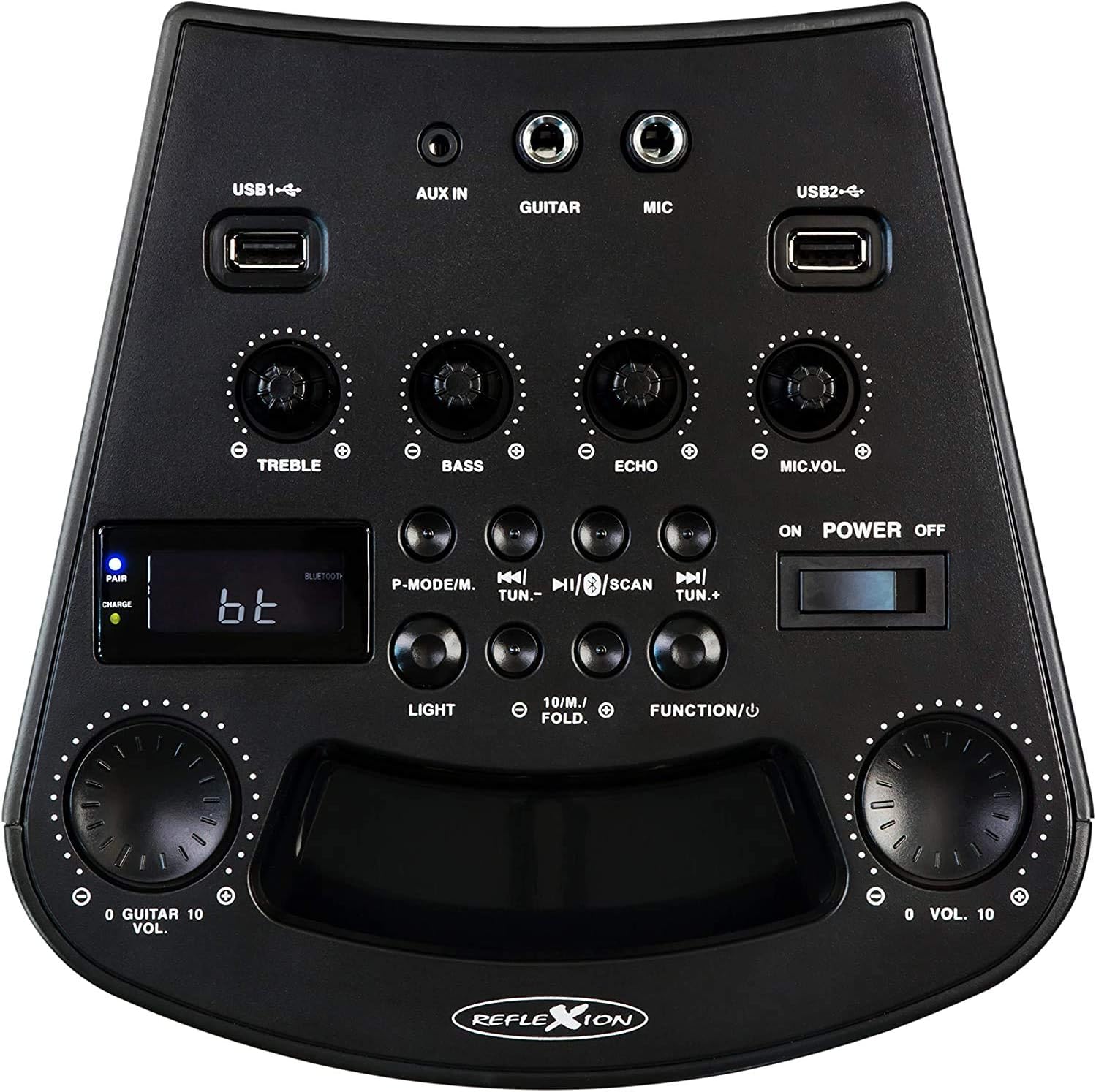
Rajah 3: Terperinci view of the PS07BT control panel, showing input ports, sound adjustment knobs, and function buttons.
- Port USB1 / USB2: Untuk memainkan audio daripada peranti storan USB.
- AUX DI: Input 3.5mm untuk sumber audio luaran.
- GITAR: Input 6.3mm untuk menyambungkan gitar.
- MIC: 6.3mm input for connecting the microphone.
- Tombol TREBLE: Melaraskan bunyi frekuensi tinggi.
- Tombol BASS: Melaraskan bunyi frekuensi rendah.
- Tombol ECHO: Melaraskan kesan gema untuk input mikrofon.
- Tombol MIC.VOL: Melaraskan kelantangan mikrofon.
- P-MODE/M Button: Program mode / Mode selection.
- TUN.- / TUN.+ Buttons: Tune down / Tune up for FM radio.
- Butang SCAN: Mengimbas stesen radio FM.
- Butang CAHAYA: Mengawal kesan cahaya LED.
- FUNCTION/U Button: Switches between input modes (Bluetooth, USB, AUX, FM).
- Tombol VOL.: Kawalan kelantangan induk.
- Suis HIDUP/MATI KUASA: Menghidupkan atau mematikan unit.
- Paparan LCD: Menunjukkan mod semasa, maklumat trek atau frekuensi FM.
- PAIR/CHARGE Indicators: Bluetooth pairing status and battery charging status.
Panel Belakang

Figure 4: Rear panel of the PS07BT, displaying the AC power input and product information label.
- Input Kuasa AC: Connect the power adapter here for charging and operation.
- Label Produk: Contains model number, serial number, and electrical specifications.
Persediaan
Mengecas Bateri
The PS07BT features a built-in rechargeable battery. Before first use, fully charge the unit.
- Connect the supplied power adapter to the AC power input on the rear of the unit.
- Palamkan penyesuai kuasa ke salur keluar dinding.
- The CHARGE indicator light will illuminate during charging.
- A full charge takes approximately 4 hours. The CHARGE indicator may change or turn off once fully charged (refer to specific indicator behavior in the quick start guide if available).
A fully charged battery provides up to 4 hours of playback time.
Connecting Microphone and Guitar
To use the karaoke or instrument features:
- Insert the microphone cable into the MIC input on the control panel.
- If connecting a guitar, insert its cable into the GITAR input.
- Laraskan MIC.VOL dan ECHO knobs as desired during operation.
Arahan Operasi
Hidupkan/Mati Kuasa
Luncurkan KUASA HIDUP/MATI switch to the 'ON' position to turn on the unit. Slide it to 'OFF' to power down.
Selecting Input Mode
Tekan ke FUNCTION/U button repeatedly to cycle through available input modes: Bluetooth (bt), USB, AUX, and FM Radio.
Sambungan Bluetooth
- Turn on the PS07BT and select 'bt' mode using the FUNCTION/U button. The 'PAIR' indicator will flash, indicating it's ready for pairing.
- Dayakan Bluetooth pada peranti mudah alih anda (telefon pintar, tablet, dll.).
- Cari untuk available devices and select 'Reflexion PS07BT' from the list.
- Once connected, the 'PAIR' indicator will stop flashing and remain solid. You can now play audio from your device through the PS07BT.
Main Balik USB
- Insert a USB storage device (e.g., USB flash drive) containing audio files ke dalam sama ada USB1 or USB2 pelabuhan.
- Select 'USB' mode using the FUNCTION/U butang.
- The unit will automatically begin playing audio files from the USB device. Use the track control buttons (usually combined with TUN.-/TUN.+) to navigate tracks.
AUX-In Connection
- Connect an external audio source (e.g., MP3 player, laptop) to the AUX IN port menggunakan kabel audio 3.5mm.
- Select 'AUX' mode using the FUNCTION/U butang.
- Play audio from your external device. The volume can be controlled via both the external device and the PS07BT's master volume knob.
Operasi Radio FM
- Select 'FM' mode using the FUNCTION/U butang.
- Tekan ke IMBAS butang untuk mengimbas dan menyimpan stesen radio FM yang tersedia secara automatik.
- Gunakan TUN.- dan TUN.+ buttons to manually tune to stations or select saved stations.
Fungsi Karaoke
With a microphone connected to the MIC input, you can sing along to music playing from any source (Bluetooth, USB, AUX, FM). Adjust the MIC.VOL knob to control your voice volume and the ECHO knob for an echo effect.
Kesan Cahaya
Tekan ke CAHAYA button to activate or change the integrated blue LED light effects, which can synchronize with the music beat.
Pelarasan Kelantangan dan Bunyi
- Jumlah Induk: Gunakan yang besar VOL. knob to adjust the overall sound output level.
- Treble / Bass: Gunakan TREBLE dan BASS knobs to fine-tune the audio's high and low frequencies.
Penyelenggaraan
Pembersihan
Wipe the unit with a soft, dry cloth. Do not use abrasive cleaners, waxes, or solvents as they may damage the finish. Ensure the unit is powered off and unplugged before cleaning.
Penyimpanan
When not in use for extended periods, store the unit in a cool, dry place, away from direct sunlight and extreme temperatures. It is recommended to fully charge the battery before storing and to recharge it every few months to maintain battery health.
Menyelesaikan masalah
If you encounter issues with your PS07BT, refer to the following common problems and solutions:
| Masalah | Penyelesaian yang Mungkin |
|---|---|
| Tiada kuasa | Ensure the power adapter is securely connected and plugged into a working outlet. Check if the battery is charged. Slide the POWER switch to ON. |
| Tiada bunyi | Increase the master VOL. knob. Check the volume on your connected audio source (e.g., phone). Ensure the correct input mode (Bluetooth, USB, AUX, FM) is selected. Check all cable connections. |
| Bluetooth tidak bersambung | Ensure the unit is in 'bt' mode and the 'PAIR' indicator is flashing. Turn off and on Bluetooth on your device. Move your device closer to the PS07BT. Forget the device from your phone's Bluetooth list and try pairing again. |
| Mikrofon tidak berfungsi | Ensure the microphone is securely plugged into the MIC input. Increase the MIC.VOL knob. Check if the microphone has its own ON/OFF switch and is turned on. |
| Isu main balik USB | Ensure the USB device is formatted correctly (FAT32 recommended) and contains compatible audio files. Cuba peranti USB lain. |
Spesifikasi
Technical details for the Reflexion PS07BT Mobile Karaoke System:
- Nama Model: PS07BT
- Dimensi (L x W x H): 20.2 x 49 x 20.1 cm
- Berat: 2 Kilogram
- Max Speaker Output Power: 320 Watt
- Teknologi Ketersambungan: Bluetooth
- Mod Output Audio: Stereo
- Bahan: plastik
- Jenis pembesar suara: Subwufer
- Ciri Khas: Bluetooth, Port USB
- Purata Hayat Bateri: 4 jam
- Masa Pengecasan: 4 jam
- Kaedah Kawalan: Touch (referring to buttons/knobs)
- Total USB 2.0 Ports: 2
- warna: Hitam
- Sumber Kuasa: Elektrik Berwayar / Bateri

Figure 5: The PS07BT's integrated handle allows for easy portability.
Waranti dan Sokongan
The Reflexion PS07BT comes with a spare parts availability period of 1 year. For technical support or warranty inquiries, please contact your retailer or the manufacturer's customer service. Keep your proof of purchase for warranty claims.