
1. Pengenalan
Thank you for choosing the Siemens iQ700 FlexInduction Hob EX275FXB1E. This instruction manual provides essential information for the safe and efficient operation, installation, and maintenance of your new appliance. Please read this manual thoroughly before using the hob and keep it for future reference.
2. Maklumat Keselamatan
Sentiasa patuhi garis panduan keselamatan berikut untuk mengelakkan kemalangan dan kerosakan pada perkakas:
- Keselamatan Elektrik: Ensure the hob is correctly installed by a qualified electrician. Do not use if the power cord is damaged.
- Bahaya Bakar: The hob surface becomes hot during operation. Do not touch hot surfaces. Use oven mitts.
- Terlalu panas: Never leave cooking unattended. Oils and fats can ignite if overheated.
- Kanak-kanak dan Haiwan Kesayangan: Jauhkan kanak-kanak dan haiwan peliharaan dari perkakas semasa operasi dan penyejukan.
- Perentak jantung: Individuals with pacemakers should consult their doctor before using induction hobs.
- Pembersihan: Disconnect from power before cleaning. Allow the hob to cool completely.
3. Produk Lebihview
The Siemens iQ700 FlexInduction Hob EX275FXB1E features advanced induction technology for fast, precise, and safe cooking. It includes two flexible cooking zones, a TouchSlider control panel, and various functions to enhance your cooking experience.
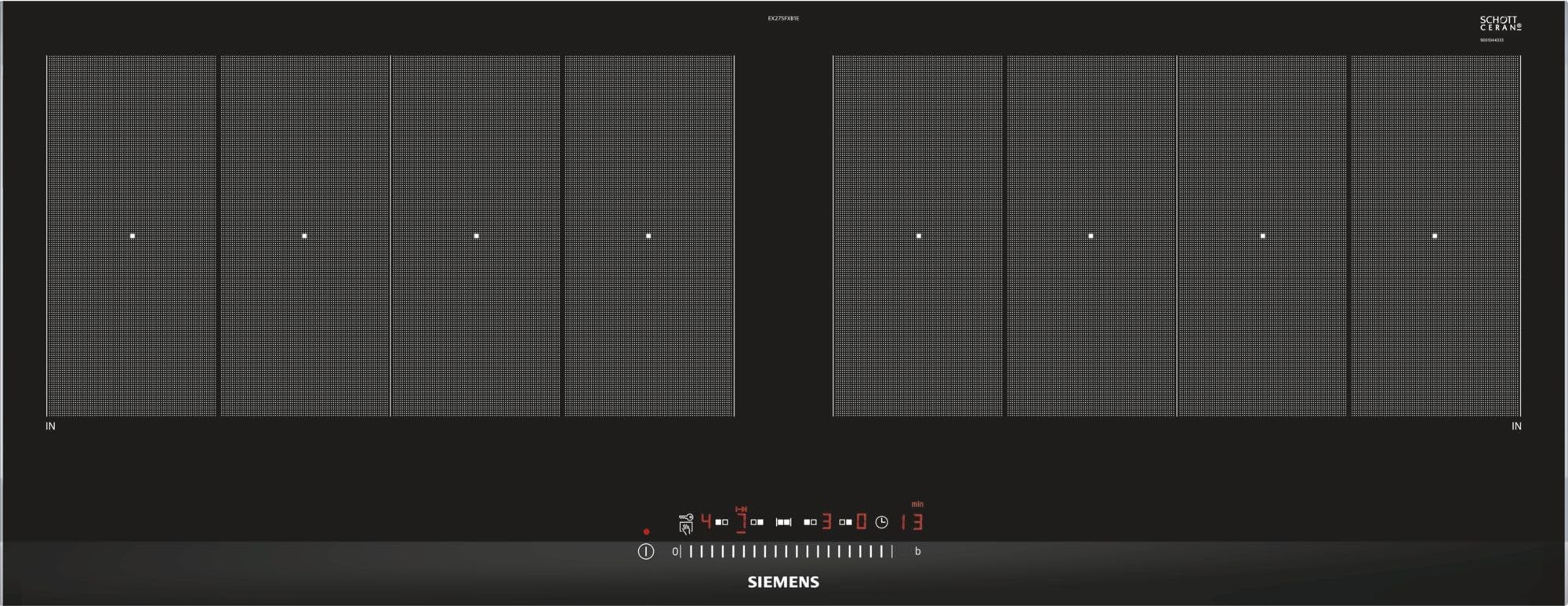
Rajah 3.1: Atas view of the Siemens iQ700 FlexInduction Hob EX275FXB1E, showing the two flexible cooking zones and the central TouchSlider control panel.
Ciri-ciri Utama:
- FlexInduksi: Combines multiple cooking zones into one large zone for flexible pot placement.
- TouchSlider Control: Allows precise power level selection by sliding a finger across the control panel.
- Fungsi PowerBoost: Increases power to a cooking zone for faster heating.
- Mula Pantas: Automatically detects the position of cookware on the hob.
- Fungsi Memori: Mengingatkan semula tetapan memasak sebelumnya.
- 17 Tahap Kuasa: Offers fine control over cooking temperature.
4. Persediaan dan Pemasangan
Installation of the Siemens iQ700 FlexInduction Hob EX275FXB1E should only be performed by a qualified technician or electrician in accordance with local regulations and the provided installation instructions. Incorrect installation can lead to hazards and void the warranty.
4.1 Membongkar
- Tanggalkan hob dari pembungkusannya dengan berhati-hati.
- Inspect the appliance for any signs of damage. Do not install a damaged hob.
- Ensure all components listed in the packing contents are present.
4.2 Countertop Preparation
- The countertop cutout dimensions are crucial for proper fit. Refer to the technical specifications for exact measurements (91.2 cm width x 35 cm depth).
- Ensure adequate ventilation space beneath the hob as specified in the separate installation guide.
4.3 Sambungan Elektrik
- The hob requires a dedicated electrical circuit.
- Connect the hob to a 220 Volt power supply.
- The electrical connection must comply with local wiring regulations.
5. Arahan Operasi
This section details how to use the various functions of your Siemens iQ700 FlexInduction Hob.
5.1 Menghidupkan / Mematikan
- To switch on, touch the main On/Off symbol.
- To switch off, touch and hold the main On/Off symbol until the display turns off.
5.2 Selecting a Cooking Zone and Power Level
- Letakkan alat memasak yang sesuai pada zon memasak yang dikehendaki.
- Touch the corresponding cooking zone selection symbol.
- Use the TouchSlider to select a power level from 1 to 9, or intermediate levels. Slide your finger along the scale or tap directly on the desired level.
5.3 FlexInduction Function
The FlexInduction feature allows you to combine two individual cooking zones into one large flexible zone. This is ideal for larger pots, pans, or multiple smaller items.
- To activate, place cookware on the flexible zone and select one of the zones.
- Press the FlexInduction symbol. The display will indicate that the zones are linked.
- Adjust the power level using the TouchSlider.
5.4 PowerBoost Function
The PowerBoost function provides a temporary increase in power to a selected cooking zone, significantly reducing heating times for large quantities of liquid or for searing.
- Pilih zon memasak yang dikehendaki.
- Press the PowerBoost symbol. The display will show 'P'.
- The function will automatically switch off after a set time or when the maximum temperature is reached.
5.5 QuickStart Function
QuickStart automatically detects the presence and position of cookware on the hob when switched on, allowing you to quickly select a power level without manually selecting the zone first.
- Place cookware on the hob.
- Switch on the hob. The hob will detect the cookware.
- Select the desired power level using the TouchSlider.
5.6 Fungsi Memori
The memory function allows you to recall the last used power settings for a cooking zone, useful for frequently prepared dishes.
- After switching on the hob, press the memory symbol within a few seconds.
- The hob will recall the last used settings for the active zone.
5.7 Fungsi Pemasa
The timer can be set for individual cooking zones to switch them off automatically after a set period, or as a simple minute minder.
- To set a cooking zone timer: Select the zone, then press the timer symbol and adjust the time using the +/- controls.
- To set a minute minder: Press the timer symbol without selecting a zone, then adjust the time.
6. Pembersihan dan Penyelenggaraan
Proper cleaning and maintenance will ensure the longevity and optimal performance of your induction hob.
6.1 Pembersihan Harian
- Always ensure the hob is switched off and cool before cleaning.
- Lap permukaan kaca seramik dengan kain lembut dan detergen ringan.
- For stubborn stains, use a specialized ceramic hob cleaner and a scraper designed for glass hobs.
- Rinse with clean water and dry thoroughly to prevent water marks.
6.2 Mengelakkan Kerosakan
- Jangan gunakan pembersih yang kasar, pad penggosok atau bahan kimia yang keras.
- Avoid dropping heavy or sharp objects on the hob surface.
- Do not slide rough-bottomed cookware across the surface to prevent scratches.
7. Penyelesaian masalah
Sebelum menghubungi khidmat pelanggan, sila rujuk panduan penyelesaian masalah berikut untuk isu-isu biasa.
| Masalah | Kemungkinan Punca | Penyelesaian |
|---|---|---|
| Hob tidak dihidupkan. | Tiada bekalan kuasa; kunci kanak-kanak diaktifkan. | Check circuit breaker; deactivate child lock (refer to full manual for specific steps). |
| Zon memasak tidak dipanaskan. | Alat memasak yang salah; alat memasak tidak berpusat; zon tidak dipilih. | Use induction-compatible cookware; center cookware; select the correct zone. |
| Paparan menunjukkan kod ralat. | Kesalahan khusus dikesan. | Note the error code and consult the full user manual or contact customer service. |
| Bunyi luar biasa semasa operasi. | Normal induction fan noise; cookware resonance. | Some noises are normal. If excessively loud or unusual, contact service. |
8. Spesifikasi Teknikal
The following are the technical specifications for the Siemens iQ700 FlexInduction Hob EX275FXB1E:
- Nombor Model: EX275FXB1E
- Dimensi (H x W x D): 5.1 cm x 91.2 cm x 35 cm
- Berat: 14 kg
- Output Kuasa: 7400 Watt
- Voltage: 220 Volt
- Bilangan Elemen Pemanas: 4 (configurable into 2 FlexInduction zones)
- Jenis Kawalan: TouchSlider (Electronic)
- Bahan Permukaan: Kaca Seramik
- Bahan Bingkai: Keluli Tahan Karat
- Fungsi Khas: 17 Power Levels, FlexInduction, PowerBoost, QuickStart, Memory Function
- Jenis bahan api: Elektrik
9. Waranti dan Sokongan
For warranty information and customer support, please refer to the warranty card included with your appliance or visit the official Siemens Home Appliances webtapak. Simpan resit pembelian anda sebagai bukti pembelian.
In case of technical issues not covered in the troubleshooting section, please contact authorized Siemens service personnel.