1. Pengenalan
The Shure BLX14/SM31 Wireless Microphone System is engineered for clear, reliable audio performance, particularly suited for fitness and aerobics instructors. This system combines the robust BLX4 single-channel receiver with the comfortable and durable SM31FH fitness headset condenser microphone and BLX1 bodypack transmitter. Enjoy wireless freedom with easy setup and up to 14 hours of continuous use.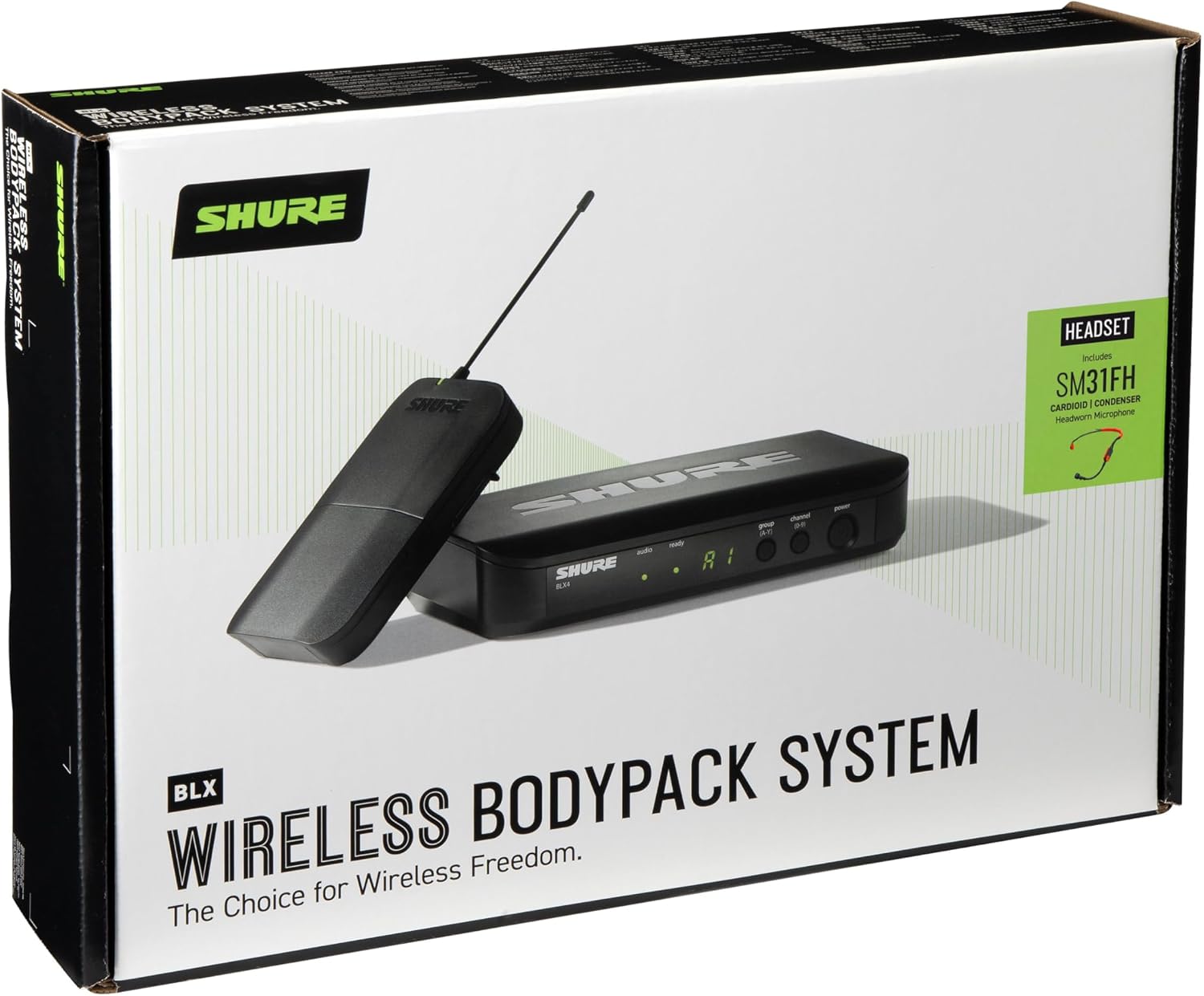
2. Apa yang ada di dalam Kotak
Your Shure BLX14/SM31 Wireless Microphone System package includes the following components:
- BLX4 single-channel receiver
- Bekalan kuasa
- BLX1 wireless bodypack transmitter
- Klip tali pinggang
- SM31FH fitness headset condenser mic
- Klip pakaian
- Cermin hadapan
- 2x bateri AA
- Panduan pengguna
3. Komponen Produk Selesaiview
BLX4 Single Channel Receiver
The BLX4 receiver is the central unit for your wireless system, featuring a user-friendly interface for channel selection and monitoring.


Pemancar Bodypack BLX1
The BLX1 bodypack transmitter is compact and durable, designed to be worn comfortably. It connects to the SM31FH headset microphone.


SM31FH Fitness Headset Condenser Microphone
The SM31FH is a durable, moisture-resistant headset microphone designed for active use in fitness and aerobics environments.

4. Persediaan
4.1. Wireless Frequency Band Selection
Before setting up, ensure the selected wireless frequency band (H9 Band: 512-542 MHz for this model) is suitable for your area. Refer to the Shure website's Wireless Frequency Finder for detailed regional information.

4.2. Persediaan Penerima
Follow these steps to set up your BLX4 receiver:
- penempatan: Position the receiver in a location that maintains a clear line of sight to the transmitter, minimizing obstructions.
- Sambungan Kuasa: Securely connect the included power supply to the receiver's power input.
- Output Audio: Connect the receiver to your sound system (mixer or amplifier) using either the XLR output (Mic Out) or the 1/4" output (Instrument Out).
- Hidupkan kuasa: Hidupkan penerima dengan menekan butang kuasa.
- Imbasan Kumpulan: Press the 'group' button on the receiver to perform an automatic scan for the best available group and channel. The receiver will display the selected group and channel. Ensure all transmitters are off during this scan.
4.3. Persediaan Pemancar
Prepare your BLX1 bodypack transmitter and SM31FH headset microphone:
- Pasang Bateri: Open the battery compartment of the BLX1 bodypack transmitter and insert two AA batteries, ensuring correct polarity.
- Sambungkan Mikrofon: Plug the SM31FH headset microphone into the TA4F (TGQ) connector on the BLX1 bodypack transmitter.
- Hidupkan kuasa: Hidupkan pemancar.
- Match Group and Channel: Set the group and channel on the transmitter to match the settings displayed on the receiver. Use the 'group' and 'channel' buttons within the battery compartment to cycle through options until they align with the receiver.
5. Operasi
5.1. Performing a Soundcheck
After initial setup, perform a soundcheck to ensure optimal audio levels and clear transmission:
- Activate System: Ensure both the receiver and transmitter are powered on. The 'ready' LED on the receiver should be illuminated.
- Ujian Audio: Speak or sing into the SM31FH headset microphone at typical performance levels. Observe the 'audio' LED on the receiver.
- Laraskan Keuntungan: If the 'audio' LED is consistently red, indicating excessive sound levels (overload), adjust the gain setting on the BLX1 bodypack transmitter. For the bodypack, rotate the gain dial to decrease the setting. For handheld transmitters (if applicable), press and hold the 'channel' button for 5 seconds until a dot appears, then adjust. Aim for the 'audio' LED to be green most of the time, with occasional red flashes during peak audio.
5.2. Petua Operasi Am
- Hayat Bateri: The BLX transmitters provide up to 14 hours of power from a single pair of AA batteries.
- Julat Operasi: The system operates up to a range of 300 feet (100m) under optimal conditions. Maintain line of sight between the transmitter and receiver for best performance.
- Peluasan Sistem: You can run up to 12 channels per frequency band, allowing for multiple wireless systems in one location.
6. Penyelenggaraan
To ensure the longevity and optimal performance of your Shure BLX14/SM31 Wireless Microphone System, follow these maintenance guidelines:
- Pembersihan: Regularly wipe down the receiver, transmitter, and headset microphone with a soft, dry cloth. Avoid using harsh chemicals or abrasive materials.
- Penjagaan Bateri: Remove batteries from the transmitter if the system will not be used for an extended period to prevent leakage. Use high-quality AA batteries for best performance.
- Storan: Store the system in a cool, dry place away from extreme temperatures and humidity. The included carrying case is ideal for protection during transport and storage.
- Headset Hygiene: For the SM31FH headset, regularly clean the microphone windscreen and replace it if it becomes worn or damaged.
7. Penyelesaian masalah
If you encounter issues with your Shure BLX14/SM31 Wireless Microphone System, consider the following common troubleshooting steps:
- Tiada Audio/Audio Intermittent:
- Check all cable connections (power, audio output, microphone to transmitter).
- Ensure both the receiver and transmitter are powered on and the 'ready' LED on the receiver is lit.
- Verify that the transmitter and receiver are set to the same group and channel.
- Replace batteries in the transmitter if they are low or depleted.
- Ensure there is a clear line of sight between the transmitter and receiver, free from obstructions.
- Kualiti/Gangguan Bunyi Lemah:
- Perform a new group scan on the receiver to find a clearer frequency.
- Adjust the transmitter gain to prevent audio overload (red 'audio' LED).
- Move the receiver away from potential sources of interference (e.g., Wi-Fi routers, other wireless devices, large metal objects).
- Ensure the SM31FH microphone is positioned correctly near the mouth.
8. Spesifikasi
| Ciri | Spesifikasi |
|---|---|
| Nama Model | BLX14/SM31 Wireless Cardioid Fitness Headset Microphone System |
| Jenama | Shure |
| Nombor Model Item | BLX14/SM31-H9 |
| Jalur Frekuensi Tanpa Wayar | H9 Band (512-542 MHz) |
| Faktor Bentuk Mikrofon | Headset (SM31FH) |
| Corak Kutub | Tidak arah (Cardioid) |
| Teknologi Ketersambungan | Tanpa wayar |
| Sumber Kuasa | Corded Electric (Receiver), Battery Powered (Transmitter) |
| Jenis Bateri | 2 bateri AA diperlukan (termasuk) |
| Hayat Bateri | Sehingga 14 jam |
| Julat Operasi | Sehingga 300 kaki (100m) |
| Bilangan Saluran | 1 (single channel receiver) |
| Max Systems per Frequency Band | Up to 12 (region and environment dependent) |
| Respons Kekerapan | 20 KHz |
| Nisbah Isyarat-ke-Bunyi | 76 dB |
| Impedans | 150 ohm |
| Berat Barang | 2.8 paun |
| Dimensi Produk (L x W x H) | 13.5 x 12 x 4 inci |
| bahan | Keluli Tahan Karat |
| Tarikh Mula-mula Tersedia | 6 Oktober 2015 |
9. Waranti & Sokongan
The Shure BLX14/SM31 Wireless Microphone System includes a 2-YEAR WARRANTY, providing peace of mind for your investment.
For additional support, detailed product information, or to access the Shure Wireless Frequency Finder, please visit the official Shure website. You can also contact Shure customer service for technical assistance.