
1. Pengenalan
This manual provides detailed instructions for the installation, operation, and maintenance of your Zmodo ZM-KW1001-O4-1TB HD Camera System. Please read this manual thoroughly before using the product to ensure proper setup and functionality. Keep this manual for future reference.
2. Produk Lebihview
2.1 Ciri-ciri Utama
- 720p HD video for clear and sharp images.
- Smartlink wireless configuration for quick setup.
- Motion detection alerts to notify you of activity.
- IP66 rated outdoor cameras for weather resistance.
- Infrared night vision for surveillance in low-light conditions.
- Integrated 1TB hard drive for local video storage.
2.2 Komponen Sistem
The Zmodo ZM-KW1001-O4-1TB system typically includes the following components:
- Wireless Network Video Recorder (NVR) with 1TB HDD
- HD Wireless Cameras (quantity may vary, typically 4)
- Penyesuai Kuasa untuk NVR dan Kamera
- Kabel Ethernet
- Skru dan Penambat Pemasangan
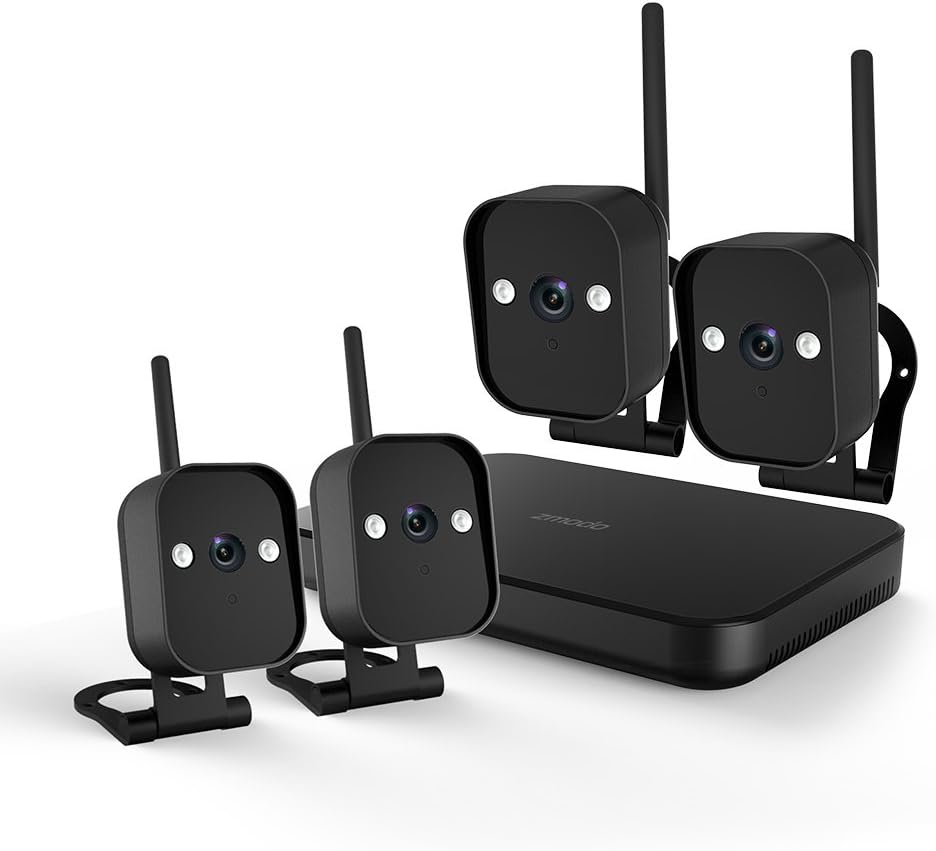
Rajah 1: Berakhirview of the Zmodo ZM-KW1001-O4-1TB HD Camera System, showing the NVR unit and four wireless cameras.
3. Arahan Persediaan
3.1 Membuka Kotak dan Pemeriksaan Awal
Carefully unpack all components and verify that all items listed in Section 2.2 are present and undamaged. If any items are missing or damaged, contact customer support.
3.2 Sambungan NVR
- Connect the NVR to a power outlet using the provided power adapter.
- For initial setup and optimal performance, connect the NVR to your router using the supplied Ethernet cable.
- Connect the NVR to a monitor via HDMI or VGA cable (not included) if local viewing dikehendaki.

Rajah 2: The Zmodo Network Video Recorder (NVR) unit, which stores recordings and manages camera connections.
3.3 Pemasangan dan Penggandingan Kamera
The cameras are designed for both indoor and outdoor use with an IP66 weather-resistant rating. Ensure cameras are placed within range of the NVR's wireless signal.
- Hidupkan Kamera: Sambungkan setiap kamera kepada penyesuai kuasa masing-masing dan pasangkannya ke soket kuasa.
- Smartlink Pairing: The cameras should automatically attempt to pair with the NVR. Follow the on-screen prompts on the connected monitor or use the Zmodo app for Smartlink setup. If pairing fails, refer to the troubleshooting section.
- Pemasangan: Choose suitable locations for your cameras. Use the provided screws and anchors to securely mount the cameras. Ensure a clear line of sight and optimal viewsudut ing.

Rajah 3: A Zmodo wireless camera shown with its wall-mounting bracket, suitable for outdoor installation.

Rajah 4: A Zmodo wireless camera shown with its stand mount, ideal for indoor placement on flat surfaces.
3.4 Mobile App Configuration
- Download the Zmodo app from the App Store (iOS) or Google Play Store (Android).
- Create a new account or log in to an existing one.
- Follow the in-app instructions to add your Zmodo NVR system. This typically involves scanning a QR code on the NVR or manually entering device details.
- Setelah ditambah, anda sepatutnya boleh view suapan langsung daripada kamera anda.
4. Arahan Operasi
4.1 Langsung View
Access the Zmodo app or the NVR's local interface to view live video streams from your cameras. You can typically select individual cameras or view multiple feeds simultaneously.
4.2 Pengesanan Gerakan dan Makluman
The system is equipped with motion detection capabilities. When motion is detected, the system can record footage and send alerts to your mobile device.
- Konfigurasi: In the Zmodo app or NVR settings, navigate to the motion detection section. You can customize detection zones, sensitivity levels, and alert schedules.
- Makluman: Ensure push notifications are enabled for the Zmodo app on your mobile device to receive timely alerts.
4.3 Rakaman dan Main semula
The NVR includes a 1TB hard drive for continuous or motion-activated recording.
- Tetapan Rakaman: Configure recording modes (continuous, scheduled, motion-activated) via the NVR's local interface or the Zmodo app.
- Main balik: Untuk kembaliview dirakam footage, access the playback feature in the Zmodo app or directly on the NVR. Select the desired date and time to view peristiwa.
4.4 Penglihatan Malam
The cameras feature infrared night vision, allowing them to capture clear video in low-light or complete darkness. The system automatically switches to night vision mode when ambient light levels are insufficient.
5. Penyelenggaraan
- Pembersihan Kamera: Bersihkan kanta kamera secara berkala dengan lembut, damp kain untuk memastikan kualiti imej yang jelas. Elakkan pembersih yang kasar.
- Kemas kini Firmware: Check the Zmodo app or website regularly for firmware updates. Keeping your system updated ensures optimal performance and security.
- Pengurusan Cakera Keras: Pemacu keras 1TB akan menulis ganti fail tertua secara automatiktage when full. If you need to preserve specific recordings, back them up to an external device before they are overwritten.
- Bekalan Kuasa: Pastikan semua penyesuai kuasa disambungkan dengan selamat dan bebas daripada kerosakan.
6. Penyelesaian masalah
- Tiada Suapan Video:
- Check if the NVR and cameras are powered on.
- Verify network connectivity for the NVR.
- Ensure cameras are within wireless range of the NVR.
- Re-pair cameras if they have lost connection.
- Amaran Gerakan Tidak Diterima:
- Confirm motion detection is enabled in the app settings.
- Check motion detection zones and sensitivity.
- Ensure push notifications are enabled for the Zmodo app on your mobile device.
- Kualiti Imej Lemah:
- Bersihkan lensa kamera.
- Pastikan tiada halangan dalam bidang kamera view.
- Check for strong interference if using wireless connection.
- Cameras Not Connecting to Wi-Fi:
- Ensure the NVR's Wi-Fi is enabled and functioning.
- Move cameras closer to the NVR to improve signal strength.
- Reset cameras and attempt Smartlink pairing again.
7. Spesifikasi
| Ciri | Spesifikasi |
|---|---|
| Nombor Model | ZM-KW1001-O4-1TB |
| Resolusi Video | 720p HD |
| Teknologi Ketersambungan | Tanpa wayar |
| Bilangan Saluran | 4 |
| Kapasiti Storan | 1 TB (Terabait) |
| Ciri Khas | Wireless, Motion Detection, Night Vision, IP66 Weatherproof |
| Keserasian Sistem Pengendalian | Android, iOS |
| Sumber Kuasa | Wireless (Power Adapters for components) |
| warna | Hitam |
| Dimensi Pakej | 26.8 x 20 x 16 cm |
| Berat Barang | 1.5 Kilogram |
8. Waranti dan Sokongan
For warranty information and technical support, please refer to the official Zmodo website or contact Zmodo customer service directly. Details regarding warranty periods and service procedures are typically available on the manufacturer's support pages.
Sokongan dalam talian: Visit the Zmodo official webtapak untuk Soalan Lazim, panduan penyelesaian masalah dan maklumat hubungan.
Hubungi Sokongan: If you require further assistance, please have your product model number (ZM-KW1001-O4-1TB) and purchase details ready when contacting support.