
pengenalan
This manual provides essential information for the safe and efficient installation, operation, and maintenance of your APC Smart-UPS SRT 8kVA Rack Mount Uninterruptible Power Supply (UPS) with a 208V to 120V Step-Down Transformer. Please read this manual thoroughly before installing or operating the equipment.
The APC Smart-UPS SRT 8kVA is designed to provide protected power to electronic equipment from utility power outages, sags, surges, and small utility fluctuations. The integrated step-down transformer converts 208V input to 120V output for compatible equipment.
Arahan Keselamatan Penting
SIMPAN ARAHAN INI - This manual contains important instructions that should be followed during installation and maintenance of the UPS and batteries.
- UPS ini bertujuan untuk kegunaan dalaman sahaja.
- Jangan kendalikan UPS ini dalam cahaya matahari langsung, bersentuhan dengan bendalir, atau di mana terdapat habuk atau kelembapan yang berlebihan.
- Sambungkan kabel kuasa UPS terus ke soket dinding. Jangan gunakan pelindung lonjakan atau kord pemanjangan.
- Servis bateri harus dilakukan atau diawasi oleh kakitangan yang berpengetahuan mengenai bateri dan langkah berjaga-jaga yang diperlukan. Jauhkan kakitangan yang tidak dibenarkan dari bateri.
- Apabila menggantikan bateri, ganti dengan jenis dan bilangan bateri atau pek bateri yang sama.
- Jangan buang bateri ke dalam api. Bateri mungkin meletup.
- Jangan buka atau rosakkan bateri. Elektrolit yang dikeluarkan berbahaya kepada kulit dan mata. Ia mungkin toksik.
- Bateri boleh menimbulkan risiko kejutan elektrik dan arus litar pintas yang tinggi. Langkah berjaga-jaga berikut harus dipatuhi semasa bekerja pada bateri:
- Tanggalkan jam tangan, cincin atau objek logam lain.
- Gunakan alatan dengan pemegang berpenebat.
- Pakai sarung tangan getah dan but.
- Jangan letakkan alatan atau bahagian logam di atas bateri.
- Putuskan sambungan sumber pengisian sebelum menyambungkan atau memutuskan terminal bateri.
Kandungan Pakej
Inspect the package upon receipt. Notify the carrier and dealer if there is any damage. The package contains:
- APC Smart-UPS SRT 8kVA UPS Unit
- 208V to 120V Step-Down Transformer
- Perkakasan pemasangan rak
- Kabel komunikasi bersiri
- Kabel komunikasi USB
- CD dokumentasi
- Arahan keselamatan
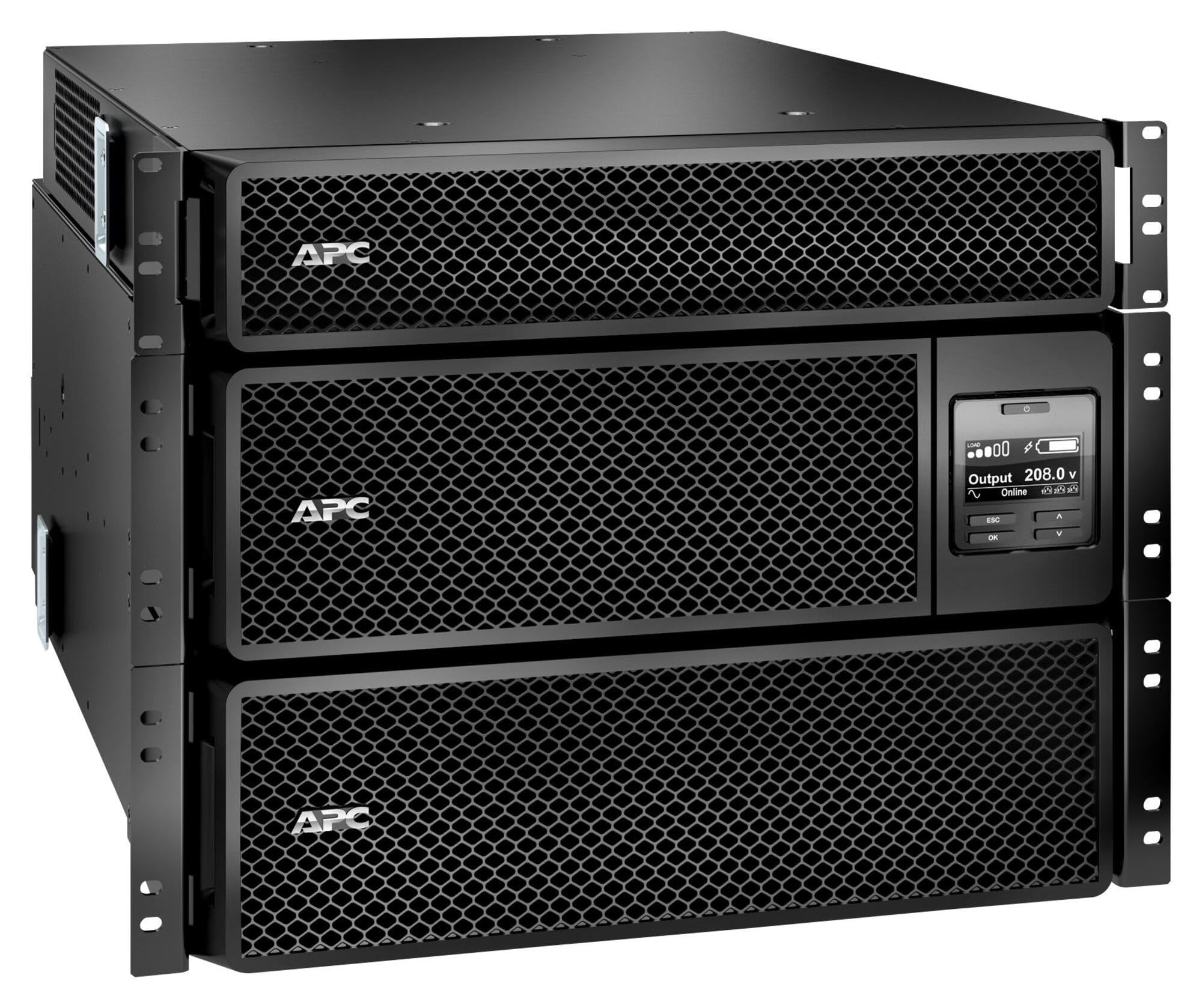
Image: APC Smart-UPS SRT 8kVA Rack Mount UPS with 208V to 120V Step-Down Transformer. This image shows the main UPS unit and the accompanying step-down transformer, typically in a rack-mountable configuration.
Persediaan
1. penempatan
The UPS and transformer are heavy. For rack-mount installations, ensure the rack is stable and capable of supporting the combined weight of the UPS, transformer, and any other equipment. For tower installations, place the unit on a flat, stable surface.
- Maintain at least 20 cm (8 inches) of clearance from the front and rear panels for proper ventilation.
- Elakkan meletakkan unit berhampiran sumber haba atau di bawah cahaya matahari langsung.
2. Sambungan Bateri
The UPS is shipped with the internal batteries disconnected for safety. Follow these steps to connect the batteries:
- Remove the front bezel or access panel to expose the battery compartment.
- Connect the internal battery cables as indicated by the labels or instructions inside the compartment. Ensure a secure connection.
- Replace the front bezel or access panel.
3. Sambungan Kuasa
Connect the UPS to utility power and your equipment.
- Kuasa Input: Connect the UPS input power cord (NEMA L6-30P) to a dedicated 208V AC outlet. Ensure the outlet is properly grounded and rated for the UPS capacity.
- Sambungan Transformer: Connect the output of the UPS to the input of the 208V to 120V Step-Down Transformer.
- Kuasa Output: Connect your 120V equipment to the 120V output receptacles on the step-down transformer. Do not overload the transformer or the UPS.
- Kabel Komunikasi: Connect the serial or USB communication cable from the UPS to your computer or server for monitoring and management.
4. Permulaan Awal
Selepas semua sambungan dibuat:
- Press the power ON button on the UPS front panel. The UPS will perform a self-test.
- Allow the UPS to charge its batteries for at least 24 hours before connecting critical loads to ensure full runtime capacity.
- Verify the UPS display shows normal operation status.
Mengendalikan UPS
Paparan dan Kawalan Panel Hadapan
The front panel features an LCD display and control buttons for monitoring and configuring the UPS. Refer to the detailed user manual on the documentation CD for specific menu navigation.
- Butang HIDUP/MATI: Powers the UPS on or off.
- Escape/Menu Button: Navigates back or enters the main menu.
- Anak panah atas/bawah: Scrolls through menu options or adjusts settings.
- Butang Masukkan: Memilih pilihan atau mengesahkan tetapan.
- Penunjuk LED: Provide quick status updates (e.g., On Line, On Battery, Fault).
Operasi Biasa
During normal operation, the UPS will be in "On Line" mode, providing conditioned power to connected equipment and charging its batteries. The LCD display will show input/output voltage, peratusan bebantage, and battery charge level.
Mod Bateri
If utility power fails or fluctuates outside acceptable limits, the UPS will automatically switch to battery power. An audible alarm may sound, and the display will indicate "On Battery" mode. The runtime available depends on the load and battery charge level.
Prosedur Penutupan
- Graceful Shutdown: Use the PowerChute software (if installed) to gracefully shut down connected equipment before the UPS runs out of battery power.
- Penutupan Manual: Press and hold the OFF button on the front panel until the UPS powers down. Ensure all connected equipment is safely shut down first.
Penyelenggaraan
Penggantian Bateri
The batteries in the UPS are user-replaceable hot-swappable battery modules. Refer to the specific battery replacement instructions provided with your replacement battery kit or on the APC website. Always use genuine APC replacement battery cartridges (RBCs).
- Battery life is typically 3-5 years, but can vary based on temperature and discharge cycles.
- Replace batteries when the UPS indicates a "Replace Battery" warning or when runtime significantly decreases.
Pembersihan
Keep the UPS and transformer free of dust and debris. Use a dry cloth to clean the exterior. Do not use liquid cleaners or solvents.
Kemas kini Perisian Tegar
Periksa APC secara berkala website for available firmware updates for your UPS model. Firmware updates can provide enhanced features, improved performance, or bug fixes. Follow the instructions provided with the firmware update package carefully.
Menyelesaikan masalah
This section provides solutions to common issues. For more complex problems, contact APC Technical Support.
| Masalah | Kemungkinan Punca | Penyelesaian |
|---|---|---|
| UPS tidak akan dihidupkan. | Bateri tidak disambungkan; Tiada kuasa input; kerosakan UPS. | Ensure battery cables are securely connected. Verify input power cable is plugged into a live outlet. If fault persists, contact support. |
| UPS berbunyi secara berterusan atau kerap. | On battery mode; Overload; Low battery. | Check utility power. Reduce connected load. Allow batteries to charge. |
| "Replace Battery" indicator is lit. | Batteries are at end of life or faulty. | Order and install new APC replacement battery cartridges. |
| Connected equipment not receiving 120V. | Transformer not connected or faulty; UPS output issue. | Verify transformer connections. Check UPS output voltage on display. Ensure equipment is plugged into the 120V outlets of the transformer. |
Spesifikasi
The following table outlines the key specifications for the APC Smart-UPS SRT 8kVA Rack Mount with 208V to 120V Step-Down Transformer (SRT8KRMXLT-5KTF).
| Ciri | Perincian |
|---|---|
| Jenama | APC |
| Nombor Model | SRT8KRMXLT-5KTF |
| Kapasiti (VA/Watts) | 8000 VA / 8000 W |
| Input Voltage | 208 V AC |
| Keluaran Voltage | 120 V AC (via Step-Down Transformer) |
| Arus Keluaran | 66.67 Amps |
| Julat Kekerapan | 50/60 Hz |
| Jenis Bateri | Asid Plumbum |
| Masa Pengecasan Bateri | 1.5 Jam |
| Typical Runtime (Full Load) | 5 minit |
| Faktor Bentuk | Rack / Tower Mountable (8U) |
| Dimensi Produk (D x W x H) | 28.2" x 17" x 13.9" (71.6cm x 43.2cm x 35.3cm) |
| Berat Barang | 341 paun (154.7 kg) |
| Sambungan Output | 1 x NEMA L6-30R, 4 x NEMA 5-20R (via transformer) |
| Bahan Kepungan | logam |
| warna | Hitam |
| Standard Keselamatan | UL 1778 |
Waranti dan Sokongan
Untuk maklumat jaminan terperinci, sila rujuk kad jaminan yang disertakan dengan produk anda atau lawati laman web rasmi APC. website. APC offers technical support to assist with installation, troubleshooting, and product inquiries.
- Sokongan dalam talian: Lawati APC website for FAQs, documentation, and software downloads.
- Sokongan Telefon: Contact APC Technical Support using the numbers provided on the APC webtapak untuk wilayah anda.
- Pendaftaran Produk: Register your product online to receive notifications about firmware updates and product information.