
pengenalan
Welcome to your new Casio AE-2100W-4AV digital watch. This manual provides detailed instructions for setup, operation, and maintenance to ensure optimal performance and longevity of your timepiece. Please read this manual thoroughly to understand all functions and proper usage.
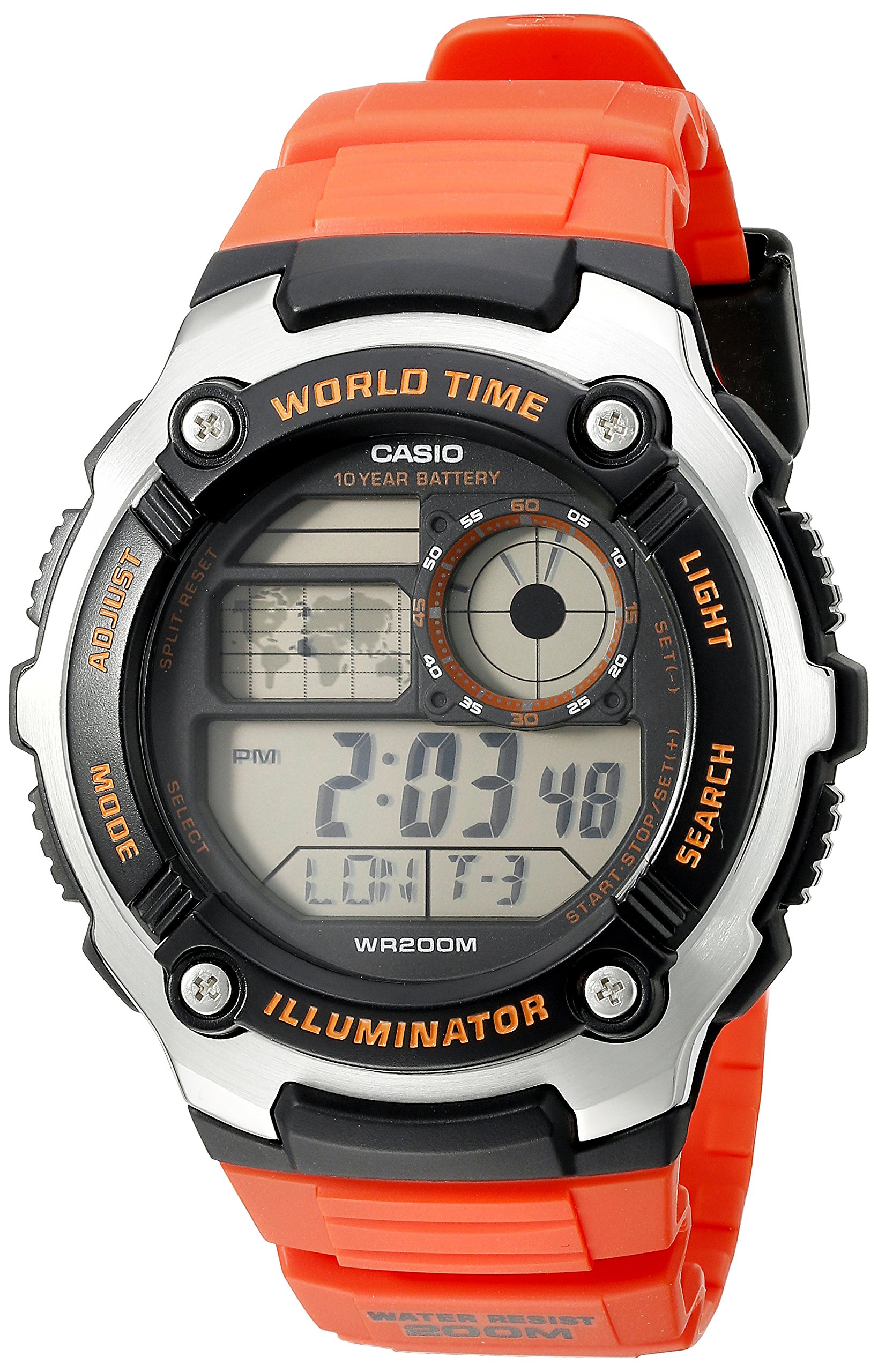
Imej: Depan view of the Casio AE-2100W-4AV digital watch, showcasing its display and button layout.
Ciri-ciri Utama
- Digital 10-Year Battery: Extended battery life for long-term use.
- World Map & LC Analog Display: Visual representation of world time zones and an analog-style display.
- Kaca Mineral: Muka jam tangan yang tahan lasak dan tahan calar.
- Rintangan Air 200 Meter: Suitable for swimming and diving (not for deep sea diving).
- Case / Bezel Material: Resin / Stainless Steel construction for durability.
- Resin Band: Comfortable and durable strap.
- Multi Time (4 Different Cities): Track time in up to four different cities simultaneously.
- Masa Dunia: 31 time zones (48 cities + Coordinated Universal Time).
- Jam randik 1/100 Kedua: Precise time measurement.
- Pemasa undur: Tetapkan pemasa untuk tempoh tertentu.
- 5 Daily Alarms or One-Time Alarms: Multiple alarm settings for daily reminders or single events.
- HourlIsyarat Masa y: Chimes every hour on the hour.
- Full Auto-Calendar (to year 2099): Automatically adjusts for month lengths and leap years.
- Format 12/24-Jam: Choose between standard and military time display.
- Button Operation Tone On/Off: Pilihan untuk membisukan bunyi butang.
- Penjagaan Masa Biasa: Digital display of hour, minute, second, PM, month, date, day.
Persediaan Awal
Tetapan Masa dan Tarikh
To set the current time and date on your watch, follow these general steps. Specific button labels are usually found on the watch case itself (e.g., ADJUST, MODE, LIGHT, SEARCH).
- Dalam Mod Penjagaan Masa, tekan dan tahan SESUAIKAN butang sehingga kod bandar mula berkelip, menunjukkan skrin tetapan.
- Gunakan MODE button to cycle through the settings: City Code, DST (Daylight Saving Time), 12/24-hour format, Seconds, Hour, Minute, Year, Month, Day.
- Gunakan CARIAN or CAHAYA butang untuk menukar nilai berkelip.
- Setelah semua tetapan betul, tekan butang SESUAIKAN button again to exit the setting screen.

Image: The Casio AE-2100W-4AV watch on a wrist, demonstrating its appearance when worn.
Mod Pengendalian
Your watch features several modes accessible via the MODE butang. Menekan MODE cycles through Timekeeping, World Time, Stopwatch, Countdown Timer, and Alarm modes.
Mod Penjagaan Masa
This is the default mode, displaying the current time, date, and day of the week for your home city. In this mode, you can press the CAHAYA butang untuk menerangi paparan.
Mod Waktu Dunia
Daripada Mod Penjagaan Masa, tekan MODE to enter World Time Mode. Use the CARIAN button to scroll through different city codes and view their current times. The watch can store up to four different city times.
Mod Jam Randik
Untuk menggunakan jam randik:
- Navigasi ke Mod Jam Rangkak menggunakan MODE butang.
- Tekan ke CARIAN butang untuk memulakan jam randik.
- Tekan CARIAN sekali lagi untuk berhenti.
- Tekan ke SESUAIKAN butang untuk menetapkan semula jam randik kepada sifar.
Mod Pemasa Kiraan Balik
Untuk menetapkan dan menggunakan pemasa undur:
- Navigasi ke Mod Pemasa Undur menggunakan MODE butang.
- Tekan dan tahan butang SESUAIKAN button until the timer setting starts to flash.
- Gunakan MODE button to select hours, minutes, or seconds.
- Gunakan CARIAN or CAHAYA butang untuk menyesuaikan nilai.
- Tekan SESUAIKAN untuk mengesahkan tetapan.
- Tekan CARIAN untuk memulakan atau menghentikan kira detik.
Mod Penggera
Your watch supports up to five daily alarms and an hourlisyarat masa y.
- Navigasi ke Mod Penggera menggunakan MODE butang.
- Gunakan CARIAN button to cycle through the different alarm numbers (AL1, AL2, etc.) and the Hourly Isyarat Masa (SIG).
- To set an alarm, press and hold the SESUAIKAN button when the desired alarm number is displayed.
- guna MODE untuk memilih jam atau minit, dan CARIAN or CAHAYA untuk menyesuaikan nilai.
- Tekan SESUAIKAN untuk mengesahkan.
- To turn an alarm or the hourly time signal on/off, select it and press the CARIAN butang.
Illuminator Light
Tekan ke CAHAYA button to illuminate the watch face for easy viewdalam keadaan cahaya malap.
Video: A 21-second product rotation video of the Casio AE-2100W-4AV watch, showing its design from various angles. This helps visualize the watch's physical features and button placement.
Penyelenggaraan dan Penjagaan
Hayat Bateri
This watch is equipped with a 10-year battery (CR2025). While designed for longevity, actual battery life may vary depending on usage frequency of features like the illuminator light and alarms. When the display becomes dim or functions become erratic, it may be time for a battery replacement. It is recommended to have battery replacement performed by an authorized service center.
Tahan Air
The watch is rated for 200-meter (660 feet) water resistance. This means it is suitable for recreational swimming, snorkeling, and diving. However, it is not designed for saturation diving. Do not operate buttons while the watch is wet or submerged to prevent water ingress. Avoid exposing the watch to hot water or steam, as this can compromise the water resistance seals.
Pembersihan
Untuk mengekalkan penampilan jam tangan anda:
- Wipe the watch case and band with a soft, dry cloth regularly.
- For resin bands, you can use a mild soap solution and a soft brush, then rinse thoroughly with clean water and dry completely.
- Avoid using harsh chemicals, solvents, or abrasive cleaners, as these can damage the watch's materials.
Menyelesaikan masalah
Isu Paparan
- Paparan Kosong atau Malap: Bateri mungkin rendah atau kehabisan bateri. Pertimbangkan untuk menggantikan bateri.
- Masa/Tarikh yang salah: Re-enter the Time and Date Setting mode and adjust as necessary. Ensure your home city code and DST settings are correct.
Butang Tidak Bertindak balas
- Ensure the watch is not in a locked mode (if applicable, though this model typically does not have a button lock).
- If the watch was recently submerged, ensure it is completely dry before operating buttons.
- Bateri yang lemah kadangkala boleh menjejaskan daya tindak balas butang.
Ketidaktepatan Masa
- Digital quartz watches are generally highly accurate. If significant inaccuracy occurs, it may indicate a need for battery replacement or service.
- Ensure the correct city code and DST settings are applied for your current location.
Spesifikasi
| Ciri | Perincian |
|---|---|
| Nombor Model | AE2100W-4AV |
| Diameter Kes | 47.7mm |
| Dimensi Produk | 6 x 6 x 4 inci; 4.8 auns |
| Tahan Air | 200 Meter (660 Kaki) |
| Jenis Bateri | 1 Logam Litium (CR2025) |
| lebih kurang Hayat Bateri | 10 tahun |
| Pergerakan | Kuarza |
| Bahan Kaca | Kaca Mineral |
| Case/Bezel Material | Resin / Keluli Tahan Karat |
| Bahan Band | damar |
| Kalendar | Kalendar Auto Penuh (hingga tahun 2099) |

Image: Watch size guide for reference, illustrating different watch diameters and heights.
Waranti dan Sokongan
Your Casio AE-2100W-4AV watch is covered by a manufacturer's warranty. Please refer to the warranty card included with your purchase for specific terms and conditions, including coverage duration and service procedures. For technical support, spare parts, or warranty claims, please contact Casio customer service or visit their official webtapak untuk pusat servis yang dibenarkan.
For additional information and support, you may visit the official Casio webtapak: www.casio.com