
pengenalan
This manual provides detailed instructions for the Inateck Bluetooth 4.1 Sport Headset, Model P20 (BH1001). Please read this guide thoroughly before using the product to ensure proper operation and to maximize your listening experience. This headset is designed for active lifestyles, offering wireless audio with a secure fit and integrated microphone.
1. Persediaan
1.1 Kandungan Pakej
Sahkan bahawa semua item terdapat dalam pakej:
- Inateck Bluetooth Sport Headset (P20 / BH1001)
- Kabel Pengecas USB
- Multiple pairs of silicone ear tips (various sizes)
- Beg Bawa
- Manual Pengguna (dokumen ini)
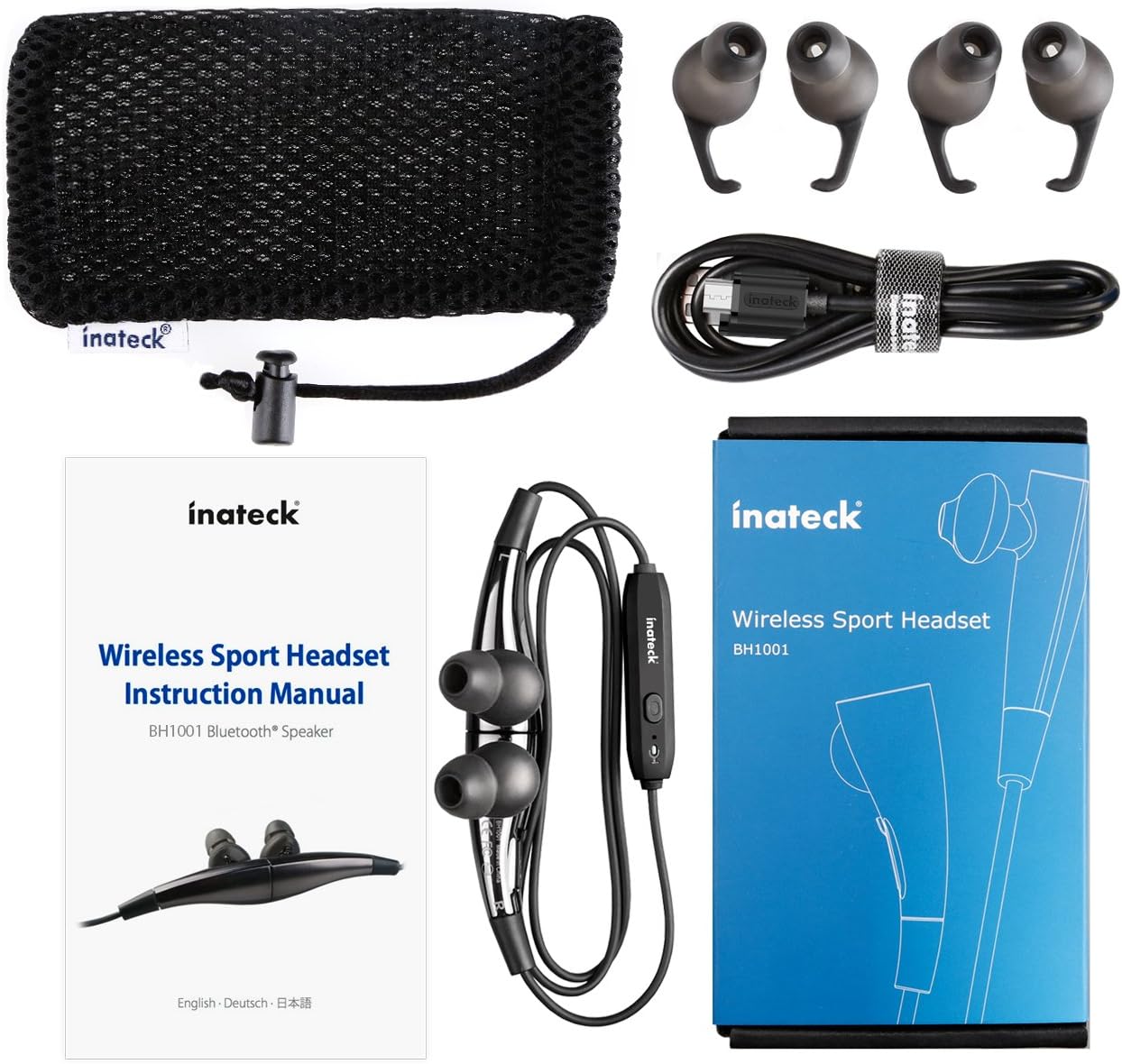
Rajah 1.1: Contents of the Inateck Bluetooth Sport Headset package.
1.2 Mengecas Alat Dengar
Before first use, fully charge the headset. A full charge takes approximately 3 hours and provides at least 8 hours of music playback.
- Locate the Micro USB charging port on the headset.
- Connect the small end of the provided USB charging cable to the headset's Micro USB port.
- Connect the larger end of the USB cable to a USB power source (e.g., computer USB port, USB wall adapter).
- The status indicator light will illuminate during charging. It will change color or turn off once charging is complete.

Rajah 1.2: Charging the Inateck Bluetooth Sport Headset via Micro USB.
1.3 Berpasangan dengan Peranti Bluetooth
Untuk menyambungkan set kepala anda ke telefon pintar atau peranti berdaya Bluetooth lain:
- Pastikan alat dengar dimatikan.
- Press and hold the Multifunction Key (MFB) on the inline control unit for approximately 5-7 seconds until the status indicator light flashes red and blue alternately. This indicates pairing mode.
- Pada peranti Bluetooth anda, dayakan Bluetooth dan cari peranti baharu.
- Select "Inateck BH1001" or "Inateck P20" from the list of available devices.
- Once paired, the status indicator light on the headset will flash blue slowly, and you may hear an audible confirmation.
- The headset will automatically attempt to reconnect to the last paired device when turned on.

Rajah 1.3: Inateck Headset paired with a mobile device for music playback.
2. Arahan Operasi
2.1 Kawalan Alat dengar
The inline control unit provides easy access to various functions:

Rajah 2.1: Berakhirview of the Inateck Headset control unit.
- Multifunction Key (MFB):
- Press and hold (5-7s): Power On/Off, Enter Pairing Mode
- Tekan sebentar: Main/Jeda muzik, Jawab/Tamatkan panggilan
- Long press (during incoming call): Reject call
- Naikkan Kelantangan (+) / Trek Seterusnya:
- Tekan pendek: Tingkatkan kelantangan
- Tekan lama: Langkau ke trek seterusnya
- Kelantangan Kurang (-) / Trek Sebelumnya:
- Tekan pendek: Kurangkan kelantangan
- Long press: Go to previous track
- Port USB Mikro: Untuk mengecas set kepala.
- Penunjuk Status: Memaparkan kuasa, berpasangan dan status pengecasan.
- mikrofon: Untuk panggilan bebas tangan.
2.2 Memakai Alat dengar
Select the ear tips that provide the most comfortable and secure fit for your ears. The headset is designed to be worn with the cable behind your neck, ensuring stability during physical activity.

Rajah 2.2: Proper wearing of the Inateck Sport Headset for active use.
2.3 Magnetic Earbuds Feature
The earbuds feature integrated magnets. When not in use, you can connect the two earbuds together, forming a necklace around your neck. This action automatically pauses music playback and prevents the headset from falling off.

Rajah 2.3: Magnetic earbuds feature for secure wearing around the neck.

Rajah 2.4: Headset worn as a necklace using the magnetic feature.
3. Penyelenggaraan
- Pembersihan: Lap alat dengar dengan kain lembut dan kering. Jangan gunakan pembersih atau pelarut yang kasar.
- Petua Telinga: Tanggalkan dan bersihkan hujung telinga silikon secara berkala dengan sabun lembut dan air. Pastikan ia kering sepenuhnya sebelum dipasang semula.
- Storan: When not in use, store the headset in the provided carrying pouch to protect it from dust and damage. Avoid extreme temperatures.
- Tahan Air: The headset is designed to be water-resistant for sports and exercise (e.g., sweat, light rain). Do not submerge it in water or expose it to heavy rain.
4. Penyelesaian masalah
4.1 Tidak Boleh Hidupkan
Ensure the headset is fully charged. Connect it to a power source using the USB cable and allow it to charge for at least 30 minutes before attempting to power on again.
4.2 Tidak Boleh Dipasangkan dengan Peranti
- Ensure the headset is in pairing mode (status indicator flashing red and blue alternately).
- Make sure Bluetooth is enabled on your device and it is within range (typically 10 meters or 33 feet).
- Matikan dan hidupkan fungsi Bluetooth pada peranti anda.
- If previously paired, try "forgetting" or "unpairing" the headset from your device's Bluetooth settings and then re-pair.
- Pastikan tiada peranti Bluetooth lain yang mengganggu sambungan.
4.3 Tiada Bunyi atau Kualiti Bunyi Lemah
- Periksa tahap kelantangan pada kedua-dua alat dengar dan peranti anda yang disambungkan.
- Ensure the headset is properly paired and connected to your device.
- Move closer to your device to reduce potential interference or range issues.
- Ensure the ear tips are correctly seated in your ears for optimal sound delivery.
- Reboot both the headset and your connected device.
4.4 Intermittent Connection
- Ensure there are no physical obstructions between the headset and your device.
- Avoid placing your device in areas where the signal might be blocked (e.g., deep pockets, behind thick walls).
- Kurangkan gangguan daripada peranti wayarles lain (penghala Wi-Fi, peranti Bluetooth lain).
- Keep the headset and your device within the recommended Bluetooth range.
5. Spesifikasi
| Jenama | Inateck |
| Nama Model | P20 |
| Nombor Model | BH1001 |
| Teknologi Ketersambungan | Bluetooth 4.1 |
| Faktor Bentuk | Dalam Telinga |
| Penempatan Telinga | Intra-aural |
| Bicu Fon Kepala | USB (untuk mengecas) |
| Tahap Ketahanan Air | Waterproof (suitable for sweat/light rain) |
| Ciri Khas | Sports and exercise, integrated microphone, magnetic earbuds |
| Berat Barang | 78 Gram |
| Jenis Kawalan | Volume Control, Multifunction Button |
| bahan | plastik |
6. Maklumat Waranti
Inateck products typically come with a limited warranty. For specific warranty terms and conditions applicable to your Inateck Bluetooth Sport Headset, please refer to the warranty card included in your product packaging or visit the official Inateck webtapak. Simpan bukti pembelian anda untuk tuntutan waranti.
7. Sokongan Pelanggan
If you encounter any issues not covered in this manual or require further assistance, please contact Inateck customer support. You can usually find contact information, FAQs, and additional resources on the official Inateck webtapak:
Webtapak: www.inateck.com
Please have your product model (P20 / BH1001) and purchase details ready when contacting support.