
1. Pengenalan
The Samson XPD1 Lavalier USB Digital Wireless System is designed to provide high-quality wireless audio for computer recordings, presentations, and other applications. This system includes a USB receiver, a belt pack transmitter, and a lavalier microphone, offering a convenient and reliable solution for capturing clear audio directly to your Mac or PC.
2. Komponen Selesaiview
Familiarize yourself with the main components of your Samson XPD1 system:
- Penerima USB: Plugs directly into your computer's USB port. Features Status and Pair buttons, and a 3.5mm output jack for monitoring.
- Belt Pack Transmitter (PXD1): Worn by the user, it transmits audio wirelessly to the receiver. Includes a power button, gain control, and a connector for the lavalier microphone.
- Lavalier Microphone (LM5): A small, clip-on microphone designed for discreet placement and clear voice capture.
3. Arahan Persediaan
3.1. Installing Batteries in the Transmitter
- Locate the battery compartment on the back of the PXD1 belt pack transmitter.
- Buka penutup petak.
- Masukkan dua bateri AA baharu, pastikan kekutuban (+/-) yang betul.
- Tutup penutup petak bateri dengan selamat.
3.2. Menyambungkan Mikrofon Lavalier
- Take the lavalier microphone. The connector is designed to securely fit the transmitter.
- Plug the microphone's connector into the input jack on the top of the PXD1 belt pack transmitter.
- Gently twist the connector to ensure it is securely fastened and will not accidentally disconnect during use.

Figure 1: Samson LM5 Lavalier Microphone. Connect this to the belt pack transmitter.
3.3. Menyambungkan Penerima USB
- Plug the XPD1 USB receiver directly into an available USB-A port on your computer (Mac or PC).
- The receiver will draw power from the USB port.
- For optimal performance and to avoid interference, ensure the USB receiver has a clear, unobstructed line of sight to the transmitter.
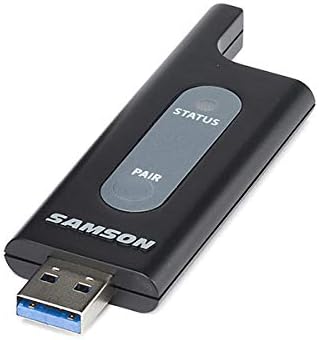
Figure 2: Samson XPD1 USB Receiver. Plug this into your computer's USB port.

Figure 3: Samson XPD1 USB Receiver connected to a mobile device (adapter not included).
3.4. Memasang Peranti
The XPD1 system is designed for easy pairing. Typically, the units are pre-paired from the factory. If re-pairing is necessary:
- Turn on the belt pack transmitter.
- Palamkan penerima USB ke dalam komputer anda.
- Press and hold the 'Pair' button on the USB receiver until the status indicator begins to flash.
- Press and hold the 'Pair' button on the belt pack transmitter until its status indicator also flashes.
- Once both indicators show a solid light, the devices are successfully paired.
4. Arahan Operasi
4.1. Menghidupkan/Mematikan
- To power on the belt pack transmitter, slide the power switch to the 'ON' position. The status indicator will light up.
- Untuk mematikan kuasa, luncurkan suis kuasa ke kedudukan 'OFF'.
- The USB receiver powers on automatically when plugged into a powered USB port.
4.2. Melaraskan Keuntungan
The belt pack transmitter features a gain control to adjust the microphone's input sensitivity. This control is located inside the battery compartment.
- Buka penutup petak bateri.
- Use a small screwdriver or similar tool to adjust the 'GAIN' dial to your desired level.
- Start with a lower gain setting and increase it gradually to avoid distortion.
- Tutup penutup petak bateri.
4.3. Pemantauan Audio
The USB receiver includes a 3.5mm output jack, allowing you to monitor the audio directly from the receiver using headphones. This is useful for checking audio levels and quality during recording or live use.
4.4. Julat Operasi
The Samson XPD1 system offers an operating range of up to 100 feet (approximately 30 meters), depending on environmental conditions. Maintain a clear line of sight between the transmitter and receiver for optimal performance and to minimize interference.
5. Penyelenggaraan
5.1. Penggantian Bateri
Regularly check and replace the AA batteries in the belt pack transmitter to ensure consistent performance. Low battery power can affect audio quality and operating range.
5.2. Pembersihan
Clean the units with a soft, dry cloth. Avoid using abrasive cleaners or solvents, which can damage the finish or internal components. Keep the microphone windscreen clean for optimal sound.
5.3. Penyimpanan
When not in use, store the system in a cool, dry place. Remove batteries from the transmitter if storing for extended periods to prevent leakage.
6. Penyelesaian masalah
- Tiada Bunyi atau Audio Sekejap-sekejap:
- Ensure both the transmitter and receiver are powered on and successfully paired (solid status lights).
- Check battery levels in the transmitter and replace if necessary.
- Verify the lavalier microphone is securely connected to the transmitter.
- Ensure the USB receiver is plugged into a functioning USB port on your computer.
- Check your computer's audio input settings to ensure the XPD1 is selected as the input device.
- Kurangkan jarak antara pemancar dan penerima.
- Ensure there are no physical obstructions or other electronic devices causing interference between the transmitter and receiver.
- Audio Berderak atau Terherot:
- Adjust the gain control on the transmitter. If the audio is too loud, it can cause distortion.
- Ensure the microphone is not too close to the sound source, which can lead to clipping.
- Check for potential sources of electromagnetic interference.
- Loss of Connection After Going Out of Range:
- If the connection is lost after moving out of range, you may need to restart the receiver (unplug and replug) or re-pair the devices once back within range.
7. Spesifikasi
| Jenama | SAMSON |
| Nama Model | Lavalier |
| Nombor Model | SWXPD1BLM5 |
| Teknologi Ketersambungan | USB |
| Jenis Penyambung | USB |
| Ciri Khas | USB, Wayarles |
| Peranti Serasi | Komputer riba, Komputer Peribadi |
| Komponen yang Disertakan | USB cable (for receiver connection) |
| Corak Kutub | Omnidirectional |
| Berat Barang | 10.4 auns |
| Faktor Bentuk Mikrofon | Lavalier |
| Sumber Kuasa | Corded Electric (for receiver), Battery (for transmitter) |
| Nisbah Isyarat-ke-Bunyi | 74 dB |
| Platform Perkakasan | PC |
| Bilangan Saluran | 1 |
| Dimensi Item | 12 x 2.75 x 4.75 inci |
| Penggunaan yang Disyorkan | Speech, Voice Recording |
8. Waranti dan Sokongan
8.1. Maklumat Waranti
The Samson XPD1 Lavalier USB Digital Wireless System comes with a alat ganti 2 tahun dan waranti buruh. Sila simpan bukti pembelian anda untuk tuntutan waranti.
8.2. Sokongan Pelanggan
For further assistance, technical support, or service inquiries, please visit the official Samson website or contact their customer service department. Refer to the product packaging or Samson's webtapak untuk maklumat hubungan terkini.