
pengenalan
Welcome to the SINGER Superb EM200 Embroidery Machine user manual. This document provides essential information for the safe and efficient operation, setup, maintenance, and troubleshooting of your embroidery machine. Please read these instructions carefully before using the machine to ensure optimal performance and longevity.

Figure 1: SINGER Superb EM200 Embroidery Machine overview.
Produk Selesaiview
The SINGER Superb EM200 is an embroidery-only machine designed to enhance your creative projects. It features a robust set of capabilities for various embroidery tasks.
Ciri-ciri Utama:
- 200 Built-in Embroidery Designs: A wide selection of designs to choose from for diverse projects.
- 6 Alphabet Options: Personalize items with various lettering styles.
- Benang Jarum Automatik: Simplifies the threading process, guiding the thread from the spool to the needle with ease.
- Extra-Large Embroidery Area: Accommodates larger designs with a maximum area of 10.25 inches x 6 inches.
- Large LCD Touch Screen: Provides intuitive control for adjusting embroidery settings and selecting designs.
- USB Stick Embroidery Design Transfer: Allows for easy transfer and storage of custom designs.
- 700 Stitches Per Minute: Enables quick completion of embroidery projects.
- 7 7/8 Inch Work Area: Tawaran ample space for managing fabric during embroidery.
- 3 STAYBRIGHT LED Lights: Illuminates the work area for clear visibility.
- Ketegangan Benang Automatik: Ensures consistent stitch quality across different fabrics.
- Bobbin Winding While Embroidering: Allows for continuous work without interruption.
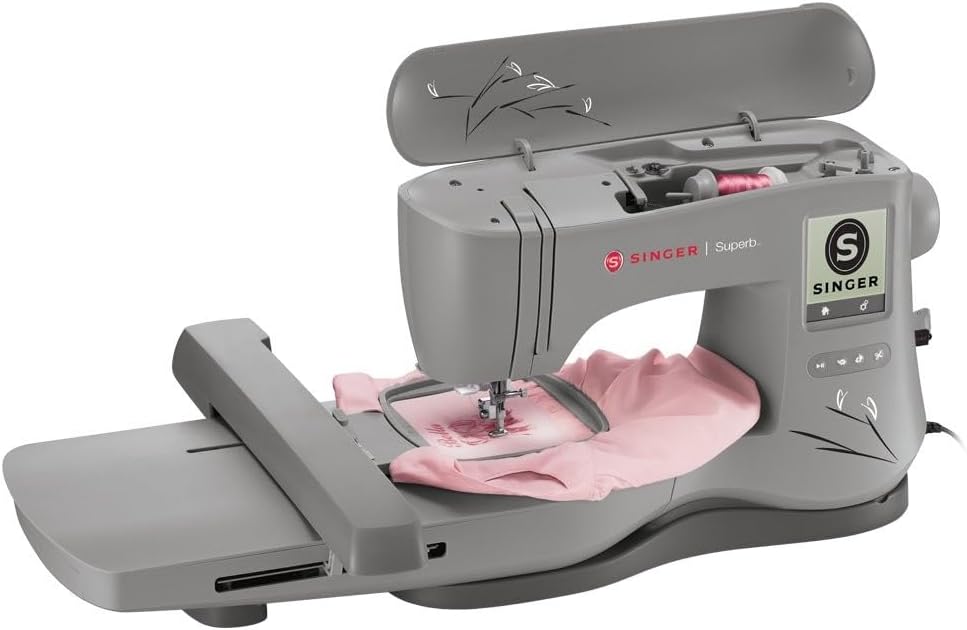
Figure 2: Embroidery in progress on the SINGER Superb EM200.

Figure 3: Interacting with the LCD touch screen.
Apa yang ada dalam Kotak
Your SINGER Superb EM200 Embroidery Machine comes with the following accessories:
- Large Embroidery Hoop (10.25" x 6")
- Small Embroidery Hoop (4" x 4")
- Kaki Sulaman
- Thread Spool Net
- Felt Pin Kili
- Pemutar skru
- Needle Plate Screwdriver
- Seam Ripper/Lint Brush
- Thread Spool Caps
- Pin Kili Bantu
- Bobbins (Class 15 transparent)
- Pack of Needles
- USB Embroidery Stick
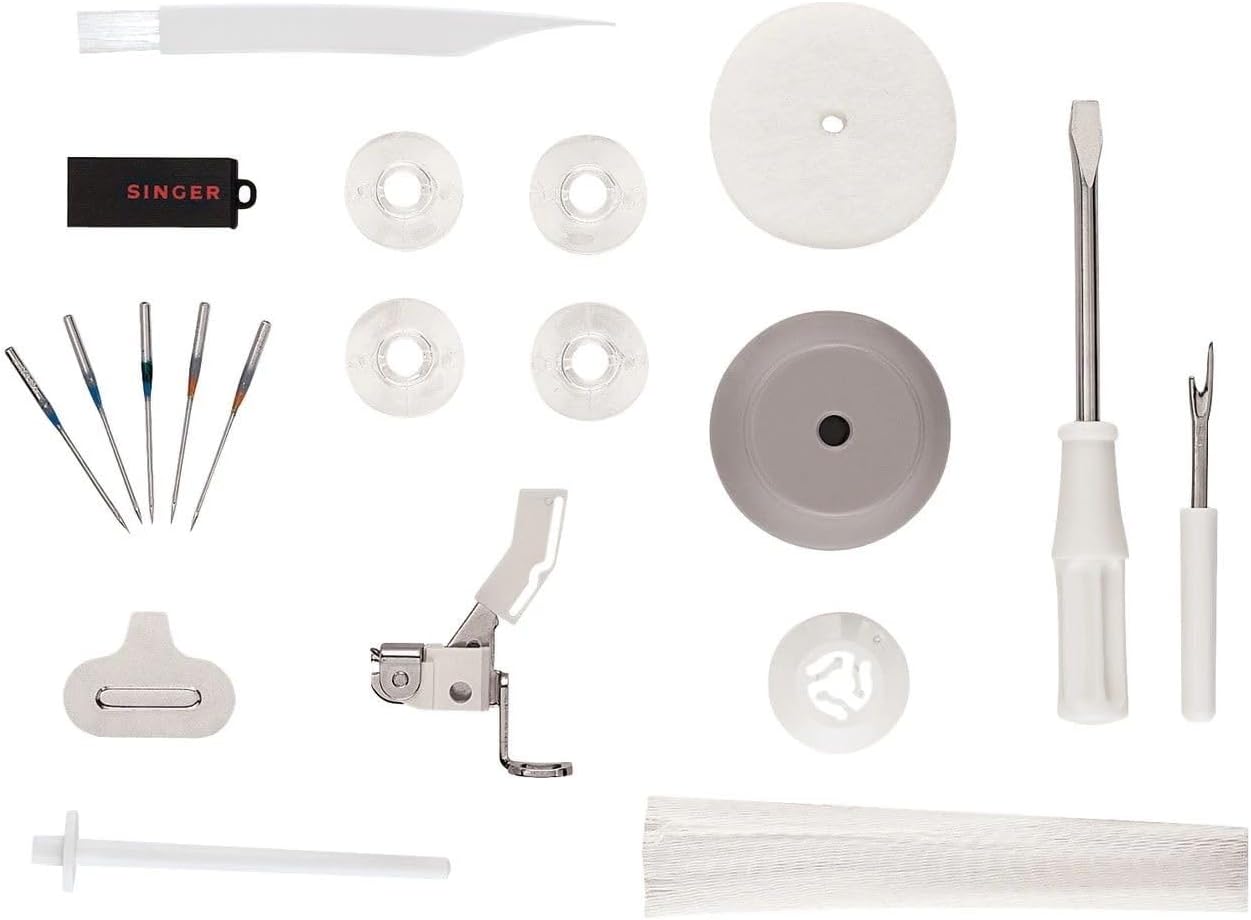
Rajah 4: Aksesori yang disertakan.
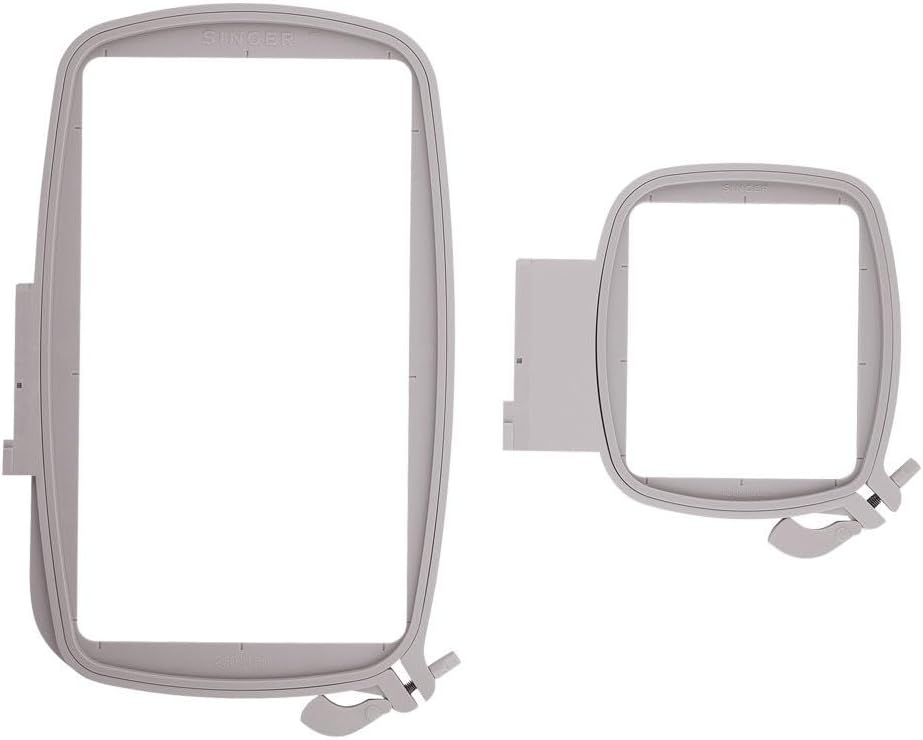
Figure 5: Large and small embroidery hoops.
Persediaan
- Membongkar: Tanggalkan mesin dan semua aksesori daripada pembungkusan dengan berhati-hati. Simpan pembungkusan asal untuk pengangkutan atau penyimpanan pada masa hadapan.
- penempatan: Place the machine on a stable, flat surface with adequate space for embroidery projects. Ensure it is near a 110-volt power outlet (for US and Canada).
- Sambungan Kuasa: Sambungkan kord kuasa ke mesin dan kemudian ke soket elektrik yang sesuai.
- Menggulung Mesin: Follow the numbered threading path indicated on the machine. Utilize the automatic needle threader for simplified needle threading.
- Menggulung Bobbin: Place a bobbin on the bobbin winder spindle and follow the winding instructions in the detailed manual.
- Fabrik Gelung: Select the appropriate embroidery hoop for your design. Place the fabric and stabilizer securely within the inner and outer rings of the hoop.
- Attaching the Hoop: Slide the hooped fabric onto the embroidery unit until it clicks into place.
Video 1: Tamatview of the SINGER Superb EM200 Embroidery Machine's features and basic operation, including design transfer via USB and hooping fabric.
Arahan Operasi
- Hidupkan kuasa: Turn on the machine using the power switch. The LCD touch screen will illuminate.
- Pemilihan Reka Bentuk: Use the LCD touch screen to browse and select from the 200 built-in embroidery designs or load designs from the USB embroidery stick.
- Design Customization: Adjust design size, rotation, and position as needed using the touch screen controls.
- Start Embroidery: Once the design is selected and the fabric is hooped and attached, press the start button to begin the embroidery process. The machine will automatically stitch the design.
- Kemajuan Pemantauan: Observe the embroidery process. The machine will alert you if the upper thread breaks or the bobbin thread runs out.
- Penamat: Once the embroidery is complete, the machine will stop. Remove the hoop from the embroidery unit and carefully unhoop the fabric. Trim any loose threads.
Penyelenggaraan
Regular maintenance ensures the smooth operation and longevity of your embroidery machine.
- Pembersihan: Regularly clean the bobbin area, feed dogs, and needle plate using the provided lint brush. Remove any lint or thread buildup.
- Penggantian jarum: Replace the needle frequently, especially after 8-10 hours of embroidery or if it becomes bent or dull. Use only appropriate embroidery machine needles.
- meminyaki: Refer to the detailed manual for specific oiling points and frequency. Use only sewing machine oil.
- Storan: Apabila tidak digunakan, tutup mesin untuk melindunginya daripada habuk. Simpan di persekitaran yang kering dan stabil.
Menyelesaikan masalah
If you encounter issues with your SINGER Superb EM200, consider the following common solutions:
| Masalah | Kemungkinan Punca | Penyelesaian |
|---|---|---|
| Benang kerap putus | Incorrect threading, dull/bent needle, improper tension, poor quality thread. | Re-thread the machine, replace the needle, adjust tension, use high-quality embroidery thread. |
| Jahitan yang dilangkau | Incorrect needle, bent needle, improper threading, fabric not hooped tightly. | Ensure correct needle type and size, replace needle, re-thread, re-hoop fabric with stabilizer. |
| Machine not embroidering | Power off, start button not pressed, hoop not correctly attached. | Check power, press start, ensure hoop is securely clicked into place. |
| Poor stitch quality (loose/tight) | Incorrect thread tension (upper or bobbin), wrong needle for fabric. | Adjust upper thread tension, check bobbin tension, ensure appropriate needle. |
For more detailed troubleshooting or issues not listed here, please consult the comprehensive manual or contact SINGER customer support.
Spesifikasi
| Ciri | Perincian |
|---|---|
| Nombor Model | EM200 |
| Dimensi Produk | 29.25 x 18 x 12.25 inci (74.3 x 45.7 x 31.1 cm) |
| Berat Barang | 23 paun (10.43 kg) |
| Lightbulb Type | LED |
| Built-in Stitches/Designs | 200 |
| Sumber Kuasa | Elektrik Bertali |
| bahan | logam |
Waranti dan Sokongan
This SINGER Superb EM200 Embroidery Machine is warranted for use in the US and Canada at 110 volts only. For specific warranty details, including coverage periods for parts and labor, please refer to the warranty card included with your product or visit the official SINGER webtapak.
For technical assistance, service, or to inquire about authorized service centers, please contact SINGER customer support. Contact information can typically be found in your product documentation or on the SINGER webtapak.