
pengenalan
The Amcrest 1080P HD-CVI Quadbrid Dome Security Camera is designed for robust outdoor surveillance, offering high-resolution video and reliable performance. This camera is compatible with 1080P DVR systems and features advanced capabilities such as 98ft night vision and IP67 weatherproofing, ensuring durability against various environmental conditions. Its quadbrid technology allows for versatile compatibility with HD-CVI, TVI, AHD, and Analog systems, providing flexibility for integration into existing security setups. This manual provides essential information for the proper setup, operation, and maintenance of your security camera.
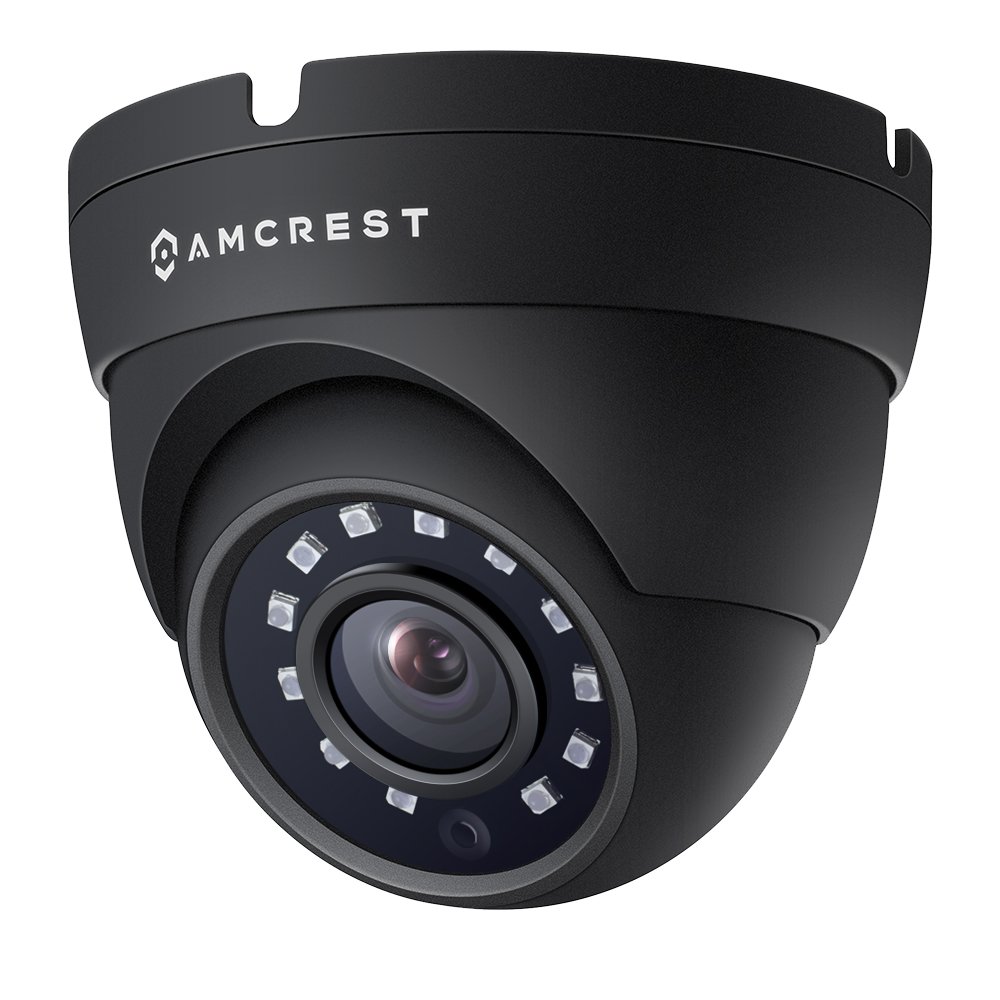
Figure 1: Amcrest 1080P HD-CVI Dome Security Camera highlighting 1080p resolution, 98ft night vision, IP67 weatherproof rating, and DIY installation.
Persediaan dan Pemasangan
Apa yang ada dalam Kotak
- 1x 1080P HD-CVI Standalone Dome Camera (Black)
Nota: Camera power supply and coaxial video cables are not included and must be purchased separately. A DVR is required for operation and is not included.
Menyambungkan Kamera
The camera connects point-to-point directly to a DVR via a BNC coaxial cable. This provides a secure, closed network connection. Ensure all connections are secure before powering on the device.

Figure 2: Connection diagram for the Amcrest Quadbrid camera, illustrating the BNC/Coax connection, DIP switch for mode selection, and 12V DC power input. Analog cameras require a coax cable and power adapter.
Quadbrid Mode Switch Setup
Your Amcrest Quadbrid camera is compatible with HD-CVI, HD-TVI, AHD, and Analog systems. The camera features a mode switch to select the appropriate video format for your DVR. Incorrect mode selection will prevent video display.
Refer to the diagram below and the video for proper mode switch configuration:
- HD-CVI: Switch 1 Down, Switch 2 Up
- HD-TVI: Switch 1 Up, Switch 2 Up
- AHD: Switch 1 Up, Switch 2 Down
- Analog: Switch 1 Down, Switch 2 Down
Video 1: Amcrest Quadbrid Mode Switch Setup. This video demonstrates how to correctly adjust the mode switch on your Amcrest Quadbrid camera to match your DVR's video format (HD-CVI, HD-TVI, AHD, or Analog).
Memasang Kamera
The camera is designed for wall mounting. Ensure the mounting surface is stable and can support the camera's weight. Use appropriate screws and anchors for secure installation. Adjust the camera's viewing angle (129 degrees FOV) to cover the desired surveillance area.

Figure 3: An Amcrest dome camera mounted on a ceiling, illustrating a typical installation scenario.
Arahan Operasi
Langsung View dan Rakaman
Once connected to a compatible DVR, the camera will provide a live 1080P HD video feed. You can view and record this feed through your DVR system. The camera's 20 powerful IR-LEDs enable clear night vision up to 98 feet, ensuring surveillance even in low-light conditions.
Akses Jauh
When connected to an Amcrest 1080P HD-CVI Security System, you can view your camera feed remotely from a mobile device or tablet using the Amcrest View app, available on the Apple App Store and Google Play Store. This allows you to monitor your property from anywhere.

Figure 4: An array of Amcrest security products, including cameras and DVRs, emphasizing remote monitoring capabilities.
Penyelenggaraan
Membersihkan Kamera
Regularly clean the camera lens and housing to ensure optimal image clarity. Use a soft, damp kain untuk mengelap habuk dan kotoran. Elakkan menggunakan bahan kimia yang keras atau bahan kasar yang boleh merosakkan kanta atau kemasan.
Menyemak Sambungan
Periodically inspect all cable connections for wear, corrosion, or looseness, especially for outdoor installations. Ensure the coaxial cable and power supply connections remain secure to prevent signal loss or power interruptions.
Menyelesaikan masalah
Tiada Paparan Video
- Suis Mod: Verify that the Quadbrid mode switch on the camera cable is set to the correct video format (HD-CVI, HD-TVI, AHD, or Analog) compatible with your DVR. Refer to the 'Quadbrid Mode Switch Setup' section for details.
- Sambungan Kabel: Ensure the coaxial cable is securely connected at both the camera and the DVR. Check for any damage to the cable.
- Bekalan Kuasa: Confirm the camera is receiving adequate power. A flickering image or no image at night can indicate insufficient power, especially with long cable runs. Ensure you are using a dedicated power supply with sufficient amperage (e.g., 1 Amp @ 12V) and appropriate gauge cabling for the distance.
Kualiti Imej Lemah
- Kebersihan kanta: Bersihkan kanta kamera seperti yang diterangkan dalam bahagian Penyelenggaraan.
- Cable Quality/Length: Long or low-quality coaxial cables can degrade video signal. Consider using higher quality cables or a video amplifier for very long runs.
- Pencahayaan: Ensure adequate lighting for optimal daytime performance. For night vision, confirm IR LEDs are functioning correctly.
Spesifikasi
| Ciri | Spesifikasi |
|---|---|
| Nombor Model | AMC1080DM36-B |
| Resolusi Tangkapan Video | 1080p (1920x1080) |
| Resolusi Video Berkesan | 1080 Piksel |
| Teknologi Ketersambungan | Wired (BNC Coaxial) |
| Peranti Serasi | Smartphone, Tablet (via DVR) |
| Penggunaan Dalaman/Luar | Dalaman, Luaran |
| Sumber Kuasa | Corded Electric (12V DC, 6 watts) |
| Julat Penglihatan Malam | 98 Kaki |
| Viewsudut | 129 Darjah |
| Penilaian Perlindungan Antarabangsa | IP67 |
| bahan | logam |
| warna | Hitam |
| Dimensi Item (L x W x H) | 5 x 5 x 5 inci |
| Berat Barang | 11.5 auns |
| Ciri Khas | Sensor Gerakan, Penglihatan Malam |
Maklumat Waranti
Amcrest products are backed by a Waranti AS 1 Tahun. This warranty covers defects in materials and workmanship under normal use. For specific terms and conditions, please refer to the official Amcrest warranty policy.

Figure 5: Amcrest's commitment to security, highlighting a 1-year US warranty and lifetime support.
Sokongan dan Maklumat Hubungan
For technical assistance, product inquiries, or warranty claims, please contact Amcrest support:
- e-mel: sokongan@amcrest.com
- telefon: 1-888-212-7538
Amcrest also provides lifetime support for its products.