
1. Pengenalan
This manual provides instructions for the proper use and care of your DeltaTrak 11047 Digital Lollipop Min/Max Probe Thermometer. This device is designed for accurate temperature measurement in various applications, featuring a digital display and Min/Max temperature recording capabilities.
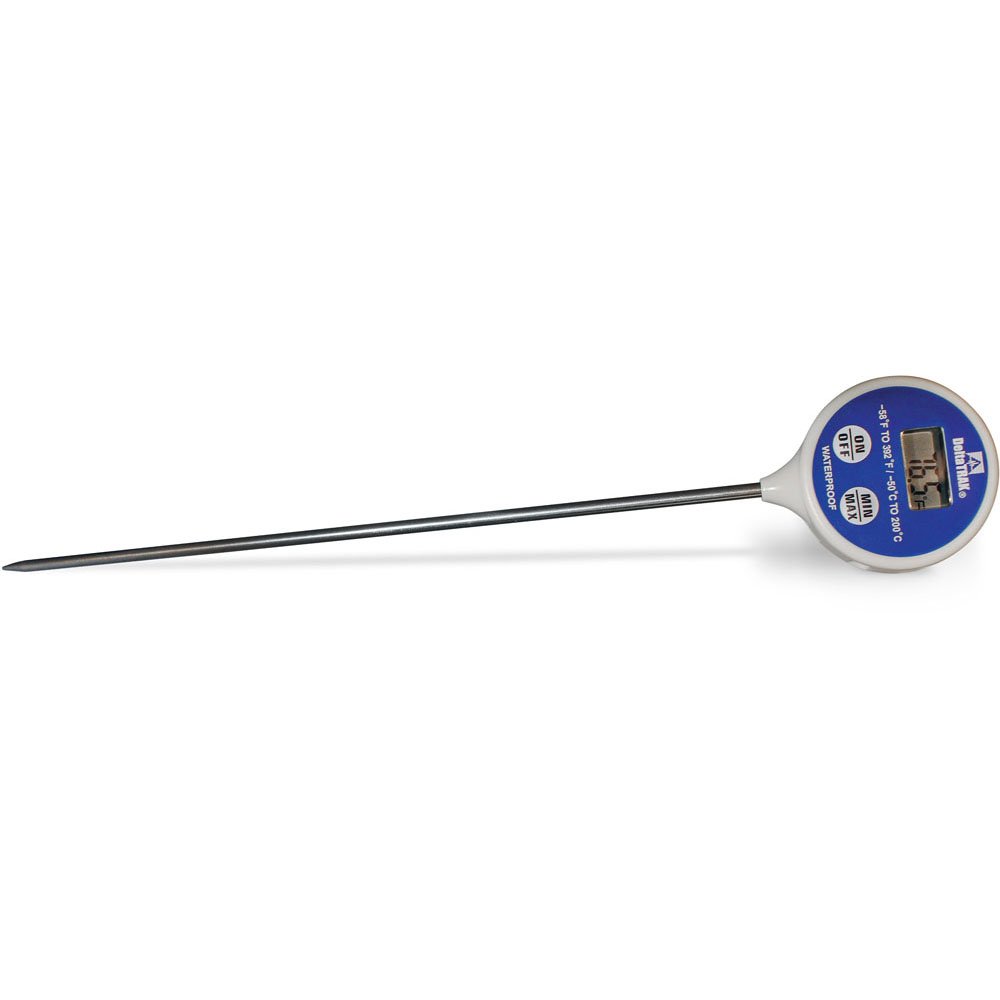
Rajah 1: DeltaTrak 11047 Digital Lollipop Min/Max Probe Thermometer. This image shows the thermometer with its digital display and probe.
2. Maklumat Keselamatan
Please read all safety instructions before using the thermometer to ensure safe operation and prevent damage to the device or injury to yourself.
- Do not expose the thermometer to extreme temperatures outside its specified operating range.
- Do not immerse the main body of the thermometer in water or other liquids. The probe is designed for immersion, but the display unit is not waterproof.
- Jauhkan daripada kanak-kanak.
- Do not attempt to disassemble or modify the thermometer. This will void the warranty and may cause damage.
- Buang bateri mengikut peraturan tempatan.
3. Persediaan
3.1. Pemasangan Bateri
The DeltaTrak 11047 thermometer requires batteries for operation (not included). Follow these steps to install them:
- Cari penutup petak bateri di belakang termometer.
- Gunakan pemutar skru kecil atau syiling untuk membuka petak bateri.
- Insert the required batteries, ensuring correct polarity (+ and -). Refer to the markings inside the compartment.
- Pasang semula penutup petak bateri dan pasangkannya dengan kukuh.
3.2. Hidupkan Kuasa Awal
Selepas pemasangan bateri, tekan butang HIDUP/MATI button to power on the device. The display will show the current temperature.
4. Arahan Operasi
4.1. Mengambil Bacaan Suhu
- Ensure the thermometer is powered on.
- Insert the stainless steel probe into the substance or environment you wish to measure. Ensure the probe tip is fully immersed or positioned correctly for accurate readings.
- Wait for the temperature reading on the digital display to stabilize. This usually takes a few seconds.
4.2. Min/Max Temperature Function
The thermometer can record the minimum and maximum temperatures measured during a session.
- Tekan ke MIN / MAX button once to display the maximum temperature recorded since the last reset.
- Tekan ke MIN / MAX button a second time to display the minimum temperature recorded.
- Tekan ke MIN / MAX button a third time to return to the current temperature display.
- To reset the Min/Max values, press and hold the MIN / MAX button for approximately 3 seconds while in Min or Max display mode.
4.3. Unit Selection (°C/°F)
Untuk bertukar antara Celsius (°C) dan Fahrenheit (°F):
- Cari ° C / ° F button, usually found near the display or battery compartment.
- Press this button to toggle between the two temperature units.
5. Penyelenggaraan
5.1. Pembersihan
As per product care instructions, the thermometer should be cleaned by wiping it. Use a damp cloth with mild soap or a sanitizing wipe to clean the probe and the body of the thermometer. Do not use abrasive cleaners or immerse the main unit in water.
5.2. Penyimpanan
When not in use, store the thermometer in a clean, dry place at room temperature. Ensure the probe is clean and dry before storage. The thermometer often comes with a protective sheath for the probe; use this to prevent damage.
5.3. Penggantian Bateri
If the display becomes dim or the thermometer stops functioning, it may be time to replace the batteries. Follow the battery installation steps in Section 3.1.
6. Penyelesaian masalah
| Masalah | Kemungkinan Punca | Penyelesaian |
|---|---|---|
| Tiada paparan atau paparan malap | Bateri mati atau lemah; pemasangan bateri yang salah. | Gantikan bateri, pastikan polariti yang betul. |
| Bacaan tidak tepat | Probe not fully immersed; probe damaged; thermometer outside operating range. | Ensure probe is correctly positioned; check for visible damage; use within specified temperature range. |
| Termometer tidak dihidupkan | Batteries not installed; power button malfunction. | Install or replace batteries; if problem persists, contact support. |
7. Spesifikasi
- Jenama: DeltaTrak
- Nombor Model: 11047
- UPC: 700779110473
- Bahan Luar: Glass (Note: This likely refers to the display or a component, the probe is typically stainless steel)
- Spesifikasi Ditemui: NIST
- Berat Barang: 36.3 g
- Dimensi Pakej: 26.8 x 5.41 x 2.79 cm
- Komponen yang Disertakan: Termometer
- Arahan Penjagaan Produk: Lap bersih
- Bateri: Tidak termasuk
8. Waranti & Sokongan
8.1. Maklumat Waranti
DeltaTrak products are manufactured to high-quality standards. For specific warranty details regarding your DeltaTrak 11047 thermometer, please refer to the warranty card included with your purchase or visit the official DeltaTrak webtapak. Simpan resit pembelian anda sebagai bukti pembelian untuk tuntutan waranti.
8.2. Sokongan Pelanggan
If you encounter any issues not covered in this manual or require further assistance, please contact DeltaTrak customer support. Contact information can typically be found on the product packaging or the official DeltaTrak webtapak.
Untuk maklumat lanjut, layari: www.deltatrak.com