
pengenalan
Terima kasih kerana membeliasing the STOGA Ubox STV040 Dual Lens Car DVR Camera. This manual provides detailed instructions for the proper installation, operation, and maintenance of your device. Please read this manual thoroughly before using the product to ensure optimal performance and safety.
Kandungan Pakej
Sila semak kandungan bungkusan semasa dibuka. Jika ada barang yang hilang atau rosak, hubungi peruncit anda.
- 1 x STOGA Ubox STV040 Car DVR Camera
- 1 x Pengecas Kereta
- 1 x Car Mount
- 1 x External GPS Module
- 1 x Manual Pengguna
Produk Selesaiview
Familiarize yourself with the components and features of your STOGA Ubox STV040 Car DVR Camera.

Rajah 1: Depan view of the DVR camera with the display screen active.

Rajah 2: Depan view detailing the dual wide-angle lenses and surrounding controls.
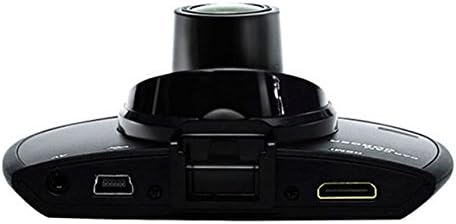
Rajah 3: Atas view illustrating the connectivity ports (HDMI, USB, AV).
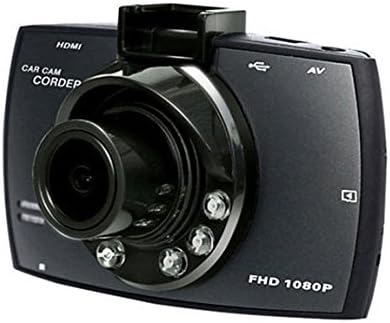
Rajah 4: Angled perspective of the DVR camera, showing its compact design.
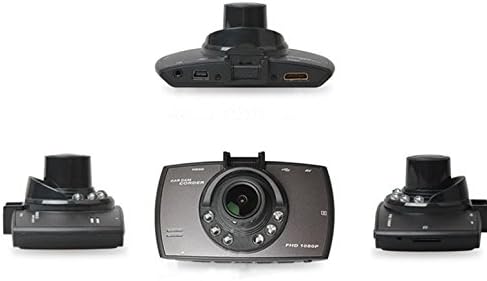
Rajah 5: Komprehensif view of the DVR camera from various angles.
Persediaan
1. Memasang Kad SD Mikro
Insert a Micro SD card (Class 6 or higher, 4GB-32GB) into the designated slot on the DVR camera. Ensure the card is inserted correctly until it clicks into place. The device supports continuous loop recording and emergency event recording.
2. Memasang Kamera
- Attach the car mount to the windshield in a position that does not obstruct your view.
- Securely attach the DVR camera to the car mount.
- Adjust the camera angle to ensure both lenses capture the desired view (front and interior/side). The dual lenses are 180-degree rotatable.
3. Sambungan Kuasa
Connect the car charger to the DVR camera's power input and plug the other end into your vehicle's 12V power outlet (cigarette lighter socket). The camera will typically power on automatically when the vehicle starts and power off when the vehicle is turned off.
4. GPS Module Connection (Optional)
Connect the external GPS module to the designated GPS port on the DVR camera. This enables GPS logging, recording location data along with video footage.
Arahan Operasi
Hidupkan/Mati Kuasa
- automatik: The camera powers on and starts recording automatically when the car engine starts. It powers off automatically when the engine is turned off.
- Manual: Tekan dan tahan butang kuasa untuk menghidupkan atau mematikan peranti secara manual.
Mod Rakaman
- Rakaman Gelung: The camera continuously records video in segments. When the memory card is full, it automatically overwrites the oldest unlocked footage.
- Rakaman Kecemasan (G-Sensor): The built-in G-Sensor detects sudden impacts or collisions. In such an event, the current video segment is automatically locked and protected from being overwritten.
Navigasi Menu
Use the control buttons located on the device to navigate through the menu options on the 2.0" TFT LCD screen. Adjust settings such as video resolution, date/time stamp, language (English, Chinese, Japanese, Russian), and G-Sensor sensitivity.
Main balik
- Stop recording if currently active.
- Enter playback mode via the menu.
- Pilih video yang dikehendaki file for playback on the device screen.
- Alternatively, remove the Micro SD card and insert it into a computer to view files.
Perlindungan Kata Laluan
The device supports password protection to prevent unauthorized access to recordings. Refer to the on-screen menu for setting up and managing this feature.
Penyelenggaraan
- Pembersihan: Use a soft, dry cloth to clean the camera lenses and screen. Avoid abrasive cleaners or solvents.
- Kad SD mikro: Format the Micro SD card regularly (e.g., once a month) to ensure optimal performance and prevent data corruption. Back up important files sebelum memformat.
- Suhu: Elakkan daripada mendedahkan peranti kepada suhu yang melampau, cahaya matahari langsung untuk tempoh yang lama, atau kelembapan yang tinggi.
- Kemas kini Firmware: Semak pengeluar weblaman web secara berkala untuk sebarang kemas kini perisian tegar yang tersedia bagi meningkatkan prestasi dan menambah ciri.
Menyelesaikan masalah
| Masalah | Kemungkinan Punca / Penyelesaian |
|---|---|
| Kamera tidak dihidupkan. |
|
| Rakaman berhenti tanpa diduga. |
|
| Kualiti video yang teruk. |
|
| GPS tidak berfungsi. |
|
| Bateri tidak menyimpan cas. |
|
Spesifikasi
| Ciri | Perincian |
|---|---|
| Nombor Model | Ubox STV040 |
| Paparan | 2.0" TFT LCD (960 x 240 pixels) |
| Kanta | Dual 140-degree A+ wide-angle, 180-degree rotatable |
| Sensor | CMOS |
| Resolusi Video | 1280 x 480 @ 30 fps, 640 x 480 @ 30 fps |
| Format Video | AVI |
| Format Imej | M-JPG |
| Penglihatan Malam | Fungsi penglihatan malam inframerah |
| Penyimpanan | Micro TF (SD HC) card, 4GB-32GB, Class 6 and above |
| GPS | Supports external GPS module |
| G-Sensor | Integrated, supports emergency event recording lock |
| Mikrofon/Speaker | Bersepadu |
| Keluaran | CVBS (Video Output) |
| Bateri | 3.7V 700mA Lithium-Polymer battery |
| Keserasian Sistem Pengendalian | Windows 2000/XP/Vista/Windows 7 |
| Bahasa yang Disokong | English, Chinese, Japanese, Russian |
Waranti dan Sokongan
For warranty information and technical support, please refer to the documentation provided with your purchase or contact your retailer. Keep your purchase receipt as proof of purchase for warranty claims.
For further assistance, you may also visit the official STOGA website (if available) or contact their customer service department.