
1. Pengenalan
The PowerDrive PD3000 is a 3000 Watt power inverter designed to convert 12V DC power from your vehicle's battery into 115V AC household power. This unit provides 3000 Watts of continuous AC power and has a high surge capacity of up to 6000 Watts to accommodate devices with high starting power requirements. It features integrated Bluetooth wireless technology for remote monitoring and control via a mobile application, along with a removable control panel for flexible placement. This manual provides essential information for the safe and efficient operation of your PowerDrive PD3000 inverter.
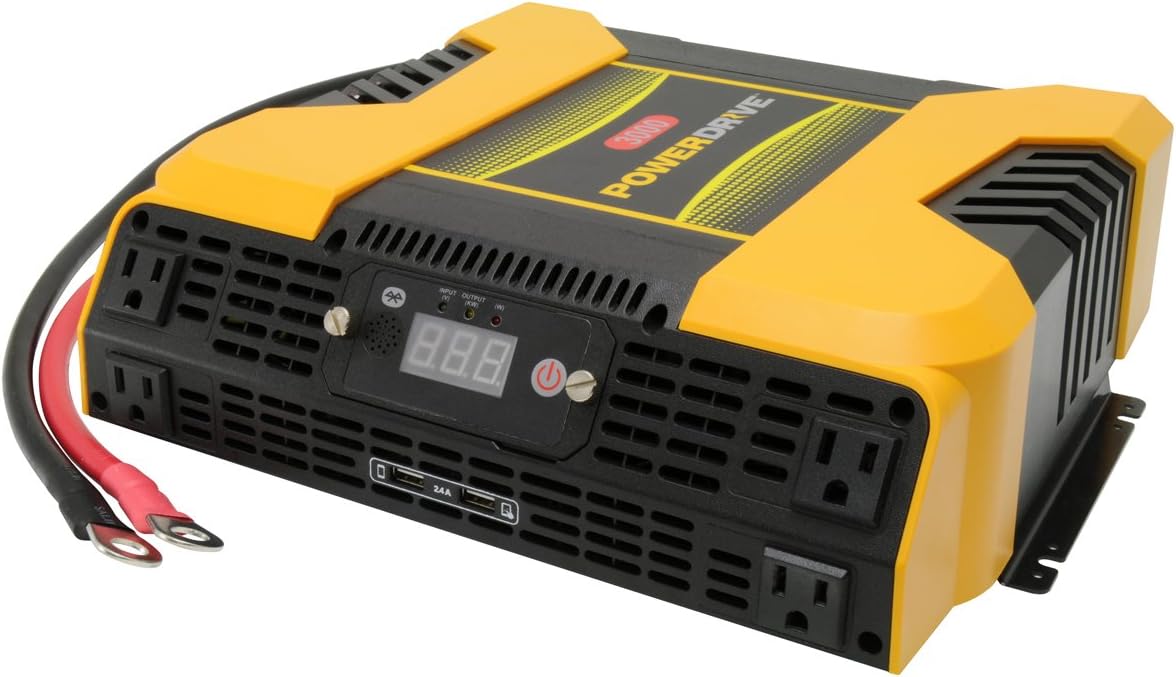
Figure 1.1: PowerDrive PD3000 3000 Watt Power Inverter, front view with outlets and display.
2. Maklumat Keselamatan
Please read and understand all safety instructions before installing or operating the inverter. Failure to follow these instructions may result in electrical shock, fire, serious injury, or property damage.
- Bahaya Kejutan Elektrik: Jangan buka penyongsang casing. Tiada bahagian yang boleh diservis pengguna di dalamnya. Rujuk semua servis kepada kakitangan perkhidmatan yang berkelayakan.
- Bahaya Kebakaran: Do not operate the inverter near flammable materials, gases, or vapors. Ensure adequate ventilation around the inverter.
- Keselamatan Bateri: Connect the inverter only to a 12V DC battery system. Ensure battery terminals are clean and connections are secure. Wear eye protection and gloves when working with batteries.
- Pengudaraan: Ensure the inverter is installed in a well-ventilated area. Do not block ventilation openings.
- Perlindungan Lebihan: Do not exceed the inverter's continuous power rating of 3000 Watts. Overloading can damage the inverter and connected devices.
- Kelembapan: Do not expose the inverter to rain, moisture, or spray.
3. Kandungan Pakej
Sahkan bahawa semua item ada semasa membongkar:
- PowerDrive PD3000 Power Inverter Unit
- Manual Arahan
- Battery Cables (Red and Black)
- Panel Kawalan Boleh Tanggal dengan Kabel
4. Ciri-ciri Produk
The PowerDrive PD3000 inverter offers a range of features for versatile power conversion:
- Output Kuasa Tinggi: Delivers 3000 Watts of continuous AC power with a 6000 Watt surge capacity.
- Multiple AC Outlets: Equipped with four (4) 3-prong AC outlets to support various devices.
- Port Pengecasan USB: Includes two (2) USB power ports (shared 2400mA total output) for charging mobile devices.
- Kesambungan Bluetooth: Allows remote access to features and settings via a free downloadable mobile application.
- Removable Control Panel: Detachable control panel enables remote monitoring and testing, offering installation flexibility.
- Pembinaan Tahan Lama: Features a robust ABS PVC composite housing designed to protect internal electronic components.
- Perlindungan Keselamatan: Incorporates audible alarms and automatic shut-off triggers for low battery, high battery, and overload conditions.

Figure 4.1: Front panel of the PowerDrive PD3000 showing AC outlets, USB ports, and digital display.
5. Persediaan dan Pemasangan
Pemasangan yang betul adalah penting untuk operasi inverter anda yang selamat dan cekap.
5.1 Memasang Penyongsang
- Pilih lokasi yang kering dan mempunyai pengudaraan yang baik, jauh daripada cahaya matahari langsung, sumber haba dan bahan mudah terbakar.
- Ensure there is sufficient space around the inverter for air circulation, especially around the cooling fans.
- Mount the inverter securely using appropriate hardware (not included) to prevent movement during operation.
5.2 Connecting to a 12V DC Power Source
Penting: Pastikan inverter dimatikan sebelum membuat sebarang sambungan.
- Sambungkan MERAH (positive) battery cable to the MERAH (positive) terminal on the inverter. Tighten securely.
- Sambungkan hujung yang satu lagi MERAH (positive) battery cable to the positif (+) terminal of your 12V DC battery. Tighten securely.
- Sambungkan HITAM (negative) battery cable to the HITAM (negative) terminal on the inverter. Tighten securely.
- Sambungkan hujung yang satu lagi HITAM (negative) battery cable to the negatif (-) terminal of your 12V DC battery. Tighten securely.
- Verify all connections are tight and free from corrosion. Loose connections can cause overheating and damage.

Figure 5.1: PowerDrive PD3000 Inverter showing battery cable connections.

Rajah 5.2: Belakang view of the PowerDrive PD3000 showing cooling fans and battery terminals.
5.3 Removable Control Panel Installation
The control panel can be used directly on the inverter or detached for remote operation.
- To use remotely, gently pull the control panel from the inverter.
- Connect the provided cable to the port on the back of the detached control panel and to the corresponding port on the inverter.
- Mount the control panel in a convenient location for monitoring and control.

Figure 5.3: PowerDrive PD3000 Inverter with its control panel detached for remote use.
6. Arahan Operasi
6.1 Menghidupkan/Mematikan
- After ensuring all battery connections are secure, press and hold the power button on the inverter or the remote control panel for approximately 1-2 seconds.
- The digital display will illuminate, and the inverter will begin providing AC power.
- Untuk mematikan, tekan dan tahan butang kuasa sekali lagi sehingga paparan dimatikan.
6.2 Menyambungkan Peranti AC
- Plug your 115V AC devices into the 3-prong AC outlets on the front of the inverter.
- Pastikan jumlah wattage daripada semua peranti yang disambungkan tidak melebihi 3000 Watt.
- For devices with high starting loads (e.g., motors, compressors), ensure their surge wattage is within the inverter's 6000 Watt surge capacity.
6.3 Menggunakan Port Pengecasan USB
- Connect your USB-powered devices (e.g., smartphones, tablets) to the USB ports.
- The two USB ports share a total output of 2400mA (2.4A).
6.4 Understanding the Digital Display and Indicators
The digital display shows real-time information such as input voltage or output wattage. Indicator lights provide status feedback:
- LED Input: Indicates the status of the DC input power.
- LED Output: Indicates the status of the AC output power.
- LED kerosakan: Illuminates to indicate an error condition (e.g., overload, low/high voltagdan).
7. Kesambungan Bluetooth
The PowerDrive PD3000 features Bluetooth wireless technology, allowing you to monitor and control the inverter using a compatible smartphone application.
7.1 Downloading the Mobile App
- Cari untuk the official PowerDrive inverter app on your smartphone's app store (e.g., Apple App Store, Google Play Store).
- Muat turun dan pasang aplikasi.
7.2 Pairing with Your Inverter
- Pastikan Bluetooth didayakan pada telefon pintar anda.
- Turn on the PowerDrive PD3000 inverter.
- Open the PowerDrive mobile app. The app should automatically detect nearby PowerDrive inverters.
- Follow the on-screen prompts within the app to pair with your PD3000 inverter.
7.3 Ciri Apl
Setelah dipasangkan, aplikasi ini membolehkan anda:
- Pantau input voltage dan output wattage.
- View inverter status and fault codes.
- Remotely turn the inverter on or off.
- Adjust certain settings (refer to the app's help section for details).

Figure 7.1: Smartphone displaying the PowerDrive mobile application interface.
8. Penyelenggaraan
Penyelenggaraan berkala memastikan prestasi optimum dan jangka hayat inverter anda.
- Pembersihan: Bersihkan bahagian luar inverter secara berkala dengan kain kering dan lembut. Jangan gunakan pembersih cecair atau pelarut.
- Pengudaraan: Ensure the cooling fans and ventilation openings are free from dust and debris. Use compressed air to clear blockages if necessary.
- Sambungan: Regularly check battery cable connections for tightness and corrosion. Clean terminals with a wire brush if corrosion is present.
- Storan: Jika menyimpan inverter untuk tempoh yang lama, cabutnya daripada bateri dan simpan di tempat yang sejuk dan kering.
9. Penyelesaian masalah
This section addresses common issues you might encounter with your PowerDrive PD3000 inverter.
9.1 Isu dan Penyelesaian Biasa
- Inverter Tidak Menghidupkan:
- Check battery connections for tightness and proper polarity.
- Pastikan voltage is above 10.5V DC (Low Battery Shut Down Point).
- Sahkan butang kuasa ditekan dan ditahan untuk tempoh yang diperlukan.
- Tiada Output AC:
- Check if the inverter is powered on and the Output LED is illuminated.
- Ensure the connected AC device is functioning correctly.
- Check for an overload condition (Fault LED illuminated). Reduce the load.
- Audible Alarm / Fault LED On:
- Penggera Bateri Rendah: Activates at 11 ± 0.3V DC. Recharge or replace the battery. The inverter will shut down at 10.5 ± 0.3V DC.
- High Battery Shut Down: Occurs at 15.5 ± 0.5V DC. Check the charging system of your vehicle.
- Lebihan beban: Jumlah wattage of connected devices exceeds 3000 Watts. Disconnect some devices.
- Melebihi suhu: Inverter is overheating. Ensure proper ventilation and reduce load.
- Isu Sambungan Bluetooth:
- Ensure Bluetooth is enabled on your smartphone and the inverter is powered on.
- Restart the mobile app and try pairing again.
- Ensure your smartphone is within range of the inverter.
10. Spesifikasi
| Spesifikasi | Nilai |
|---|---|
| Model | PD3000 |
| Continuous AC Power Output | 3000 Watt |
| Kuasa Lonjakan Puncak | 6000 Watt |
| Input DC Voltage | 12.8V |
| Keluaran AC Voltage | 115V |
| Kekerapan Output AC | 58Hz-62Hz |
| Output USB | 5V / 2 (Shared 2400mA) |
| Kecekapan (Maksimum) | >88% |
| Kecekapan (Muatan Penuh) | >84% |
| Battery Drain (No AC Load) | <0.6A |
| Pencetus Penggera Bateri Rendah | 11 ± 0.3V DC |
| Titik Penutupan Bateri Rendah | 10.5 ± 0.3V DC |
| Titik Penutupan Bateri Tinggi | 15.5 ± 0.5V DC |
| Memulihkan Voltage selepas Under Voltage Matikan | 12 ± 0.3V DC |
| Berat Barang | 12.14 paun |
| Dimensi Produk | 16.2 x 16.3 x 7.6 inci |
11. Waranti dan Sokongan
For warranty information or technical support, please refer to the documentation included with your purchase or visit the official PowerDrive webtapak. Simpan bukti pembelian anda untuk sebarang tuntutan waranti.