
LAMAX DRIVE C7
LAMAX DRIVE C7 Dashcam Car Camera User Manual
Model: LAMAX DRIVE C7

Imej: Depan dan belakang view of the LAMAX DRIVE C7 Dashcam, showcasing reka bentuk dan lensanya yang padat.
pengenalan
This manual provides comprehensive instructions for the proper installation, operation, and maintenance of your LAMAX DRIVE C7 Dashcam. Please read this manual thoroughly before using the device to ensure optimal performance and longevity. The LAMAX DRIVE C7 is designed to record your journeys in Full HD 1080p, offering crucial evidence in case of incidents and enhancing your driving safety.
Kandungan Pakej
- LAMAX DRIVE C7 Dashcam
- Pengecas kereta
- Lekapan cawan sedutan
- Pelekat pelekat
- Kabel USB
- Memory Card (as per product specifications)
- Manual Pengguna (dokumen ini)
Peranti Lebihview
Familiarize yourself with the various components and controls of your LAMAX DRIVE C7 Dashcam.
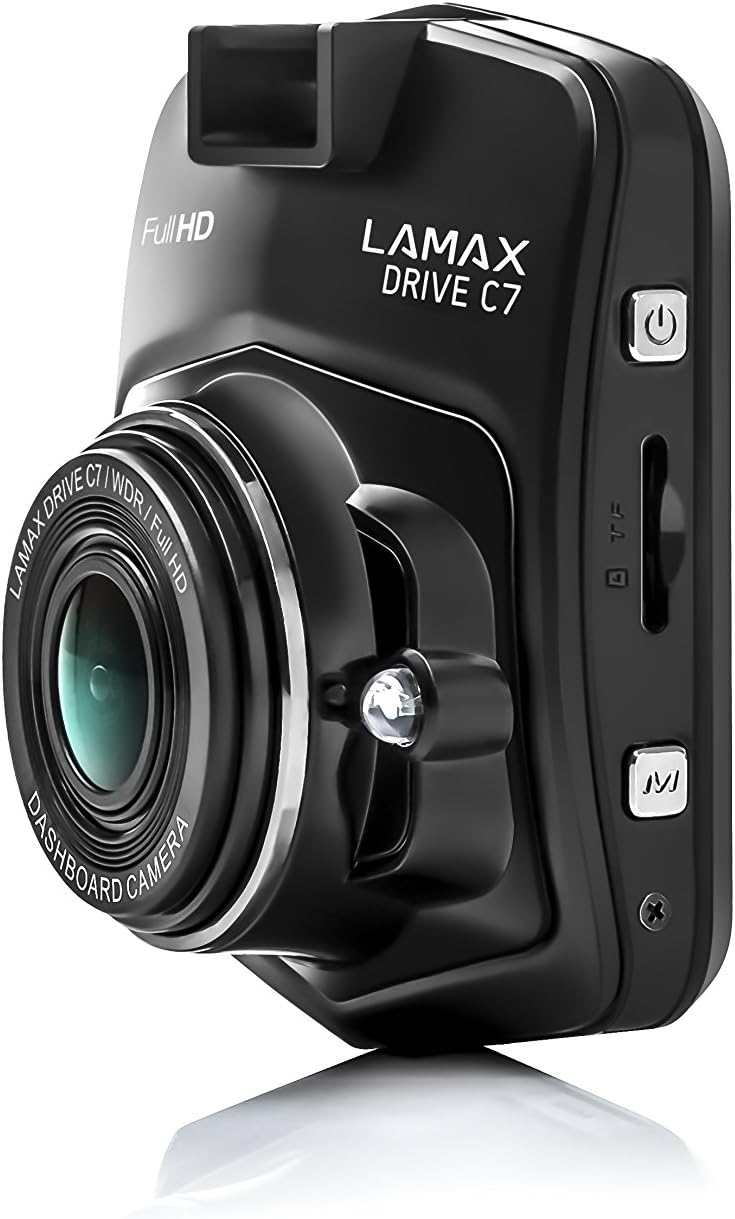
Imej: Sisi view of the dashcam, highlighting the power button, memory card slot, and USB port.

Imej: Depan view of the dashcam with the 2.4-inch LCD display and control buttons below.
- Kanta: High-resolution camera lens.
- paparan: Skrin LCD 2.4 inci untuk viewing recordings and menu.
- Butang Kuasa: Menghidupkan/mematikan peranti.
- Butang Menu: Mengakses tetapan dan pilihan.
- Butang Naik / Turun: Navigasi melalui pilihan menu.
- Butang OK: Mengesahkan pilihan.
- Slot Kad MicroSD: Insert memory card here.
- Port USB: Untuk bekalan kuasa dan pemindahan data.
- Butang Tetapkan Semula: Resets the device (use a thin object).
Persediaan
1. Memasukkan Kad Memori
Ensure the dashcam is powered off before inserting or removing the microSD card. Insert the card into the slot until it clicks into place. Use a Class 10 or higher microSD card, up to 32GB capacity, for optimal performance. It is recommended to format the memory card within the dashcam settings before first use and periodically thereafter.
2. Memasang Dashcam
Pilih lokasi pada cermin depan anda yang tidak menghalang anda view of the road. Clean the windshield surface thoroughly before applying the mount.

Image: The dashcam attached to its suction cup mount, ready for windshield installation.

Imej: Belakang view of the dashcam with the suction cup mount attached, showing the screen and buttons.
- Attach the chosen mount (suction cup or adhesive) to the dashcam.
- Press the mount firmly against the windshield and secure it.
- Laraskan sudut kamera untuk memastikan gambar yang jelas view jalan di hadapan.
3. Menyambung kepada Kuasa
Connect the car charger to the dashcam's USB port and plug the other end into your vehicle's 12V power outlet (cigarette lighter socket). The dashcam will automatically power on and begin recording when the vehicle's ignition is turned on.
Arahan Operasi
Hidupkan/Mati Kuasa
- automatik: The dashcam powers on/off automatically with the vehicle's ignition.
- Manual: Press and hold the Power button to manually turn the device on or off.
Mod Rakaman
- Rakaman Gelung: The dashcam records video in continuous loops (e.g., 1, 3, or 5 minutes). When the memory card is full, the oldest unlocked files ditimpa.
- G-Sensor: In the event of a sudden impact or collision, the G-Sensor automatically locks the current recording, preventing it from being overwritten. The sensitivity of the G-Sensor can be adjusted in the settings.
- Mod Letak Kereta: When enabled, the dashcam will automatically start recording if it detects motion or an impact while the vehicle is parked. This feature provides 24-hour surveillance for your vehicle.
- Video Selang Masa: This feature allows the camera to record at a lower frame rate (e.g., 1 frame per second), compressing long periods of time into short videos. This can significantly extend the recording capacity of your memory card.
Navigasi Menu
Tekan ke Menu button to access the settings. Use the Atas/Bawah butang untuk menavigasi pilihan dan OK button to confirm selections. Press Menu again to exit the settings.
Main balik
Kepada view recorded videos, stop recording (if active), then press the Mod button to switch to playback mode. Use the Atas/Bawah butang untuk memilih a file dan OK to play it. You can also connect the dashcam to a computer via USB to access files secara langsung.
Penyelenggaraan
Pengurusan Kad Memori
- Pemformatan: Regularly format your microSD card (at least once a month) using the dashcam's format function to prevent data corruption and ensure smooth recording.
- kapasiti: Ensure sufficient free space on the memory card. Locked files from G-Sensor events can accumulate and fill the card. Periodically review dan padamkan yang tidak perlu dikunci files.
Pembersihan
Wipe the camera lens with a soft, lint-free cloth to ensure clear video quality. Use a slightly damp cloth to clean the body of the dashcam. Do not use harsh chemicals or abrasive cleaners.
Kemas kini Perisian Tegar
Check the official LAMAX website periodically for available firmware updates. Updates can improve performance, add new features, or fix bugs. Follow the instructions provided with the firmware update carefully.
Menyelesaikan masalah
| Masalah | Kemungkinan Punca / Penyelesaian |
|---|---|
| Dashcam tidak dihidupkan. |
|
| Rakaman berhenti tanpa diduga. |
|
| Kualiti video kurang baik atau kabur. |
|
| Dashcam freezes or becomes unresponsive. |
|
Spesifikasi
| Ciri | Perincian |
|---|---|
| Resolusi Video | HD Penuh 1080p |
| Viewsudut | 150° |
| Saiz Paparan | 2.4 inches (6.1 cm) LCD |
| Rakaman Gelung | ya |
| G-Sensor | ya |
| Mod Letak Kereta | Yes (24h) |
| Penglihatan Malam | ya |
| GPS terbina dalam | Optional (via external module) |
| Penyimpanan | MicroSD card (Class 10+, up to 32GB recommended) |
| Dimensi | 3.3 x 6.1 x 7.2 cm |
| Berat badan | 60 g |
| Komponen yang Disertakan | Memory Card (as per product details) |
Waranti dan Sokongan
Maklumat Waranti
The LAMAX DRIVE C7 Dashcam comes with a standard manufacturer's warranty. Please refer to the warranty card included in your package or visit the official LAMAX webtapak untuk terma dan syarat waranti terperinci khusus untuk wilayah anda. Simpan bukti pembelian anda untuk tuntutan waranti.
Sokongan Pelanggan
For technical assistance, troubleshooting, or product inquiries, please visit the official LAMAX support website or contact their customer service department. Contact details can typically be found on the brand's official webtapak atau pada pembungkusan produk.
Official LAMAX Store: Visit LAMAX Store on Amazon
Ask a question about this manual
Ask about setup, troubleshooting, compatibility, parts, safety, or missing instructions. Manuals+ will review the question and use this page’s manual context to help answer it.